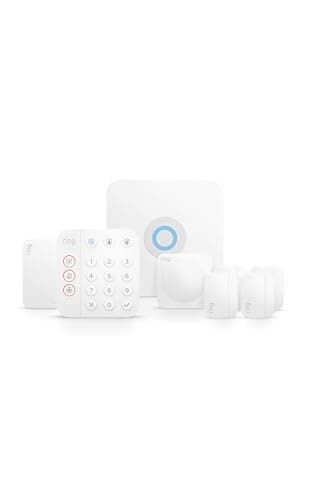
The Ring Alarm 8-Piece Kit is the system we recommend first to the most people, and the reason is boring in the best way: it does the fundamentals, it does them without a contract, and it costs less to keep monitored than anything comparable. The kit — base station, keypad, door and window sensors, a motion detector and a range extender — is everything a typical home needs to arm its entry points on day one.
What makes it a value benchmark is the plan structure. You can self-monitor for free indefinitely: the alarm sounds and Ring pushes an alert to your phone, and you decide what to do. If you want a monitoring center watching around the clock, Ring's professional plan is the least expensive of any no-contract DIY system we track, and it's month-to-month, so you can switch it on before a trip and off when you're home. The three-year table below shows what each choice adds up to.
What's in the box, and how it grows
The eight-piece configuration is built to secure a typical home's main entry points out of the box, and everything mounts without tools: the base station plugs into an outlet, the keypad sits by your most-used door, the contact sensors stick onto doors and windows, and the motion detector covers a room. The range extender keeps sensors at the far end of the house reliably connected. What makes Ring especially easy to live with over time is expansion — extra contact sensors, motion detectors, keypads, panic buttons and Ring cameras all pair from the same app in seconds, and the accessory catalog is the largest in DIY security, so adding coverage later is cheap and painless.
The catch: it's a Ring and Alexa world
The honest limitation is ecosystem. The Ring Alarm speaks Ring and Alexa fluently and nothing else — there's no Apple HomeKit, and no Matter support for the alarm. For a household that's already on Alexa, that's a non-issue and arguably a bonus, because Ring cameras and doorbells slot into the same app. For an iPhone-first home that wants everything in Apple's Home app, it's a dealbreaker, and the abode iota is the pick instead - though as of October 2026 that is a direct purchase from abode, not an Amazon one. If you're unsure how much ecosystem lock-in matters to you, the ecosystem comparison is worth ten minutes.
What the paid plan actually unlocks
Free self-monitoring covers the basics. The paid Ring plan adds three things that some homes want and others don't need: 24/7 professional monitoring that can dispatch help, cellular backup so the system stays online if your internet drops, and longer recorded-video history for any Ring cameras you own. If none of those apply to you, you are not missing out by staying free — a point we make in full in the DIY vs monitored guide.
Who should buy the Ring Alarm
Buy it if you want a proven DIY system with the lowest running cost, if your home already uses Alexa, or if you like the idea of starting free and adding professional monitoring later without a contract. It's also the easiest system to expand cheaply — extra sensors and keypads are inexpensive and pair in seconds.
Who should look elsewhere
Skip it if you need Apple HomeKit — go to the abode iota, which abode now sells direct rather than on Amazon. And if the built-in camera-plus-router idea appeals, the Ring Alarm Pro variant covered in the main systems roundup adds an eero Wi-Fi 6 router to the base station. To see our top pick measured against the other big DIY name, read Ring vs SimpliSafe.
Against a professionally installed system
The comparison most people actually want is not Ring against another DIY kit but Ring against a traditional monitored provider — different hardware model, very different contract, and a cost difference that compounds over three years. We work through it in Ring vs ADT.