Skip to content
Latch & Hub

Systems · Security Systems

The Best Home Security Systems for 2026

Three systems worth buying, ranked on the decision that actually matters: how you want it monitored. We lead with DIY, no-contract kits, and we show the three-year cost both ways.

By Stephen V.Updated How we choose
#ad

We earn a commission when you buy through our Amazon links, at no extra cost to you. It never changes our rankings — where the subscription-free or cheaper option is the better buy, we say so. How this works.

A home security system isn't really a pile of sensors — it's a decision about how you want the alarm watched. Get the monitoring question right and the hardware almost picks itself. That's why we rank DIY, no-contract systems first: they let you start by self-monitoring for free, then add a professional monitoring center later if — and only if — you decide you want one. Nothing here signs you up for a multi-year contract.

All three picks install without tools or an electrician: sensors are adhesive-backed, the base station plugs into power, and pairing happens in an app in an afternoon. What separates them is the ecosystem they live in and what their monitoring costs over the years you'll actually own them. We put the two most different systems — Ring and abode — head to head on exactly that in the DIY no-contract roundup, and if you're still weighing whether to pay a monitoring center at all, the DIY vs monitored guide is the honest version of that argument.

One caveat up front, the same one on every page here: we don't run a break-in lab. We read each system's hardware contents and monitoring plans off the manufacturer's own listings and plan pages, computed the multi-year cost, and weighed aggregated owner sentiment. Where a figure is the maker's published claim rather than something we measured, we say so — that's spelled out in full on our methodology page, and how we're paid is on the affiliate disclosure.

The short answer

Quick picks

Tap any row for the full write-up.

#ProductBest forMatterPrice
01
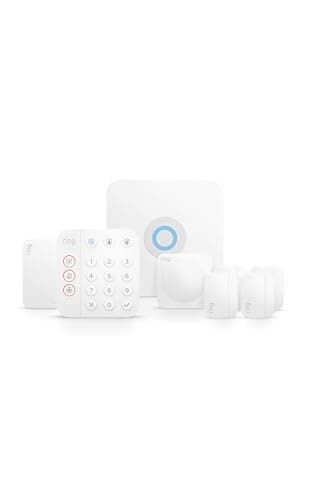
Ring Alarm 8-Piece Kit (2nd Gen)Top pick

The system most people should start with: a complete DIY kit you can self-monitor for free, with the cheapest optional 24/7 professional monitoring here and no contract either way.

Most homesNo Matter — Ring/Alexa app
$249.99View on Amazon

#ad · we may earn a commission from this link to Ring Alarm 8-Piece Kit (2nd Gen)

02
abode iota All-In-One Kit

The all-in-one pick for a HomeKit household: a single hub with a camera built in that works with Apple Home, Alexa and Google, self-monitors free, and never locks you into a contract.

Apple HomeKit householdsWorks with HomeKit, Alexa & Google
$249.99View on Amazon

#ad · we may earn a commission from this link to abode iota All-In-One Kit

03
Ring Alarm Pro

The upgrade brain: a Ring Alarm base station with a full eero Wi-Fi 6 router inside, plus local video storage and internet backup. It only makes sense if you actually want a new router too.

Anyone due for a new Wi-Fi routerNo Matter — Ring/Alexa app
$249.99View on Amazon

#ad · we may earn a commission from this link to Ring Alarm Pro

#ad · Live prices from the Amazon Product API, as of Jul 18, 2026. Where we have no verified live price we show none — we would rather leave a gap than print a number that has rotted.

3-year cost: hardware + monitoring, self-monitored vs 24/7 professional
ProductHardwareMonthly3-yr fees3-yr total
Ring Alarm 8-Piece — self-monitoredFree self-monitoring: app alerts + siren, no professional dispatch. Contract-free.$250$0$0$250
abode iota — self-monitoredFree self-monitoring, contract-free. Works with HomeKit, Alexa & Google.$250$0$0$250
Ring Alarm 8-Piece — Ring Home StandardAdds 24/7 professional monitoring + cellular backup. Confirm current pricing at ring.com/plans.$250$10/mo$360$610
Ring Alarm Pro — Ring Home StandardBase has a built-in eero Wi-Fi 6 router + local video option. Confirm current pricing.$250$10/mo$360$610
abode iota — abode ProAdds 24/7 professional monitoring + 4G cellular backup. Confirm current pricing at goabode.com/plans.$250$27/mo$972$1,222

Hardware figures are approximate MSRP context for the comparison; the live, date-stamped price is on each product's buy button. Fees are the published plan rates at the time of writing — always confirm current pricing with the brand.

In detail

The picks, in full

01

Ring Alarm 8-Piece Kit (2nd Gen)

Top pick
Ring Alarm 8-Piece Kit (2nd Gen)
$249.99View on Amazon

Price as of Jul 18, 2026. Amazon's price at checkout is the one that counts.

#ad · we may earn a commission from this link to Ring Alarm 8-Piece Kit (2nd Gen)

The system most people should start with: a complete DIY kit you can self-monitor for free, with the cheapest optional 24/7 professional monitoring here and no contract either way.

  • 8-piece DIY kit
  • Base station + keypad
  • Door/window + motion sensors
  • Range extender included
  • Optional 24/7 pro monitoring
  • Works with Alexa
Matter: No Matter — Ring/Alexa appFee: Free self-monitored; about $10/mo for 24/7 pro monitoringResearched, not hands-on tested

Good

  • Self-monitoring is genuinely free — you get app alerts and a siren with no plan at all
  • If you do want a monitoring center watching it, Ring's plan is the least expensive here and still contract-free
  • Enormous accessory range; adding sensors, keypads and Ring cameras is a five-minute app job

Less good

  • The alarm lives in the Ring/Alexa world — there's no Apple HomeKit and no Matter support
  • Cellular backup and recorded-video history only switch on with a paid plan

Skip it if: you want your alarm to appear in Apple Home — Ring doesn't support HomeKit, so an iPhone-first household that insists on Home app control should look at abode instead.

02

abode iota All-In-One Kit

abode iota All-In-One Kit
$249.99View on Amazon

Price as of Jul 18, 2026. Amazon's price at checkout is the one that counts.

#ad · we may earn a commission from this link to abode iota All-In-One Kit

The all-in-one pick for a HomeKit household: a single hub with a camera built in that works with Apple Home, Alexa and Google, self-monitors free, and never locks you into a contract.

  • All-in-one hub with built-in camera
  • Motion + door/window sensors, key fob
  • Works with HomeKit, Alexa & Google
  • DIY installation
  • Optional 24/7 pro monitoring
  • Contract-free
Matter: Works with HomeKit, Alexa & GoogleFee: Free self-monitored; about $26.99/mo abode Pro for 24/7 monitoringResearched, not hands-on tested

Good

  • The only pick here that works with Apple HomeKit, alongside Alexa and Google
  • The hub itself has a camera, so the brain of the system also watches the room — fewer separate boxes
  • Contract-free, with a free self-monitoring tier and no obligation to ever pay a plan

Less good

  • If you want 24/7 professional monitoring, abode's plan costs noticeably more per month than Ring's
  • Smarter features like an extended event timeline and AI detection sit behind a paid plan

Skip it if: you know you'll pay for 24/7 professional monitoring and want the lowest possible monthly bill — abode's monitored plan is the priciest here.

03

Ring Alarm Pro

Ring Alarm Pro
$249.99View on Amazon

Price as of Jul 18, 2026. Amazon's price at checkout is the one that counts.

#ad · we may earn a commission from this link to Ring Alarm Pro

The upgrade brain: a Ring Alarm base station with a full eero Wi-Fi 6 router inside, plus local video storage and internet backup. It only makes sense if you actually want a new router too.

  • Base station + built-in eero Wi-Fi 6 router
  • Local video storage via Ring Edge (with plan)
  • Internet + cellular backup (with plan)
  • Optional 24/7 pro monitoring
  • Works with Alexa
Matter: No Matter — Ring/Alexa appFee: Free self-monitored; about $10/mo for 24/7 pro monitoringResearched, not hands-on tested

Good

  • Replaces your router and your alarm brain in one box — the built-in eero is a genuine Wi-Fi 6 mesh unit
  • Can keep Ring camera video local on the base station with a Ring plan (Ring Edge)
  • Adds backup internet so the system stays online if your broadband drops, on the paid plan

Less good

  • The router-plus-alarm value only lands if you were going to replace your router anyway
  • The headline local-video and backup-internet features are gated behind a paid Ring plan

Skip it if: you're happy with your current router — the Pro's whole reason to exist is the built-in eero, so without that you're paying for hardware you don't need. Get the standard Ring Alarm kit instead.

Start with the monitoring question, not the hardware

There are three ways an alarm gets watched, and they cost wildly different amounts. Self-monitoringmeans the system sirens and sends the alert to your phone; you decide whether to call for help. It's free on both Ring and abode, and for a lot of homes it's genuinely enough. Professional monitoringadds a center that watches around the clock and can dispatch police or fire when an alarm trips — that's the paid plan. Cellular backup keeps the system online if your internet or power drops, and on these systems it rides along with the professional plan. Decide which of those you actually need first; the hardware follows from there.

Then match the system to your phone

If your home runs on Alexa or you just want the widest, cheapest accessory range, Ring is the natural fit — and its professional monitoring is the least expensive of the group. If you're an iPhone household that wants the alarm to show up in Apple Home, abode is the only pick here that does HomeKit. Neither one speaks Matter for the alarm itself yet, so don't buy expecting cross-brand magic; if that matters to you, read the ecosystem comparison before you commit.

Don't overpay for a base station you don't need

The Ring Alarm Pro is excellent, but its signature feature is a Wi-Fi router built into the base. If your current router is fine, that value evaporates and the standard 8-piece kit is the smarter buy. Conversely, if you were about to spend on a new mesh router anyway, folding it into your alarm brain is a tidy way to do both at once. New to all of this? The security system basics guide walks through every component in plain English.

Where cameras fit

An alarm system protects entry points; cameras tell you what actually happened. The abode iota has a camera built into the hub, but most people add standalone cameras to cover the yard and driveway. If that's you, our security camera roundup ranks the no-monthly-fee options first, the same way we do here.
How we chose

We don't run a test lab

We don't wire every one of these into a test rig, and we won't write "in our testing" as if we do. What we did instead: pulled each product's published specifications, confirmed its Matter/Thread/HomeKit support from the manufacturer's own documentation, added up the real 3-year cost with any monthly fee included, and read the aggregated verified-buyer sentiment. Every pick is chosen against that published method. Where a number came from someone else, we name and link them in Sources.

Questions

Frequently asked

Do I have to pay a monthly fee for a home security system?
No. Both the Ring Alarm and the abode iota self-monitor for free — you get a loud siren and a push alert to your phone with no plan at all. A monthly fee buys you a professional monitoring center that can dispatch help, plus cellular backup and longer video history. If you're comfortable responding to your own alerts, you can run either system for years without ever paying a plan.
Which system has the cheapest professional monitoring?
Ring. Its 24/7 professional monitoring plan is the least expensive of the systems here and is contract-free, so you can start and stop it month to month. abode's professionally monitored plan does more per dollar in some ways (4G cellular backup, longer timelines) but costs more each month. Always confirm the current rate on the Ring Alarm reviewand at the brand's plans page before you buy.
Are these systems really contract-free?
Yes. Ring and abode are both no-contract, DIY systems: you own the hardware outright and any monitoring plan is optional and cancellable. That's the main way they differ from traditional providers like ADT or Vivint, which typically install professionally and tie you to a multi-year agreement.
Can I install one myself?
Yes — all three are designed for DIY. Sensors stick on with adhesive, the base station plugs into an outlet, and setup is done through the app in an afternoon. No drilling into wiring and no professional installer required.

Keep reading

Receipts

Sources

We do not run a test lab, and we do not pretend to. Compatibility and subscription-cost claims come from the manufacturer's own documentation and the live retailer listing, read on the dates shown. Read our full method.