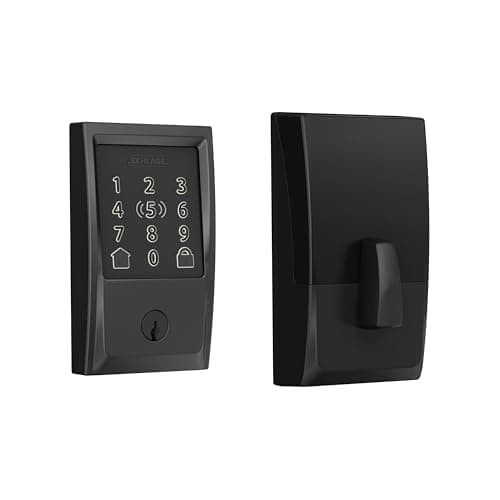
The Schlage Encode Plus is our top overall smart lock, and the reason is narrow and specific: for an Apple household, it does the three things that matter without asking you to buy anything else. It is a full-replacement deadbolt with a touchscreen keypad, it has Wi-Fi built in, and it supports Apple Home Key - so you can tap your iPhone or Apple Watch against it to unlock. That combination, in one lock, is still rare.
Apple Home Key is the headline
Apple Home Key turns your phone or watch into the key. You hold the device near the lock and it opens - no app to launch, no code to type, and it works even if your phone's battery is low thanks to Apple's power reserve. Once you have used it for a week, typing a keypad code feels slow. The Encode Plus is one of only three locks we cover with Home Key, alongside the Level Lock+ and the Aqara U100. If you are an iPhone user, this is the feature that justifies the price.
The rest of the ecosystem picture
Beyond Home Key, the listing names Apple HomeKit and Amazon Alexa, and Wi-Fi is built directly into the lock, so remote control and activity history work with no separate bridge. What the listing does not name is Google Home or Matter - so we do not credit those. If your home is built on Google as its hub, that is the honest dealbreaker, and you would be better served by the Kwikset Halo or the Yale Assure Lock 2 in our deadbolt roundup. This is exactly the kind of gap the marketing glosses over and the reason our compatibility matrix exists.
As a deadbolt and a keypad
Underneath the smarts, this is a proper full-size Schlage deadbolt with a capacitive touchscreen keypad, so you can hand out entry codes to family, guests or a cleaner and remove them later. The keypad is a practical backup to Home Key: anyone without your phone, or a house guest, still gets in with a code. The trade for all that capability is size - the Encode Plus has a substantial body and does not disappear into the door the way the Level Lock+ does. If discretion is your priority over a keypad, that is the one genuine reason to look elsewhere.
Access codes and everyday management
Day to day, the part you actually use most is code management. Through the Schlage Home app you can create entry codes for family, guests, a cleaner or a dog walker, and delete them when they are no longer needed - so you never hand out a physical key you have to chase down later. You can review recent lock activity to see when codes were used, and because HomeKit is supported, the same lock also appears in Apple Home alongside the rest of your Apple devices for automations and Siri control. This is the quiet convenience that makes a keypad lock worth it: entry becomes something you grant and revoke from your phone rather than something tied to a piece of brass.
Install, power and backups
Installation is a standard deadbolt swap: remove your old deadbolt, fit the Encode Plus with the included template and screws, and pair it in the Schlage or Apple Home app. It is a screwdriver job, not a locksmith job. The lock runs on batteries with clear low-battery warnings well in advance, and it keeps a physical backup so a dead battery is an inconvenience, not a lockout - our guide on smart locks without power covers those fallbacks. Because Wi-Fi handles the remote features, local unlocking by keypad or Home Key still works even if your internet is down, which we cover in the without-Wi-Fi guide.
Who should buy it
Buy the Encode Plus if you live in Apple Home and want tap-to-unlock on a real, keyed deadbolt with a keypad - it is the most complete package for that buyer, full stop. Skip it if your home is Google-first, or if you want the lock to be invisible. For the head-to-head against the popular retrofit alternative, see August vs Schlage. This is a research-based review built from Schlage's own listing and support docs, per our methodology - not a lab test.