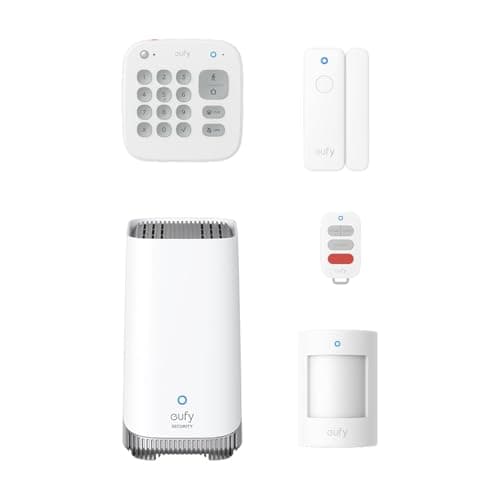
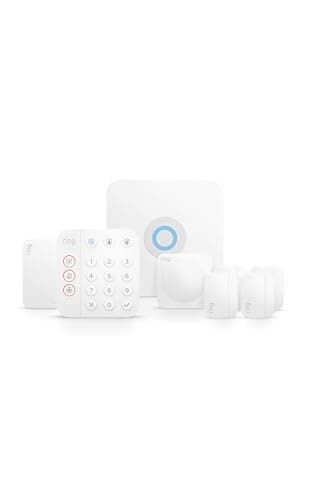
"DIY" and "no-contract" are really one promise: you buy the hardware, you own it, and nobody locks you into a multi-year agreement to use it. Both systems here deliver that, and both let you self-monitor for free — meaning the alarm sirens and pings your phone with no plan at all. The reason this is a money page is that the real cost of a security system isn't the kit; it's the monitoring you may or may not choose to add on top, year after year. So that's what we rank on.
The split between these two is clean. The Ring Alarm is the pick for most people, because its optional 24/7 professional monitoring is the cheapest of any no-contract system we follow and its accessory catalogue is the deepest — so the decision to pay, or not, stays reversible. The eufy Alarm 5-Piece kit is the pick if you want that decision closed: eufy sells no monitoring plan for it at all, and its HomeBase 3 hub keeps camera footage on local storage you can expand to 16TB. Neither decision is wrong — they answer different questions.
Traditional providers like ADT and Vivint sit at the opposite end: professionally installed, professionally monitored, and typically bound by a contract. That model suits some people, but it is not what this page is about. If you want a broader field including our top pick against the other big DIY name, the Ring vs SimpliSafe comparison lays it out, and the full field is on the main systems roundup.
Once the kit arrives
DIY means you do the install, and almost everything that goes wrong is a decision rather than a step — a sensor stuck where it catches the frame, a motion detector aimed at a radiator, a base station in a cupboard that cannot reach the far bedroom. How to install a home security system yourself is the order to do it in, including the sensor alignment rule and the two tests most people skip.
Free self-monitoring is a real option, not a trial
The most important thing to understand about DIY security is that the free tier isn't a countdown to a paywall. On both systems, self-monitoring is a permanent, no-cost way to run the alarm: it makes noise and it tells you. What you give up without a plan is a monitoring center that can dispatch help when you're asleep or away, plus cellular backup and longer video history. For an apartment or a light-sleeping household that's often home, free self-monitoring genuinely can be enough — we walk through exactly when in the DIY vs monitored guide.
If you might want a monitoring center, only one of these can give you one
The three-year table above tells the story: the hardware is close between these two, so the plan is what moves the total — and only Ring sells one. Ring's professional monitoring is the cheapest monthly commitment in no-contract DIY, and it is month-to-month, so you can turn it on before a trip and off when you're back. eufy has no monitored tier at all for this kit, which is either the whole appeal or a dealbreaker depending on who you are. Decide that before you buy, because it is the one thing you cannot change later without changing systems.
Let the footage break the tie
When the monitoring question is settled, storage decides it. If you expect to add cameras and you want their footage kept in the house with nothing on the meter, the eufy kit is the one — its hub is a local recorder you can expand to 16TB. If you want the cheapest route to a dispatch centre and the biggest parts bin, take the Ring Alarm. Neither appears in Apple Home: Ring does not do HomeKit, and eufy publishes Alexa and Google Assistant support but not HomeKit. If you're unsure what any of these hubs and sensors actually do, start with the security system basics guide.
Renters, apartments and small homes
DIY systems are a particularly good fit if you rent or live in an apartment, precisely because nothing is hard-wired. Every sensor mounts with adhesive and peels off cleanly when you move, the base station simply unplugs, and there's no installer appointment or contract tying the system to one address. When you relocate, the whole kit comes with you and pairs again in an afternoon. For a smaller home the eufy kit is especially efficient — the hub carries the 100dB siren itself, so a studio or one-bedroom is covered by the base plus the two entry sensors and the motion sensor already in the box.
Start small, expand as you go
You don't have to buy for your whole house on day one. Both systems are modular: begin with the kit that covers your main entry points, then add contact sensors, motion detectors, extra keypads or cameras as you find the gaps. Ring has the larger accessory catalog, so piecemeal expansion tends to be cheaper there; eufy's HomeBase 3 goes further in one direction specifically, taking up to 16 eufy cameras and doorbells and 34 sensors. Either way, the sensible pattern is to secure the doors first, add motion coverage for large open rooms second, and layer in cameras only once the alarm itself is doing its job. If cameras are next on your list, the camera roundup ranks the no-monthly-fee options first, exactly as we do here.
If you rent rather than own
Everything above assumes you can put adhesive on your own door frames and leave a base station plugged in indefinitely, which most renters can — but the brief changes in two ways that matter: a lease has an end date where a monitoring contract usually does not, and a 100dB siren in a shared building is a neighbor problem rather than a deterrent. We rank the lease-safe options, including the sensor-only routes that make no noise at all, in best home security systems for apartments.
The sensors worth adding after the kit
Every kit above ships with a token sensor count, and the cheapest real improvement to any of them is more sensors rather than a bigger bundle. Contact sensors cover the perimeter; motion sensors are the interior catch that fires when someone is already inside, having come in a way your door and window sensors do not cover. The motion field is ranked on detection pattern, pet false alarms and hub requirements in best motion sensors, and the perimeter half in best door and window sensors.