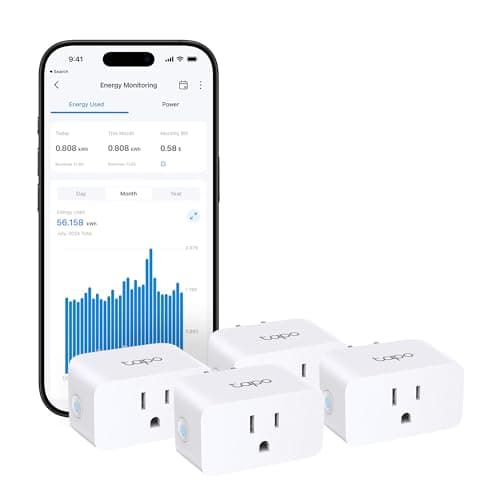
A smart plug is the least glamorous device in the smart home, and it is also the one that most often turns a skeptic into a believer. The TP-Link Tapo P110M is the plug we point beginners toward, because it does the one job a plug should do - put a lamp, a fan, a heater or a coffee maker on a schedule and on your phone - and then adds the one extra that makes it worth choosing over a no-name plug: it measures how much power the thing plugged into it actually draws. It is Matter-compatible, it works with Alexa, Google Home and SmartThings, it needs no hub, and it is sold four to a pack. This review is about where that value is real, and the two honest catches to check before you buy.
What the P110M actually is
The P110M is a compact smart plug - the "Mini" in its full name is literal, and it is designed not to smother the second socket on a wall outlet. You plug it into the wall, plug a lamp or appliance into it, join it to your home Wi-Fi through the free Tapo app, and from that moment the thing on the other side of it can be switched on or off from your phone, told to run on a schedule, set to a countdown timer, or triggered by a voice assistant. There is nothing exotic here, and that is the point: a plug is the simplest possible piece of automation, the one that asks the least of you and still changes how a room behaves. If the whole idea is new, our what is a smart home explainer starts from zero. What sets the P110M apart from the cheapest plugs on the shelf is not a flashy feature but the combination of energy monitoring, Matter support and the four-pack, which together make it the value benchmark in a category where most products are near-identical. Because it is sold four to a pack, one purchase covers four lamps or appliances rather than one, which is why it lands on our best budget smart home devices list as the cheapest real automation you can buy.
Energy monitoring is the feature that earns its keep
Energy monitoring is the feature that separates the P110M from a bag of generic plugs, and it is more useful than it sounds. Every plug can turn a device on and off; this one also reports how many watts the device is pulling right now and how much energy it has used over time. That turns a question people usually only guess at - what does this old fridge, that space heater, or the games console left on standby actually cost to run - into a number you can read in the app. Once you can see it, you can act on it: the appliance that quietly draws power all day becomes visible, the heater you thought you switched off shows up as still running, and you can put the worst offenders on a schedule so they are not burning power overnight. None of that needs a subscription and none of it needs a hub - the measurement happens in the plug and shows up in the free app. For anyone whose reason for going smart is to trim a power bill rather than to play with gadgets, this is the plug that makes the case, and it makes it with no monthly fee.
It fits whatever app your home already speaks
The P110M works with Amazon Alexa, Google Home and Samsung SmartThings, which covers the three ecosystems most households already live in. That matters more than a spec sheet makes it look. The single most common way to waste money in a smart home is to buy a device that fights the phones in the house - an Alexa-only gadget in a Google home, or the reverse. The P110M sidesteps that by speaking to all three of the big assistants, so whichever app your home already opens, the plug slots in and answers to the same voice commands and the same automations as everything else. If you have not settled on an ecosystem yet, our best smart home ecosystem guide is ten minutes well spent before you buy anything; but the reassuring thing about this plug specifically is that it does not force the choice, and it will not be orphaned if you change your mind later.
No hub, and what "Matter-compatible" really buys you
You do not need a hub, a bridge or a base station for the P110M. It joins your Wi-Fi directly and talks to your router, which is a large part of why a starter setup built on these plugs stays cheap and simple. The Matter-compatible label adds a second layer of future-proofing on top of that. Matter is the cross-brand standard designed so that a device from one company works inside another company's app without a translation layer, and a Matter-compatible plug is one that can be brought into a Matter setup down the line rather than being locked to a single app forever. In plain terms, buying Matter today is buying a plug that is less likely to be stranded when you switch ecosystems or add a controller later. If the word Matter is new to you, our what is Matter guide explains what it does and does not promise, and our do I need a smart home hub guide explains why a plug like this does not need one on day one. For now the takeaway is simple: no hub to buy, and a standard on board that keeps your options open.
The first honest catch: 2.4GHz Wi-Fi only
Here is the first thing to check before you buy. The P110M joins 2.4GHz Wi-Fi only - it does not connect over the faster 5GHz band. For a smart plug that is actually the right choice, because 2.4GHz reaches farther through walls and a plug does not need speed, only a steady connection. The catch is not the band itself but how some modern routers handle it. Many mesh systems and combined routers broadcast 2.4GHz and 5GHz under a single network name and decide for you which band a device uses, and that can make pairing a 2.4GHz-only device fiddlier than it should be - the phone you are setting it up from may be sitting on 5GHz while the plug needs to see the 2.4GHz network to join. It is almost always solvable: temporarily separating the bands, or nudging your phone onto the 2.4GHz network during setup, gets the plug paired, after which it runs fine. But it is worth naming, because a small number of people hit a frustrating first ten minutes here, and knowing the cause in advance turns it from a mystery into a two-minute fix.
The second catch: a plug only cuts and restores power
The second catch is about what a plug fundamentally is, and it is the more important of the two. A smart plug does exactly one physical thing: it cuts mains power to whatever is plugged into it, and restores it. That is perfect for anything with a simple switch that you leave in the on position - a lamp, a fan, a string of lights, a coffee maker, a heater. It is the wrong tool for two kinds of device. First, it cannot dim a lamp: the plug can turn the lamp fully on or fully off, but it has no way to set it to half brightness, because dimming has to happen inside the bulb or a proper dimmer, not at the socket. If you want dimming, you want a smart bulb, not a smart plug. Second, it cannot usefully control a device that will not resume its previous state after power comes back. A gadget that boots to a standby screen and waits for a button press, or one that forgets its settings every time it loses power, will not simply pick up where it left off when the plug switches back on. Before you buy a plug for a specific appliance, do the free test: flick that appliance off at the wall and back on, and watch whether it returns to doing its job on its own. If it does, the P110M will automate it beautifully; if it does not, no smart plug will fix that, and you are looking at the wrong category of device.
The verdict
The Tapo P110M earns its award as the best starter smart plug because it does the humble job of a plug well and adds the two things that actually matter at this price: energy monitoring that turns running costs into real numbers, and broad compatibility with Alexa, Google Home and SmartThings, all with no hub and no monthly fee. Sold four to a pack, it is the cheapest genuine automation you can put in a home, which is exactly why it is the device we hand to people who are not sure a smart home is for them - low cost, low commitment, immediately useful. The two catches are real but narrow: check that your router will let a 2.4GHz-only device pair, and match the plug to appliances that switch cleanly on and off rather than dimmable lights or gadgets that forget their state. Get those right and there is very little to dislike. If you are building from scratch, it pairs naturally with the rest of our smart home for beginners picks, it makes an easy no-fuss gift, and because it installs by plugging in and takes nothing with you when you move, it is a natural fit for our best smart home devices for renters list too.