Skip to content
Latch & Hub

Ecosystem · Guides

The Best Smart Home Devices for 2026

Not a shopping spree — a sequence. Seven devices ranked in the order they earn their money, with the ecosystem they lock you into and the monthly fee (if any) stated up front.

By Stephen V.Updated How we choose
#ad

We earn a commission when you buy through our Amazon links, at no extra cost to you. It never changes our rankings — where the subscription-free or cheaper option is the better buy, we say so. How this works.

Most "best smart home devices" lists are a pile of gadgets in no particular order, which is exactly how people end up with a drawer of half-used hardware. This one is a sequence. We ranked these seven on what they do for a house that owns nothing yet, in the order each one earns its money — the cheapest useful thing first, the biggest commitment last. Buy number one, live with it for a month, and only then look at number two.

Three rules decided the order, and they are worth stating because they are also the reasons a device did not make it. First, ecosystem before product: a device that does not appear in the app your household already opens is a device nobody uses, however good the specs are. Second, the monthly fee is part of the price: a $60 camera with a $5 plan costs more over three years than a $150 camera with none, so every pick below states its fee, and five of the seven have none. Third, a device has to work on day one without the rest of the list — nothing here requires you to have bought the thing above it.

A word on what this list is not. We cover home security and home control: cameras, doorbells, locks, alarms, hubs and the plugs that tie them together. We do not cover thermostats, robot vacuums or smart lighting, because we do not research them properly and a list padded with categories we have not read the documentation on is worth nothing to you. If a thermostat is what you came for, we are the wrong site — that is a cheaper answer than a fabricated recommendation.

One more caveat we repeat on every page: we do not run a test lab, and we do not hand out numeric scores. Every specification below is the manufacturer's own published claim, read on the date in our methodology, and where a maker does not claim support for something we write "not listed" instead of guessing. The compatibility matrix is the honest version of a score.

The short answer

Quick picks

Tap any row for the full write-up.

#ProductBest forMatterPrice
01
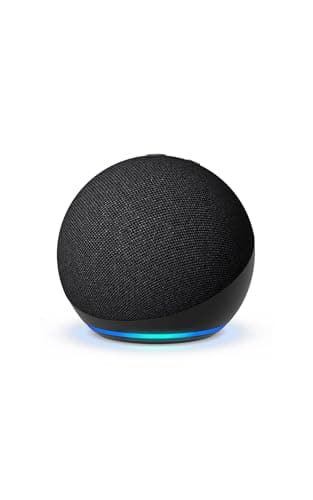
Amazon Echo Dot (5th Gen)
Amazon Echo Dot (5th Gen)Top pick

The cheapest honest way to find out whether you like a smart home at all: a voice assistant in one room that also acts as a Matter controller, so the next thing you buy has something to talk to.

The first device, on the smallest budgetMatter controller (via Alexa)
$49.99View on Amazon

#ad · we may earn a commission from this link to Amazon Echo Dot (5th Gen)

02
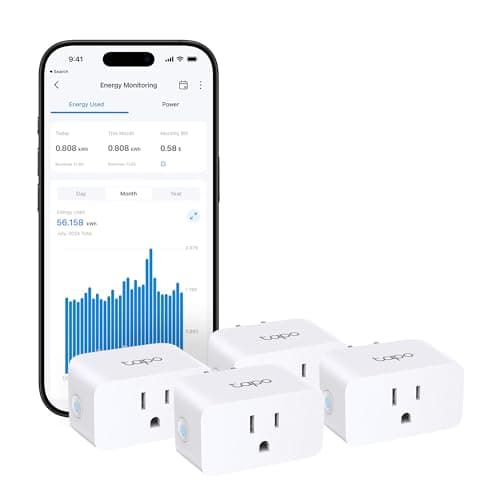
TP-Link Tapo P110M Smart Plug Mini

The first device that makes a smart home feel like one rather than a gadget: a Matter-certified plug that works with Alexa, Google Home, Apple Home and SmartThings at once, and tells you what the thing plugged into it costs to run.

Your first real automation, on any ecosystemMatter-certified — all four major ecosystems
$28.69View on Amazon

$35.9920% off

#ad · we may earn a commission from this link to TP-Link Tapo P110M Smart Plug Mini

03
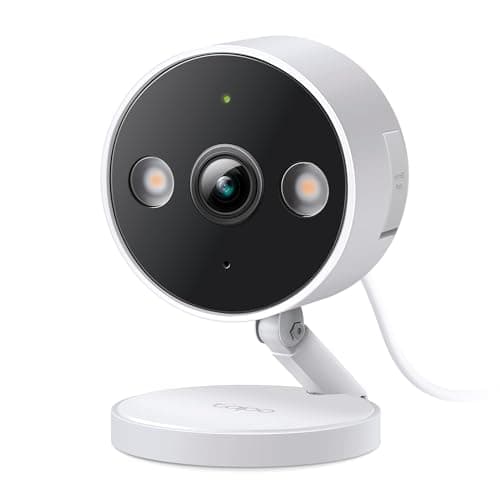
TP-Link Tapo C120
TP-Link Tapo C120

The camera to start with, because it does the one thing budget cameras usually charge for: it decides whether that was a person, a pet or a car on the camera itself, free, and saves the clip to a card you own.

A first camera with no monthly feeNo Matter (Alexa / Google)
$29.99View on Amazon

$39.9925% off

#ad · we may earn a commission from this link to TP-Link Tapo C120

04
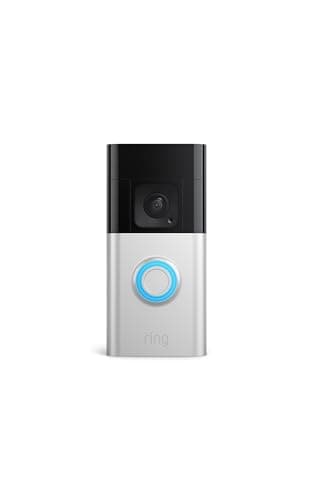
Ring Battery Doorbell Plus

The device most people get the most daily use out of, and the one place we think a subscription can be worth paying: a tall head-to-toe view of the doorstep, with a battery you can pull and recharge rather than rewire.

Seeing the doorstep, including the parcelNo Matter (doorbells not covered yet)
$108.37View on Amazon

#ad · we may earn a commission from this link to Ring Battery Doorbell Plus

05
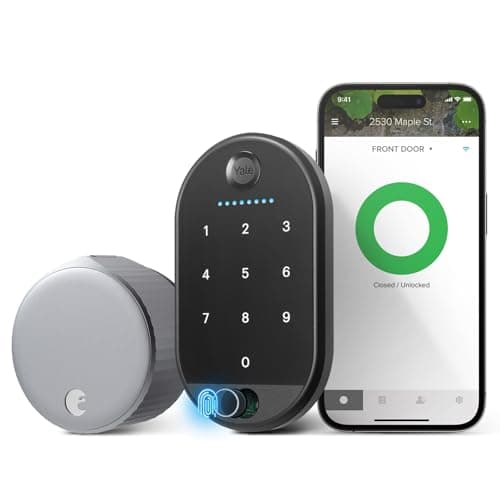
August Wi-Fi Smart Lock (4th Gen)

The smart lock for people who cannot or will not change their door: it clamps onto the deadbolt you already own, your existing keys keep working, and the outside of the door never changes.

Keyless entry without changing the doorNo Matter (Alexa / Google)
$129.00View on Amazon

$249.9948% off

#ad · we may earn a commission from this link to August Wi-Fi Smart Lock (4th Gen)

06
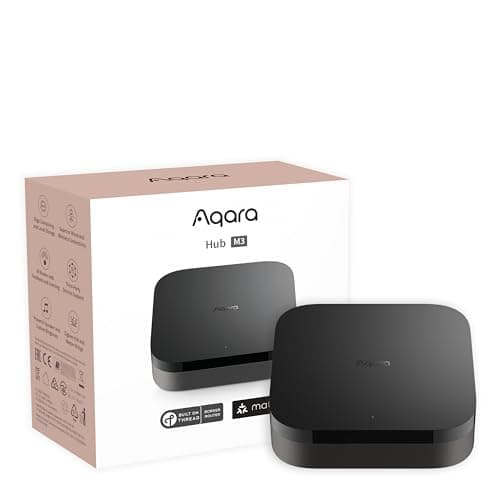
Aqara Hub M3
Aqara Hub M3

The device you buy when Wi-Fi gadgets stop being enough: one box that speaks Matter, Thread and Zigbee and reaches Apple Home, Alexa and SmartThings, which is what unlocks the cheap sensors.

Outgrowing Wi-Fi devices and adding sensorsMatter controller + Thread border router
$159.99View on Amazon

#ad · we may earn a commission from this link to Aqara Hub M3

07
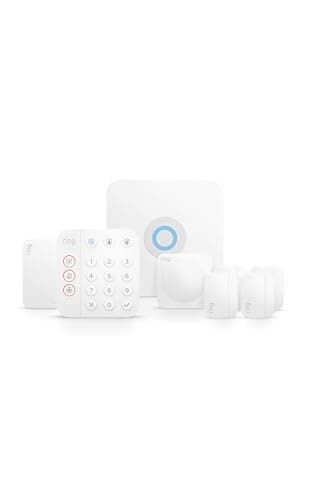
Ring Alarm 8-Piece Kit (2nd Gen)

The last step, and the only one on this list that is a security system rather than a smart device: a complete DIY kit you can self-monitor for free, with the cheapest optional 24/7 monitoring we track and no contract either way.

Whole-home alarm coverage, contract-freeNo Matter — Ring/Alexa app
$249.99View on Amazon

#ad · we may earn a commission from this link to Ring Alarm 8-Piece Kit (2nd Gen)

#ad · Live prices from the Amazon Product API, as of Jul 24, 2026. Where we have no verified live price we show none — we would rather leave a gap than print a number that has rotted.

What each device works with, and what it costs you every month
DeviceMatterAlexaGoogleApple HomeMonthly fee
Echo DotStart hereControllerYesNoNoNone
Tapo P110M plugAny ecosystemCertifiedYesYesYesNone
Tapo C120 cameraNoYesYesNoNone
Ring Doorbell PlusNoYesNot listedNo$4.99/mo for clips
August Wi-Fi LockNoYesYesNot listedNone
Aqara Hub M3ControllerYesNot listedYesNone
Ring Alarm 8-pieceNoYesNot listedNoFree, or ~$10/mo pro

In detail

The picks, in full

01

Amazon Echo Dot (5th Gen)

Top pick
Amazon Echo Dot (5th Gen)
$49.99View on Amazon

Price as of Jul 24, 2026. Amazon's price at checkout is the one that counts.

#ad · we may earn a commission from this link to Amazon Echo Dot (5th Gen)

The cheapest honest way to find out whether you like a smart home at all: a voice assistant in one room that also acts as a Matter controller, so the next thing you buy has something to talk to.

  • Alexa smart speaker
  • Matter controller
  • Built-in temperature sensor
  • Wi-Fi + Bluetooth
  • No Zigbee or Thread radio
Matter: Matter controller (via Alexa)Fee: None — no subscriptionResearched, not hands-on tested

Good

  • The least expensive way to get a working voice front-end and a Matter controller in the same box
  • The built-in temperature sensor can trigger routines on its own, which is rare at this price
  • If you decide a smart home is not for you, you are out the price of a decent takeaway, not a weekend project

Less good

  • Not a Zigbee or Thread hub — Amazon builds those radios into the Echo Hub and the fourth-gen Echo, not the Dot
  • Alexa only: no Apple Home, no Google Home, so it is a dead end if your household is on either
  • It is a speaker first; the smart-home role is a bonus, not a full hub

Skip it if: your household runs on Apple Home or Google Home — the Dot is Alexa-only, and buying against your own phones is the most expensive mistake in this category.

02

TP-Link Tapo P110M Smart Plug Mini

TP-Link Tapo P110M Smart Plug Mini
$28.69View on Amazon

$35.9920% off

Price as of Jul 24, 2026. Amazon's price at checkout is the one that counts.

#ad · we may earn a commission from this link to TP-Link Tapo P110M Smart Plug Mini

The first device that makes a smart home feel like one rather than a gadget: a Matter-certified plug that works with Alexa, Google Home, Apple Home and SmartThings at once, and tells you what the thing plugged into it costs to run.

  • Matter-certified
  • Works with Alexa, Google Home, Apple Home, SmartThings
  • Energy monitoring
  • 15A / 1800W max load
  • 2.4GHz Wi-Fi only, no hub required
Matter: Matter-certified — all four major ecosystemsFee: None — no subscriptionResearched, not hands-on tested

Good

  • Matter certification means it works with all four major platforms, so it survives you changing your mind about ecosystems later
  • Energy monitoring turns a vague worry about the electricity bill into a number you can act on
  • No hub required — it joins your 2.4GHz Wi-Fi directly, which is the whole point of a first automation

Less good

  • 2.4GHz Wi-Fi only, and some mesh routers make joining a 2.4GHz-only device more fiddly than it should be
  • A plug only switches power — it cannot dim a lamp or take over a device with a soft-touch power button
  • Bluetooth is for setup only, so it is useless if your Wi-Fi is down

Skip it if: the thing you want to automate is a lamp you want to dim, or a device that does not resume its previous state when power returns — a plug just cuts and restores mains power.

03

TP-Link Tapo C120

TP-Link Tapo C120
$29.99View on Amazon

$39.9925% off

Price as of Jul 24, 2026. Amazon's price at checkout is the one that counts.

#ad · we may earn a commission from this link to TP-Link Tapo C120

The camera to start with, because it does the one thing budget cameras usually charge for: it decides whether that was a person, a pet or a car on the camera itself, free, and saves the clip to a card you own.

  • 2K QHD (4MP) video
  • Indoor/outdoor, wired (IP66)
  • Color night vision
  • Free on-device person/pet/vehicle detection
  • microSD up to 512GB, no plan
Matter: No Matter (Alexa / Google)Fee: None — free local storage and on-device AIResearched, not hands-on tested

Good

  • Person, pet and vehicle detection runs on the camera itself with no plan, which is what stops the alerts becoming noise
  • Records to a microSD card up to 512GB, so the footage is yours and the running cost is zero
  • IP66 rating and color night vision mean it can go outside as well as in

Less good

  • It needs mains power — this is a wired camera, not a battery one you stick anywhere
  • No Apple Home and no Matter; it lives in the Tapo, Alexa and Google apps
  • You buy the microSD card separately, and without one there is no local recording at all

Skip it if: you need a battery camera for a spot with no outlet, or you are an Apple Home household — this is wired, and it does not appear in Apple Home.

04

Ring Battery Doorbell Plus

Ring Battery Doorbell Plus
$108.37View on Amazon

Price as of Jul 24, 2026. Amazon's price at checkout is the one that counts.

#ad · we may earn a commission from this link to Ring Battery Doorbell Plus

The device most people get the most daily use out of, and the one place we think a subscription can be worth paying: a tall head-to-toe view of the doorstep, with a battery you can pull and recharge rather than rewire.

  • Head-to-Toe HD+ video
  • Two-way talk
  • Motion detection & alerts
  • Battery or hardwired
  • Works with Alexa
Matter: No Matter (doorbells not covered yet)Fee: $4.99/mo Ring Home for saved clipsResearched, not hands-on tested

Good

  • The head-to-toe view frames a caller from face to feet, which is the difference between seeing a delivery and seeing a parcel on the step
  • Removable battery pack — no wiring needed, and no ladder when it needs charging
  • One app for the doorbell, any Ring cameras and the alarm, which is the tidiest experience here if you are already on Alexa

Less good

  • Recorded clips need a Ring Home plan; without one you get live view and alerts only
  • No local storage option at all — every saved clip lives in Ring's cloud
  • No Apple Home, no Google Home, no Matter

Skip it if: you refuse to pay a monthly fee for recorded video — the free tier is live-view only, so a no-subscription doorbell is the better shape of purchase for you.

05

August Wi-Fi Smart Lock (4th Gen)

August Wi-Fi Smart Lock (4th Gen)
$129.00View on Amazon

$249.9948% off

Price as of Jul 24, 2026. Amazon's price at checkout is the one that counts.

#ad · we may earn a commission from this link to August Wi-Fi Smart Lock (4th Gen)

The smart lock for people who cannot or will not change their door: it clamps onto the deadbolt you already own, your existing keys keep working, and the outside of the door never changes.

  • Retrofit — fits your current deadbolt
  • Keep using your existing keys
  • Built-in Wi-Fi
  • Alexa, Google, SmartThings
  • Keypad Touch included
Matter: No Matter (Alexa / Google)Fee: None — no subscriptionResearched, not hands-on tested

Good

  • Installs on the inside only, so a landlord, an HOA or a shared entrance is not a reason to skip it
  • Built-in Wi-Fi means remote locking without a separate bridge plugged in down the hall
  • Your old keys still work, which quietly removes the biggest objection anyone in the house will raise

Less good

  • The listing does not name Apple HomeKit or Apple Home Key
  • It inherits your existing deadbolt's build quality — a weak lock stays a weak lock, now with Wi-Fi
  • The interior body is chunkier than a purpose-built smart deadbolt

Skip it if: you want Apple Home Key on your phone or watch — this reuses your existing hardware and is built around Alexa and Google, so a full deadbolt replacement is the right call instead.

06

Aqara Hub M3

Aqara Hub M3
$159.99View on Amazon

Price as of Jul 24, 2026. Amazon's price at checkout is the one that counts.

#ad · we may earn a commission from this link to Aqara Hub M3

The device you buy when Wi-Fi gadgets stop being enough: one box that speaks Matter, Thread and Zigbee and reaches Apple Home, Alexa and SmartThings, which is what unlocks the cheap sensors.

  • Matter controller
  • Thread border router
  • Zigbee + Bluetooth
  • Wi-Fi, PoE and IR
  • HomeKit, Alexa, SmartThings, Home Assistant
Matter: Matter controller + Thread border routerFee: None — no subscriptionResearched, not hands-on tested

Good

  • One box covers Matter, Thread and Zigbee, which is the combination that makes low-cost sensors and buttons viable
  • It is a Thread border router, the piece most homes are quietly missing when a Matter device refuses to pair
  • Reaches Apple Home, Alexa, SmartThings and Home Assistant at the same time — the least ecosystem-locked pick here

Less good

  • No Z-Wave radio, so an existing Z-Wave sensor collection needs a different hub
  • It is a headless box, not a screen you mount and tap
  • It is the most expensive device on this list that does nothing visible on its own

Skip it if: everything you own is Wi-Fi — a hub adds a box and a bill to your setup without adding a capability you are currently using. Buy it when a Thread or Zigbee device makes you.

07

Ring Alarm 8-Piece Kit (2nd Gen)

Ring Alarm 8-Piece Kit (2nd Gen)
$249.99View on Amazon

Price as of Jul 24, 2026. Amazon's price at checkout is the one that counts.

#ad · we may earn a commission from this link to Ring Alarm 8-Piece Kit (2nd Gen)

The last step, and the only one on this list that is a security system rather than a smart device: a complete DIY kit you can self-monitor for free, with the cheapest optional 24/7 monitoring we track and no contract either way.

  • 8-piece DIY kit
  • Base station + keypad
  • Door/window + motion sensors
  • Range extender included
  • Optional 24/7 pro monitoring
  • Works with Alexa
Matter: No Matter — Ring/Alexa appFee: Free self-monitored; about $10/mo for 24/7 pro monitoringResearched, not hands-on tested

Good

  • Self-monitoring is genuinely free — app alerts and a siren with no plan at all
  • If you do want a monitoring center watching it, Ring's plan is the least expensive we track and still contract-free
  • The accessory range is the widest in DIY security, so adding a sensor later is an app job, not a project

Less good

  • It lives in the Ring and Alexa world — no Apple Home, no Google Home, no Matter
  • Cellular backup and recorded-video history only switch on with a paid plan
  • It is a real install: sensors on doors and windows, a base station, and a keypad everyone has to learn

Skip it if: you are buying your first smart device — an alarm is the end of this list for a reason. Start at the top and come back when the cheap wins are already in place.

Make the free decision first: which app is your home base?

Before a single purchase, pick the ecosystem everything will report to — Amazon Alexa, Google Home or Apple Home. It costs nothing and it decides more than any spec on this page. The shortcut is the phones in the house: an all-iPhone household leans Apple Home, an Android household leans Google, and Alexa is the easy generalist on either. Look at the matrix above through that lens and the list shortens immediately. An Apple household should skip the Echo Dot and the two Ring devices entirely and start at the Tapo plug and the Aqara hub. Our ecosystem comparison is ten minutes well spent before you spend anything.

Matter is the hedge against getting that decision wrong

Matter is a cross-brand standard: a Matter device can be shared across Alexa, Google Home, Apple Home and SmartThings, so it survives you changing your mind. That is exactly why the Tapo plug sits at number two despite being the cheapest thing here — it is the one device on the list that cannot become orphaned by an ecosystem switch. It is also why the honest answer for the cameras, the doorbell and the alarm is "no Matter": those categories are still largely brand-locked, and pretending otherwise would not help you. If the words Matter, Thread and Zigbee are a blur, the Matter vs Thread vs Zigbee explainer untangles them in plain English.

Do the three-year sum, not the sticker sum

The single most expensive habit in this category is comparing sticker prices. A $4.99 monthly doorbell plan adds close to $180 in fees across three years — often more than the doorbell itself — while a camera that records to a card you already own adds nothing, forever. Neither number makes one device better than the other — the Ring plan buys you cloud clips you cannot lose to a stolen camera, and that is a real thing to want. But you should be choosing it knowingly. Five of the seven picks here have no monthly fee at all, and we put the fee column in the matrix so it is impossible to miss. The same arithmetic in more detail lives in our camera subscription cost breakdown.

You almost certainly do not need a hub yet

Note where the Aqara M3 sits: sixth, behind four devices that need nothing but Wi-Fi. That is deliberate, and it is the opposite of what a hub seller will tell you. Cameras, doorbells, most plugs and Wi-Fi locks talk to your router directly. A hub earns its place the day you want the cheap, reliable, battery-sipping stuff — Thread and Zigbee sensors, buttons, contact sensors on every window — or the day a Matter device refuses to pair because nothing in your house is a Thread border router. Until then it is a box that costs money and does nothing you can see. Our do-I-need-a-hub guide says "not yet" more often than the category would like.

Buy one at a time, in this order, and stop when you are happy

There is no prize for finishing the list. A huge number of people are genuinely done after the plug and the camera, and the ones who stay happy are almost always the ones who bought slowly. The order above is roughly cheapest-and-most-useful first: a speaker to control things by voice, a plug to automate one annoying thing, a camera for the room that worries you, a doorbell for the parcels, a lock so nobody is locked out, a hub when Wi-Fi runs out of road, and an alarm when you want the house covered rather than watched. If you want the calm version of this with no products in it at all, read smart home for beginners first and come back.
How we chose

We don't run a test lab

We don't wire every one of these into a test rig, and we won't write "in our testing" as if we do. What we did instead: pulled each product's published specifications, confirmed its Matter/Thread/HomeKit support from the manufacturer's own documentation, added up the real 3-year cost with any monthly fee included, and read the aggregated verified-buyer sentiment. Every pick is chosen against that published method. Where a number came from someone else, we name and link them in Sources.

Questions

Frequently asked

What smart home device should I buy first?
A smart speaker or a smart plug — whichever matches the ecosystem your phones point at. Both are cheap enough that a change of mind costs almost nothing, and both give you something useful on day one without needing a second purchase. We put the Echo Dot first for Alexa households because it doubles as a Matter controller, and the Matter-certified Tapo plug first for everyone else, because it works with Alexa, Google Home and Apple Home alike.
Which of these smart home devices have no monthly fee?
Five of the seven: the Echo Dot, the Tapo P110M plug, the Tapo C120 camera, the August Wi-Fi Smart Lock and the Aqara Hub M3 all cost nothing per month. The Ring Battery Doorbell Plus needs a Ring Home plan (about $4.99/mo) to save recorded clips, and the Ring Alarm is free to self-monitor with optional 24/7 professional monitoring at roughly $10/mo. If a zero-fee setup is the goal, our no-subscription camera roundup takes that constraint the whole way.
Do I need a smart home hub to use these?
No. Six of these seven devices connect over Wi-Fi and talk to your router directly — that is why the hub sits sixth on the list rather than first. You need a hub when you want Thread or Zigbee devices, such as low-cost contact and motion sensors, or when a Matter device asks for a Thread border router. The Aqara Hub M3 is the pick when that day comes.
Which of these work with Apple Home on an iPhone?
On this list, the Tapo P110M plug (via Matter) and the Aqara Hub M3 are the ones that state Apple Home support. The Echo Dot, the Ring doorbell and the Ring Alarm are Alexa-side products with no Apple Home support. The August lock's listing does not name Apple HomeKit or Apple Home Key, so we mark it "not listed" rather than assume. For a lock that does support Apple Home Key, see our smart lock compatibility matrix.
Why are there no smart thermostats, bulbs or robot vacuums on this list?
Because we do not cover them. This site researches home security and home control — cameras, doorbells, locks, alarms, hubs and the plugs that connect them — and we read the manufacturer documentation for everything we rank. Padding the list with categories we have not done that work on would make it longer and less trustworthy, which is a bad trade for you.

Keep reading

Receipts

Sources

We do not run a test lab, and we do not pretend to. Compatibility and subscription-cost claims come from the manufacturer's own documentation and the live retailer listing, read on the dates shown. Read our full method.