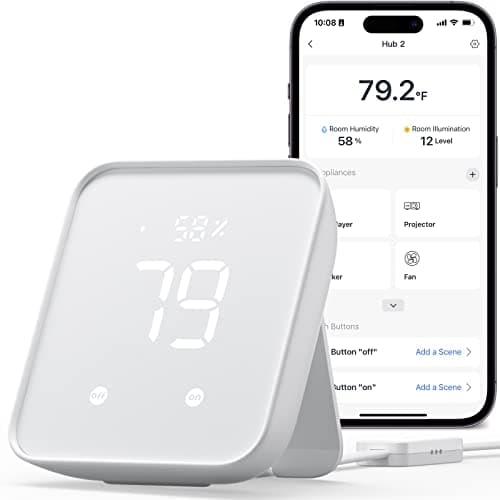
The SwitchBot Hub 2 is one of the most misunderstood boxes in the category, because the word "hub" sets the wrong expectation. It is not the thing that runs a whole-home mesh of sensors and bulbs. It is a clever bridge that does three specific jobs unusually well: it is a temperature, humidity and light sensor; it is an infrared blaster that can control legacy appliances; and it is a Matter bridge for SwitchBot's own accessories across Alexa, Google Home and Apple Home. Judge it as that, and it is genuinely useful. Judge it as a rival to a full-radio hub, and it will disappoint. This review is about telling those two things apart.
Everything below comes from SwitchBot's own product listing and manufacturer documentation, read on the date in our methodology. We researched this unit rather than putting one on a bench — we don't run a hardware lab and we don't hand out numeric scores — so where the maker doesn't publish a claim, we say so instead of inventing one.
What the Hub 2 actually is
Strip away the marketing and the Hub 2 is a small mains-powered panel with a built-in temperature and humidity sensor, a light sensor, and an infrared transmitter — plus the software to bridge SwitchBot's own devices onto the big voice platforms. That is a different animal from the hubs it sits next to on a shelf. A full hub is defined by the radios it carries; the Hub 2 is defined by the sensing and remote-control tricks it packs into one inexpensive box. If you have been trying to work out where it fits against the full-radio options, the short answer lives in the best smart home hubs roundup, where its row in the matrix reads very differently from the Aqara and Aeotec boxes.
The practical upshot is that the Hub 2 is a companion to a smart home, not the foundation of one. It shines when it is adding a capability your existing setup lacks — a room's temperature reading, a way to script an old air conditioner — rather than when it is being asked to be the single brain tying many brands together. It cannot be that brain, because it does not speak the low-power mesh radios that job requires.
The sensor and IR blaster are the real story
The most quietly valuable thing about the Hub 2 is that it is a sensor you were probably going to buy anyway. The built-in temperature and humidity readings, plus the light sensor, mean you can write routines around real conditions in the room — nudge a fan on when it gets warm, flag a basement that is creeping damp, or hold a lamp off while there is still daylight — without adding a separate sensor puck to the shopping list. For a lot of homes that alone justifies the purchase, because a decent temperature/humidity sensor is not free either.
The infrared blaster is the other headline. Plenty of the appliances people actually own — an older TV, a window air conditioner, a fan, a soundbar — still answer to an infrared remote and will never get a Wi-Fi update. The Hub 2 learns those remotes and re-broadcasts them, so those "dumb" devices can be controlled from an app or a voice assistant and folded into scenes. That is a real superpower for renters and for anyone who is not about to replace a working appliance just to make it smart. It is the cheapest honest path to a smart AC or a voice-controlled old TV that we know of.
What "Matter bridge" means here — and what it doesn't
The spec sheet says "Matter," and that word is doing a lot of narrow work. The Hub 2 acts as a Matter bridge for some SwitchBot devices — it can take supported SwitchBot accessories and expose them to Matter-compatible ecosystems so Apple Home, Alexa, Google Home and others can see them. That is genuinely handy if you are already buying SwitchBot curtains, blinds motors or plugs, because it lets those live alongside the rest of your smart home under a single roof.
What it is not is a Matter controller for the whole house. It will not bring your neighbor's favorite third-party Zigbee sensor, a Z-Wave lock or a random Thread gadget into Matter, because the Hub 2 only bridges SwitchBot's own catalog and carries none of those radios. If the distinction between a bridge, a controller and a border router is fuzzy, the Matter vs Thread vs Zigbee explainer untangles exactly what each term promises — and it makes clear why "Matter bridge (some SwitchBot devices)" is a much smaller claim than "Matter controller."
Who it's for
Three readers should have this on the list. First, renters and anyone who can't or won't rewire: the Hub 2 adds sensing and appliance control without touching the walls, and it can move to the next place in a box. Second, people whose smart-home wish list is really an appliance list — the window AC, the ceiling fan, the old TV — where the IR blaster is the whole point. Third, existing SwitchBot owners, for whom the Hub 2 is the piece that lifts their curtains, plugs and meters into Alexa, Google and Apple Home and, where supported, onto Matter.
For those buyers it is close to a no-brainer, especially given how little it costs relative to a full hub. It is inexpensive, it earns its keep as a sensor, and the ecosystem reach is broad for the money. The trap is only when someone buys it expecting it to be the center of a diverse, multi-brand mesh — that is not the job, and no firmware update changes the radios it was built with.
Where it falls short
The honest limitation is the radio set: there isn't one to speak of, beyond Wi-Fi and the IR transmitter. There is no Zigbee, no Thread and no Z-Wave, so the Hub 2 cannot host the cheap, reliable low-power sensors and bulbs that are the whole reason many people buy a hub in the first place. If your plan involves third-party Zigbee door sensors or a fleet of Z-Wave gear, this box simply cannot see them, and you want a full-radio hub instead — the two we compare in Aqara Hub M3 vs Aeotec are the boxes that do that job.
The second caveat is the Matter ceiling already covered: bridging is limited to SwitchBot's own devices, so the Hub 2 can't unify a mixed-brand setup the way a true Matter controller can. Neither of these is a defect — they are just the boundary of what the product is. The mistake is buying it to cross a line it was never designed to cross. If you are still not sure a hub of any kind belongs in your setup, our do-I-need-a-hub guide is the honest gut check to run first.
The verdict
The SwitchBot Hub 2 is an easy recommendation for the job it was actually built to do. As a temperature, humidity and light sensor with an IR blaster bolted on, and as the bridge that puts SwitchBot's own gear onto Alexa, Google and Apple Home, it punches well above its modest price. Renters, owners of stubbornly infrared appliances, and existing SwitchBot households get real, immediate value with no subscription attached. Just buy it for what it is — a clever bridge and a sensor — and not for what the word "hub" tempts you to expect. If your smart home future is built on Zigbee, Thread or Z-Wave sensors from many brands, this is the wrong box, and a full-radio hub is the right one.