Skip to content
Latch & Hub

Cameras · Security Cameras

How to Stop Security Camera False Alerts

A camera that alerts on every passing car, every branch and every patch of moving sunlight stops being a security device within about a week, because you stop looking. Almost all of it is fixable, and only some of the fixes involve buying anything.

By Stephen V.Updated How we choose
#ad

We earn a commission when you buy through our Amazon links, at no extra cost to you. It never changes our rankings — where the subscription-free or cheaper option is the better buy, we say so. How this works.

Verdict

The bottom line

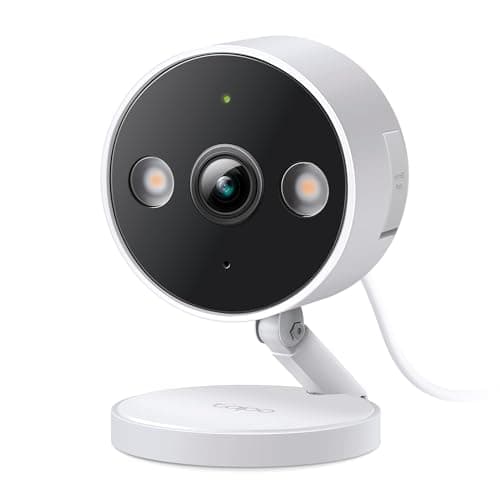
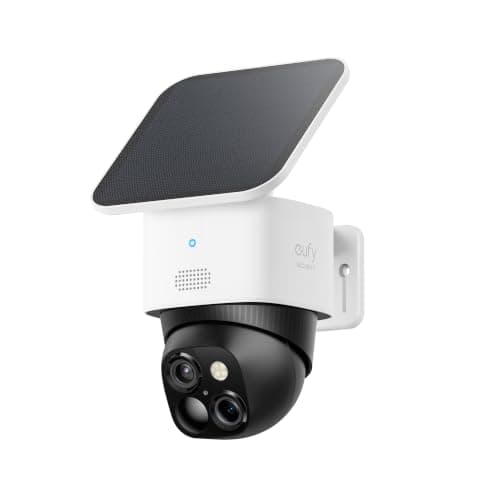
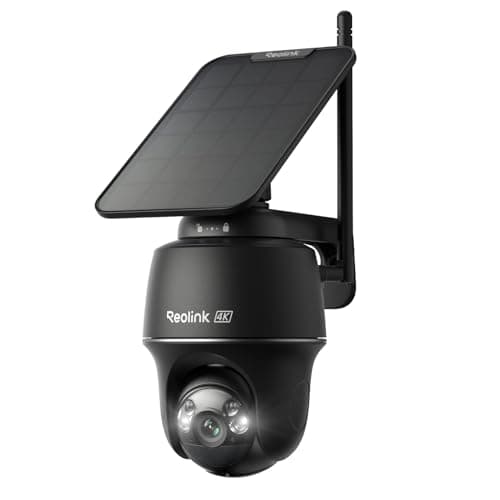
Most false alerts come from one of three causes, and they are fixed in this order. First, placement: a camera pointed at a road, a tree, a heating vent or a wall that catches direct sun will alert forever regardless of settings, and moving or re-aiming it fixes more than any slider. Second, activity zones— drawing the detection area to exclude the sidewalk, the road and the neighbor's drive typically removes the large majority of remaining alerts. Third, detection type: raw pixel-change motion detection cannot tell a person from a cat or a cloud shadow, while person detection can, and on several cameras that filtering runs on the camera itself for free. If you are buying with this problem in mind, the TP-Link Tapo C120 is the cheapest camera that does person, pet and vehicle detection on-device with no subscription, the eufy SoloCam S340 is the wire-free pick that filters locally, and the Reolink Argus PT Ultra adds a turning head so one camera can cover ground that would otherwise need two badly-aimed ones.

A security camera that cries wolf is worse than no camera, because it trains you to dismiss it. The usual response is to turn the sensitivity down until the alerts stop, which also turns off the alerts you wanted. The better approach is to understand what is actually triggering the camera, because almost every cause has a specific fix and they are not interchangeable. Here they are in the order worth trying.

Fix one: move the camera before you touch a setting

More false alerts are caused by where a camera points than by how it is configured. Four placements are reliably bad. A camera that can see a public road or sidewalk will alert on every vehicle and pedestrian. A camera aimed at a tree, shrub or hanging basket alerts on every gust of wind. A camera looking at a surface in direct sunlight alerts as cloud shadows cross it, and in the morning and evening it alerts as the sun moves. And a camera near a heating vent, extractor, wood stove or clothes-dryer vent will trigger an infrared motion sensor with warm air alone — nothing visible moves at all.

Re-aiming is free and usually decisive. Point cameras across an approach rather than down it, keep the horizon and the sky out of frame where you can, and get vegetation out of the lower third of the picture. Our camera placement guide covers the angles worth covering; this is the same advice read backwards, from the false-alert end.

Fix two: draw activity zones properly

Nearly every camera app lets you mask part of the frame so motion outside it is ignored. This is the single highest-value setting on the page and most people either skip it or draw it too generously. Three rules make it work. Exclude everything you do not own— the road, the sidewalk, the neighbor's drive, the bus stop across the street. Exclude the top third of the frame in most outdoor scenes, because sky, trees and rooflines produce motion that is never a security event. And draw the zone around the approach rather than the destination: the strip of path somebody has to cross to reach your door, not the door itself, because by the time they are at the door the useful warning has passed.

Note the thing that catches people out: on many cameras the activity zone filters notifications, not recording. The camera may still be recording continuously, which is what you want — you are suppressing the alerts, not the footage.

Fix three: understand what kind of detection you actually have

This is where most of the remaining noise lives, and it is a hardware question rather than a settings one. There are three mechanisms in play and they fail differently.

Pixel-change motion detection compares frames and flags differences. It is cheap, it runs on anything, and it cannot distinguish a person from a cat, a car, a shadow or rain. PIR (passive infrared) detection, used by almost every battery camera to avoid burning power on constant analysis, looks for a moving heat source — which is why battery cameras produce fewer shadow and rain alerts but are reliably fooled by warm air from a vent and by direct sun warming a wall. Person, pet and vehicle detection runs a classifier over the image and only alerts when it recognises the category you asked for. That is the one that genuinely solves this problem.

The commercial catch: on several of the biggest brands, that classification is the feature the subscription pays for. Wyze puts its smartest AI events behind Cam Plus; Ring gates smart alerts behind its plan. On the three cameras below it runs on the camera itself at no recurring cost, which is why they are the picks on a page about this specific problem. Camera subscription costs lays out what the paid route adds up to.

Fix four: turn infrared off if the camera is behind glass

A camera indoors pointed through a window is a legitimate and often excellent setup, but its infrared LEDs reflect off the glass and wash the whole frame out — and that blown-out, flickering image generates motion events all night. Two fixes: push the lens flush against the glass so no light can get between camera and window, and turn the camera's infrared illumination off entirely, relying on a porch or street light. The same applies to a camera under an overhang with a white soffit above it, which bounces infrared straight back.

Fix five: deal with the insects, because they are probably the cause at night

If your camera is quiet all day and alerts constantly between dusk and dawn, the answer is almost always insects. The camera's own infrared LEDs attract moths and spiders, which then cross the lens inches away and look like a large fast-moving object. Spiders in particular build webs directly across the housing, and a web strand moving in the breeze triggers alerts all night, every night. The fixes are mundane and they work: wipe the housing and clear webs monthly, mount the camera a foot or two away from the wall rather than flush against it, and if the camera supports an external infrared illuminator, use one positioned away from the lens so the insects gather there instead.

Fix six: tune sensitivity last, and tune it per camera

Sensitivity is the setting everyone reaches for first and it should be last, because lowering it reduces all detections rather than the wrong ones — you are trading away real events, not noise. Once placement, zones and detection type are right, a modest reduction cleans up the remainder. Do it per camera rather than globally: a doorbell camera watching a three-foot porch and a driveway camera watching forty feet need completely different settings, and a single site-wide value is wrong for both.

Fix seven: require two signals before you call it an alarm

The most robust fix is not a camera setting at all. If you also run sensors, make the alarm condition motion plus something else — a contact sensor on the door, a second sensor in the hallway — rather than motion alone. A cat triggers one sensor; a person coming through a door triggers two. That logic is what separates a system that you trust from a stream of notifications you swipe away, and it is covered in smart home security automations. If you have not reached the sensor stage yet, how home security sensors work explains why PIR behaves the way it does.

When the camera is the problem

There is a point at which no amount of tuning helps. If the camera only offers raw motion detection, has no activity zones, and gates person detection behind a subscription you do not want to pay, you are managing a limitation rather than fixing a fault. The three cameras below all do category detection on the camera itself with no plan, which is the specification to buy on if false alerts are the reason you are shopping. For the broader field see best no-subscription security cameras, and if the camera is also dropping offline rather than over-alerting, why is my security camera offline is the page for that.
The short answer

Quick picks

Tap any row for the full write-up.

  • TP-Link Tapo C120
    01 TP-Link Tapo C120Top pick

    The cheapest camera that filters properly. Person, pet and vehicle detection run on the camera itself with no subscription, which is the single specification that fixes this problem — and it records 2K to a microSD card so the footage is still there even when the alert is suppressed.

    Best for: Fixing false alerts on the smallest budget, with no plan · No Matter

    $39.99View on Amazon

    #ad · we may earn a commission from this link to TP-Link Tapo C120

  • eufy SoloCam S340
    02 eufy SoloCam S340

    The wire-free pick that still filters locally. It stores its own footage on 8GB of built-in memory with no plan, pans and tilts across 360 degrees so you can aim away from the road rather than live with it in frame, and the solar panel means a better position is not limited by a cable.

    Best for: Re-aiming freely — no cable to constrain the position · No Matter (app + Alexa/Google)

    $159.99View on Amazon

    $199.9920% off

    #ad · we may earn a commission from this link to eufy SoloCam S340

  • Reolink Argus PT Ultra
    03 Reolink Argus PT Ultra

    The pick when one camera has to cover ground that is generating alerts from several directions at once. 4K on a pan-tilt head with auto-tracking means you can frame tightly on the approach that matters instead of pulling back wide and catching the road, the tree and the neighbor's drive in the same shot.

    Best for: Wide areas where a tight frame beats a wide one · No Matter (Reolink app; Alexa & Google)

    $159.99View on Amazon

    #ad · we may earn a commission from this link to Reolink Argus PT Ultra

#ad · Live prices from the Amazon Product API, as of October 10, 2026. Where we have no verified live price we show none — we would rather leave a gap than print a number that has rotted.

False alert causes and the fix that actually works for each
DeviceTypical symptomThe fixCosts anything?
Passing cars and pedestriansDozens of alerts at commuting timesActivity zone excluding road and sidewalk, then vehicle filteringNo
Trees, shrubs, hanging basketsAlerts cluster on windy daysRe-aim to keep vegetation out of the lower frame; zone out the top thirdNo
Moving sun and cloud shadowsAlerts in the morning and late afternoonRe-aim off the sunlit surface; person detection rather than pixel motionSometimes a camera change
Heating vents, dryers, wood stovesAlerts with nothing visible in the clipMove the camera out of the warm airflow — PIR sees heat, not movementNo
Insects and spider websQuiet by day, constant after darkClean the housing monthly; mount away from the wall; external IR illuminatorNo, or a small accessory
Infrared reflecting off glassWashed-out night frames and constant night alertsLens flush to the glass and infrared LEDs switched offNo
PetsAlerts whenever the cat or dog movesPet filtering in on-device detection; raise the camera and angle slightly upSometimes a camera change

In detail

The picks, in full

01

TP-Link Tapo C120

Top pick
TP-Link Tapo C120
$39.99View on Amazon

Price as of October 10, 2026. Amazon's price at checkout is the one that counts.

#ad · we may earn a commission from this link to TP-Link Tapo C120

The cheapest camera that filters properly. Person, pet and vehicle detection run on the camera itself with no subscription, which is the single specification that fixes this problem — and it records 2K to a microSD card so the footage is still there even when the alert is suppressed.

  • 2K+ (2560x1440) at 20fps
  • Free on-device person/pet/vehicle AI
  • microSD to 512GB
  • Color + IR night vision to 40 ft
  • IP66 wired indoor/outdoor
Matter: No MatterFee: Free — microSD local (optional Tapo Care)Researched, not hands-on tested

Good

  • On-device person, pet and vehicle detection with no cloud plan is exactly the feature that removes the alerts you do not want while keeping the ones you do — and the two brands most people own charge monthly for it
  • Because it is wired it can record continuously to a microSD card, so suppressing an alert does not mean losing the footage — you can still go back and look
  • At its price you can afford to buy a second one and aim each at a narrow approach rather than asking one badly-placed camera to watch everything, which is the real structural fix

Less good

  • It has to be plugged in, so the best anti-false-alert position is constrained by where power reaches
  • The Tapo app is functional rather than polished, and the activity-zone editor is basic compared with the premium brands
  • No Matter, and TP-Link runs Tapo and Kasa as separate apps if you own both

Skip it if: the spot you need covered has no power nearby — a wired camera is only as good as the nearest outlet.

02

eufy SoloCam S340

eufy SoloCam S340
$159.99View on Amazon

$199.9920% off

Price as of October 10, 2026. Amazon's price at checkout is the one that counts.

#ad · we may earn a commission from this link to eufy SoloCam S340

The wire-free pick that still filters locally. It stores its own footage on 8GB of built-in memory with no plan, pans and tilts across 360 degrees so you can aim away from the road rather than live with it in frame, and the solar panel means a better position is not limited by a cable.

  • 3K wide (2880x1620) + 2K telephoto
  • 360 degree pan / 70 degree tilt
  • 8GB built-in eMMC
  • 2.2W solar panel included
  • Alexa + Google
Matter: No Matter (app + Alexa/Google)Fee: Free — 8GB local + solarResearched, not hands-on tested

Good

  • Being solar and wire-free means you can mount it wherever the false alerts are lowest rather than wherever the outlet is, which on this particular problem is worth more than any setting
  • 360-degree pan and 70-degree tilt let you aim precisely away from a road, a tree or a sunlit wall without remounting the bracket
  • It records events to 8GB of built-in memory with no subscription, so filtering alerts does not cost you the recording

Less good

  • 8GB fills quickly on a busy camera, and a camera that is still over-triggering will fill it faster — fixing the alerts also fixes the storage
  • Battery cameras lean on infrared motion sensing to save power, which means warm air from a vent and sun-warmed walls are live causes here even though shadows are not
  • No Matter or HomeKit; you live in the eufy app plus Alexa or Google

Skip it if: the mounting spot is in permanent shade — a solar camera in a north-facing light well becomes a camera you have to bring indoors to charge.

How we chose

We don't run a test lab

We don't wire every one of these into a test rig, and we won't write "in our testing" as if we do. What we did instead: pulled each product's published specifications, confirmed its Matter/Thread/HomeKit support from the manufacturer's own documentation, added up the real 3-year cost with any monthly fee included, and read the aggregated verified-buyer sentiment. Every pick is chosen against that published method. Where a number came from someone else, we name and link them in Sources.

Questions

Frequently asked

Why does my security camera keep alerting when nothing is there?
Usually one of four things. If the clip shows nothing at all, it is warm air — a heating vent, an extractor, a dryer outlet or a sun-warmed wall triggering an infrared sensor that detects heat rather than movement. If it happens only after dark, it is almost certainly insects attracted to the camera's own infrared LEDs, or a spider web across the housing. If it happens in the morning and late afternoon, it is the sun moving. And if it clusters on windy days, it is vegetation. Each has a different fix, which is why lowering sensitivity rarely helps.
Do activity zones stop the camera recording, or just the alerts?
On most cameras, just the alerts — and that is what you want. The camera typically carries on recording, so if something happens in an excluded area you can still go back and find it; you have only stopped it interrupting you. Behaviour does vary by brand, so check whether your model describes the zone as a detection zone or a notification zone, especially if you rely on continuous recording to a card.
Is person detection worth paying a subscription for?
It is genuinely the feature that fixes this problem, so if your camera gates it behind a plan the choice is real rather than a cash grab. But it is worth knowing the feature is available for free on the camera itself from several makers — TP-Link's Tapo cameras, eufy and Reolink all run category detection locally with no plan. If false alerts are the reason you are shopping, buying a camera that filters on-device is cheaper over three years than subscribing on a camera that does not. Camera subscription costs has the arithmetic.
Will turning sensitivity down fix false alerts?
Partly, and at a cost. Sensitivity is a blunt control: it reduces all detections rather than the wrong ones, so turning it low enough to silence a tree will also miss a person in dark clothing at the edge of the frame. Do placement, activity zones and detection type first, then trim sensitivity to clean up what is left — and set it per camera, because a porch camera and a driveway camera need very different values.
Why does my camera alert all night but not during the day?
Insects, nearly always. The infrared LEDs that let the camera see in the dark attract moths and spiders, which cross the lens a few inches away and read as a large, fast object. Spider webs are the worse version: a strand across the housing moves in the slightest breeze and triggers alerts continuously. Clean the housing monthly, mount the camera away from the wall rather than flush to it, and if your model supports a separate infrared illuminator, place it away from the lens so the insects gather there instead.
Can a camera ignore my pets?
Only if it classifies what it sees. A camera with person, pet and vehicle detection can report people and ignore the dog; a camera doing raw motion detection cannot, and no sensitivity setting will reliably separate a large dog from a small person. Mounting higher and angling slightly upward helps a little with infrared sensors, since it keeps floor-level movement out of the hottest part of the detection pattern — but the real fix is category detection.

Keep reading

Receipts

Sources

We do not run a test lab, and we do not pretend to. Compatibility and subscription-cost claims come from the manufacturer's own documentation and the live retailer listing, read on the dates shown. Read our full method.