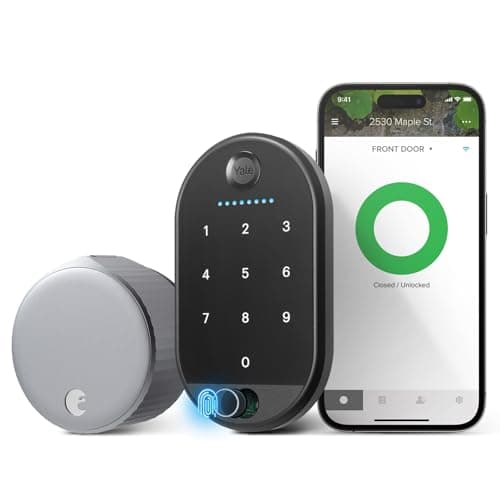
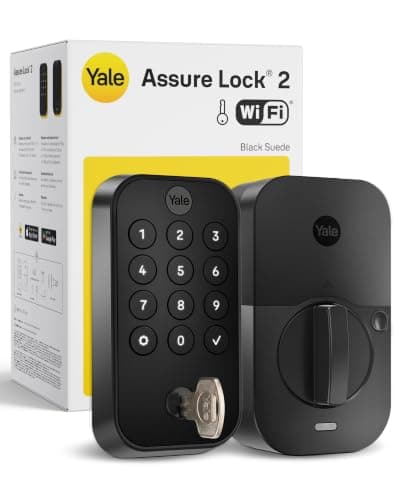
The August Wi-Fi Smart Lock and the Yale Assure Lock 2 get compared constantly, and there is an honest wrinkle worth saying up front: they are cousins. August is now owned by Yale, and Amazon even lists the August as the "Yale August Wi-Fi Smart Lock with Keypad Touch." So this is not really a brand fight - it is a fight between two designs. One lock bolts onto the inside of the deadbolt you already have and keeps everything else the same. The other rips out the whole deadbolt and gives you a fresh keypad door. Retrofit versus full replacement - that is the entire decision, and which side you land on has almost nothing to do with the logo and everything to do with whether you own the place.
The one difference that decides it: retrofit vs full replacement
The August Wi-Fi Smart Lock is a retrofit. It mounts on the interior side of your existing deadbolt and motorizes the thumbturn you already have. The exterior of your door does not change at all - same hardware, same keyway, same physical keys in your pocket. You are adding brains to the lock you own, not swapping the lock. Installation is genuinely quick because you never touch the outside of the door, and when you move out you unscrew the August and take it with you, leaving the original deadbolt exactly as you found it. That last part is why it is the renter's lock.
The Yale Assure Lock 2 is a full replacement. You remove your old deadbolt entirely - inside and out - and install a new touchscreen-keypad deadbolt in its place. The exterior face becomes a proper illuminated keypad, the keyway changes to Yale's (or disappears, if you choose a keyless version), and the whole door is now a fresh, integrated smart lock. It is more of a project than the August because you are changing the hardware on both sides, but the payoff is a clean, purpose-built keypad deadbolt rather than an add-on clamped to an old one. That is the owner's lock.
Everything else about these two - the app experience, the no-subscription pricing, the assistant support - is close enough that it should not drive your choice. Sort out retrofit versus replacement first, because it maps almost perfectly onto a question you can answer in one second: do you own this door, or are you borrowing it?
Renters and keep-your-keys homes: the August wins by design
If you rent, the August is the obvious answer and it is not close. Most leases forbid changing the exterior lock, and even where they do not, you do not want to buy a full deadbolt you will leave behind or have to reinstall the old one when you go. The August sidesteps all of that: the outside of the door is untouched, your landlord's keyway and your existing keys keep working for anyone who needs the old-fashioned way in, and removal is a two-minute job with a screwdriver. You get Wi-Fi, app control, and the included Keypad Touch for codes without altering the door you do not own.
The keep-your-keys benefit is not just for renters, either. Plenty of owners like that the August preserves the physical keys they have already handed to family, a neighbor, or a house-sitter - nobody has to be re-keyed, and the mechanical lock they already trust stays in place as a backup. The August also lists SmartThingsalongside Alexa and Google, which is a nice bonus if you run a SmartThings hub. Because it keeps codes and app entry with the door's original exterior, it is a favorite for short-term rentals too - see our best smart locks for Airbnb for how that plays out with guest codes, and the full August Wi-Fi Smart Lock review for the retrofit fit in detail.
Owners who want a fresh keypad door: the Yale is the upgrade
If you own your home and the whole point of the exercise is a keyless, keypad front door, the Yale Assure Lock 2 is the better buy. Instead of clamping a motor onto an old thumbturn, you get a purpose-built touchscreen-keypad deadbolt with an integrated exterior face - it looks like a smart lock because it is one, front to back. Guests punch a code into the keypad and walk in with no phone, and you are not carrying forward whatever wear or weakness lived in your old deadbolt, because that hardware is gone.
The Yale's calling card is its swappable-module system. The lock itself is the base, and you add the piece you need: the Wi-Fi module brings remote access and the Alexa and Google support most people want, and there are other module and finish options in the family. It is a tidy way to buy exactly the connectivity you need without paying for a hub you will not use. You can also choose a keyed backup version if you want a physical key as a fallback, or go fully keyless for the cleanest look. The Yale Assure Lock 2 review covers the module choices, and because remote features hang on the Wi-Fi module it is worth knowing what still works when the network drops - our guide on whether smart locks work without power explains the battery-and-backup side of a full-replacement deadbolt.
Where they are genuinely the same
Because they share a corporate parent, the two locks overlap more than a typical cross-brand pair. Both name Alexa and Google (the Yale through its Wi-Fi module, the August through its built-in Wi-Fi), so voice control is on the table either way. Neither one's listing names Apple HomeKit or Apple Home Key, and neither claims Matter - so if you are an iPhone household set on Home Key, or you are trying to standardize on Matter, this pair is not built for that and you should look at a HomeKit-first lock instead. Our smart-lock ecosystem compatibility guide lays out which locks name which platforms so you do not assume support that the listing never claims.
Both are also refreshingly free of a subscription. Codes, app control, remote lock and unlock, and voice control are all included in the hardware price - there is no monthly plan gating the features on either lock. That is worth saying plainly because it is not true of every smart-home category. Whichever design you pick, the running cost after purchase is zero, and that is part of why both sit comfortably in our best smart locks roundup. The decision really does come down to the door, not a recurring bill.
Install and living with each one
The install effort tracks the design exactly. The August is the lighter lift: you keep the exterior deadbolt in place and attach the August body to the inside, so there is no drilling, no new bore, and no change to the outside of the door. It is the kind of job most people finish in well under an hour with a screwdriver, and it is fully reversible. The trade is that you inherit your existing exterior hardware, warts and all - if that old deadbolt is loose or worn, the August does not fix it.
The Yale asks for more up front and gives you more in return. Replacing a deadbolt means removing the old one and fitting a new lock on both sides, which is still a DIY-friendly job but a bigger one, and it does change your keyway. In exchange you get a brand-new, integrated keypad deadbolt with none of the old hardware carried forward. If you want the step-by-step of either path before you buy, our how to install a smart lockguide walks through both the retrofit and the full-replacement route, including how to check your door's backset and thickness first.
One more honest note on the family resemblance: because August is now Yale-owned, you are not really choosing between two philosophies of company, only two philosophies of lock. That is liberating, actually - it means you can pick purely on retrofit-versus-replace without worrying that one brand's app or support is going to be worlds better than the other's. If you want to see how the August stacks up against a different keypad deadbolt entirely, our August vs Schlagecomparison puts the retrofit against Schlage's full-replacement approach.
Who should buy which
Buy the Yale Assure Lock 2 if you own your home and want a fresh, keyless keypad door. The full-replacement design gives you an integrated touchscreen keypad, the flexibility of the swappable-module system for Wi-Fi and voice control, and an optional keyed backup - all with no subscription. It is the more substantial upgrade and our top pick here for anyone whose goal is a proper smart deadbolt rather than a smartened-up old one.
Buy the August Wi-Fi Smart Lock if you rent, or if you simply want to keep your existing keys and exterior hardware. It mounts inside your current deadbolt, changes nothing on the outside, keeps your keys working, and comes out clean when you move - all while adding Wi-Fi, the Keypad Touch, and Alexa, Google and SmartThings support. For a renter it is close to the only sensible choice, and for plenty of owners the keep-everything convenience is worth it too.
The one-line rule of thumb: own the door and want a new keypad deadbolt, buy the Yale; borrow the door or want to keep your keys, buy the August. Everything else about them is close enough to call a tie, precisely because they are cousins. Answer the ownership question honestly and the lock chooses itself.
The usual honest caveat applies, the same one on every page here: we did not install and stress-test these two locks in a lab. We read each lock's own Amazon listing and manufacturer documentation for its specs and the ecosystems it actually names, and compared them straight. Where a claim would have to come from hands-on testing, we say so rather than inventing it. Our full method is on the methodology page.