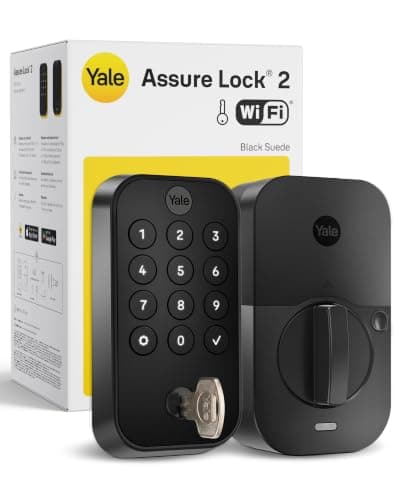
The Yale Assure Lock 2 is one of the tidiest keypad deadbolts you can put on a front door, and it is the only lock we recommend that is designed to be rewired after you buy it. Most smart locks lock you into whatever radio they shipped with. The Assure Lock 2 is built the other way around: the smart part lives in a small module you can swap, so the lock you own today can speak a different protocol tomorrow. That flexibility is the whole story here - and this review is about the specific configuration Yale sells with the Wi-Fi module, what it actually claims, and the one thing its listing does not.
What the Assure Lock 2 actually is
Strip away the module talk and the Assure Lock 2 is a full-replacement touchscreen deadbolt. You remove your existing deadbolt entirely and this takes its place, so both the interior and the exterior hardware are new. The exterior face is a flat, backlit touchscreen keypad - no cylinder sticking out, no dial - which is why it reads as one of the cleaner-looking locks on a door. You punch a code to get in, and you can hand out codes to family, a house cleaner or a dog walker without ever cutting a key. In the roundup where we rank it against every other lock we cover, the Yale earns its place on exactly this combination of a clean face and code-based entry; see where it lands in our best smart locks guide.
Because it is a true deadbolt swap rather than a retrofit, the Assure Lock 2 belongs in the same family as the Schlage and Kwikset deadbolts we cover, not the retrofit August that clamps onto an existing lock. If you are only shopping full-replacement locks - the kind that give you a fresh keyless deadbolt on both sides of the door - our best smart deadbolts roundup narrows the field to just those. The Yale is a fixture of that list.
The module system is the real reason to buy it
Here is what sets the Assure Lock 2 apart from almost everything else on a door. The connectivity is not baked into the lock body - it lives in a swappable module that clips into the interior side. Yale sells the lock in different configurations built around which module is fitted, and the point of the design is that the module can be changed. In practice that means the lock you screw to your door is not a dead end: if the way you want it to connect changes down the line, the intention of the platform is that you swap the module rather than replace the entire lock.
That is genuinely rare, and it is worth understanding before you buy, because it is also the source of the one thing that trips people up. Since the lock's smarts depend on the module fitted, the capabilities of "the Yale Assure Lock 2" are not one fixed thing - they are whatever that specific configuration ships with. A shopper who reads a review of one variant and buys another can end up with a different set of features than they expected. So the single most important habit with this lock is to read the exact configuration on the listing you are about to order, and confirm it names the connectivity you want.
The Wi-Fi configuration: Alexa, Google and remote access
The configuration we are reviewing here is the one built around the Wi-Fi module, and that module is what turns the Assure Lock 2 from a local keypad lock into a connected one. With the Wi-Fi module fitted, the lock reaches your home network directly, so you get remote lock and unlock from your phone when you are away, and you can check whether the door is locked without walking to it. That same module is what brings voice control into the picture: this configuration's listing names Amazon Alexa and Google, so you can lock the door or ask its status through an Echo or a Google speaker.
Crucially, none of that carries a subscription. The remote access, the app control and the voice integration are part of the lock, not a plan you renew. That matters more than it sounds, because in the camera and doorbell world the connected features are often the thing you pay monthly to keep. With the Assure Lock 2 there is no equivalent - lock, unlock, status and codes are yours outright. For a plain-English tour of what each platform actually does for a lock, and where a Wi-Fi module fits versus a hub, our smart lock ecosystem compatibility guide is the companion piece to this review.
The honest catch: no Apple Home Key on this configuration
This is the part a buyer has to hear clearly, because it is the most common mismatch. The listing for this Wi-Fi configuration names Alexa and Google. It does not name Apple HomeKit, and it does not name Apple Home Key - the feature that lets you tap an iPhone or Apple Watch against the lock to open it. Our house rule across this whole site is that we report only the platforms a listing actually claims; when a listing is silent on a platform, we say "Not listed" rather than assume it works. On that standard, this configuration is an Alexa-and-Google lock, full stop.
If you live in an Apple household and the tap-to-unlock convenience of Apple Home Key is the reason you want a smart lock in the first place, this is the wrong configuration for you - and it is worth being blunt about that rather than letting you find out after it is on the door. The comparison we wrote for exactly this fork in the road puts the Yale head to head with the Apple-Home alternative in our Schlage Encode Plus vs Yale Assure Lock 2 breakdown; if you are torn between the two, start there. The short version: the Schlage is the pick when Apple Home Key is a must, and the Yale is the pick when Alexa or Google is your home's hub.
Keyed backup and everyday living
One reassuring detail for anyone nervous about going fully keyless: the Assure Lock 2 offers a keyed backup option. Not everyone wants a physical keyway on a smart lock - some buyers prefer the clean, cylinder-free look and the fact that there is no lock to pick - but if a traditional key as a fallback helps you sleep, the option exists in the range. Between the keypad code, the app and, on this configuration, remote access, the day-to-day reality is that you will rarely reach for a key at all; it is there as the belt-and-suspenders backstop, not the primary way in.
In normal use, the touchscreen keypad is the star. It wakes to a tap, you enter a code, and the deadbolt throws. Handing a contractor a temporary code for a week and then deleting it is the kind of everyday control that makes people wonder how they lived with a metal key ring. And because the codes live on the lock and the connectivity rides on the Wi-Fi module, the keypad keeps working for entry even if your internet has a bad day - it is the remote and voice features that lean on the network, not the ability to physically get through the door.
Installation
Fitting the Assure Lock 2 is a standard deadbolt swap: remove the old deadbolt, drop the new one into the same prepared door holes, and connect the interior module. It is the same 15-to-30-minute job as any full-replacement smart deadbolt, done with a screwdriver and the included template - no locksmith, no drilling a new door if yours already has a bored deadbolt hole. The one extra step compared with a dumb deadbolt is pairing the Wi-Fi module to your network in the app, which is a guided, one-time setup.
The verdict
The Yale Assure Lock 2 is the keypad deadbolt to buy when you want a clean, low-profile face, code-based entry for guests, and the unusual freedom to change how the lock connects later instead of rebuying the whole thing. In this Wi-Fi configuration it gives you remote control and Alexa or Google voice with no subscription attached, and an optional keyed backup for peace of mind. The one hard limit is the one to respect: this configuration's listing names Alexa and Google, not Apple HomeKit or Apple Home Key. If you are an Alexa or Google household, that is no loss and this is an easy, upgradeable recommendation. If you are an Apple household chasing tap-to-unlock, buy the Schlage instead. As with every lock we cover, this is a researched review built from the manufacturer's own published claims and the live listing - not a hands-on lab test - and we have flagged the exact place the listing goes quiet rather than filling the gap with a guess.
The two comparisons that come up most
Against August, it is a full-replacement keypad deadbolt against a retrofit that keeps your existing cylinder — August vs Yale Assure Lock 2. Against Level, it is a visible touchscreen against a mechanism hidden inside the door — Yale Assure Lock 2 vs Level Lock+.