The most useful thing to know before you spend a cent is that these two are not really rivals. Both carry the word "hub," both turn up in the same search, and both plug into your smart home - but the SwitchBot Hub 2 and the Amazon Echo Hub answer completely different questions. One is an inexpensive sensor and universal remote that quietly bridges SwitchBot's own gear into the big assistants. The other is a wall-mounted Alexa control panel with a proper Zigbee, Thread and Matter hub inside it. Cross-shopping them as though they were the same device is how people end up with a gadget that cannot do the job they bought it for. Let us make sure that is not you.
The verdict up front
For a buyer who wants a home that a hub actually runs, the Amazon Echo Hub is the stronger machine and our pick here. It is a genuine control surface - an 8-inch touchscreen you mount on the wall - and, more importantly, it has a real hub built in: Zigbee, Thread and Matter support that can drive thousands of compatible devices. If you live in Alexa and want one box that both shows you the home and hosts its devices, this is that box.
The SwitchBot Hub 2wins a different buyer cleanly, and it is not a consolation prize. If you mostly own SwitchBot gear, want a built-in temperature, humidity and light sensor, or need an IR blaster to smarten an old TV or window air conditioner, the Hub 2 does all of that in one cheap unit, and it bridges SwitchBot devices into Alexa, Google and Apple Home over Matter. For that job the Echo Hub is far more device than you need - and it cannot sense a room or blast IR at all. So the honest headline is not "which is better," it is "which job are you buying for."
What each box actually is
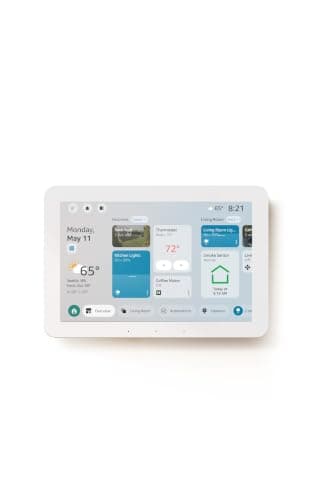
The Amazon Echo Hubis, in Amazon's own words, an 8-inch smart-home control panel designed for Alexa and Alexa+, compatible with thousands of devices. That description hides the important part: it is not just a screen. It ships with a built-in Zigbee hub and supports Thread and Matter, which means it can host and run third-party mesh devices directly - the sensors, bulbs and plugs that a real hub is supposed to control. Mount it on the wall and it becomes both the dashboard you tap and the brain the home talks to. The full picture is in our Amazon Echo Hub review.
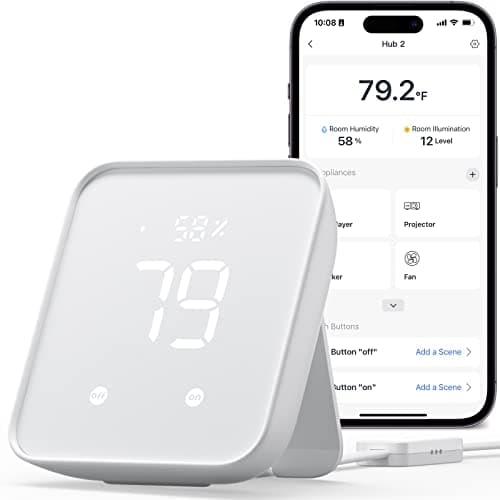
The SwitchBot Hub 2 is something else entirely, and its own listing is refreshingly honest about it. It is a Wi-Fi thermometer and hygrometer, an IR blaster that can control legacy TVs, fans and air conditioners, a light sensor with a smart button, and a Matter bridge for SwitchBot's own accessories - pulling SwitchBot curtains, blinds and plugs into Alexa, Google Home and Apple Home over a 2.4GHz connection. What it is not is a Zigbee, Thread or Z-Wave hub. It carries none of those mesh radios, so it cannot see or run third-party sensors, and it has no screen. It is a clever, cheap, genuinely useful gadget with a specific job - the point our SwitchBot Hub 2 review makes at length.
The mesh radios: the real dividing line
Strip away the marketing and the single biggest difference is what each one can host. The Echo Hub has a built-in Zigbee hub plus Thread and Matter, so it can directly run third-party mesh gear - a Zigbee motion sensor, a Thread-based accessory, a Matter plug - the way a hub is meant to. The SwitchBot Hub 2 has no Zigbee, no Thread border router and no Z-Wave, so it cannot host any of that. Its Matter role is a bridgefor SwitchBot's own devices, not a controller for a mixed-brand home. If you read "SwitchBot Hub 2 supports Matter" and assumed it could pull your non-SwitchBot Zigbee sensors into Apple Home, that is the trap - it has no radio to even hear them. Our Matter vs Thread vs Zigbee guide unpacks why a bridge and a real hub are not the same thing, and it is the whole basis of the matrix below.
A concrete example makes it click. Say you want cheap Zigbee door and motion sensors around the house, feeding automations that also touch a Matter light. Only the Echo Hub can host that - it has the Zigbee radio and the Matter support to run it directly. Now say instead you want to read your bedroom's temperature and humidity, teach the smart home your old air conditioner's remote so it turns on automatically, and control a few SwitchBot curtains by voice. The Echo Hub does none of the sensing or IR; the Hub 2 does all three in one budget unit. Same category name, opposite jobs.
Ecosystem: which assistants each one speaks
Here the roles flip in an interesting way. The Echo Hub is powerful but narrow: it is an Alexa device, designed for Alexa and Alexa+, and its listing does not name Google Home or Apple Home. If you live in Alexa that is exactly what you want; if you live in Apple Home or Google, it is a hard ecosystem lock to accept. The SwitchBot Hub 2, despite being the smaller device, is the more ecumenical one - it bridges SwitchBot gear to Alexa, Google Home and Apple Home. So the cheaper box is the more cross-ecosystem one, and the more capable box is the more locked one. If choosing your assistant is still the open question, start with do I need a smart home hub? before either purchase.
Form factor: a puck on a shelf vs a panel on the wall
The physical design tells you what each is for. The Echo Hub is meant to be mounted - an 8-inch touchscreen on the wall by the door, a single glanceable dashboard for the whole home, the kind of surface you tap on your way out to arm, dim and check. The SwitchBot Hub 2 is a small unit you set on a shelf or stick near the appliance it needs to reach with infrared; its own display shows temperature and humidity, not a home dashboard. If a wall control panel is part of what you are buying, only one of these is that. If you just need a discreet sensor and remote in a room, the panel is wasted on you.
Sensors and IR: the SwitchBot's hidden superpower
The Hub 2's built-in temperature, humidity and light sensing is the feature the Echo Hub simply does not have, and it is more useful than it sounds. Those readings can drive routines - turn on a fan when a room gets warm, nudge a humidifier when the air dries out - without buying a separate sensor. Pair that with the IR blaster, which learns the remotes of dumb TVs, fans and air conditioners, and the Hub 2 quietly modernizes appliances the Echo Hub cannot touch. Neither box does Z-Wave, so if your sensors are Z-Wave, look instead at a SmartThings-style hub such as the Aeotec Smart Home Hub covered in our best smart home hubs roundup.
So which one?
Want a wall-mounted dashboard and a real hub that hosts third-party Zigbee, Thread and Matter devices, and you live in Alexa? Buy the Amazon Echo Hub - it is a proper control panel and hub in one, and it is our pick here for the buyer who wants a home a hub actually runs. Mostly own SwitchBot gear, want a built-in room sensor, or need to smarten a legacy IR appliance without spending much? Buy the SwitchBot Hub 2 - it does those jobs beautifully and cheaply, and it reaches all three big assistants. There is no universally better device here; there is the right tool for the job. If you need both jobs done, they coexist happily - the Echo Hub runs the mesh and the dashboard, the Hub 2 adds sensing and IR.
The usual honest caveat: we did not bench these two side by side. We read each device's own Amazon listing and manufacturer documentation for its radios, roles and ecosystem support, and compared them straight, crediting no capability a listing does not claim. Where a maker does not state something, we write "Not listed" rather than guess. The full method is on the methodology page.