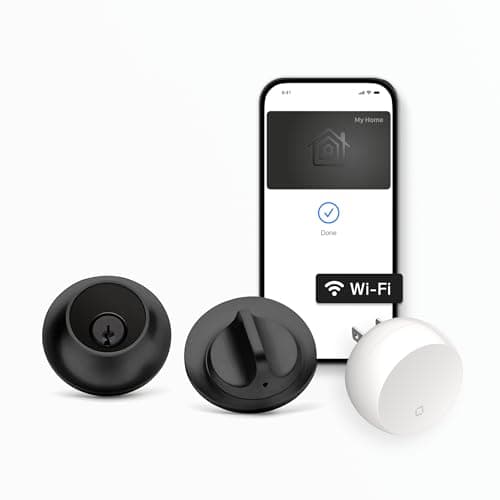
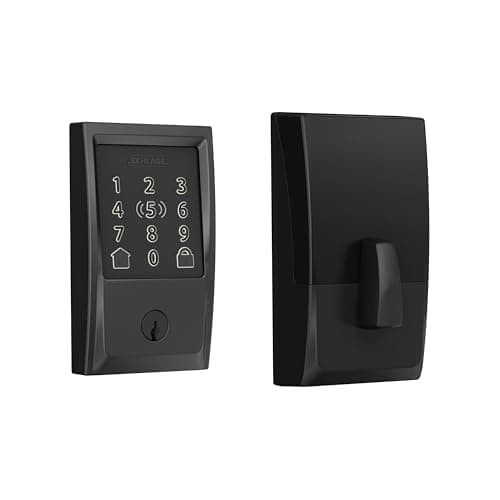
The Level Lock+ and the Schlage Encode Plus are the two locks an iPhone household keeps landing on once it decides it wants Apple Home Key. On paper they are close cousins: both are full-replacement deadbolts, both do Apple Home Key so you tap an iPhone or Apple Watch to unlock, both have Wi-Fi built in for remote control with no hub, and — the part that matters over years of ownership — neither charges a subscription. Where they split is not the phone trick or a fee. It is what shows on the door, and that single difference should decide which one you install.
The one difference that decides it: a visible keypad vs. an invisible lock
The Schlage Encode Plus is a touchscreen-keypad deadbolt. It looks like a smart lock and it acts like one: an illuminated keypad sits on the exterior escutcheon, so anyone you give a code to — a guest, a cleaner, a kid without a phone — can punch it in and walk in. That keypad is the whole point. It means the lock does not depend on everyone at the door owning the right phone, and it is why the Schlage is the more flexible choice for a busy household that hands out access.
The Level Lock+ takes the opposite approach and hides. Nearly all of its smart hardware lives insidethe door bore, so from either side it reads as an ordinary deadbolt — there is no keypad, no glowing panel, nothing that says "smart lock" to a passerby. By default it ships without an exterior keypad, and entry is by phone (Apple Home Key or the Level app), a key card, or a traditional key. Its advantage is pure discretion: it is the lock nobody can tell is smart, which is exactly what some owners want and exactly what rules it out for others.
The catch is the mirror image of each strength. The Schlage cannot disappear — a keypad deadbolt announces itself, and that is the trade for guest codes. The Level cannot take a code at the door out of the box — the clean, hidden look is the trade for leaving the keypad off. Neither is "better" in the abstract. A keypad is the safer default for a home that shares access; an invisible lock is the better tool when a discreet, uncluttered door matters more than code-based entry.
Guest access: the scenario the keypad wins
The abstract "keypad vs. no keypad" choice gets concrete the moment someone who isn't you needs to get through the door. Picture the usual cast: a dog-walker at 1pm, a cleaner every other Friday, a teenager who left their phone at school, a relative staying for the weekend. With the Schlage Encode Plus you hand each of them a code — and, if you like, a code that only works on certain days or hours — and you never have to be home, cut a key, or leave one under the mat. That is the single most-cited reason people buy a keypad deadbolt, and it is a genuine daily convenience for a busy household.
The Level Lock+ can absolutely give guests access too, but it asks you to plan ahead. Because there is no keypad on the door by default, an authorized visitor needs one of the other keys to the kingdom: the Level app on their phone, a key card you have handed over, or an old-fashioned physical key. For a couple who mostly let themselves in and rarely have visitors, that is a non-issue. For a home with a revolving door of helpers, it is friction the Schlage simply doesn't have. Be honest about which of those two homes is yours — it is the fastest way to settle this comparison.
Ecosystem: where the Level pulls ahead
Both locks are aimed squarely at Apple homes, and both nail the Apple basics: HomeKit and Apple Home Key, so the lock appears in the Apple Home app and you can tap to unlock. Neither claims Matter, so if you are trying to future-proof around that standard, read Matter vs Thread vs Zigbee and check the exact model before buying rather than assuming it.
The gap opens on the other assistants. The Schlage Encode Plus listing names Apple HomeKit and Amazon Alexa — but not Google Home — so a Google household loses native voice control with it. The Level Lock+ lists the broader set: Apple, Alexa and Google. If your home is purely Apple, this difference is academic; both do everything you need. But if you straddle ecosystems, or you might add a Google speaker later, the Level is the safer bet for keeping a voice option open. For the wider view of how these two sit against the rest of the field, our best smart locks for Apple Home roundup ranks both alongside the Aqara U100.
Install, keys and living with each one
Both are full-replacement deadbolts — you remove your existing deadbolt and fit the new lock, a standard screwdriver job rather than a locksmith call. The Schlage's keypad face is the familiar, well-documented install most people picture when they think of a smart deadbolt, and its keyed backup means a physical key always works if the electronics ever sulk. The Level, by design, keeps a normal keyway on the exterior precisely so the door still looks and works like a traditional lock, with the smarts tucked away.
Day to day, the difference you feel is who is at the door. If it is mostly you and other phone owners, both are effortless — walk up, tap, in. The moment someone withoutthe right phone needs to get in on their own, the Schlage's keypad earns its keep and the Level asks you to have handed out a key card or a physical key in advance. Neither lock charges a fee for any of this, which is worth underlining: whatever you save or spend is the hardware and nothing more. If you want that reasoning laid out across the whole category, the best smart locks roundup puts both of these against the full field.
Reliability is another place the two designs quietly diverge, and it is worth thinking through before you buy. Both keep a traditional keyway, so a dead battery or a downed router never locks you out — you can always fall back to a physical key. But the everyday experience differs: on the Schlage, the keypad means anyone can still get in with a code even if the app or Wi-Fi is having a bad day, because the code is verified on the lock itself. On the Level, if you are relying on the phone to get in and the connection stutters, the key card or physical key becomes your backup rather than a code. Neither is fragile, but if you want a door that keeps working the most gracefully when the network doesn't, the keypad gives you one more offline way in. Our guide to whether smart locks work without Wi-Fi walks through exactly what still functions when the internet drops.
Who should buy which
Buy the Schlage Encode Plus if you want people to let themselves in with a code. A household with cleaners, dog-walkers, teenagers or a steady stream of guests gets the most from the touchscreen keypad, and you still get Apple Home Key, built-in Wi-Fi and HomeKit on top. It is the more practical everyday lock for a door a lot of different people use, and it is our pick here for that reason.
Buy the Level Lock+if you want a smart lock nobody can tell is smart. If a clean, traditional-looking door matters to you — a period home, an HOA-sensitive frontage, or just a preference for hardware that does not advertise itself — the Level is unmatched, and it quietly lists the broadest platform support of the two (Apple, Alexa and Google). Go in knowing the trade: no keypad by default, so plan to unlock by phone, key card or key, and be ready to pay a premium for hardware you deliberately can't see.
If you want a one-line rule of thumb: the more different people use your door, the more the Schlage's keypad earns its keep; the more you care about how the door looks, the more the Level's hidden design earns its price. Everything else about them is close enough to call a tie. They are both full-replacement Apple Home Key deadbolts, both put Wi-Fi in the lock so you skip a hub, and — the part that quietly matters most over years of ownership — neither one ever bills you. Whichever you choose the running cost is zero, so this really is a choice about the door and the people who use it, not about a monthly fee. That is a rare and welcome thing in smart-home hardware, and it is why both sit near the top of our Apple Home lock rankings.
The usual honest caveat applies, the same one on every page here: we did not install and stress these two locks in a lab. We read each lock's own Amazon listing and manufacturer documentation for its specs and the ecosystems it actually names, and compared them straight. Where a claim would have to come from hands-on testing, we say so rather than inventing it. Our full method is on the methodology page.