If you live in Apple Home, most smart lock roundups are useless to you, because they rank locks your iPhone cannot fully use. The question for an Apple household is narrower and stricter: does the lock appear in Apple Home, and can you tap your iPhone or Apple Watch to unlock it with Apple Home Key? On the honest standard we hold every lock to - we credit only the platforms a listing actually names - just three of the locks we cover claim both. This page is those three, and it is unusually short by design.
HomeKit and Apple Home Key are not the same thing
Two Apple terms get blurred together, and the difference decides how happy you will be. Apple HomeKit is the integration that makes the lock appear in the Apple Home app: you can see whether the door is locked, lock or unlock it from your phone, include it in automations, and control it with Siri. Apple Home Keyis the newer, more physical feature - it puts a digital key in your Apple Wallet so you can tap your iPhone or Apple Watch against the lock to open it, with nothing to launch and nothing to type. HomeKit is "the lock is in my Apple home." Home Key is "I tap my phone and walk in."
Plenty of locks do HomeKit. Far fewer do Home Key, and Home Key is the feature an iPhone household actually feels day to day. That is the bar for this list: every pick here names HomeKit and Apple Home Key on its own listing. If a lock only did HomeKit, or only worked through a third-party app, it did not make the page. For the broader map of how HomeKit, Home Key, hubs and Matter relate, our smart lock ecosystem compatibility guide is the deeper explainer behind this shortlist.
Only three locks name Home Key - and they could not be more different
The surprise, once you narrow to Home Key, is how little these three have in common beyond the Apple feature. They are three genuinely different answers to "put a smart lock on my Apple home":
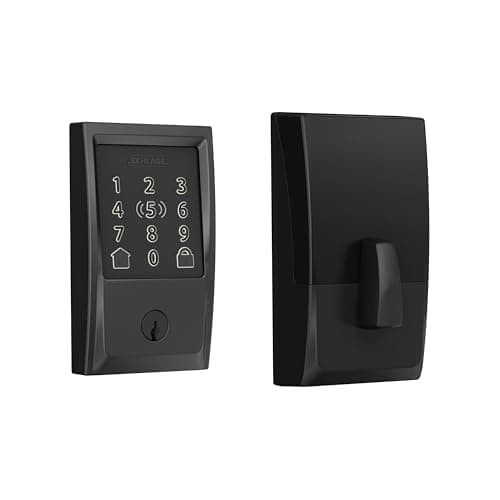
The Schlage Encode Plus is the full keypad deadbolt. It is the most complete and the most conventional: a proper full-replacement deadbolt with a touchscreen keypad on the outside, built-in Wi-Fi for remote access with no hub, and both HomeKit and Apple Home Key. You can tap your phone, punch a code, or control it from anywhere - it covers every base an ordinary household wants, which is why it is our top pick here. The one gap is Google: its listing names Apple and Alexa, not Google. Our full Schlage Encode Plus review goes deeper on it.
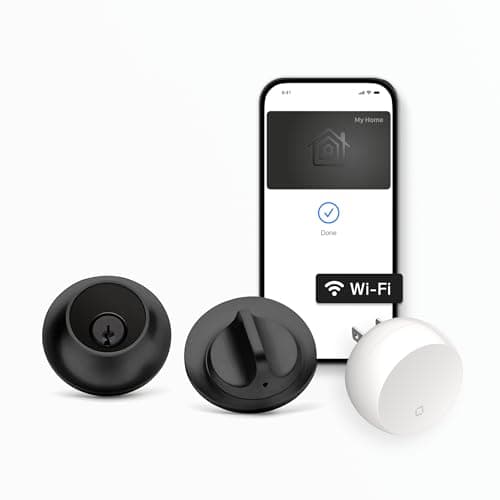
The Level Lock+ is the hidden one.Almost all of its hardware lives inside the door, so from either side it looks like an ordinary deadbolt - no keypad, no obvious "smart lock" bulk. It still does HomeKit, Apple Home Key and built-in Wi-Fi, and its listing actually names the broadest platform set of the three: Apple, Alexa and Google. The trade is the flip side of the disappearing act: there is no exterior keypad by default, so you get in by tapping a phone, using a key card, or a physical key - not by handing a guest a code. If the look is what you care about, read the Level Lock+ review for the full picture.
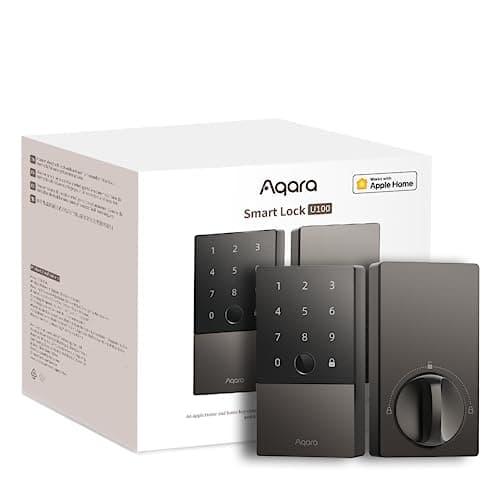
The Aqara U100 is the feature-dense one. It packs the most ways in of any lock here - a fingerprint reader on top of a keypad and Apple Home Key - and it is IP65 weatherproof for an exposed exterior door. It names HomeKit, Alexa, Google and IFTTT. The catch is architectural: the U100 is Bluetooth on its own and needs an Aqara hub to reach the internet, so its remote access and voice control run through that hub rather than built-in Wi-Fi. If you already own Aqara gear, that hub is probably already on your shelf and this is a lot of lock for the money; if you do not, it is an extra box to buy and place.
A word on Matter, and on subscriptions
Two quick reassurances. First, none of these three charges a subscription - Apple Home Key, HomeKit, the keypad and remote access are all part of the lock, not a monthly plan. That is the norm for locks and a welcome contrast to the camera world. Second, all three read "No Matter" in our matrix. Matter for locks is real and growing, but none of these specific listings claims it as of our review date, so we do not claim it for them. Home Key does not depend on Matter, so this is not a gap for an Apple household today - but if you are future-proofing, confirm the exact model and firmware before you buy.
The usual honest caveat applies, the same one on every page here: we do not run a lock lab. We built this list from each lock's own Amazon listing and manufacturer documentation, wrote down only the platforms each one actually names, and marked anything a listing left unsaid as "Not listed" rather than assuming it. This is researched, not hands-on tested.
How to choose between the three
Because all three do HomeKit and Apple Home Key, you are not choosing an ecosystem here - you are choosing a shape. Start with one question: do you need a keypad so guests can enter with a code? If yes, the choice is the Schlage or the Aqara, and the Level is out, because it ships without an exterior keypad. If you do not need a keypad and you want the lock to disappear into the door, the Level is the reason this list exists.
If you want the safe all-rounder
Buy the Schlage Encode Plus. It is the least fussy of the three: a normal-looking full-replacement deadbolt with a keypad, built-in Wi-Fi so there is no hub to buy, and both HomeKit and Home Key. Tap your phone, or give a guest a code - it does both, works out of the box for an Apple household, and asks nothing extra of you. Its only real limit is that its listing does not name Google, which matters only if you run a mixed Apple-and-Google home.
If looks or fingerprints matter more
Buy the Level Lock+ if the single most important thing is that the lock not look like a smart lock - it hides in the door and still delivers Home Key, at the cost of the exterior keypad. Buy the Aqara U100 if you want the most entry options - fingerprint, keypad and Home Key together - and you either already own an Aqara hub or do not mind adding one, since that hub is what gives the U100 its remote and voice features. All three are on our best smart locks overall list too, ranked against locks for every ecosystem; and if you are still deciding whether Apple Home is even the platform to build on, our best smart home ecosystem guide weighs Apple against Alexa, Google and SmartThings first.