Skip to content
Latch & Hub

Doorbells · Video Doorbells

Wyze Video Doorbell Pro vs Nest Doorbell (Battery): Which Free Tier Fits You

Both are battery doorbells, and both give you something for free - but opposite things. The Wyze stores your footage for free on a microSD card and charges for the smart AI alerts. The Nest gives you the smart AI alerts for free and charges to keep more than a few hours of footage. Your priority - the recordings or the intelligence - picks the doorbell.

By Stephen V.Updated How we choose
#ad

We earn a commission when you buy through our Amazon links, at no extra cost to you. It never changes our rankings — where the subscription-free or cheaper option is the better buy, we say so. How this works.

The Wyze Video Doorbell Pro and the Nest Doorbell (Battery) are both good wireless doorbells, and both dangle a "free" tier to reel you in - but they give away opposite halves of the product, and that is the entire comparison. Wyze hands you free storage: your footage lives on a microSD card you own, at no monthly cost, while the clever AI alerts are the paid extra. Nest hands you free intelligence: on-device AI that names a person, a package, an animal or a vehicle at no charge, while keeping more than a few hours of that footage is the paid extra. Neither is more generous than the other - they are mirror images. So the honest question is not "which is free," it is "which free half do you actually want?"

The mirror-image free tiers

Let us make the trade explicit, because it is the thing to get right. With the Wyze, you insert a microSD card and it records to it with no subscription - your event history is genuinely free, and you can scroll back through days of clips without paying anyone. What costs extra is Wyze's smartest AI (person and package detection and the like) via the optional Cam Plus plan. With the Nest, the AI is the free part - it separates people, packages, animals and vehicles on-device at no charge - but the history is the catch: the free tier keeps only about three hours of events, and to keep real history you pay for Google Home Premium.

So picture the two failure modes. On the Wyze, you get a plain motion clip for free and pay if you want it labelled "package." On the Nest, you get the "package" label for free but lose the clip after a few hours unless you pay. If what you care about is keeping the footage- proof, a record, the ability to look back at yesterday - Wyze's free tier is the useful one. If what you care about is smart notifications- being told what is at the door, not just that something is - Nest's free tier is the useful one. Our doorbell subscription costs guide breaks down exactly what each paid tier adds so you can price the half you do not get for free.

Ecosystem: Google-native vs go-anywhere

The second real difference is where each doorbell wants to live. The Nest Doorbell is built around Google Home - that is its home turf and also its fence. In a Google household it is superb: it drops in, shows on Nest Hubs and Google speakers, and the AI just works. In an Alexa or Apple household it fights you, and you lose most of what makes it special. The Wyze lives in the Wyze app and is far less tied to any one assistant, which makes it the more flexible choice if you are not a Google home - or if you do not want your doorbell to depend on which ecosystem you picked. If you are firmly in Google, that is a point for the Nest; if you are anywhere else, it is a point against it, and for the Wyze.

Image shape, hardware and price

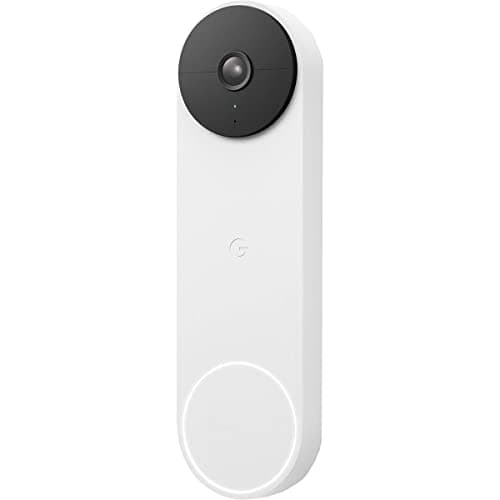
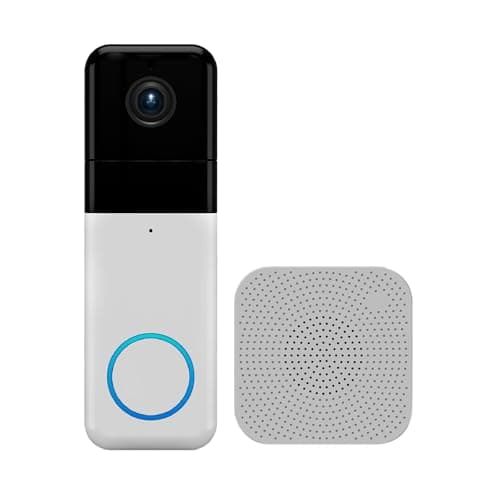
Both show a caller head to toe, but in different shapes. The Wyze uses a square 1:1 frame at 1440 HD that fits a visitor and the doorstep - and any parcel on it - together; the Nest uses a tall 3:4 frame that emphasises a person from head to feet with the package at their feet. Both are good; the choice is aesthetic more than qualitative. On hardware, both run on a rechargeable battery (the Nest can also hardwire to existing doorbell terminals), and the Wyze includes a plug-in chime in the box, which is a small but real cost saving since a doorbell you cannot hear ring is not much use.

Price favours the Wyze, and not by a little. It is the cheaper doorbell up front, includes the chime, and its footage storage is free - so its total cost of ownership stays low unless you opt into Cam Plus. The Nest costs more to buy, and if you want more than three hours of history you are into a monthly fee that runs higher than many rivals' saved-clip plans. For a strict value calculation, the Wyze wins; for a Google home that prizes the free AI and does not need long history, the Nest earns its price. The full Wyze Video Doorbell Pro review and Nest Doorbell (Battery) review go deeper on each.

Who should buy which

Buy the Wyze Video Doorbell Pro if you want the lowest cost and free footage storage, you are comfortable inserting a microSD card and locking down the account with a strong password and two-factor, and you are not tied to Google. It is the most doorbell for the least money and our top pick here - the value default. Buy the Nest Doorbell (Battery) if you live in Google Home and you value smart, labelled alerts for free over keeping long footage history, and you are willing to pay Google Home Premium if you later want that history. It is the natural doorbell for a Google household and superb inside one - just go in clear about the three-hour free limit.

The one-line rule: want to keep the footage for free, take the Wyze; want the smart alerts for free and live in Google, take the Nest. Whichever you choose, note that video doorbells are the one category where Matter still does not reach, so neither will unify across ecosystems the way a lock or a plug can - that is a limitation of the category today, not of these two products. The honest caveat, as always: we did not run these two side by side in a lab. We read each doorbell's own Amazon listing and manufacturer documentation for its specs and subscription terms and compared them straight, crediting no feature a listing does not claim; the full method is on the methodology page.
The short answer

Quick picks

Tap any row for the full write-up.

  • Wyze Video Doorbell Pro
    01 Wyze Video Doorbell ProTop pick

    The value pick, and the one that keeps your footage for free: a sharp 1440 HD image in a square 1:1 shape, a chime in the box, and local microSD recording with no subscription. It asks for a little setup and a locked-down account, and the smartest AI alerts want the optional Cam Plus plan.

    Best for: The most doorbell for the least money · No Matter (doorbells not covered yet)

    $103.98View on Amazon

    #ad · we may earn a commission from this link to Wyze Video Doorbell Pro

  • Google Nest Doorbell (Battery)
    02 Google Nest Doorbell (Battery)

    The pick for a Google household that wants smart alerts for free: on-device AI names people, packages, animals and vehicles at no charge, in a tall image that shows a caller head-to-toe. The catch is history - the free tier keeps only about three hours, and real history means Google Home Premium.

    Best for: Google Home households wanting free smart alerts · No Matter (doorbells not covered yet)

    $154.99View on Amazon

    $179.9914% off

    #ad · we may earn a commission from this link to Google Nest Doorbell (Battery)

#ad · Live prices from the Amazon Product API, as of Aug 1, 2026. Where we have no verified live price we show none — we would rather leave a gap than print a number that has rotted.

Wyze Video Doorbell Pro vs Nest Doorbell (Battery) - only what each listing claims
DeviceResolutionImage shapeFree footageFree smart AIChime includedWorks with
Wyze Video Doorbell ProLocal storage1440 HDSquare 1:1Yes - microSDCam Plus (paid)YesWyze app / Alexa / Google
Nest Doorbell (Battery)Google-nativeHDTall 3:4~3 hours onlyYes - on-deviceNot includedGoogle Home

In detail

The picks, in full

01

Wyze Video Doorbell Pro

Top pick
Wyze Video Doorbell Pro
$103.98View on Amazon

Price as of Aug 1, 2026. Amazon's price at checkout is the one that counts.

#ad · we may earn a commission from this link to Wyze Video Doorbell Pro

The value pick, and the one that keeps your footage for free: a sharp 1440 HD image in a square 1:1 shape, a chime in the box, and local microSD recording with no subscription. It asks for a little setup and a locked-down account, and the smartest AI alerts want the optional Cam Plus plan.

  • 1440 HD video
  • 1:1 head-to-toe view
  • Two-way audio, night vision
  • Local microSD storage
  • Wireless, chime included
Matter: No Matter (doorbells not covered yet)Fee: Free with microSD (Cam Plus optional)Researched, not hands-on tested

Good

  • Records locally to a microSD card with no monthly fee - your footage history is free, not rented
  • Sharp 1440 HD in a square 1:1 shape that shows a caller and the doorstep together, and a chime is already in the box
  • The lower price of the two, on a rechargeable battery that mounts with no existing doorbell wiring

Less good

  • You supply and insert the microSD card, and the smartest AI alerts want the optional Cam Plus plan
  • Wyze has had past security incidents, so a unique password and two-factor authentication are non-negotiable

Skip it if: you live in Google Home and want intelligent alerts out of the box with no tinkering - the Nest's free on-device AI fits that home better.

02

Google Nest Doorbell (Battery)

Google Nest Doorbell (Battery)
$154.99View on Amazon

$179.9914% off

Price as of Aug 1, 2026. Amazon's price at checkout is the one that counts.

#ad · we may earn a commission from this link to Google Nest Doorbell (Battery)

The pick for a Google household that wants smart alerts for free: on-device AI names people, packages, animals and vehicles at no charge, in a tall image that shows a caller head-to-toe. The catch is history - the free tier keeps only about three hours, and real history means Google Home Premium.

  • Tall 3:4 head-to-toe view
  • On-device AI: person, package, animal, vehicle
  • About 3 hours of free event history
  • Battery or hardwired
  • Works with Google Home
Matter: No Matter (doorbells not covered yet)Fee: Free AI; ~$10/mo for real historyResearched, not hands-on tested

Good

  • Free on-device AI separates people, packages, animals and vehicles - a genuine standout with no plan
  • The tall 3:4 image shows a visitor head-to-toe and a parcel at their feet, and it drops straight into Google Home
  • Runs on a rechargeable battery or wires to existing doorbell terminals

Less good

  • The free tier keeps only about three hours of event history - older clips are gone unless you pay for Google Home Premium
  • Built around Google Home alone, and the paid tier costs more per month than many rivals' saved-clip plans

Skip it if: you want to keep footage without a subscription, or you live in Alexa or Apple - the Nest keeps little for free and is built for Google Home.

How we chose

We don't run a test lab

We don't wire every one of these into a test rig, and we won't write "in our testing" as if we do. What we did instead: pulled each product's published specifications, confirmed its Matter/Thread/HomeKit support from the manufacturer's own documentation, added up the real 3-year cost with any monthly fee included, and read the aggregated verified-buyer sentiment. Every pick is chosen against that published method. Where a number came from someone else, we name and link them in Sources.

Questions

Frequently asked

Is the Wyze Video Doorbell Pro or the Nest Doorbell cheaper to own?
The Wyze. It costs less up front, includes a chime, and records to a microSD card with no monthly fee, so keeping footage is free. The Nest costs more and keeps only about three hours of history for free - real history needs Google Home Premium, which runs higher per month than many rivals' plans.
Which doorbell has free smart alerts?
The Nest. Its on-device AI separates people, packages, animals and vehicles at no charge - a genuine standout. On the Wyze, plain motion recording is free to a microSD card, but the smartest AI alerts want the optional Cam Plus plan. It's a mirror image: Nest gives free intelligence, Wyze gives free storage.
Does the Nest Doorbell work with Alexa or Apple Home?
It's built around Google Home and works best there - it shows on Nest Hubs and Google speakers and the free AI is designed for that ecosystem. In an Alexa or Apple household it loses most of its advantages, so if you're not a Google home, the more flexible Wyze is usually the better fit.
Do either need existing doorbell wiring?
No - both run on a rechargeable battery, so they mount where there's no doorbell wiring. The Nest can also hardwire to existing terminals if you have them. The Wyze includes a plug-in chime in the box; with the Nest you'd use a Google speaker/display or add a chime.
Do these support Matter?
No. Video doorbells are the one smart-home category Matter still doesn't cover, so neither of these (nor any doorbell we cover) is a Matter device. That means neither will unify across ecosystems the way a lock or plug can - a limit of the category today, not of these specific products.

Keep reading

Receipts

Sources

We do not run a test lab, and we do not pretend to. Compatibility and subscription-cost claims come from the manufacturer's own documentation and the live retailer listing, read on the dates shown. Read our full method.