Skip to content
Latch & Hub

Cameras · Security Cameras

The Best 4K Security Cameras for 2026

Real 4K is the resolution where a blurry shape becomes a readable face or license plate. We rank one wire-free solar camera and two wired PoE systems, and say plainly what 4K costs you in storage and install effort.

By Stephen V.Updated How we choose
#ad

We earn a commission when you buy through our Amazon links, at no extra cost to you. It never changes our rankings — where the subscription-free or cheaper option is the better buy, we say so. How this works.

4K is the resolution where a security camera stops describing an event and starts documenting it. At 8 megapixels there is enough detail to read a face across a porch or a plate across a driveway, the moment most cheaper cameras turn to a helpful blur. That sharpness is worth real money - but it also has two honest costs that budget marketing skips, and this page is built around naming them: 4K eats storage, and the most reliable 4K is wired.

We split the field the way buyers actually shop it. If you want one sharp camera and refuse to run cable, the wire-free, solar Reolink Argus 4 Pro is the standalone pick, storing footage locally with no plan. If you want to cover a whole house, a wired Power-over-Ethernet system is the honest answer, and we rank two: the ANNKE 8CH 4K PoE kit for best all-round value, and the Reolink RLK8-800B4 bullet-camera system for long-range perimeter coverage. All three record locally with no subscription; the difference is wiring, form and how much house they cover.

The usual caveat: we don't run a camera lab and we invent no scores. The specs here come from each product's own Amazon listing and the manufacturer's documentation, read on the date shown, and where a listing doesn't state a figure we write "Not listed" instead of guessing. For the broader field across every resolution and price, see the main camera roundup.

What true 4K actually buys you - and where it doesn't

4K (8MP) roughly quadruples the pixels of 1080p, and those pixels land where you need them: on the small, specific things that identify a person or a car. In practice that means you can digitally zoom into a recorded clip and still read detail, rather than magnifying a smudge. Where 4K does nothelp is low, flat light or a camera pointed at empty lawn - more pixels of nothing is still nothing. That is why the Reolink Argus 4 Pro's ColorX night sensor matters as much as its resolution, and why placement beats specs. Our 2K vs 4K explainershows the real-world difference so you don't pay for detail you'll never use.

4K needs real storage - budget for it up front

Here is the cost nobody prints on the box: 4K footage is big, and it fills storage fast. A single 4K camera recording continuously can chew through tens of gigabytes a day, so the Argus 4 Pro wants a large microSD card or the Reolink Home Hub to hold a useful history. This is exactly why the two wired systems ship with a 2TB hard drive built into the NVR - that headroom is not a luxury on 4K, it is the point. Whichever you choose, size the storage to how far back you want to scroll, and lean toward more than you think. The local vs cloud storage guide explains how continuous versus event-only recording changes those numbers dramatically.

Wired PoE is the reliability play - if you can install it

A wireless 4K camera is convenient; a wired one is dependable. Power over Ethernet sends power and video down a single cable, so a PoE system like the ANNKE or the Reolink RLK8-800B4 has no battery to die and no Wi-Fi to drop - it simply records, all day, to a drive in your house. The price is install effort: you run Ethernet to each camera and mount them on a plan, which is a weekend project or an electrician's afternoon, and it is why a PoE kit suits an owned home more than a rental. If that reliability is what you're after across the whole property, our wired camera system roundup goes deeper on channels, drives and expansion.

The short answer

Quick picks

Tap any row for the full write-up.

  • Reolink Argus 4 Pro
    01 Reolink Argus 4 ProTop pick

    The best standalone 4K camera you can put anywhere: dual-lens, 180-degree, solar-charged and wire-free, storing footage locally with no plan. The pick when you want one sharp camera without running a single cable.

    Best for: One 4K camera, anywhere, no wiring · No Matter

    $214.99View on Amazon

    #ad · we may earn a commission from this link to Reolink Argus 4 Pro

  • ANNKE 8CH 4K PoE System
    02 ANNKE 8CH 4K PoE System

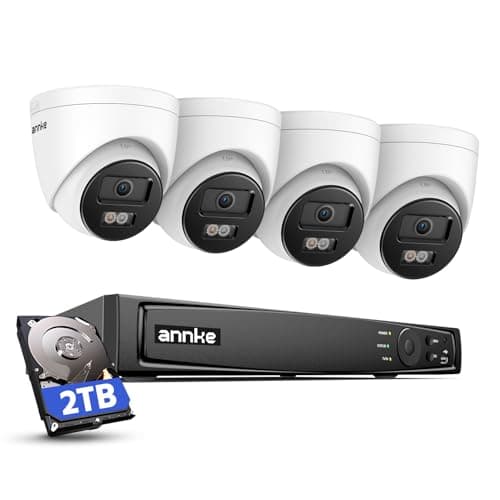
    The value leader for whole-home 4K: four 8MP turret cameras, an 8-channel NVR and a 2TB drive in one box, recording locally with no fees. The most detail per dollar if you can run the cable.

    Best for: Best-value whole-home 4K on one bill · No Matter

    $499.99View on Amazon

    #ad · we may earn a commission from this link to ANNKE 8CH 4K PoE System

  • Reolink RLK8-800B4 4K PoE System
    03 Reolink RLK8-800B4 4K PoE System

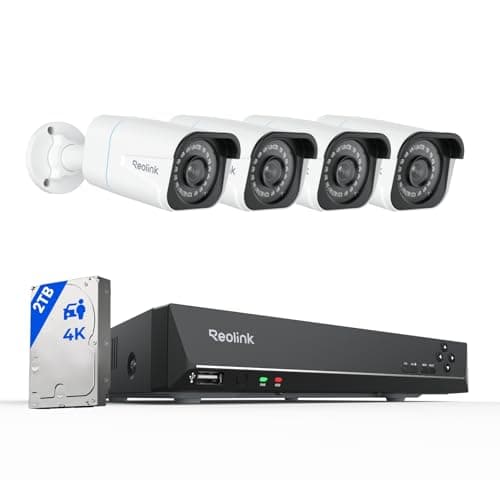
    A 4K PoE system built around bullet cameras, which makes it the strongest of the three for long-range perimeter views - a driveway, a fence line, a long side yard. Records locally to a 2TB drive with no plan.

    Best for: Long-range perimeter and property lines · No Matter

    $749.99View on Amazon

    #ad · we may earn a commission from this link to Reolink RLK8-800B4 4K PoE System

#ad · Live prices from the Amazon Product API, as of Aug 1, 2026. Where we have no verified live price we show none — we would rather leave a gap than print a number that has rotted.

How the three 4K picks compare (from the maker's own listing)
DeviceResolutionPower/wiringStorageSubscriptionCameras included
Reolink Argus 4 ProTop pick4K (8MP)Wireless / solarmicroSD / Home HubNone1
ANNKE 8CH 4K PoE4K (8MP)Wired PoE2TB NVRNone4
Reolink RLK8-800B44K (8MP)Wired PoE2TB NVRNone4

In detail

The picks, in full

02

ANNKE 8CH 4K PoE System

ANNKE 8CH 4K PoE System
$499.99View on Amazon

Price as of Aug 1, 2026. Amazon's price at checkout is the one that counts.

#ad · we may earn a commission from this link to ANNKE 8CH 4K PoE System

The value leader for whole-home 4K: four 8MP turret cameras, an 8-channel NVR and a 2TB drive in one box, recording locally with no fees. The most detail per dollar if you can run the cable.

  • 4x 8MP / 4K turret cameras
  • 8-channel PoE NVR
  • 2TB HDD included
  • Single cable carries power + data
  • Local recording, no subscription
Matter: No MatterFee: None - local 2TB NVRResearched, not hands-on tested

Good

  • Four 4K cameras, an NVR and a 2TB drive in one purchase - the value benchmark for whole-home 4K
  • Power over Ethernet means a single cable per camera carries both power and data
  • Records locally to the NVR around the clock with no monthly fee, ever
  • Wired reliability - no batteries to recharge and no Wi-Fi signal to drop

Less good

  • Running Ethernet to each camera is genuine installation work, not a five-minute job
  • A fixed 8-channel system commits you to a mounting plan - less flexible than a camera you can move

Skip it if: you rent or can't run cable through walls - a PoE system is a semi-permanent install.

One camera or a whole house - answer that first

The fork in this category is not brand, it is scope. If you need a single sharp camera on one spot - a front door, a back gate, one blind corner - and you don't want to run cable, the wire-free Reolink Argus 4 Pro is the whole decision, and its solar panel means you effectively never touch it again. The moment you want three, four or more angles covering a whole property, a wired PoE system is both cheaper per camera and far more reliable, and you choose between the ANNKE and the Reolink on form. Trying to blanket a house with individual battery cameras gets expensive and fiddly fast; that is the job an NVR system was built for.

Turret versus bullet - match the shape to the view

Between the two wired systems, the camera body is the real difference. The ANNKE kit uses turret cameras - compact, dome-like, less prone to spider webs and glare, and a bit more discreet - which makes them a fine all-round choice for eaves, corners and general coverage. The Reolink RLK8-800B4 uses bullet cameras, whose long housings suit long, straight views down a driveway or a fence line and which read clearly as cameras, so they double as a deterrent. If your priority is broad, tidy whole-home coverage, lean ANNKE; if it is long-range perimeter and visible deterrence, lean Reolink. Our guide on where to place security cameras helps map bodies to the angles that matter.

Plan the storage and the cabling before you buy

Two practical checks save the most regret. First, storage: 4K is data-hungry, so a 2TB drive that sounds huge can hold less continuous history than you expect across four cameras - decide whether you need continuous or event-only recording, and whether you'll want to upgrade the NVR drive later. Second, cabling: for the PoE kits, walk the runs from each camera back to the NVR before you commit, because the install is the hard part, not the setup. Get those two right and a 4K system is a buy-once, own-forever proposition. If you're still sizing the job, our guide on how many cameras you need keeps the channel count honest.
How we chose

We don't run a test lab

We don't wire every one of these into a test rig, and we won't write "in our testing" as if we do. What we did instead: pulled each product's published specifications, confirmed its Matter/Thread/HomeKit support from the manufacturer's own documentation, added up the real 3-year cost with any monthly fee included, and read the aggregated verified-buyer sentiment. Every pick is chosen against that published method. Where a number came from someone else, we name and link them in Sources.

Questions

Frequently asked

Do I really need 4K, or is 2K enough?
You need 4K where you must read specific detail - a face across a porch, a plate across a driveway - and want to digitally zoom into a clip without it falling apart. For a general "is something moving in the yard" view, 2K is genuinely enough and saves both money and storage. The honest rule is to buy 4K for the one or two angles where identification matters and save the pixels elsewhere. Our 2K vs 4K guide shows the difference at real distances.
How much storage does a 4K camera need?
A lot more than a 1080p one - roughly four times the data for the same footage. A single 4K camera recording continuously can use tens of gigabytes a day, which is why the wired systems here ship with a 2TB drive and why the Reolink Argus 4 Pro wants a large microSD card or the Reolink Home Hub. Size the storage to how far back you want to scroll, and to whether you record continuously or only on motion. The local vs cloud guide breaks the numbers down.
Is a wired PoE system worth the install effort?
If you own your home and want reliability, usually yes. Power over Ethernet gives each camera power and video down one cable, with no battery to recharge and no Wi-Fi to drop, recording locally to an NVR with no monthly fee. The cost is the install - running Ethernet and mounting on a plan is a weekend project. For a single spot or a rental, the wire-free Reolink Argus 4 Pro avoids all of that. The wired system roundup covers the trade in full.
Do any of these 4K cameras charge a subscription?
No. All three record locally with no required plan - the Reolink Argus 4 Pro to a microSD card or the Reolink Home Hub, and both PoE systems to the 2TB drive in their NVR. That is the whole appeal: 4K detail you own, with no monthly fee to review it. None of them support Matter or Apple HomeKit, so you live in the manufacturer's app, which for local-first cameras is a fair trade.

Keep reading

Receipts

Sources

We do not run a test lab, and we do not pretend to. Compatibility and subscription-cost claims come from the manufacturer's own documentation and the live retailer listing, read on the dates shown. Read our full method.