Skip to content
Latch & Hub

Cameras · Security Cameras

Wyze Floodlight v2 vs Blink Wired Floodlight

These are the two cheapest ways to put a camera inside a security light, and they are not the same product at a different price. One records 2K to a card for free and detects motion across 270 degrees. The other is 1080p, Alexa-native and publishes almost nothing about surviving a winter.

By Stephen V.Updated How we choose
#ad

We earn a commission when you buy through our Amazon links, at no extra cost to you. It never changes our rankings — where the subscription-free or cheaper option is the better buy, we say so. How this works.

Verdict

The bottom line

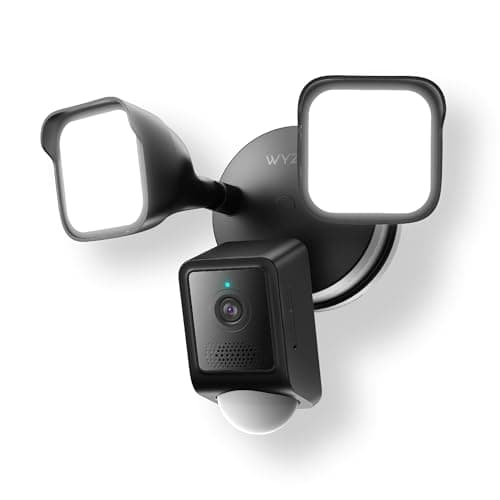
Buy the Wyze Floodlight Camera v2. It beats the Blink Wired Floodlighton every spec that decides a floodlight camera: 2K instead of 1080p, 2,800 lumens instead of 2,600, a 270-degree motion sensor that sees far wider than its own lens, and 24/7 recording to a microSD card with no subscription at all. Blink's case is price and nothing else — it is the cheapest legitimate hardwired floodlight camera on the market, it drops into Alexa as an Amazon-owned brand with no skill or extra account, and for a side of the house or a shed wall where "something moved and a light came on" is the whole requirement, that is enough. Buy the Blink only when you need three fixtures and can afford one Wyze, or when your household runs entirely on Alexa and you want it to stay that way. If the camera is going over your front door and you already own Ring, step up to the Ring Floodlight Cam Wired Plus instead: it is the only one of the three that arms with a Ring Alarm and publishes a rated operating temperature range.

The short answer

Quick picks

Tap any row for the full write-up.

  • Wyze Floodlight Camera v2
    01 Wyze Floodlight Camera v2Top pick

    The value pick, and the right default. It records 2K to a microSD card without any subscription, throws 2,800 lumens, and includes the one feature people forget to check: a 270-degree PIR sensor that sees motion far wider than the lens does. Against the Blink it is better in every measurable way and costs modestly more.

    Best for: Almost everyone — the most camera and the most light per dollar · No Matter — Alexa and Google Assistant

    • 2K (2304 x 1296), 160 degrees diagonal
    • 2,800 total lumens
    • 105 dB siren, color night vision
    • 270-degree PIR motion detection, 30 ft range
    • microSD up to 256 GB (exFAT) for local 24/7 recording
    • Hardwired 110-120 V AC; IP65; 2.4 GHz Wi-Fi only
    $79.99View on Amazon

    $99.9820% off

    #ad · we may earn a commission from this link to Wyze Floodlight Camera v2

  • Blink Wired Floodlight Camera
    02 Blink Wired Floodlight Camera

    The cheapest legitimate way to put a camera inside a security light, by a wide margin. It is 1080p, it is Alexa-first, and Blink publishes less about it than anyone else here — but if the job is 'light the side of the house and see who set it off', it does that for a fraction of what the others cost.

    Best for: A side of the house, a shed wall, or a second angle on a tight budget · No Matter — Blink app and Alexa

    • 1080p HD, 143 degrees diagonal
    • 2,600 lumens, 5000 K LEDs
    • 105 dB siren (measured at 4 in / 10 cm)
    • Two-way audio; works with Alexa
    • Hardwired, neutral required, 100-240 V AC, 45 W
    • 2.4 GHz Wi-Fi only
    $99.99View on Amazon

    #ad · we may earn a commission from this link to Blink Wired Floodlight Camera

  • Ring Floodlight Cam Wired Plus
    03 Ring Floodlight Cam Wired Plus

    The step up neither budget pick can match on integration. It is the only one of the three that arms and disarms alongside a Ring Alarm, the only one publishing a rated operating temperature range, and the only one with a siren you can trigger deliberately from an app. The catch is not the hardware — it is that reviewing what it recorded is a paid feature.

    Best for: Homes already running Ring Alarm, a Ring doorbell, or Alexa · No Matter — Ring app and Alexa

    • 1080p HD, color night vision
    • 140 degrees horizontal, 80 degrees vertical
    • Two 3000 K floodlights, 2,000 lumens
    • 105 dB remote-activated siren
    • Dual-band Wi-Fi (2.4 or 5 GHz)
    • Hardwired 100-240 V; rated -5 F to 118 F
    $179.99View on Amazon

    #ad · we may earn a commission from this link to Ring Floodlight Cam Wired Plus

#ad · Live prices from the Amazon Product API, as of October 10, 2026. Where we have no verified live price we show none — we would rather leave a gap than print a number that has rotted.

A floodlight camera is a genuinely different purchase from a camera. You are buying a light fixture that happens to film, which means it is wired into a junction box, it is mounted high, and it is the device that decides whether your drive is lit at 2am. Wyze and Blink are the two cheapest ways into that category, and the gap between them is wider than the price gap suggests. Four things separate them.

Resolution: 2K against 1080p, on the camera furthest from the subject

Wyze publishes 2K (2304 x 1296) across a 160-degree diagonal. Blink publishes 1080p across 143 degrees. On an indoor camera a few feet from a doorway that difference is academic; on a floodlight mounted at eaves height looking down a drive, it is the difference between "a man in a dark jacket" and a face. Floodlight cameras are almost always the furthest camera from whatever you want to identify, which makes resolution worth more here than anywhere else in a system. The ranked field is in best floodlight cameras, and the general case for paying up is in 2K vs 4K security cameras.

Motion coverage: the spec most people never check

This is the real argument for the Wyze and it has nothing to do with the picture. Wyze publishes a 270-degree PIR motion sensor with a 30 ft range — far wider than the 160 degrees the lens can see. That means someone stepping onto the drive from the side triggers the light before they are in frame, which is precisely the behavior a security light exists to produce. Blink publishes no equivalent wide-arc motion figure for its floodlight, so in practice what trips the light is roughly what the 143-degree lens is looking at. On a fixture whose main job is to come on at the right moment, that is a functional difference rather than a numbers one. The physics behind it is in how home security sensors work.

Where the footage goes, and what each path costs

Both makers sell a subscription and both have a local option, but the local options are not equivalent. The Wyze takes a microSD card up to 256 GB and records 24/7 to it with no plan — you buy a card once and the camera is complete. The Blink stores clips in Blink's cloud on a subscription, or locally if you add a Sync Module, which is a separate purchase on top of the fixture. So the Blink's cheap sticker price is the beginning of the cost rather than the end of it, and the configuration most people actually want — a floodlight that records without a bill — costs noticeably more than the headline. Over three years the gap widens rather than closes; the arithmetic is in security camera subscription costs, and local vs cloud camera storage covers which arrangement suits which household.

What Blink does not publish, and why it matters outdoors

We will be plain about this because it is the strongest mark against the Blink and it is not a matter of opinion. Blink's own technical specification page for this fixture publishes no IP rating and no operating temperature range. Wyze publishes IP65. Ring publishes a rated range of -5 F to 118 F. Those are the two numbers that tell you whether an outdoor fixture survives three winters on an exposed wall, and one of the three makers here does not state them. That does not mean the Blink will fail — it means you are buying without the information, which is a fair trade at its price and a bad one at any higher price. If the wall in question is sheltered under an overhang, it matters less. If it faces weather, cold-weather camera performance is worth reading first.

The one thing Blink genuinely wins

Count, not quality. At its price you can light and watch three sides of a house for what one of the others costs, and three adequate angles beat one excellent angle for most burglary scenarios — an intruder picks the dark side, not the filmed side. If your problem is that the back, the side of the house and the shed are all unlit, buying three Blinks is a more sensible answer than buying one Wyze and leaving two sides dark. It is also Amazon-owned, so Alexa integration is first-party: live view on an Echo Show, no skill, no extra account. The wider Alexa picture is in best security cameras that work with Alexa, and if you are covering a drive specifically, best security cameras for driveways is the page for that angle.

Installation: both are an electrical job

Neither of these is a plug-in purchase. Both are hardwired into a junction box and both require a neutral wire, which is the thing most likely to stop the install dead in an older house. Blink specifies 100-240 V AC at 45 W; Wyze specifies 110-120 V AC, which is the narrower spec of the two. If you are replacing an existing security light, the wiring is usually already there and the job is an hour. If you are putting a floodlight somewhere there has never been one, that is an electrician, and the cost of the electrician will exceed the price difference between these two cameras several times over — which is a good argument for buying the better camera once the hole is being made anyway.
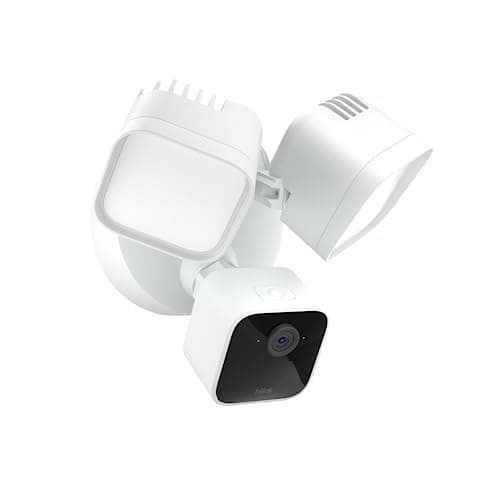
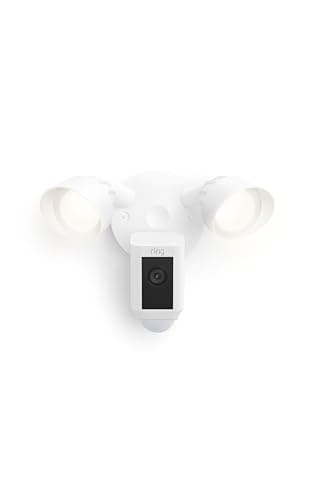
Wyze Floodlight v2 vs Blink Wired Floodlight vs Ring Floodlight Cam Wired Plus — published specs only
DeviceResolutionLumensMotion coverageLocal recordingWeather specWi-Fi
Wyze Floodlight Camera v22K (2304 x 1296), 160 deg diagonal2,800 total270-degree PIR, 30 ftmicroSD to 256 GB, 24/7, no planIP652.4 GHz only
Blink Wired Floodlight1080p, 143 deg diagonal2,600 (5000 K)Not published as a wide-arc figureSync Module required (sold separately)Not published2.4 GHz only
Ring Floodlight Cam Wired Plus1080p, 140 x 80 deg2,000 (3000 K)Not published as a wide-arc figureNone — subscription to review videoRated -5 F to 118 FDual-band 2.4 / 5 GHz

In detail

The picks, in full

01

Wyze Floodlight Camera v2

Top pick
Wyze Floodlight Camera v2
$79.99View on Amazon

$99.9820% off

Price as of October 10, 2026. Amazon's price at checkout is the one that counts.

#ad · we may earn a commission from this link to Wyze Floodlight Camera v2

The value pick, and the right default. It records 2K to a microSD card without any subscription, throws 2,800 lumens, and includes the one feature people forget to check: a 270-degree PIR sensor that sees motion far wider than the lens does. Against the Blink it is better in every measurable way and costs modestly more.

  • 2K (2304 x 1296), 160 degrees diagonal
  • 2,800 total lumens
  • 105 dB siren, color night vision
  • 270-degree PIR motion detection, 30 ft range
  • microSD up to 256 GB (exFAT) for local 24/7 recording
  • Hardwired 110-120 V AC; IP65; 2.4 GHz Wi-Fi only
Matter: No Matter — Alexa and Google AssistantFee: None for local microSD recording; Cam Plus adds AI alerts and cloud backupResearched, not hands-on tested

Good

  • The 270-degree PIR sensor is the quiet advantage over the Blink. The camera sees 160 degrees, but motion is detected across a much wider arc — so someone stepping onto the drive from the side triggers the light before they are in frame, which is what a security light is actually for
  • It records 24/7 to a microSD card up to 256 GB with no subscription at all. Blink's local-storage path needs a Sync Module bought separately; Wyze's needs a card
  • 2,800 lumens with dusk-to-dawn automation and an ambient light mode means it can be an ordinary porch light most of the night and a security light when something moves — the setting that stops a floodlight camera annoying your neighbors
  • Wyze publishes an IP65 rating. Blink publishes no weather rating for its floodlight at all, and on an outdoor fixture that is the difference between a specification and a hope

Less good

  • It is 2.4 GHz Wi-Fi only, exactly like the Blink — a 2K camera at the far end of a house on the same crowded band as everything else is where dropped streams come from
  • Wyze specifies hardwired 110-120 V AC into a junction box with a neutral, which is a narrower electrical spec than the Blink's 100-240 V and the Ring's 100-240 V
  • No HomeKit and no Matter, and the AI detection that separates a person from a passing car is the part Cam Plus charges for. Local recording is free; useful alerts, largely, are not

Skip it if: the mounting point is a long way from your router — a 2.4 GHz-only camera is the wrong tool for a detached garage at the end of the yard.

03

Ring Floodlight Cam Wired Plus

Ring Floodlight Cam Wired Plus
$179.99View on Amazon

Price as of October 10, 2026. Amazon's price at checkout is the one that counts.

#ad · we may earn a commission from this link to Ring Floodlight Cam Wired Plus

The step up neither budget pick can match on integration. It is the only one of the three that arms and disarms alongside a Ring Alarm, the only one publishing a rated operating temperature range, and the only one with a siren you can trigger deliberately from an app. The catch is not the hardware — it is that reviewing what it recorded is a paid feature.

  • 1080p HD, color night vision
  • 140 degrees horizontal, 80 degrees vertical
  • Two 3000 K floodlights, 2,000 lumens
  • 105 dB remote-activated siren
  • Dual-band Wi-Fi (2.4 or 5 GHz)
  • Hardwired 100-240 V; rated -5 F to 118 F
Matter: No Matter — Ring app and AlexaFee: A Ring subscription is required to save and review recorded videoResearched, not hands-on tested

Good

  • It is the only pick that plugs into a full alarm system. If you own a Ring Alarm, this floodlight becomes part of it — armed with the house, triggering with the rest of the sensors — rather than a separate camera in a separate app
  • Ring publishes the environmental spec the others mostly skip: a rated operating range from -5 F to 118 F. If you are mounting on a north wall in a real winter, that is the number that matters
  • It is the only one of the three with dual-band Wi-Fi. Both budget picks are 2.4 GHz only, and on a long house that single difference decides whether the stream holds up

Less good

  • 1080p and 2,000 lumens means it is beaten on both headline numbers by the cheaper Wyze — you are paying for integration and published specs, not picture or light
  • Without a Ring subscription you get live view and notifications, but saving and reviewing what happened is a paid feature. Over the years you will own this camera, that recurring cost dwarfs the purchase-price gap
  • Its 140-degree horizontal field of view is the narrowest here and it cannot turn, so aiming it correctly on install day is the whole ball game

Skip it if: you do not already own Ring gear and do not want a monthly bill — the Wyze above is a higher-resolution, brighter camera that records to a card for free.

How we chose

We don't run a test lab

We don't wire every one of these into a test rig, and we won't write "in our testing" as if we do. What we did instead: pulled each product's published specifications, confirmed its Matter/Thread/HomeKit support from the manufacturer's own documentation, added up the real 3-year cost with any monthly fee included, and read the aggregated verified-buyer sentiment. Every pick is chosen against that published method. Where a number came from someone else, we name and link them in Sources.

Questions

Frequently asked

Is the Wyze Floodlight v2 worth the extra over the Blink Wired Floodlight?
For one fixture, yes, comfortably. You get 2K instead of 1080p, 2,800 lumens instead of 2,600, a published 270-degree motion sensor instead of no wide-arc figure at all, free 24/7 recording to a microSD card instead of a Sync Module or a subscription, and a published IP65 rating instead of no weather spec. The Blink becomes the better buy only on count: if your real problem is three unlit sides of a house, three Blinks beat one Wyze.
Do either of these work without a subscription?
The Wyze does, properly: add a microSD card up to 256 GB and it records 24/7 with no plan, though the AI alerts that distinguish a person from a car are part of Cam Plus. The Blink needs a Sync Module, bought separately, to store clips locally — otherwise clips go to Blink's cloud on a subscription. So "no subscription" costs a card on the Wyze and a second device on the Blink.
Can I install a floodlight camera myself?
If you are replacing an existing security light, usually yes — the wiring is already in the junction box and the job is about an hour with the breaker off. Both of these fixtures are hardwired and both require a neutral wire, which is the most common reason an install stalls in an older house. If there has never been a light at that spot, it is an electrician's job, and that cost dwarfs the price difference between these two cameras — which is a good reason to fit the better one while the hole is being made.
Which one works better with Alexa?
The Blink, on integration depth. Blink is owned by Amazon, so it appears in the Alexa app and on an Echo Show with no skill and no extra account, and its events are available to Alexa natively. Wyze lists Alexa and Google Assistant, which covers live view and basic events through a third-party integration. If voice and routines are the point, see the best security cameras for Alexa.
How bright does a floodlight camera need to be?
Less than the marketing suggests. All three fixtures here sit between 2,000 and 2,800 lumens, which is plenty for a drive or a backyard — above roughly 3,000 lumens on a residential wall you are mostly lighting your neighbor's bedroom. Color temperature matters nearly as much as output: Blink's 5000 K is a harsh white, Ring's 3000 K is warmer and less intrusive. What genuinely helps is the Wyze's ambient-light mode, which lets the fixture sit at low output as an ordinary porch light and jump to full only on motion.
Does a floodlight camera replace a regular security camera?
For the approach it covers, largely yes — it is a camera with a light and a siren attached. What it is not is flexible: it is fixed at height, hardwired, and aimed once. A proper setup usually pairs one floodlight camera over the main approach with one or two cheaper cameras elsewhere, which is the layering described in how many security cameras do I need.

Keep reading

Receipts

Sources

We do not run a test lab, and we do not pretend to. Compatibility and subscription-cost claims come from the manufacturer's own documentation and the live retailer listing, read on the dates shown. Read our full method.