Wyze Floodlight v2 vs Ring Floodlight Cam Wired Plus
Both bolt to a junction box, both flood the drive with light and both sound a 105 dB siren. Then they part company: one records 2K to a card in the camera for nothing, and the other records 1080p to Ring's cloud and asks for a plan to keep it. Over three years that is not a small difference.
We earn a commission when you buy through our Amazon links, at no extra cost to you. It never changes our rankings — where the subscription-free or cheaper option is the better buy, we say so. How this works.
Verdict
The bottom line
For most houses, the Wyze Floodlight Camera v2is the better buy: it is sharper (2K, 2304 x 1296 against the Ring's 1080p), brighter (2,800 lumens against 2,000), it records to a microSD card with no plan at all, and it costs a fraction of the Ring's price. Buy the Ring Floodlight Cam Wired Plusif you already run Ring or Alexa devices and want this camera to behave like one of them — or if your install needs what Ring publishes and Wyze does not: dual-band 2.4/5 GHz Wi-Fi and an operating range rated from -5 F to 118 F. Both are hardwired into a junction box, both put out a 105 dB siren, and both need a neutral wire, so the installation effort is the same either way. The decision is really storage philosophy and ecosystem: a card in the camera, or clips in Ring's cloud behind a subscription.
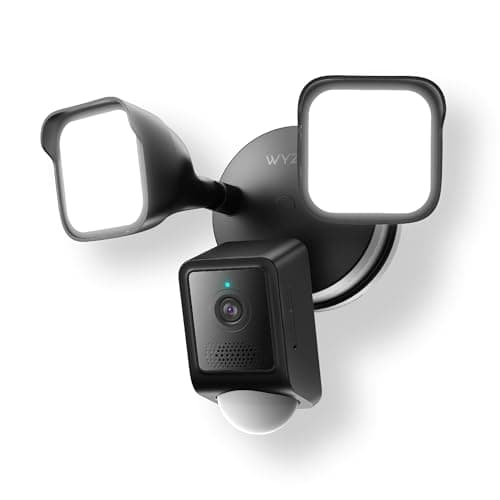
The value pick, and not by a small margin: higher resolution, more light, a 270-degree PIR motion zone and local recording that works without a subscription. Wyze documents both Alexa and Google Assistant, which Ring cannot match. The compromises are 2.4 GHz Wi-Fi only and no published weather temperature range.
2K, 2304 x 1296; 160° diagonal
2,800 total lumens
105 dB siren
microSD up to 256GB (exFAT) — local recording works without Cam Plus
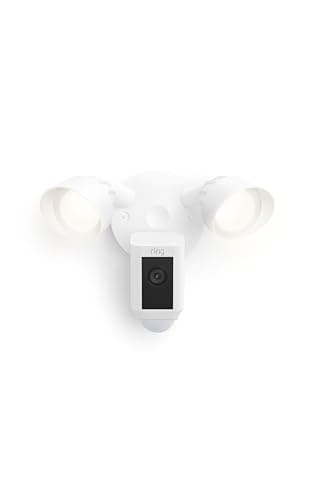
The pick for a house already running Ring. The video is 1080p and the light is dimmer, but the installation details Ring publishes are better: dual-band Wi-Fi, a -5 F to 118 F operating range, two-way audio with noise cancellation. The catch is the one Ring never hides — saved video features require a Ring subscription, which turns this into a recurring cost.
1080p HD; 140° horizontal x 80° vertical
Two 3000 K floodlights, 2,000 lumens
105 dB remote-activated siren (measured at 4 in)
Hardwired 100-240V on a 4-inch round weatherproof box
Dual-band Wi-Fi 2.4 / 5 GHz
Operating range -5 F to 118 F
Two-way audio with noise cancellation; works with Alexa
Existing Ring and Alexa households that want one app
The value pick, and not by a small margin: higher resolution, more light, a 270-degree PIR motion zone and local recording that works without a subscription. Wyze documents both Alexa and Google Assistant, which Ring cannot match. The compromises are 2.4 GHz Wi-Fi only and no published weather temperature range.
Best for: Most driveways — more light, more pixels, no monthly fee · No Matter — Wyze app plus Alexa/Google voice
2K, 2304 x 1296; 160° diagonal
2,800 total lumens
105 dB siren
microSD up to 256GB (exFAT) — local recording works without Cam Plus
The pick for a house already running Ring. The video is 1080p and the light is dimmer, but the installation details Ring publishes are better: dual-band Wi-Fi, a -5 F to 118 F operating range, two-way audio with noise cancellation. The catch is the one Ring never hides — saved video features require a Ring subscription, which turns this into a recurring cost.
Best for: Existing Ring and Alexa households that want one app · No Matter — Ring app and Alexa
1080p HD; 140° horizontal x 80° vertical
Two 3000 K floodlights, 2,000 lumens
105 dB remote-activated siren (measured at 4 in)
Hardwired 100-240V on a 4-inch round weatherproof box
Dual-band Wi-Fi 2.4 / 5 GHz
Operating range -5 F to 118 F
Two-way audio with noise cancellation; works with Alexa
#ad · Live prices from the Amazon Product API, as of October 17, 2026. Where we have no verified live price we show none — we would rather leave a gap than print a number that has rotted.
A floodlight camera has one job: make the dark part of your property bright and recorded at the same time. Both of these do that, both hardwire into a junction box with a neutral wire, and both carry a 105 dB siren for the moment you want to make a point. So this comparison is not really about whether they work. It is about the three things that differ — how much light and resolution you get, where the video goes, and which ecosystem the camera belongs to.
Light and resolution: the Wyze wins on the numbers
Wyze publishes 2,800 total lumens and 2K video at 2304 x 1296 with a 160-degree diagonal field of view. Ring publishes two 3000 K floodlights at 2,000 lumens and 1080p at 140 by 80 degrees. There is no reading of those specifications where the Ring is sharper or brighter.
What that means in practice: on a driveway, the extra 800 lumens is the difference between lighting the car and lighting the car and the hedge behind it, and the extra pixels are what let you tell a delivery driver from a neighbour at the far end of the frame. Neither camera turns night into day at 60 feet — see night vision for the honest limits — but the Wyze starts from a better position.
Storage: a card in the camera, or clips in a cloud plan
This is the real fork. Wyze supports a microSD card up to 256GB in exFAT, and local recording works without Cam Plus — the camera keeps writing footage whether or not you ever pay Wyze anything. Ring is the opposite model by design: the camera streams live for free, and saved video features require a compatible Ring subscription, which is Ring's own wording.
Both models are defensible. A card in the camera costs nothing per month and keeps footage in your house, which is also its weakness: a thief who takes the camera takes the card. A cloud plan survives the camera being stolen and adds AI filtering, at $4.99 a month per device and upwards, forever. Our local vs cloud storage page weighs that properly, and camera subscription costs prices out the long version.
Ecosystem: the one place Ring is clearly ahead
If your doorbell is a Ring doorbell, your alarm is a Ring alarm and your speakers are Echoes, then adding a Ring floodlight camera means one app, one event history and announcements that arrive on the devices you already own. That coherence is genuinely valuable and it is the reason to pay more here.
Wyze's counter is breadth rather than depth: Wyze documents Alexa and Google Assistant for its cameras, so it is the pick that works in a Nest-display house — Ring lists no Google support at all. Neither camera supports Matter, Apple Home or any shared camera standard, which is normal for the category rather than a failing of either; camera ecosystem compatibility explains why cameras are the last holdout.
Installation is the same work either way
Do not pick on installation difficulty, because there is nothing to pick. Both are hardwired into a junction box and both need a neutral wire — Wyze specifies 110-120V AC, Ring 100-240V on a 4-inch round weatherproof box. If there is already a porch light where you want the camera, either one goes up in an afternoon. If there is not, both need an electrician, and that cost dwarfs the difference between the two cameras. Where you mount it matters more than which one you mount: where to place security cameras covers heights and angles.
One genuine installation difference: the Ring's dual-band Wi-Fi gives you the 5 GHz option for a camera mounted close to the router, while the Wyze is 2.4 GHz only and has to share the busiest band in the house. If you are already running several cameras, Wi-Fi congestion is worth reading before you add another 2.4 GHz device.
Published specifications, from each maker's own documentation — read 2026-10-17
The value pick, and not by a small margin: higher resolution, more light, a 270-degree PIR motion zone and local recording that works without a subscription. Wyze documents both Alexa and Google Assistant, which Ring cannot match. The compromises are 2.4 GHz Wi-Fi only and no published weather temperature range.
2K, 2304 x 1296; 160° diagonal
2,800 total lumens
105 dB siren
microSD up to 256GB (exFAT) — local recording works without Cam Plus
2.4 GHz Wi-Fi only; Alexa and Google Assistant documented
Matter: No Matter — Wyze app plus Alexa/Google voiceFee: Free with microSD (Cam Plus optional for AI alerts and cloud backup)Researched, not hands-on tested
Good
+2,800 lumens against the Ring's 2,000, and 2K against 1080p — on the two specifications a floodlight camera exists for, it simply wins
+Local recording to a microSD card that works with no plan, so footage you have already captured is never held behind a lapsed subscription
+Wyze documents Alexa and Google Assistant integration, making it the only one of the two that fits a Nest-display household
+A 270-degree PIR zone with a published 30 ft range covers a wider approach than the camera's own field of view, plus dusk-to-dawn and ambient light modes
Less good
−2.4 GHz Wi-Fi only — the busiest band in most homes, and the one most likely to stutter with several cameras on it
−Wyze does not publish an operating temperature range for this model, so a very cold climate is an unknown rather than a documented spec
−Cam Plus is optional, but AI alert filtering and cloud backup sit behind it — the free tier gives you recording, not smart triage
Skip it if: you are deep in Ring or Alexa hardware and want one app and one event timeline for every device — that is the Ring's whole argument.
The pick for a house already running Ring. The video is 1080p and the light is dimmer, but the installation details Ring publishes are better: dual-band Wi-Fi, a -5 F to 118 F operating range, two-way audio with noise cancellation. The catch is the one Ring never hides — saved video features require a Ring subscription, which turns this into a recurring cost.
1080p HD; 140° horizontal x 80° vertical
Two 3000 K floodlights, 2,000 lumens
105 dB remote-activated siren (measured at 4 in)
Hardwired 100-240V on a 4-inch round weatherproof box
Dual-band Wi-Fi 2.4 / 5 GHz
Operating range -5 F to 118 F
Two-way audio with noise cancellation; works with Alexa
Matter: No Matter — Ring app and AlexaFee: Ring Home from $4.99/mo per device for saved video featuresResearched, not hands-on tested
Good
+Dual-band Wi-Fi is the quietly important spec here: on 5 GHz this camera sidesteps the congestion the Wyze has to live with
+A published operating range of -5 F to 118 F is a real answer for a cold climate, where Wyze offers none for this model
+In a Ring household it is simply one more device in the same app, same event timeline and same Alexa announcements as the doorbell — that coherence is worth paying for if you already own the rest
Less good
−1080p and 2,000 lumens are both a step behind the Wyze on the two numbers that matter most for a floodlight camera
−Saved video features require a Ring subscription, so the real cost keeps running after you have paid for the hardware
−Ring does not list Google support, so a Nest-display household gets no voice casting at all
Skip it if: you want to avoid a monthly fee or you need Google Assistant — on both counts the Wyze is the straightforward answer.
Three-year cost, which is where this comparison is decided
Hardware is the smaller number on a Ring camera. The table below uses approximate MSRP context for the hardware (the live price on each buy button above is the number that matters today) and Ring's entry Ring Home tier at $4.99 a month for saved video. Wyze's row assumes what the free tier actually gives you — local recording to a card you buy once.
3-year cost of ownership — approximate MSRP context (2026-10-17) plus published monthly fees
Product
Hardware
Monthly
3-yr fees
3-yr total
Wyze Floodlight v2 + 64GB cardLocal microSD recording works without Cam Plus
$90
$0
$0
$90
Ring Floodlight Cam Wired PlusRing Home — required for saved video features
$180
$5/mo
$180
$360
Hardware figures are approximate MSRP context for the comparison; the live, date-stamped price is on each product's buy button. Fees are the published plan rates at the time of writing — always confirm current pricing with the brand.
Read that gap carefully before deciding the Ring's ecosystem is worth it, because the subscription is per device: a doorbell and two cameras on separate plans is three times the monthly line. Ring does sell a whole-home tier that covers unlimited Ring devices, which changes the arithmetic sharply if you own several — if you are going to end up there anyway, the Ring floodlight stops looking expensive.
Pick on this, in this order
Do you already own Ring hardware? If yes, and you are already paying for a plan, buy the Ring — one app and one timeline is worth more than 800 lumens.
Is this your first floodlight camera? Buy the Wyze. It is brighter, sharper and free to keep footage from, and nothing about it locks you in.
Is the house a Google house, or very cold? Google pushes you to the Wyze (Ring lists no Google support); a documented -5 F winter pushes you to the Ring, which is the only one of the two that publishes a temperature range.
How we chose
We don't run a test lab
We don't wire every one of these into a test rig, and we won't write "in our testing" as if we do. What we did instead: pulled each product's published specifications, confirmed its Matter/Thread/HomeKit support from the manufacturer's own documentation, added up the real 3-year cost with any monthly fee included, and read the aggregated verified-buyer sentiment. Every pick is chosen against that published method. Where a number came from someone else, we name and link them in Sources.
Questions
Frequently asked
Which is brighter, the Wyze or the Ring?+
The Wyze, on the published figures: 2,800 total lumens against Ring's two 3000 K floodlights at 2,000 lumens. Both are bright enough to light a driveway; the Wyze has more to spend on the edges of the scene.
Does the Wyze Floodlight v2 record without a subscription?+
Yes. Wyze documents microSD recording up to a 256GB exFAT card that works without Cam Plus. Cam Plus adds AI alert filtering and cloud backup, and it is genuinely optional. The Ring, by contrast, states that saved video features require a compatible Ring subscription — the live view is free, keeping the clip is not.
Can I install either of these without an electrician?+
If you are replacing an existing porch light and you are comfortable working at a junction box with the breaker off, yes — both are designed for that job and both need a neutral wire. If there is no fixture where you want the camera, you are adding a circuit, and that is an electrician in most homes regardless of which brand you choose.
Do either of them work with Google Home or Apple Home?+
Wyze documents Alexa and Google Assistant integration for its cameras; Ring publishes Alexa only. Neither lists Apple Home, and neither supports Matter — normal for cameras rather than a defect. If Google matters, best security cameras for Google Home is the shortlist.
What about the eufy Floodlight E340 — should I consider that instead?+
It is the third serious option and it solves a different problem: dual lenses with 360-degree pan and tilt, 2,000 lumens and local storage, at a price above both cameras here. We compare it with the Ring directly in eufy Floodlight E340 vs Ring Floodlight Cam Wired Plus, and the whole field is ranked in best floodlight cameras.
Is the 105 dB siren on either of these a real deterrent?+
Treat it as an attention-getter rather than a defence. Both publish 105 dB, Ring measured at 4 inches from the device — which is how siren figures are usually quoted and why they sound quieter in the garden than on the spec sheet. The light coming on is the part most people react to; the siren is what you trigger deliberately from the app.
We do not run a test lab, and we do not pretend to. Compatibility and subscription-cost claims come from the manufacturer's own documentation and the live retailer listing, read on the dates shown. Read our full method.