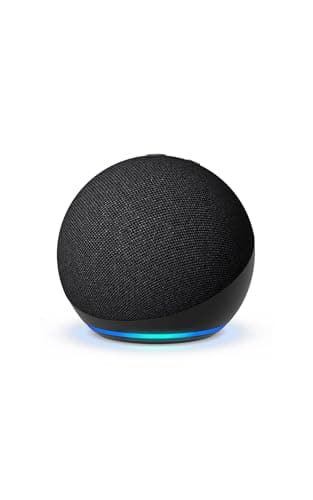
The Amazon Echo Dot (5th Gen) is the little puck people buy for timers, music and asking about the weather, and most of them never realize it is quietly doing something more useful in the background: it can act as a Matter controller for your smart home. That is the whole reason a budget speaker earns a place on a hubs site. It is the cheapest way to put Alexa and a Matter controller in the same room at once. But there is one line worth being honest about up front, because the marketing blurs it - the Echo Dot is a smart speaker, not a full smart home hub. It has no Zigbee radio and no Thread radio, so the low-power sensors and bulbs that rely on those meshes still need a real hub. This review is about exactly where the Dot delivers and where its budget ceiling sits.
What the Echo Dot actually is
At its core the Dot is a small Wi-Fi and Bluetooth speaker with Alexa built in. It is the entry rung of Amazon's Echo ladder: inexpensive, compact, and good enough for a nightstand, a kitchen counter or a home office. You talk to it, it answers, it plays music and runs Alexa routines. If all you ever did was use it as a voice assistant, it would still be one of the easiest budget picks in the category. What makes it interesting for a smart home is that this cheap speaker carries the same Matter controller role that the pricier Echo devices do, so the moment you say "Alexa, discover devices," it can bring compatible Matter accessories into your home. You are not paying extra for a dedicated hub to get that - it rides along with a speaker you might have bought anyway.
Yes, it is a Matter controller - here is what that buys you
Matter is the cross-brand standard meant to let a light, a plug or a sensor work across Alexa, Apple Home, Google Home and SmartThings without a separate app for each. A Matter controller is the thing in your home that actually adds and commands those devices. The Echo Dot plays that role through Alexa, which means a Matter-over-Wi-Fi plug or bulb can be set up and controlled with nothing more than the Dot and the Alexa app. For a lot of first smart homes - a couple of Matter plugs, a smart bulb, a routine that turns them on at sunset - that is genuinely all the "hub" you need. If the alphabet soup of Matter, Thread and Zigbee is a blur, our Matter vs Thread vs Zigbee explainer untangles it in plain English before you spend anything.
There is an important nuance the box does not spell out. A Matter controller is not the same as a Thread border router. Many of the newest Matter accessories talk over Thread, a low-power mesh radio, and a Thread device needs a Thread border router somewhere in the house to reach your network. The Dot has no Thread radio, so it is not that border router. It can be the controller that runs the show, but a Matter-over-Thread accessory still needs a Thread border router - a device like the Amazon Echo Hub or an Aqara hub - present in the home. On the Matter-over-Wi-Fi side, the Dot is enough on its own; on the Thread side, it is not.
The built-in temperature sensor is a real bonus
One feature punches above the price: the 5th-gen Dot includes a temperature sensor. That sounds minor until you build a routine around it. You can have the Dot notice a room passing a set temperature and trigger an action - nudge a smart plug running a fan when the office gets warm, or send a phone alert if a room drops cold overnight. It is the kind of small automation people normally buy a separate sensor for, and here it is baked into a speaker you were already considering. It will not replace a dedicated climate system, and it reads the temperature where the Dot sits rather than across the whole room, but as a free extra on a budget device it is a genuine reason to pick the 5th-gen Dot over an older or cheaper speaker that lacks it.
What it is not: no Zigbee, no Thread radio
Here is the honest ceiling, and it is the single most important thing to understand before you buy the Dot expecting a hub. It has no Zigbee radio and no Thread radio. That matters because a whole class of cheap, reliable smart home gear - Zigbee bulbs and buttons, Thread sensors, low-power contact and motion sensors - speaks those mesh radios and nothing else. Without the matching radio in your home, those devices simply cannot connect. This is exactly where the Dot differs from its siblings: the Amazon Echo Hub and the 4th-gen Echo include a built-in Zigbee hub and act as a Thread border router, so they can onboard that mesh gear directly. The Dot cannot. If your plan involves Zigbee or Thread sensors, you need a real hub in the mix, and the Dot is the controller and speaker beside it, not the hub itself. Our do-I-need-a-hub guide walks through which camp your devices fall into so you do not buy the wrong box.
If you have already decided you want a proper Matter and Thread home rather than a Matter-over-Wi-Fi starter, skip the Dot as your hub and start with our roundup of the best Matter smart home hubs, which ranks the boxes that actually carry a Thread border router. The Dot can still live happily in that home as a cheap voice point in a spare bedroom - it just is not the piece doing the heavy lifting.
Alexa-only: no Apple Home, no Google Home
The Dot lives inside Alexa and only Alexa. It does not expose to Apple Home, and it is not part of the Google Home world. For an Alexa household that is a non-issue - it slots straight in. But if you open the Apple Home app every day, or you have committed to Google, the Dot is the wrong starting point, because the controller and the routines all run through Alexa. This is less about the Dot being limited and more about matching the box to the app you already live in, which is the single biggest decision in this whole category. Our ecosystem comparison is the ten minutes worth spending before you commit to any assistant, because switching later means re-adding devices.
Who the Echo Dot is really for
Picture three people. The first is buying their very first smart device and wants Alexa plus the ability to add a Matter plug or bulb without researching hubs for a weekend - the Dot is close to ideal, cheap and low-commitment. The second wants a gift that feels useful without being expensive or fiddly to set up, and a Dot that also happens to be a Matter controller and a temperature sensor is an easy, generous-feeling present. The third already has an Alexa home with a real hub and just wants another voice point and speaker in a back room; the Dot does that job and quietly adds a second Matter controller and temperature reading while it is at it. In all three cases the value is the same: a lot of small, genuinely useful capability for very little money.
Who should look elsewhere? Anyone whose plan leans on Zigbee or Thread sensors, anyone who wants a mounted screen to tap rather than a puck to talk to, and anyone living in Apple Home or Google Home. Those buyers are better served by a device built for the job - the Amazon Echo Hub for an Alexa wall panel with real radios, or one of the multi-radio boxes in our best smart home hubs roundup for everyone else.
The verdict
The Echo Dot (5th Gen) earns its award as the best budget entry point because it does three useful things for a small price: it puts Alexa in a room, it acts as a Matter controller for Matter-over-Wi-Fi devices, and it throws in a temperature sensor you can automate around. None of that asks for a subscription. The honest limits are just as clear - it is not a Zigbee or Thread hub, so low-power mesh sensors still need a real hub, and it is Alexa-only. Read the way it is meant to be read - a cheap, capable voice-and-Matter starting point rather than the backbone of a big mesh home - and it is one of the easiest recommendations on the site. Treat it as a full hub and you will hit the ceiling fast, at which point the Echo Hub or a dedicated multi-radio hub is the upgrade to make.
Speaker or hub? The distinction this device sits on
The Dot is the clearest example of why the two categories get confused: it is a real Matter controller and it is not a Zigbee or Thread hub, and both halves of that sentence surprise people. Smart home hub vs smart speaker works through what each kind of device can and cannot do, and best smart home hubs for Alexa is where to go if you need the radios this one leaves out.