Skip to content
Latch & Hub

Hubs · Smart Home Hubs

The Best Zigbee Smart Home Hubs in 2026

Zigbee is the radio behind the cheap battery sensors that make a house automatic rather than remote-controlled, and the thing most smart speakers do not have. Only a handful of hubs actually carry the radio, so this is a short field — and the right pick depends almost entirely on which OTHER radios you need alongside it.

By Stephen V.Updated How we choose
#ad

We earn a commission when you buy through our Amazon links, at no extra cost to you. It never changes our rankings — where the subscription-free or cheaper option is the better buy, we say so. How this works.

Verdict

The bottom line

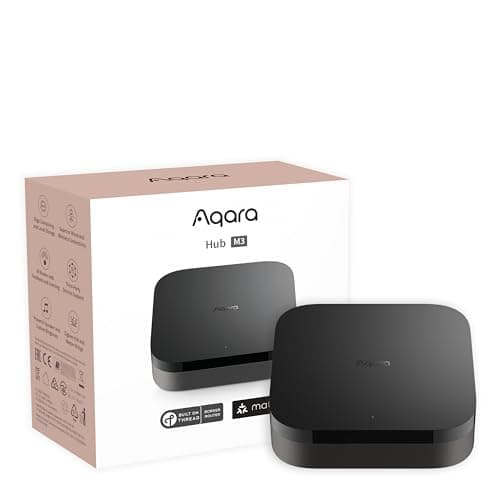
For most households, buy the Aqara Hub M3. It is the pick that carries a Zigbee radio and a Thread border router and Matter, reports into Apple Home, Alexa, SmartThings and Home Assistant rather than one assistant, and can run on wired Ethernet with PoE so the device holding your sensor list is not sitting on Wi-Fi. Buy the Aeotec Smart Home Hub instead if your house already has — or will have — Z-Wave gear, because it is the only pick here with that radio and SmartThings is the platform with the deepest device list. Buy the Amazon Echo Hub if you are an Alexa household and want the Zigbee radio behind a wall-mounted touchscreen, accepting that it is Alexa-only. All three are one-time purchases with no subscription; none of them has every radio, which is the actual decision on this page.

The short answer

Quick picks

Tap any row for the full write-up.

  • Aqara Hub M3
    01 Aqara Hub M3Top pick

    The most complete radio set of the three, and the only one that does not tie your sensors to a single assistant. Zigbee for the cheap battery devices, a Thread border router for Matter-over-Thread, Matter controller duties for everything else, an infrared blaster for pre-smart appliances, and a wired PoE option so the hub is not a Wi-Fi client. If you are buying one box to build a sensor-driven home on, this is it.

    Best for: Most homes — Zigbee plus Thread, and more than one ecosystem · Matter controller + Thread border router

    • Zigbee + Thread + Bluetooth radios
    • Matter controller and Thread border router
    • Wi-Fi or wired Ethernet with PoE
    • Built-in IR blaster
    • Works with Apple Home, Alexa, SmartThings, Home Assistant
    $139.99View on Amazon

    $159.9913% off

    #ad · we may earn a commission from this link to Aqara Hub M3

  • Aeotec Smart Home Hub (SmartThings)
    02 Aeotec Smart Home Hub (SmartThings)

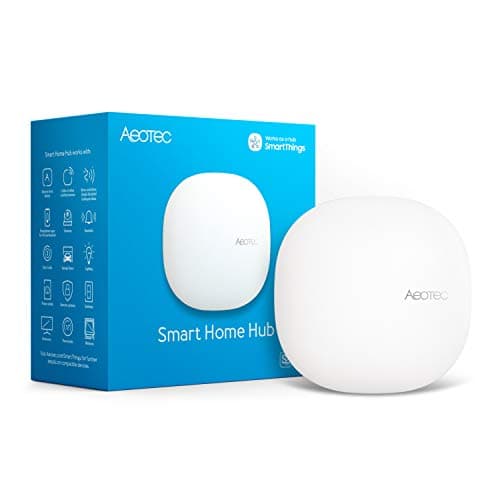
    The pick for a house with a mixed radio history. It runs SmartThings with both Zigbee and Z-Wave on board and acts as a Matter gateway, which makes it the only hub here that can adopt the Z-Wave locks and sensors a previous owner left behind and still pair a 2026 Matter plug. The trade is that there is no Thread border router listed and no Apple Home.

    Best for: Z-Wave gear, mixed-radio houses and the widest device list · Matter gateway (SmartThings)

    • Zigbee + Z-Wave radios
    • Runs SmartThings
    • Matter gateway
    • Works with Alexa and Google Assistant
    • No Thread border router listed; no Apple HomeKit
    $159.99View on Amazon

    #ad · we may earn a commission from this link to Aeotec Smart Home Hub (SmartThings)

  • Amazon Echo Hub
    03 Amazon Echo Hub

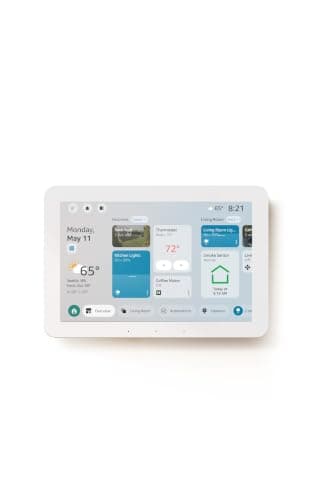
    The Zigbee hub for an Alexa house that wants a control surface rather than a box behind the router. It is a Matter controller, a Thread border router and a Zigbee hub in one 8-inch wall panel, so one purchase closes the radio gap an ordinary Echo leaves and gives you tiles a guest can press. Alexa-only, by design.

    Best for: Alexa households that want a wall panel, not a headless box · Matter controller + Thread border router (via Alexa)

    • 8-inch wall-mounted control panel
    • Built-in Zigbee hub
    • Matter controller + Thread border router
    • Designed for Alexa+
    • No Z-Wave radio; no Apple Home or Google Home listed
    $179.99View on Amazon

    #ad · we may earn a commission from this link to Amazon Echo Hub

#ad · Live prices from the Amazon Product API, as of October 17, 2026. Where we have no verified live price we show none — we would rather leave a gap than print a number that has rotted.

Zigbee is not a brand and not an app — it is a low-power mesh radio, and it is the reason a door sensor can cost $12 and run for two years on a coin cell. That is also why it needs a hub: Zigbee devices do not speak Wi-Fi, so something on your network has to carry the radio and act as the coordinator. Most smart speakers do not. The field of hubs that genuinely do is small, and the three here are the ones worth buying — separated not by how good their Zigbee is, but by which other radios sit beside it.

Why you would want a Zigbee hub at all

Two reasons, and the first one is money. The affordable end of the sensor catalogue — contact sensors, motion and presence sensors, buttons, temperature and leak sensors — is still overwhelmingly Zigbee, because the radio is cheap to build in and sips power. The Wi-Fi equivalent of a $12 Zigbee sensor is a $30 device you have to recharge or wire, and twenty of them on your router is a different kind of problem (see smart home Wi-Fi congestion).

The second reason is behaviour. Zigbee devices form a mesh: every mains-powered Zigbee device — a plug, a bulb — repeats for the battery ones, so coverage improves as you add devices rather than degrading. And because the hub holds the device list locally, a well-built Zigbee setup keeps reacting when your broadband drops. That is the difference between a house that is automatic and a house that is remote-controlled.

What actually separates these three hubs

All three carry Zigbee. None of them carries every radio, so the decision is a process of elimination:

Do you have Z-Wave devices? If yes, the Aeotec Smart Home Hub is your pick and the question is over — it is the only one of the three with the radio. This is the single most common way people end up with two hubs: they buy for Zigbee, then discover the lock the previous owner left is Z-Wave. Zigbee vs Z-Wave covers why the two coexist.

Do you need Thread as well? New Matter devices increasingly arrive on Thread, which needs a Thread border router on the network before they will join anything. The Aqara M3 and the Echo Hub have one; the Aeotec does not list one. If you want one box to cover the cheap Zigbee sensors and the new Thread devices, that narrows the field to two.

Which ecosystems must these devices appear in? This is where the Echo Hub separates from the Aqara. Amazon lists Alexa only. Aqara lists Apple Home, Alexa, SmartThings and Home Assistant. Aeotec lists Alexa and Google Assistant but not Apple Home. Pick on the assistant your household already uses, not the one a review prefers — best smart home ecosystem walks through that choice from scratch.

What a Zigbee hub does not fix

Buying a Zigbee hub does not make your existing Wi-Fi devices local, and it does not make Zigbee devices from every brand interchangeable. Zigbee certification covers the radio, not the behaviour: a sensor from a brand your hub has never heard of may pair and report nothing useful, and brand-specific features (an Aqara sensor's extra modes, for example) often only appear in that brand's own app. In practice, pairing a mainstream Zigbee sensor to a mainstream Zigbee hub works; pairing an obscure one is a gamble worth checking before you buy twenty.

It also does not remove the need for a controller you actually touch. All three picks here are plumbing, even the one with a screen — you still interact through an app or a voice assistant, and hub vs smart speaker is the page that untangles those two jobs.

Radios and ecosystems — from each maker's published specifications, read 2026-10-17
DeviceZigbeeThreadZ-WaveMatterEcosystems listed
Aqara Hub M3Wi-Fi or PoE; IR blasterYesBorder routerNoControllerApple Home, Alexa, SmartThings, Home Assistant
Aeotec Smart Home HubRuns SmartThingsYesNot listedYesGatewayAlexa, Google Assistant
Amazon Echo Hub8-inch wall panelYesBorder routerNoControllerAlexa only

In detail

The picks, in full

01

Aqara Hub M3

Top pick
Aqara Hub M3
$139.99View on Amazon

$159.9913% off

Price as of October 17, 2026. Amazon's price at checkout is the one that counts.

#ad · we may earn a commission from this link to Aqara Hub M3

The most complete radio set of the three, and the only one that does not tie your sensors to a single assistant. Zigbee for the cheap battery devices, a Thread border router for Matter-over-Thread, Matter controller duties for everything else, an infrared blaster for pre-smart appliances, and a wired PoE option so the hub is not a Wi-Fi client. If you are buying one box to build a sensor-driven home on, this is it.

  • Zigbee + Thread + Bluetooth radios
  • Matter controller and Thread border router
  • Wi-Fi or wired Ethernet with PoE
  • Built-in IR blaster
  • Works with Apple Home, Alexa, SmartThings, Home Assistant
Matter: Matter controller + Thread border routerFee: None — no subscriptionResearched, not hands-on tested

Good

  • It is the only pick that carries Zigbee and a Thread border router, which matters because new devices are arriving on Thread while the affordable sensor catalogue is still overwhelmingly Zigbee — one box covers both halves
  • Aqara lists Apple Home, Alexa, SmartThings and Home Assistant, so the Zigbee devices you pair here stay reachable if you change assistants later. A hub tied to one voice platform cannot say that
  • The PoE option is a genuinely useful detail on a hub: one Ethernet cable gives it power and a wired network link, so the device holding your whole sensor list stops depending on Wi-Fi coverage in a cupboard
  • The IR blaster pulls pre-smart TVs, fans and air conditioners into the same automations as the sensors, which is a category of device no Zigbee radio can reach

Less good

  • No Z-Wave radio — if you have inherited Z-Wave gear, this hub cannot see any of it and no firmware update will change that
  • Aqara does not list Google Home support for the M3, so a Nest-display household is the one case where this is the wrong pick
  • It is headless plumbing with no screen and no voice, so you still control the house through an app or an assistant you bought separately

Skip it if: you own Z-Wave devices or you run a Google Home household — the Aeotec hub covers the first case and neither of these three covers the second well.

02

Aeotec Smart Home Hub (SmartThings)

Aeotec Smart Home Hub (SmartThings)
$159.99View on Amazon

Price as of October 17, 2026. Amazon's price at checkout is the one that counts.

#ad · we may earn a commission from this link to Aeotec Smart Home Hub (SmartThings)

The pick for a house with a mixed radio history. It runs SmartThings with both Zigbee and Z-Wave on board and acts as a Matter gateway, which makes it the only hub here that can adopt the Z-Wave locks and sensors a previous owner left behind and still pair a 2026 Matter plug. The trade is that there is no Thread border router listed and no Apple Home.

  • Zigbee + Z-Wave radios
  • Runs SmartThings
  • Matter gateway
  • Works with Alexa and Google Assistant
  • No Thread border router listed; no Apple HomeKit
Matter: Matter gateway (SmartThings)Fee: None — no subscriptionResearched, not hands-on tested

Good

  • The only pick with a Z-Wave radio, which is the radio that strands people: professionally installed systems and older DIY kits lean on it heavily and almost nothing new in the consumer aisle carries it
  • SmartThings has the longest-running third-party device list of any platform here, so an unusual sensor is more likely to be supported than on a maker-specific hub
  • It works with both Alexa and Google Assistant, so the voice layer is not decided for you at purchase

Less good

  • No Thread border router is listed, so Matter-over-Thread devices still need something else on the network to join — a real gap on a hub bought in 2026
  • No Apple HomeKit support, which rules it out as the one hub in an iPhone-centred house
  • SmartThings pushes more of its intelligence to the cloud than Aqara or Home Assistant do, so more of your automation depends on a service being up

Skip it if: you have no Z-Wave devices and no plans to buy any — you would be paying for a radio you never use and giving up the Thread border router the Aqara includes.

03

Amazon Echo Hub

Amazon Echo Hub
$179.99View on Amazon

Price as of October 17, 2026. Amazon's price at checkout is the one that counts.

#ad · we may earn a commission from this link to Amazon Echo Hub

The Zigbee hub for an Alexa house that wants a control surface rather than a box behind the router. It is a Matter controller, a Thread border router and a Zigbee hub in one 8-inch wall panel, so one purchase closes the radio gap an ordinary Echo leaves and gives you tiles a guest can press. Alexa-only, by design.

  • 8-inch wall-mounted control panel
  • Built-in Zigbee hub
  • Matter controller + Thread border router
  • Designed for Alexa+
  • No Z-Wave radio; no Apple Home or Google Home listed
Matter: Matter controller + Thread border router (via Alexa)Fee: None — no subscriptionResearched, not hands-on tested

Good

  • Zigbee, Thread and Matter in an Alexa-native device, so the cheap battery sensors Alexa normally cannot see pair directly to the thing on your wall
  • A mounted touchscreen is the interface households actually use. Voice is excellent until the room is quiet or a guest does not know your device names, and a tile needs no recall at all
  • Mains-powered and permanently mounted means it is always awake on the network, which is what you want from the device holding your sensor list

Less good

  • Alexa-only: Amazon does not list Apple Home or Google Home support, so the Zigbee devices you pair here are effectively inside Amazon's platform
  • No Z-Wave radio, so an inherited Z-Wave system still needs a second hub
  • It is a wall panel, which means picking a spot and dealing with a cable — a headless hub hides behind the router and asks nothing of you

Skip it if: you are not an Alexa household, or you want the option to move your sensors to another ecosystem later.

The four things to check before you buy

One: the radio list, by name."Works with Matter" is not a Zigbee radio, and a hub can be a Matter controller while being completely blind to Zigbee. Read the specification for the words Zigbee, Thread and Z-Wave individually — those are three different radios and no amount of software adds a missing one.

Two: where the automation runs. A hub that evaluates rules locally keeps your motion-triggered lights working through a broadband outage; a hub that sends every trigger to a cloud does not. This is the difference you feel on a bad day, and it is also the latency you notice walking through a doorway. Put anything that must not fail on local rules.

Three: how the hub sits on your network. Mains power and a wired connection are boring specifications that quietly decide reliability. A hub on PoE or Ethernet in a cupboard is one less thing competing for Wi-Fi airtime with the cameras.

Four: the exit. Zigbee devices are paired to a coordinator, so moving to a different hub later means re-pairing every one of them by hand. That is an afternoon at twenty devices. Choosing a hub that reports into more than one ecosystem is the cheapest insurance against doing it twice.
How we chose

We don't run a test lab

We don't wire every one of these into a test rig, and we won't write "in our testing" as if we do. What we did instead: pulled each product's published specifications, confirmed its Matter/Thread/HomeKit support from the manufacturer's own documentation, added up the real 3-year cost with any monthly fee included, and read the aggregated verified-buyer sentiment. Every pick is chosen against that published method. Where a number came from someone else, we name and link them in Sources.

Questions

Frequently asked

Do I need a Zigbee hub if I already have an Echo or a Nest speaker?
Yes, for Zigbee devices. Most smart speakers are Matter controllers over Wi-Fi, which is a real capability, but they do not carry a Zigbee radio — so a Zigbee sensor eight feet away is simply invisible to them. The exception in this roundup is the Echo Hub, which is an Alexa device with a built-in Zigbee hub. Our hub vs smart speaker page has the full radio test.
Does Matter replace Zigbee?
No. Matter is an application-layer standard that runs over Wi-Fi, Ethernet and Thread; it is not a radio and it does not run over Zigbee. What that means practically is that Matter does not make your Zigbee sensors obsolete and does not let a Matter controller talk to them directly — a Zigbee hub still has to bridge them in. Expect to own both for years: Matter vs Thread vs Zigbee puts the three in one picture.
Will Zigbee devices from different brands work on the same hub?
Usually, with caveats. Zigbee certification standardises the radio and basic device types, so a mainstream contact sensor generally pairs to a mainstream hub and reports open/closed correctly. What does not transfer reliably are brand-specific extras and firmware updates, which often live only in the maker's own app. If you are buying twenty of something, buy one first and pair it.
How many Zigbee devices can one hub handle?
More than most homes need, and the real limit is mesh quality rather than a number in a specification. Zigbee is a mesh: every mains-powered device — plug, bulb, panel — repeats for the battery devices, so a house with a dozen plugs holds a far larger sensor network than a house with none. If a far sensor drops out, adding a mains-powered Zigbee device between it and the hub usually fixes it.
Is Zigbee or Thread the better radio to build on in 2026?
Build on both, which is exactly why the Aqara M3 leads here. Thread is the newer mesh and where Matter's momentum is, but the affordable sensor catalogue you will actually fill a house with is still Zigbee, and those devices are not going to stop working. A hub that carries Zigbee and acts as a Thread border router means you never have to pick.
Can I use a USB Zigbee dongle with Home Assistant instead?
You can, and for a technical household running Home Assistant on its own hardware that is a legitimate and very local route. It is a different kind of project, though: you own the integration work, the updates and the backups. The hubs here are the appliance answer — and note that Aqara lists Home Assistant support for the M3, so the two approaches are not mutually exclusive.
Do any of these hubs charge a subscription?
No. All three are one-time hardware purchases with no monthly fee for local control and automations. Fees arrive with cameras and alarm monitoring, not with hubs — see smart home subscription costs for where the recurring money actually goes.

Keep reading

Receipts

Sources

We do not run a test lab, and we do not pretend to. Compatibility and subscription-cost claims come from the manufacturer's own documentation and the live retailer listing, read on the dates shown. Read our full method.