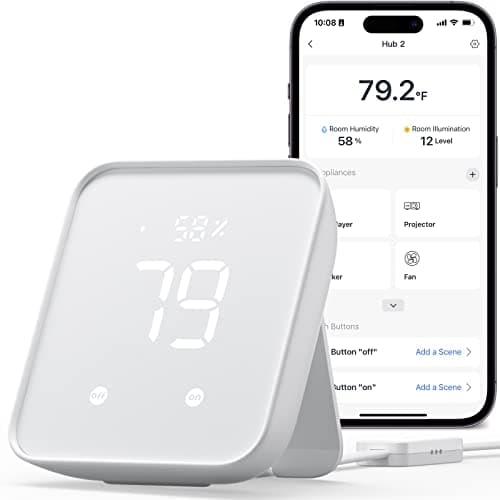
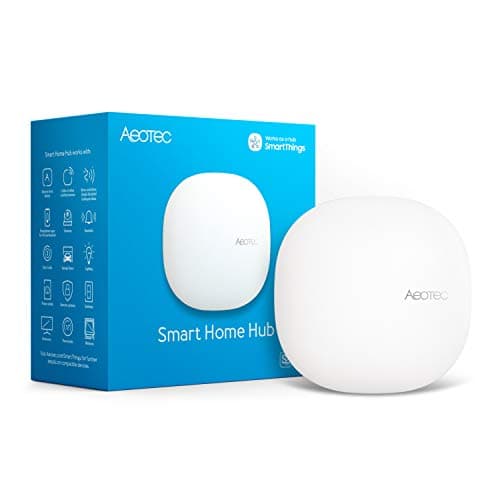
The single most useful thing to understand before you buy either of these is that they are not really competitors. Both have "hub" on the box, both show up in the same search, and both cost real money - but the SwitchBot Hub 2 and the Aeotec Smart Home Hub answer completely different questions. One is a sensor and a universal remote that happens to bridge SwitchBot's own gear into the big assistants. The other is a genuine multi-protocol controller that can run a house full of mixed-brand devices. Cross-shopping them as if they were rivals is how people end up with a hub that cannot see the sensors they just bought. Let us make sure that is not you.
What each box actually is
The Aeotec Smart Home Hub is a whole-home controller. It has a Z-Wave radio and a Zigbee radio, it acts as a Matter gateway, and it runs the SmartThings platform, working with Alexa and Google. In plain terms, it can host third-party Z-Wave and Zigbee sensors - door contacts, motion sensors, leak detectors from many brands - and pull them together with newer Matter devices under one roof. If you are assembling a smart home from more than one brand and want a single box to make them cooperate, this is that box. Its one notable gap is Apple HomeKit, which its listing does not name. The full Aeotec Smart Home Hub review goes deep on exactly what it can host.
The SwitchBot Hub 2 is something else entirely, and its own listing is honest about it. It is a temperature, humidity and light sensor, an IR blaster that can control legacy TVs, fans and air conditioners, and a Matter bridge for SwitchBot's own accessories - pulling SwitchBot devices into Alexa, Google Home and Apple Home. What it is not is a Zigbee, Thread or Z-Wave hub. It has none of those mesh radios, so it cannot see or run third-party sensors. It is a clever, useful, inexpensive gadget with a specific job, not a multi-protocol controller - the point the SwitchBot Hub 2 review makes at length.
The question that decides it: what are you connecting?
Forget price for a moment and answer one thing: what devices do you need this hub to talk to? If the answer includes third-party Z-Wave or Zigbee sensors, or the words "tie my different brands together," the Hub 2 is immediately ruled out - it does not have the radios, and no amount of setup will give it them. You need the Aeotec (or another multi-protocol hub). If the answer is "I mostly have SwitchBot stuff," or "I want to smarten my old air conditioner and get room temperature into my routines," the Aeotec is overkill and the Hub 2 is precisely designed for you. This is not a better/worse comparison; it is a right-tool comparison, and the difference between Z-Wave and Zigbee themselves is covered in our Zigbee vs Z-Wave guide.
A concrete example makes it click. Say you want inexpensive Z-Wave door and motion sensors around the house, plus a few Zigbee bulbs, all feeding automations that also touch a newer Matter plug. Only the Aeotec can host that - a Z-Wave radio for the sensors, a Zigbee radio for the bulbs, and Matter to fold in the plug. Now say instead you want to read your bedroom's temperature and humidity, have the smart home turn on a dumb window air conditioner by learning its remote, and control a couple of SwitchBot curtains by voice. The Aeotec does none of the temperature-sensing or IR out of a matching purpose; the Hub 2 does all three in one cheap unit. Same category name, opposite jobs.
Where they briefly overlap - and why it is a trap
The one place these two seem to meet is Matter, and it is worth being precise so the overlap does not mislead you. Both touch Matter - but the Aeotec is a Matter gateway paired with real Z-Wave and Zigbee radios, so it can run and bridge a broad range of devices, while the Hub 2 is a Matter bridgefor SwitchBot's own accessories only. So "both do Matter" is true and misleading at the same time. If you read that as "the Hub 2 can bridge my non-SwitchBot Zigbee sensors to Matter," you will be disappointed - it cannot, because it has no Zigbee radio to hear them in the first place. Our Matter vs Thread vs Zigbee guide unpacks why a bridge and a real hub are not the same thing.
There is one honest reversal worth flagging, because it cuts against the pattern. On Apple Home, the cheaper device is actually the more capable one: the SwitchBot Hub 2 reaches Apple Home via Matter for its own accessories, while the Aeotec's listing does not name Apple HomeKit at all. So an Apple Home household is in the odd position where the budget bridge fits and the serious hub does not. That does not make the Hub 2 a whole-home controller - it still has no mesh radios - but if Apple Home is your world and your devices are SwitchBot's, it is a genuine point in the Hub 2's favor.
Cost, and the honest recommendation
Price tracks the class difference: the Hub 2 is the cheaper device, because it does less, and the Aeotec costs more because it is a proper controller with multiple radios. But price should be the last thing you weigh here, not the first - a cheap Hub 2 is no bargain if it cannot see the devices you want to run, and an Aeotec is money wasted if all you needed was a temperature reading and an IR blaster. Buy on capability first, price second. If you are shopping the low end deliberately, our best budget smart home hubs page shows where each cheap option genuinely fits.
So the recommendation is unusually clean. Buy the Aeotec Smart Home Hub if you are building a mixed-brand smart home and need real Z-Wave, Zigbee and Matter support in one box - it is our pick of the two and the right foundation for a growing setup, provided you are not tied to Apple Home. Buy the SwitchBot Hub 2if you own SwitchBot gear, want a built-in room sensor, or need to smarten a legacy IR appliance, and you do not need to host third-party mesh devices - it is excellent at that, and cheap. If you genuinely need both jobs done, they coexist happily: the Aeotec runs the mesh, the Hub 2 adds sensing and IR. The mistake to avoid is buying the Hub 2 expecting the Aeotec's job. If you are still unsure whether you need a hub at all, start with do I need a smart home hub?
The usual honest caveat: we did not bench these two side by side. We read each device's own Amazon listing and manufacturer documentation for its radios, roles and ecosystem support, and compared them straight, crediting no capability a listing does not claim. Both sit in the wider field on our best smart home hubs page, and the full method is on the methodology page.