Skip to content
Latch & Hub

Locks · Smart Locks

How to Share Smart Lock Access With Guests

The reason to own a smart lock is rarely the lock. It is that you can let a cleaner, a dog walker, a contractor or your in-laws into the house without a key existing, and take that access away again in four seconds from anywhere. Doing it properly takes about ten minutes of setup.

By Stephen V.Updated How we choose
#ad

We earn a commission when you buy through our Amazon links, at no extra cost to you. It never changes our rankings — where the subscription-free or cheaper option is the better buy, we say so. How this works.

Verdict

The bottom line

There are four ways to share access and they are not interchangeable. A permanent code is for someone who comes indefinitely — a cleaner, a family member — and each person should have their own, never a shared one. A scheduled code, valid only on certain days or between certain hours, is the right tool for a dog walker or a contractor working a known week. A one-time code that expires after a single use is for a delivery, a viewing or a neighbor doing you one favor. An app invite is for people you trust with full control, which in practice means household members only. The lock determines which of these you actually get: the Schlage Encode Plus handles codes with built-in Wi-Fi so you can issue and revoke from anywhere, the August Wi-Fi Smart Lock adds app-based guest invites on top of the existing deadbolt and keys, and the igloohome Smart Padlock 2 solves the hardest case — a gate or outbuilding with no internet at all — by validating codes on the lock itself.

A physical key has one access model: whoever holds it can come in, forever, and you will never know when they did. Every genuine benefit of a smart lock comes from replacing that single model with four more precise ones. The mistake almost everyone makes at the start is using the wrong one — typically handing out a single permanent code to five people, which recreates the key problem with extra steps.

The four access types, and what each is actually for

Permanent codes are for people with an ongoing reason to enter: a cleaner, an adult child, a carer, a tenant in a shared house. The rule that matters is one code per person. It costs nothing, it means the access log tells you who came rather than that somebody did, and it means removing one person's access does not require telling four other people a new number.

Scheduled or time-limited codes are the most under-used and the most useful. A code that only works Tuesdays between 9am and noon is exactly right for a dog walker; a code that works for one week and then stops is right for a contractor or a house-sitter. The security benefit is that the code expires whether or not you remember to delete it, which is the part humans reliably get wrong.

One-time codes expire after a single use. Use them for a delivery you need taken inside, a real estate agent viewing, or a neighbor coming once to water plants. A one-time code cannot be reused if it is forwarded, screenshotted or overheard, which makes it the right choice any time the code will travel through a channel you do not control.

App invites give someone the lock in their own app, usually with the ability to lock and unlock remotely and sometimes to manage other users. This is the most powerful kind of access and it should be the rarest: household members, and anyone who genuinely needs to let other people in. A dog walker does not need an account on your lock.

How codes actually get to the lock — and why that decides what you can share

This is the mechanical detail that explains most of the frustration people hit. There are three different architectures.

A Wi-Fi lock such as the Schlage Encode Plus is connected to the internet itself. You create a code in the app, it reaches the lock within seconds from anywhere, and you can delete it from a different country. This is the arrangement you want if you share access regularly.

A Bluetooth lock with a bridge works the same way as long as the bridge is plugged in and online. Without the bridge you have to be physically within Bluetooth range to change anything, which means a code you need to revoke in a hurry cannot be revoked until you get home. The distinction is covered in Bluetooth vs Wi-Fi smart locks and do smart locks need a hub.

An offline PIN lockis the clever one, and it is the only solution to a gate, shed or outbuilding where there is no power and no Wi-Fi. igloohome's algoPIN approach generates codes mathematically in the app and the lock validates them locally against the same algorithm — one-time, duration-limited, recurring and custom codes all work with the lock having no connection of any kind. That is why you can text a contractor a code for a gate two counties away that has never seen a network.

The revocation habits that matter

Issuing access is easy and everyone does it. Removing it is the part that decays, and a lock with eleven active codes belonging to six people you half remember is not more secure than a key. Four habits fix it.

Prefer expiry to deletion. Any time you can set a code to end on a date, do it, even if you think the access is open-ended. A code that expires in six months and needs renewing is a prompt to review; a permanent code is a thing you forget.

Name every code after a person, not a role."Cleaner" becomes meaningless the moment the cleaning company changes staff. A name tells you whose access you are looking at eighteen months later.

Audit twice a year. Open the user list, and delete anything you cannot immediately justify. Put it on the same calendar reminder as changing the lock batteries — smart lock battery life explains why you want that reminder anyway.

Change the master or owner code separately. The administrator credential should never be a code you have given anyone, and it should not be the same number as the household code. If a guest code is ever compromised, you want the admin path untouched.

What the access log does and does not tell you

Most of these locks keep a history of which code opened the door and when, and it is genuinely useful — confirming a cleaner arrived, seeing what time a teenager got in, establishing that nobody entered on a day something went missing. Two limits are worth knowing. The log records the credential, not the person: if two people share one code, the log cannot distinguish them, which is the strongest practical argument for one code per person. And the log records the lock, not the house: a door left on the latch, an unlocked window or a second entrance with a conventional lock are all invisible to it.

Three mistakes to avoid

Sharing your account password instead of issuing access. It happens constantly, usually with family. It gives the other person administrative control of the lock, it cannot be revoked without changing the password and re-adding everyone, and it destroys the audit trail. Use a proper invite or a code.

Using the same code for everyone and never changing it. This is a key with extra steps. Worse, it is a key you cannot tell has been copied, since a code spreads silently.

Forgetting the physical key still exists. Most smart deadbolts keep a keyway, and every key in circulation still opens the door regardless of what you do in the app. If you have replaced a lock to control access, account for the old keys too — and if a key has gone missing, a code change does nothing about it. See can you use a key with a smart lock for which designs keep a keyway.

If you are doing this for a rental

Short-term rental hosting is the heaviest use of guest codes there is, and the workflow is slightly different: a code per booking, issued in the check-in message, scheduled to start at check-in and expire at checkout, plus one permanent code for your cleaner so the two never get confused in the log. The lock needs built-in Wi-Fi for that to be workable, because you will be issuing codes from wherever you happen to be. Best smart locks for Airbnb ranks locks for that job specifically, and the wider host device list covers what else earns its place.
The short answer

Quick picks

Tap any row for the full write-up.

  • Schlage Encode Plus
    01 Schlage Encode PlusTop pick

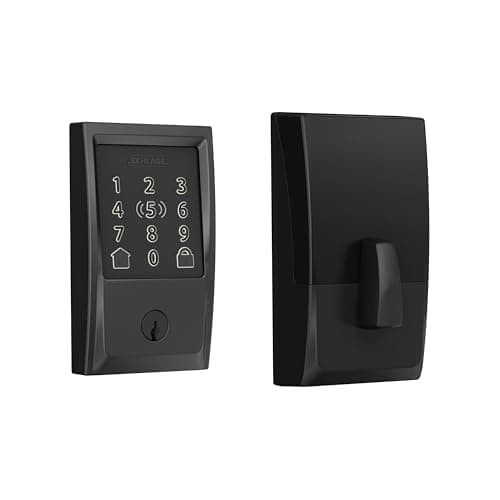
    The best all-round lock for sharing access. Built-in Wi-Fi means a code you create reaches the lock in seconds and can be deleted from anywhere, and the large touchscreen is the keypad a guest at the door in the dark actually copes with — which is the half of this that product pages never mention.

    Best for: Regular code sharing, with remote issue and revoke · No Matter (HomeKit + Apple Home Key)

    $299.28View on Amazon

    $329.999% off

    #ad · we may earn a commission from this link to Schlage Encode Plus

  • August Wi-Fi Smart Lock (4th Gen)
    02 August Wi-Fi Smart Lock (4th Gen)

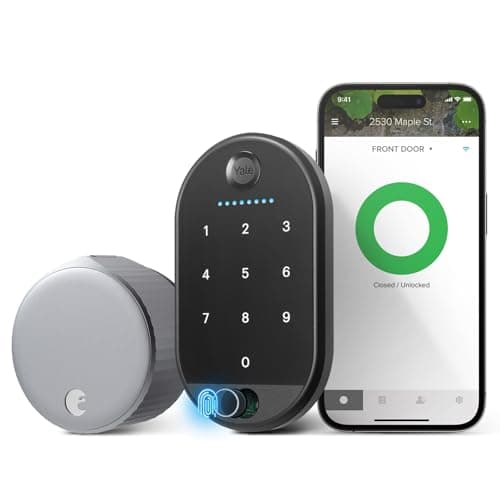
    The pick when you want to add guest access without changing the door. It mounts inside on the existing deadbolt, so every key already in circulation keeps working, and the included Keypad Touch adds codes for people you do not want to give an app to. Built-in Wi-Fi handles the remote half.

    Best for: Adding shared access to an existing lock, keeping existing keys · No Matter (Alexa / Google)

    $129.00View on Amazon

    #ad · we may earn a commission from this link to August Wi-Fi Smart Lock (4th Gen)

  • igloohome Smart Padlock 2 (SP2)
    03 igloohome Smart Padlock 2 (SP2)

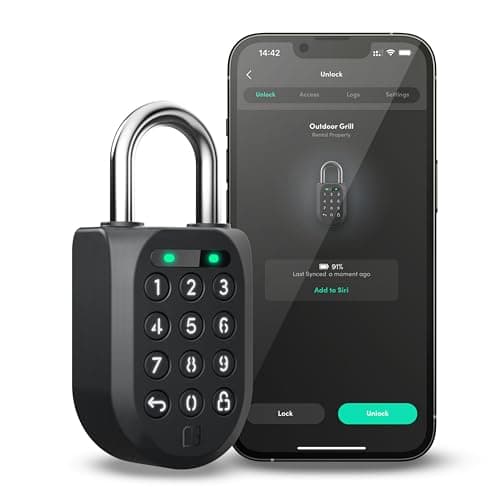
    The answer to the hardest sharing problem there is: a gate, a shed or a storage unit with no power and no internet. It validates PIN codes on the lock itself, so you can text a contractor a one-time or week-long code for somewhere that has never had a network, and it still expires on schedule.

    Best for: Gates, sheds and storage with no power and no Wi-Fi · No Matter; Alexa only via igloohome Bridge

    $184.99View on Amazon

    #ad · we may earn a commission from this link to igloohome Smart Padlock 2 (SP2)

#ad · Live prices from the Amazon Product API, as of October 11, 2026. Where we have no verified live price we show none — we would rather leave a gap than print a number that has rotted.

The four ways to share access — what each is for, how it is revoked, and the risk if you get it wrong
DeviceUse it forHow it endsAppears in the log asMain risk
Permanent code (one per person)Cleaner, carer, adult child, tenantYou delete it manuallyThat named personForgotten codes accumulating for years
Scheduled / recurring codeDog walker, weekly help, a contractor's known weekExpires on its own scheduleThat named person, within its windowSchedule set too generously
One-time codeA delivery, a viewing, a single favorExpires after one useA single entryNone really — this is the safe default
App invite / shared userHousehold members onlyYou remove the user in the appThat user accountGiving administrative control away
Sharing your account passwordNothing. Never do thisOnly by changing the passwordYou — the trail is destroyedFull control of the lock, unrevokable in practice

In detail

The picks, in full

01

Schlage Encode Plus

Top pick
Schlage Encode Plus
$299.28View on Amazon

$329.999% off

Price as of October 11, 2026. Amazon's price at checkout is the one that counts.

#ad · we may earn a commission from this link to Schlage Encode Plus

The best all-round lock for sharing access. Built-in Wi-Fi means a code you create reaches the lock in seconds and can be deleted from anywhere, and the large touchscreen is the keypad a guest at the door in the dark actually copes with — which is the half of this that product pages never mention.

  • Keyless-entry deadbolt (replaces yours)
  • Apple Home Key (iPhone / Apple Watch)
  • Built-in Wi-Fi + app control
  • Alexa + Apple HomeKit
  • Touchscreen keypad, easy install
Matter: No Matter (HomeKit + Apple Home Key)Fee: None - no subscriptionResearched, not hands-on tested

Good

  • Built-in Wi-Fi with no bridge is the specification that makes sharing practical: issue a code from the office, delete it from a holiday, and never need to be in Bluetooth range of your own front door
  • A large, high-contrast touchscreen is what a first-time guest can use at night with luggage in both hands, and the most common cause of a failed check-in is a keypad nobody can read
  • Apple Home Key means household members can tap a phone or watch instead of using a code at all, keeping the shared codes for people who genuinely are guests

Less good

  • The listing does not name Google Home or Matter, so a Google-centerd household gets less from it
  • Replacing the deadbolt invalidates every existing key, so plan new keys for anyone who holds one before install day
  • It is a Wi-Fi lock, so the convenience depends on the property's router — codes set earlier keep working offline, but issuing a new one does not

Skip it if: your household runs on Google Home as its hub - the Schlage listing names Apple and Alexa, not Google.

02

August Wi-Fi Smart Lock (4th Gen)

August Wi-Fi Smart Lock (4th Gen)
$129.00View on Amazon

Price as of October 11, 2026. Amazon's price at checkout is the one that counts.

#ad · we may earn a commission from this link to August Wi-Fi Smart Lock (4th Gen)

The pick when you want to add guest access without changing the door. It mounts inside on the existing deadbolt, so every key already in circulation keeps working, and the included Keypad Touch adds codes for people you do not want to give an app to. Built-in Wi-Fi handles the remote half.

  • Retrofit - fits your current deadbolt
  • Keep using your existing keys
  • Built-in Wi-Fi
  • Alexa, Google, SmartThings
  • Keypad Touch included
Matter: No Matter (Alexa / Google)Fee: None - no subscriptionResearched, not hands-on tested

Good

  • Nothing changes on the outside of the door and nobody's existing key stops working, which makes this the lowest-disruption way to add guest codes to a household that already has keys out
  • The included Keypad Touch means you can offer a code to a dog walker or a contractor without inviting them into an app, which is the distinction most people want and few locks make easy
  • Built-in Wi-Fi means guest access can be issued and revoked remotely, and the lock reports who came and when

Less good

  • The listing does not name Apple HomeKit or Apple Home Key, so an iPhone-centerd household gets less from it
  • You are still relying on the existing deadbolt's build quality on the outside — a retrofit motor inherits a worn or sticky lock's problems
  • Keeping the old keys cuts both ways: if the reason you are managing access is that a key went missing, a retrofit does not solve that and a new deadbolt does

Skip it if: the existing deadbolt is old, stiff or poor quality - a retrofit motor cannot fix a bad lock, and a fresh deadbolt is the better purchase.

03

igloohome Smart Padlock 2 (SP2)

igloohome Smart Padlock 2 (SP2)
$184.99View on Amazon

Price as of October 11, 2026. Amazon's price at checkout is the one that counts.

#ad · we may earn a commission from this link to igloohome Smart Padlock 2 (SP2)

The answer to the hardest sharing problem there is: a gate, a shed or a storage unit with no power and no internet. It validates PIN codes on the lock itself, so you can text a contractor a one-time or week-long code for somewhere that has never had a network, and it still expires on schedule.

  • PIN codes + Bluetooth digital keys (algoPIN)
  • IPX7; passed seven MIL-STD 810H tests
  • 0.34 in (8.7 mm) shackle; 15 kN cut, 5 kN pull, 100 Nm twist
  • Rechargeable Li-ion; up to 9 months, up to 8,000 unlocks
  • -4 F to 122 F operating range
Matter: No Matter; Alexa only via igloohome BridgeFee: No subscription — Bridge sold separately for alertsResearched, not hands-on tested

Good

  • Offline PIN validation is the whole reason to buy it: igloohome's algoPIN generates one-time, duration, recurring and custom codes in the app and the lock checks them locally, so sharing access does not require the lock to have any signal at all
  • It is the only lock here publishing force ratings — 15 kN cutting, 5 kN pulling, 100 Nm twisting on a 0.34 in shackle — which matters on an outbuilding nobody is watching
  • IPX7 plus seven passed MIL-STD 810H tests and a -4 F to 122 F range is a real durability claim for a lock that lives outdoors year-round

Less good

  • There is no keyway and no fallback key, so a completely dead battery means charging it in place before anything opens
  • Real-time notifications and remote status need the igloohome Bridge, which is a second purchase and defeats the point if the lock is somewhere with no power
  • It is a padlock, not a door lock — the right tool for a gate, a shed or a storage unit, and the wrong one for a front door

Skip it if: you want a physical key as your last-resort fallback — this lock does not have one, and no amount of app polish changes that.

How we chose

We don't run a test lab

We don't wire every one of these into a test rig, and we won't write "in our testing" as if we do. What we did instead: pulled each product's published specifications, confirmed its Matter/Thread/HomeKit support from the manufacturer's own documentation, added up the real 3-year cost with any monthly fee included, and read the aggregated verified-buyer sentiment. Every pick is chosen against that published method. Where a number came from someone else, we name and link them in Sources.

Questions

Frequently asked

How do I give a cleaner access without giving them a key?
Create a permanent code in their own name, not a shared household one. That way the access log shows when they arrived rather than just that somebody did, and when the arrangement ends you delete one code without telling anyone else a new number. If they come on fixed days, better still: use a scheduled code valid only on those days and hours, so the access is narrower than a key could ever be.
Can I give someone temporary access to my smart lock remotely?
Yes, if the lock reaches the internet. A Wi-Fi lock such as the Schlage Encode Plus or the August takes a new code within seconds from anywhere, and you can revoke it the same way. A Bluetooth-only lock cannot do this — you have to be within range of the door to change anything, which is why a bridge or built-in Wi-Fi is the specification to insist on if sharing access is your reason for buying. The outlier is an offline PIN lock like the igloohome, which generates valid codes in the app without the lock being connected at all.
Are one-time codes actually secure?
They are the most secure way to share access, because the code cannot be reused once it has been consumed — forwarding it, screenshotting it or being overheard reading it out all become harmless after the single entry. Use a one-time code any time the code will travel through a channel you do not control, which includes text messages, email and anything passed on by a third party.
Does my smart lock tell me who came in?
It tells you which credential opened the door and when, which is only as specific as your codes are. If three people share one code, the log cannot distinguish them — which is the main practical argument for one code per person. It also only knows about the lock: a door left on the latch, an open window or a second door with a conventional lock are all invisible to it.
Should I share my smart lock account with my partner?
Share the lock, not the account. Every one of these systems has a proper way to add another user with their own login, which keeps the audit trail intact and lets either of you be removed later without a password change and a re-invite of everyone else. Sharing the account password instead is the single most common mistake here, and it is the hardest one to undo.
How do I share access to a gate or shed with no Wi-Fi?
Use a lock that validates codes offline. igloohome's algoPIN system generates one-time, duration-limited, recurring and custom PINs in the app, and the lock checks them locally against the same algorithm — so the lock needs no power supply, no network and no bridge. It is the only architecture that genuinely solves a gate at the end of a field, which is why it is on this page despite being a padlock rather than a door lock.

Keep reading

Receipts

Sources

We do not run a test lab, and we do not pretend to. Compatibility and subscription-cost claims come from the manufacturer's own documentation and the live retailer listing, read on the dates shown. Read our full method.