A keypad smart lock earns its place with one promise: family and guests get in with a code, so nobody hunts for a key, hides one under a mat, or waits on the porch for you to come home. We ranked these four the way you will actually live with them - by the keypad itself, the ecosystem the lock fits, whether it needs a hub to reach the internet, and whether it retrofits onto your current deadbolt or replaces the whole thing. A lock that will not show up in your Apple Home, or that will not fit your door, is the wrong lock no matter how sharp its keypad looks.
As with every roundup here, we read each lock's own Amazon listing and manufacturer page, wrote down only the platforms and features it actually names, and built the compatibility matrix belowfrom that. If a listing does not claim a platform, we mark it "Not listed" rather than assume it. That matters most with keypad locks, where "works with Alexa" on the box tells you nothing about whether you can also tap an iPhone to unlock, or whether the keypad is a slick touchscreen or a separate external pad.
The four questions that decide a keypad lock
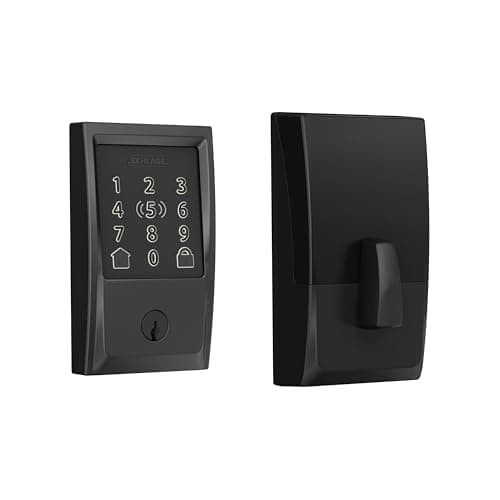
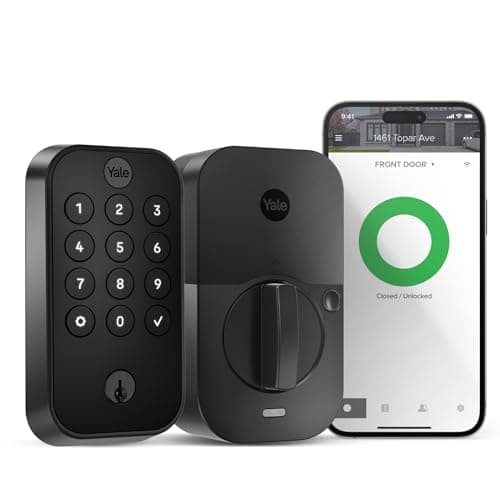
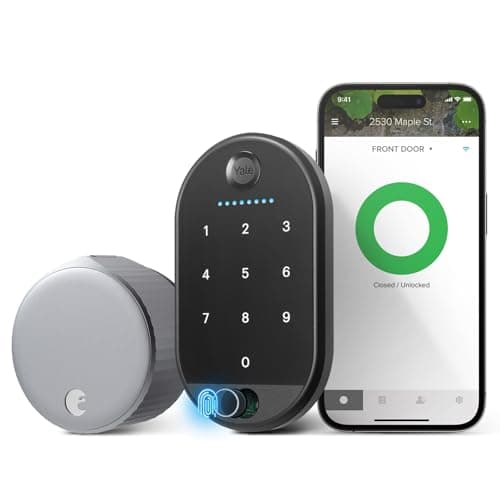
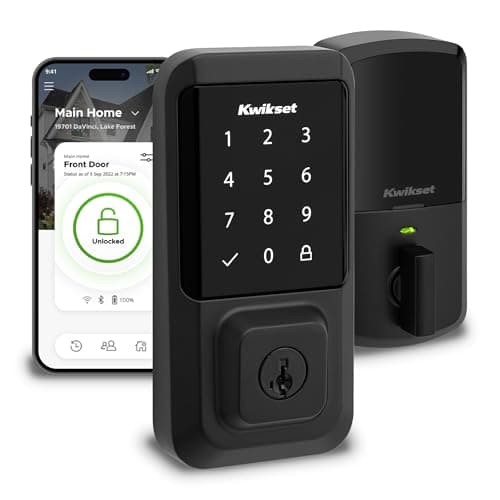
One: touchscreen keypad or a separate external pad? Three of these - the Kwikset Halo, Schlage Encode Plus and Yale Assure Lock 2 - build a touchscreen keypad into the deadbolt face itself, so entering a code feels like one clean, integrated device. The August takes a different route: the smart mechanism lives inside your door and the Keypad Touch is a small external unit you mount by the door. Both let guests enter with a code; they just look and install very differently.
Two: which ecosystem is your home built on? If you live in Apple Home and want to tap your phone as well as punch a code, the Schlage Encode Plus is the only pick here that names Apple Home Key. If your home runs on Alexa or Google, the Kwikset Halo, Yale Assure Lock 2 and August are all aimed squarely at you. Buying a keypad lock outside your ecosystem means living in a second app - the most common regret owners report. Our Apple Home locks roundup goes deeper if you are an iPhone household.
Three: does it need a hub to reach the internet? All four of these have Wi-Fi built in (or, for the Yale, a Wi-Fi module) and talk to your network directly, so you can share a code or check the lock from anywhere with no extra hub. That is deliberate: we kept this list to pure built-in-Wi-Fi keypads so a code you send a guest works remotely without buying a bridge first.
Four: retrofit or full replacement? The August Wi-Fi Smart Lock is a retrofit - it clamps onto the inside of your existing deadbolt, so the exterior and your keys stay exactly as they are, which is why it is the pick renters keep coming back to. The Kwikset, Schlage and Yale are full-replacement deadbolts that swap the whole mechanism for a clean, keyless keypad face. If keeping your existing physical key matters to you, our guide on using a key with a smart lock walks through which of these keeps a keyway.
Why the Aqara U100 is not on this list
If you searched for a keypad lock, you have probably seen the Aqara U100 recommended - and it is a genuinely good lock. It stacks a fingerprint reader on top of its touchscreen keypad, so a household can enter by code or by finger. We left it off this particular list for one honest reason: the U100 is Bluetooth on its own and needs an Aqara hub for remote access and voice control, so it is not a pure built-in-Wi-Fi keypad the way these four are. If a fingerprint reader appeals more than another code to remember, read our Aqara U100 review and our sibling guide on keypad vs fingerprint smart locks to decide which unlock method actually fits your home.
One honest caveat, the same one on every page here: we do not run a lock lab. We compiled the published specs and confirmed each lock's keypad type and ecosystem support from the manufacturer's own Amazon and support listings, and read aggregated owner sentiment. Where a figure came from someone else's testing, we say so. Our full method is on the methodology page.
Touchscreen keypad vs an external keypad
The first thing to settle is what the keypad actually is. A touchscreen keypad built into the deadbolt face - the Kwikset Halo, Schlage Encode Plus and Yale Assure Lock 2 - is one integrated unit: it looks clean, wakes with a tap, and often lets you smear a few extra digits around your real code to defeat a nosy neighbor reading fingerprints on the glass. An external keypad like the August Keypad Touch is a separate pad you mount by the door while the smart mechanism hides inside. It is the trade-off you accept to keep your existing deadbolt and keys: two pieces of hardware instead of one faceplate, but no changes to the outside of your door. Neither is wrong - it depends on whether you value one clean face or a keep-your-door retrofit.
Match the ecosystem before anything else
A keypad code works locally no matter what, but the moment you want to send a guest a code from your phone, check whether the door is locked from the office, or add voice control, the lock's ecosystem decides your experience. Apple Home households that want to tap a phone as well as type a code should start with the Schlage Encode Plus - the only pick here with Apple Home Key. Alexa and Google homes can pick the Kwikset Halo, Yale Assure Lock 2 or August without losing anything they will actually use. If you want the codes to reach an Airbnb turnover routine, our Airbnb locks roundup covers the hosting side, and our best locks for Alexa page ranks the Alexa options by value.
Retrofit or full replacement
If you rent, or you simply want to keep your existing keys and exterior hardware, the retrofit August is the obvious answer - it changes nothing a landlord would notice, and the Keypad Touch still gives guests code entry. If you own your home and want a clean, keyless deadbolt with the keypad on the door itself, the full-replacement Kwikset, Schlage and Yale swap the whole mechanism in a standard 15-to-30-minute job. Our best smart deadbolts roundup covers only the full-replacement route, and our overall best smart locks list puts keypad picks next to fingerprint and hidden designs if you are still weighing the format.