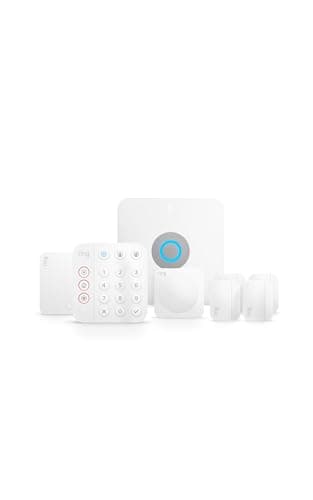
The Ring Alarm Pro is the most interesting base station Ring makes, and also the easiest to buy for the wrong reasons. Underneath, it is an ordinary Ring Alarm — the same sensors, the same app, the same free self-monitoring — with one big addition: a genuine eero Wi-Fi 6 mesh router built into the base station. That single fact is the whole review. If you were about to buy a new router anyway, the Pro is a clever way to get two boxes' worth of hardware in one. If your router is fine, you're paying a premium for a feature you won't use, and the standard kit is the smarter buy.
We researched the Pro off Ring's own hardware listing and plan pages rather than living with it on a bench — this is researched, not hands-on tested — so where a capability is Ring's published claim rather than something we measured, we say so. What follows is the honest read on what the Pro adds, what it doesn't, and exactly when the premium over the standard kit is money well spent.
What the Ring Alarm Pro actually is
Start with the part that is not in doubt: the router is real. The Pro base station has an eero Wi-Fi 6 mesh router built in, and eero is Amazon's own mesh brand, so this isn't a token radio bolted on as a checkbox. It behaves like a proper eero — it can anchor a mesh network, and you can add more eero units to extend coverage across a larger home. So the Pro is, quite literally, your alarm hub and your Wi-Fi router in the same box, managed from the Ring and eero apps. For a household that needs both, collapsing them into one device on one power outlet is a legitimately tidy piece of engineering.
Everything else about the alarm side matches the standard system. It works with Alexa, not Apple HomeKit, and there is no Matter support for the alarm — it lives in the Ring and Alexa world, the same as the rest of the range. If cross-ecosystem control matters to you, that limitation is identical to the standard kit, and we cover the Apple-friendly alternative in Ring Alarm vs abode iota.
It self-monitors free, exactly like the standard kit
This is the good news for anyone allergic to a monthly bill: the Pro self-monitors for free, with no plan and no contract, just like the standard Ring Alarm. Arm it, trip a sensor, and the base sounds a loud siren while a push alert lands on your phone. You own the hardware outright and there is no obligation to ever pay Ring a cent for the alarm to do its core job. If a plan appeals later, Ring's optional 24/7 professional monitoring is the cheapest among the systems we cover, and it stays contract-free. In other words, on the free tier the Pro and the standard kit are the same alarm — which is exactly why the router is the only reason to pay more. Because it runs free, the Pro also earns a place in our best no-subscription systems roundup.
The two headline features are gated behind a plan
Here is the part Ring's marketing leads with, and the part you have to read carefully. The Pro can store Ring camera video locally on the base station — a feature called Ring Edge — and it can add backup internet plus cellular so the system stays online if your broadband drops. Both are genuinely useful. Both require a paid Ring plan to switch on. Ring Edge local video storage is not a free-tier feature, and the backup-internet and cellular safety net is tied to the plan as well. So if you buy the Pro specifically for local recording or for internet failover and then run it on the free tier, those headline tricks simply won't be active. Budget the plan from day one if those are your reasons for buying, or the Pro is doing the same job as the cheaper kit.
The distinction matters because it changes who the Pro is for. The free-forever alarm is a reason to like Ring in general; it is not a reason to pay the Pro premium. The router is the reason to pay the premium. The local video and backup internet are reasons to pay the premium and a monthly plan on top. Keeping those three buckets straight is the difference between a smart purchase and an over-bought one.
Setup and living with it
Installation is the familiar Ring experience: adhesive-backed sensors, a base station that plugs into an outlet, and pairing through the app in an afternoon — no electrician, no drilling into wiring. The one extra step over the standard kit is the network side. Because the base is now your router, you set up the eero as your home Wi-Fi, which is more involved than dropping a sensor-only hub onto an existing network, and it means the alarm brain and your internet now share a single device. For most homes that is a convenience; if you like keeping your networking and your security on separate boxes, it is worth noting up front.
How it compares to the standard Ring Alarm
Feature for feature on the alarm itself, the Pro and the standard 8-piece kit are the same system with the same free self-monitoring and the same optional plan. The Pro adds the eero router and unlocks the local-video and backup-internet options on a plan. That is the entire delta. So the comparison is refreshingly simple: if you need a new router, the Pro can be excellent value; if you don't, the standard kit gives you an identical alarm for less. We walk through the cheaper brain in full in the Ring Alarm review, and both are ranked against the wider field in best home security systems.
The verdict
The Ring Alarm Pro is a genuinely good product with a narrow sweet spot. Buy it if you are due a new Wi-Fi router and like the idea of folding it into your alarm base — in that scenario the built-in eero Wi-Fi 6 mesh is real value, and the free self-monitoring means you can run the whole thing without a bill. Do not buy it for the local video or backup internet unless you also plan to pay for a Ring plan, because those features don't exist without one. And if your current router is perfectly fine, skip the premium entirely: the standard Ring Alarm kit is the same alarm for less money. If you're still deciding whether to pay for monitoring at all, our DIY vs monitored guide is the honest version of that argument.