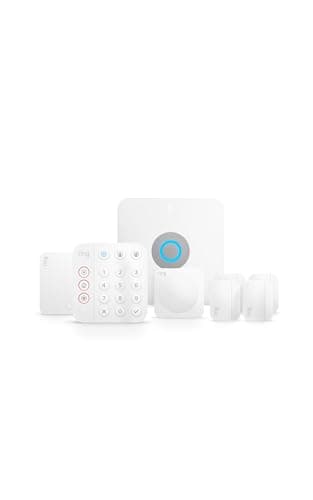
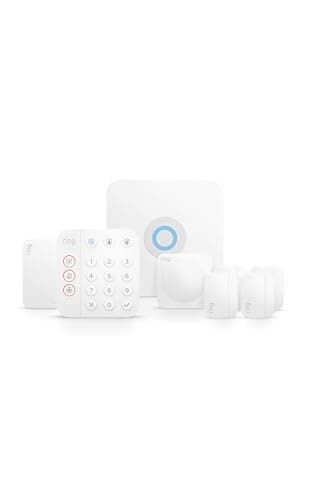
Ring sells two alarms that look like rivals and are really the same product wearing a different jacket. The Ring Alarm 8-Piece Kit is the complete do-it-yourself system most people picture - a base station, a keypad, door and window and motion sensors, and a range extender - that you set up yourself, self-monitor for free, and can add cheap 24/7 professional monitoring to whenever you like, with no contract. The Ring Alarm Pro runs the exact same alarm brain and the exact same sensors, then builds one extra thing into the base station: a full eero Wi-Fi 6 mesh router. Everything that makes the Pro sound fancier - local video storage, backup internet - flows from that router or from a paid plan. So the choice is not really "which alarm is better." It is one question: do you need a new router?
Same alarm, same sensors - one is just a router too
Start with what is identical, because it is almost everything. Both systems use the same Ring Alarm base station logic, the same contact and motion sensors, the same keypad, and the same Ring app. Both arm and disarm the same way, both push the same motion alerts to your phone, both sound the same siren, and both work with Alexa. Crucially, both offer the same deal on watching the house: you can self-monitor for free - the app tells you something tripped and you decide what to do - or add optional 24/7 professional monitoring for a low monthly fee with no long-term contract. If all you compared were the security features, there would be nothing to compare; they are the same alarm.
The one hardware difference is that the Ring Alarm Pro's base station is an eero Wi-Fi 6 mesh point. Instead of sitting next to your router and borrowing its connection, the Pro becomes your router - your home Wi-Fi runs through it, and you can expand it with more eero units like any mesh system. That single design decision is the entire reason the Pro exists, and it is the entire reason it costs more. Everything else Ring lists as a Pro advantage is downstream of that router or lives behind a subscription, which is where most of the confusion comes from. Our deeper Ring Alarm review and the matching Ring Alarm Pro review walk each unit on its own; this page is about which of the two you should hand your money to.
The router question that actually decides it
Here is the honest way to read the Pro, and it is the whole point of this comparison. The Ring Alarm Pro only makes financial sense if you were already going to buy a new router or mesh system. If your Wi-Fi is due for an upgrade - dead spots in the back bedroom, an aging box your provider gave you years ago, a house that has outgrown a single router - then the Pro is a clever two-for-one: you replace the router you needed anyway and get the alarm base station folded into the same device. In that scenario the Pro can genuinely be the smarter buy, because you are not double-paying for hardware.
But flip it around. If your current router or mesh system already covers your home well, the Pro asks you to pay for an eero you have no use for. The alarm you would get is identical to the one in the cheaper 8-Piece kit, so the premium buys you a router you would leave in a drawer - or worse, one you feel obligated to swap your working Wi-Fi for. That is money spent on a feature you did not need. For the large majority of homes whose Wi-Fi is fine, the standard Ring Alarm 8-Piece Kitis the correct pick and the Pro is a needless upgrade. Be ruthlessly honest about the state of your router before you let the Pro's spec sheet talk you into it. If you want the DIY category laid out in full, our best DIY home security systems roundup puts both Ring kits against the field.
Local video and backup internet - the plan-gated extras
The Pro's other two headline features sound like free upgrades and are not. The first is local video storage via Ring Edge: because the Pro has the horsepower and storage of a router, it can save your Ring camera and doorbell clips to a microSD card on the device instead of only to Ring's cloud. That is a real perk for anyone who prefers footage that lives at home - but it is unlocked by a paid Ring plan, not switched on out of the box. Without the plan, Ring Edge does not run, and your video behaves the same way it would on the standard kit.
The second is internet plus cellular backup. Because the Pro is your router, it can fail over to a cellular connection if your home internet drops, keeping the alarm - and, with the right plan, your Wi-Fi - online through an outage. It is a legitimately useful resilience feature, and it is the closest thing to a security reason to choose the Pro. But again, the backup behavior that matters most is tied to a subscription. So when you read the Pro's marketing, mentally sort its bullet points into two piles: "the eero router," which is real hardware you either need or you don't, and "local video and backup," which are plan features you pay for monthly on top. Neither pile changes the fact that the underlying alarm is the same as the 8-Piece kit's.
Monitoring and running cost: identical on both
People often assume the pricier system must have the pricier monitoring, and here it simply does not. Both the 8-Piece kit and the Pro give you the same two options: keep it free and self-monitor - the app alerts you and the siren does its job, and you call for help yourself - or pay a low monthly fee for 24/7 professional monitoring, where a monitoring center watches the system and can dispatch responders, with no contract locking you in. The monthly figure is the same whichever base station you own. Deciding between free self-monitoring and paid 24/7 coverage is a real decision, but it is a separate one from this comparison - we work through it in full in do you need a monitoring plan, and it applies equally to both Ring kits.
That matters because it removes the usual "but the cheaper one costs more to run" catch. It doesn't. Over three years the standard kit and the Pro cost the same to monitor; the only durable price difference between them is the up-front hardware premium for the built-in eero router. So if the router does nothing for you, that premium is pure cost with no offsetting saving down the line. If you want a system that never asks for a monthly fee at all, note that both Ring kits can run free on self-monitoring - we cover the truly plan-free options in our best no-subscription home security systems guide.
Who should buy which
Buy the Ring Alarm 8-Piece Kit if you want a complete, contract-free DIY alarm and your home Wi-Fi is already fine - which describes most homes. You get the base station, keypad, door and window and motion sensors, and a range extender; you self-monitor for free or add cheap 24/7 professional monitoring when you want it; and you skip paying for a router you did not come here to buy. It is the sensible default and our pick on this page for exactly that reason. It also slots neatly into the wider best home security systems shortlist as the DIY entry point.
Buy the Ring Alarm Proonly if you were going to replace your router or mesh system anyway. In that one situation the Pro is a smart consolidation: one device becomes your Wi-Fi and your alarm, and you can layer on local video through Ring Edge and internet-with-cellular backup by adding a plan. If a resilient connection that survives an internet outage is a priority and you are ready to route your home Wi-Fi through eero, the Pro earns its premium. Just go in clear-eyed that the alarm itself is no better than the cheaper kit's, and that the video and backup features you are picturing arrive with a monthly subscription attached.
The one-line rule: if your router needs replacing, look hard at the Pro; if it doesn't, buy the 8-Piece kit and put the difference toward sensors or a monitoring plan. Everything that makes an alarm an alarm is the same across both, so this is a networking decision dressed up as a security one. The usual honest caveat applies here as on every page: we did not install and stress-test these two systems in a lab. We read each product's own Amazon listing and Ring's documentation for its specs and the features it actually names, and compared them straight. Where a claim would have to come from hands-on testing, we say so rather than inventing it, and our full method is on the methodology page.