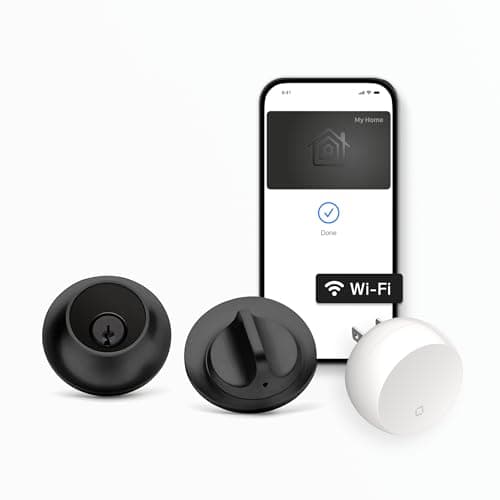
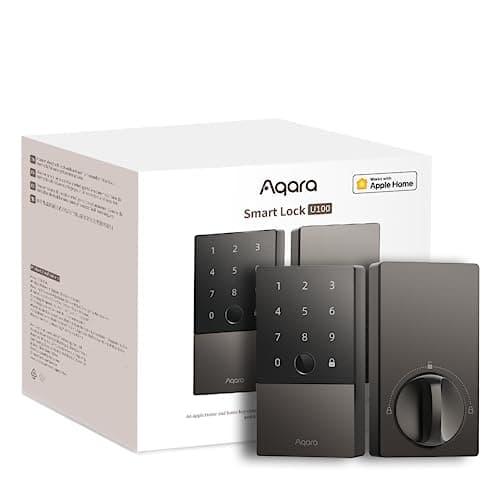
The Aqara U100 and the Level Lock+ answer the same question - "how do I tap my iPhone to open my front door without paying a monthly fee?" - and both answer it well. Both carry Apple Home Key, so an iPhone or Apple Watch opens the door with a tap, both appear in the Apple Home app via HomeKit, and neither charges a subscription for any of it. If Apple Home Key is your must-have, you cannot go wrong with either. The difference is everything around the tap: one lock loads up on ways to get in - fingerprint, keypad, code - while the other strips them all away to vanish into the door. That single choice decides the price, the daily experience and how much gear ends up on your shelf.
Both do Apple Home Key - that part is a tie
Start with the shared ground, because it is why both locks are on this page. Apple Home Key stores a secure digital key in your iPhone or Apple Watch Wallet, so you walk up, hold the phone near the lock, and it opens - no app to launch, no code to type, and it keeps working even when the phone is nearly out of battery. Both the U100 and the Level Lock+ support it, both show up in the Apple Home app via HomeKit, and both respond to Siri, all with no subscription. So for an Apple-first home the tap-to-unlock experience is effectively identical on either lock, and the decision moves entirely to the differences around it. For the wider Apple field, including the Schlage Encode Plus, our best smart locks for Apple Home roundup ranks all three together.
The core difference: fingerprint and keypad, or nothing at all
This is the sentence that decides most of the comparison. The Aqara U100 stacks a fingerprint reader on top of a touchscreen keypad, so on top of the Home Key tap you get two more ways in that need no phone at all: a family member unlocks with a thumb, and a guest punches a code. The Level Lock+ takes the exact opposite approach - it ships with no exterior keypad, because a keypad would give the game away. Almost all of its hardware lives inside the door so the lock reads as an ordinary deadbolt from both sides, and entry is by phone, an included key card, or a physical key. There is no code to hand a guest by default.
For a busy front door, that is a real, daily difference rather than a spec-sheet footnote. If people who are not you need to get in - kids without phones, a dog walker, a contractor, a relative - the U100's fingerprint and keypad do the job the moment the lock is on the door, and it is unusual to get fingerprint andHome Key at the U100's price. The Level's answer to guest access is to hand out the app or a key card, which suits a solo owner or a couple far better than a household with a rotating cast at the door. Decide who actually needs to open your door before anything else, because it is the crux here. Our guide to keypad vs fingerprint smart locks walks through how each unlock method actually feels to live with.
The hub question: an Aqara hub vs built-in Wi-Fi
The trade cuts the other way on connectivity, and this is where the Level earns its premium. The Level Lock+ has Wi-Fi built into the lock, so from the moment you install it you can lock, unlock and check status from anywhere, and Home Key and HomeKit work, with nothing else to buy. The Aqara U100 is Bluetooth on its own. On the door it does everything locally - fingerprint, keypad, Home Key tap - but for remote access from outside the house, open alerts, and voice control, it needs an Aqara hub to bridge it to your network. That is real extra hardware to buy and place within range, and it is the honest catch we lead with in the full Aqara U100 review. If you want the fuller map of which locks need a bridge and which do not, our do smart locks need a hub explainer lays it out.
Which architecture is better depends on your house. If you want the simplest path to a Home Key lock you can control from the office with zero extra boxes, the Level wins outright - it is one purchase and it is done. But if you already run Aqara gear, the hub is likely on your shelf already, the U100 slots straight into an app you use, and the objection mostly evaporates. The U100 is at its best inside an Aqara household; the Level is at its best as a standalone, self-contained lock. Be honest with yourself about which describes you.
Design, weather and the way each one looks on the door
These two could not look more different, and for some buyers that alone settles it. The Level Lock+ is built to be invisible - its listing calls it the world's smallest smart lock, and the point is that a visitor cannot tell your deadbolt is smart at all. If a clean, unbroken door is what you care about, nothing else here comes close. The Aqara U100 is the opposite: a visible, full-size keypad deadbolt that clearly announces itself, with a fingerprint pad and touchscreen on the outside. It is not trying to hide; it is trying to give everyone a way in.
The U100's counter is weatherproofing. It carries an IP65 rating, which is worth having on an exposed front or side door that takes direct sun and driving rain - the Level listing does not headline a comparable rating, so for a fully exposed door the Aqara is the safer bet on the elements. So the design call is really two questions at once: do you want the lock to disappear, or to be obvious and give everyone a code - and does your door see enough weather that an IP65 body matters.
Price and value
Price is not close. The Aqara U100 is the more affordable lock by a wide margin, and the buy buttons on this page show the live figure for each. Even once you add an Aqara hub for remote access, the U100-plus-hub total typically still lands well under the Level's sticker price - and you get a fingerprint reader and a keypad the Level does not have. That is the honest value picture: the Level is not overpriced for what it is, but what it is happens to be a niche, premium object - the hidden design and the built-in Wi-Fi are the whole reason it costs what it does.
Frame the comparison like for like. If you need remote access and do not already own an Aqara hub, compare U100-plus-hubagainst the Level alone; if you only care about local entry at the door, compare the two locks straight and the U100's advantage widens. Either way, the U100 is the value pick, and the Level asks you to pay a premium specifically to make the lock disappear and to skip the hub. Whether that is worth it is a taste-and-priorities question, not a better-lock-for-the-money one.
Who should buy which
Buy the Aqara U100 if you want the most ways in for the least money and still keep Apple Home Key: fingerprint, keypad and tap-to-unlock, an IP65 body, and Apple, Alexa, Google and IFTTT support, as long as you already run Aqara or do not mind adding a hub for remote access. For most front doors - especially ones where family and guests need to get in without your phone - it is the more practical and far more affordable lock, which is why it is our pick here.
Buy the Level Lock+if the single most important thing is that the lock not look like a smart lock, and you want built-in Wi-Fi remote with no hub at all. It delivers Apple Home Key and the broadest platform list in a package that hides in the door, at the cost of the keypad and a higher price. The one-line rule: pick the Aqara if "most ways in for the least money" matters most, and the Level if "invisible, and no extra box" matters most. Both keep Apple Home Key and skip the subscription, so whichever fits your house, the front door gets a lot smarter without a monthly bill. If you are still weighing the format, our best smart deadbolts roundup puts both against the wider full-replacement field.
The usual honest caveat: we did not install and cycle these two locks in a lab. We read each lock's own Amazon listing and manufacturer documentation for its specs, radios and the ecosystems it names, and compared them straight, crediting nothing a listing does not claim. Where a judgment would need hands-on testing, we say so; the full method is on the methodology page.