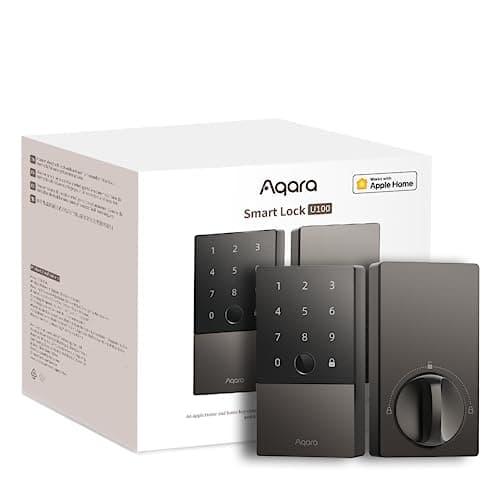
Most smart deadbolts ask you to pick a lane: a keypad for codes, a phone tap for convenience, or a key for backup. The Aqara U100 refuses to choose. It puts a fingerprint reader, a full touchscreen keypad and Apple Home Key tap-to-unlock into a single IP65 weatherproof body, names Apple HomeKit, Alexa, Google and IFTTT on its listing, and charges no monthly fee for any of it. That is a lot of lock. The honest catch is not a missing feature - it is an architecture decision: the U100 speaks Bluetooth on its own, so the remote access and voice control most people expect from a smart lock run through an Aqara hub rather than built-in Wi-Fi. This review is about where that trade is worth it and where it is not.
Three genuinely different ways through the door
The headline reason to look at the U100 is that it gives every kind of household member a way in that suits them. A fingerprint reader sits on the exterior escutcheon, so an adult can unlock the door with a thumb in the time it takes to reach for it - no phone, no code, nothing to remember. Above or beside it is a full touchscreen keypad, which is what you hand to a house cleaner, a dog walker or a teenager who does not carry a phone: a code they type, that you can change whenever you like. And for an iPhone or Apple Watch, Apple Home Key adds a digital key to the Wallet so you tap the phone against the lock and walk in, with nothing to launch.
Three entry methods on one lock matters more in daily life than it sounds on a spec sheet. The most common smart-lock frustration is a single point of failure - a dead phone battery, a forgotten code, a guest who cannot use your app. The U100 spreads that risk across three independent mechanisms, so someone in the household almost always has a way in that is working. For a busy front door with a mix of ages and habits, that redundancy is the whole argument, and it is the reason this lock earns its award as our best fingerprint pick. If a fingerprint reader is the specific feature drawing you in, the U100 is the most complete way to get one alongside a keypad and Home Key rather than instead of them.
IP65 means it can live on an exposed door
Plenty of smart locks are quietly happier on a sheltered door than an exposed one, and their listings stay quiet about it. The U100 does not: it carries an IP65 rating, which is the manufacturer's own claim that the exterior hardware is built to shrug off dust and low-pressure water from any direction. In plain terms, that is a lock specified for a front door that catches afternoon sun and driving rain, a side gate, or a cabin door with no porch over it - the places where a lesser lock's keypad or fingerprint sensor is the first thing to get temperamental.
That weather rating is a real differentiator, not a marketing throwaway, because the two features the U100 leans on hardest - a capacitive fingerprint reader and a touchscreen - are exactly the parts that an exposed door punishes. Pairing them with an IP65 body is the sensible engineering answer. If your door is fully sheltered the rating is a nice-to-have, but if it is out in the weather it moves the U100 from "might struggle" to "specified for the job." It is the same reason the U100 shows up whenever we talk about exposed or exterior doors across the best smart deadbolts we cover.
A broad ecosystem list - with one asterisk
On paper the U100 has one of the broadest ecosystem lists of any lock we cover: its listing names Apple HomeKit, Amazon Alexa, Google and IFTTT. HomeKit puts the lock in the Apple Home app so you can see its status, control it with Siri and fold it into automations; Apple Home Key is the tap-to-unlock layer on top. Alexa and Google add voice control from those assistants, and IFTTT opens up rule-based automations with other services. For a household that has not fully committed to one platform, that breadth is reassuring - the lock is unlikely to be the thing that boxes you in.
The asterisk is important, and it is the reason this is genuinely an Apple-household lock first. Apple Home Key and HomeKit work over the local Bluetooth and, for Home Key specifically, the phone's own hardware, so an iPhone can tap-to-unlock at the door without anything extra. Alexa, Google and remote control, by contrast, need the lock to reach the internet - and that is where the hub comes in. So while the listed ecosystem is wide, the amount you get without adding hardware is widest for an Apple user standing at their own door. To see how HomeKit, Home Key, hubs and Matter actually fit together before you commit, our smart lock ecosystem compatibility guide is the deeper explainer behind this shortlist.
The honest catch: it is Bluetooth, and the hub is not optional
Here is the single most important thing to understand before you buy. The U100 is a Bluetooth lock. On its own, it talks to a phone that is physically near it, which is enough for Apple Home Key at the door, for the fingerprint reader and keypad, and for setup - but it is not enough to reach it from work, to get a "door unlocked" alert while you are out, or to control it by voice. For all of that, the U100 relies on an Aqara hub sitting on your network, which bridges the lock's Bluetooth to the internet. The lock does its core job locally, but the remote half of what most people mean by "smart lock" lives behind that hub.
This is a real cost and a real point of friction, and it deserves to be stated plainly rather than buried. A hub is another box to buy, another thing to power and place within range, and another component that can go wrong. Compare that with a lock that has Wi-Fi built into the deadbolt and does remote access straight out of the box with nothing else on the shelf. If you want the simplest possible setup, that built-in-Wi-Fi approach is the cleaner path, and it is exactly what the Kwikset Halo and the locks on our best smart locks overalllist offer. The flip side is that the U100's local Bluetooth entry keeps working even if your internet drops - the door still opens on a fingerprint, a code or a tap - which is the reassuring answer to the worry we unpack in the do smart locks work without Wi-Fi guide. You just lose the remote half until the connection is back.
It is at its best inside the Aqara app
The other thing to know is that the U100 is a deeper, more configurable lock than most, and it shows its best face inside the Aqara app and the wider Aqara ecosystem. If you already run Aqara sensors, an Aqara hub or Aqara automations, the U100 slots straight in - the hub it needs is very likely already on your shelf, the app is already on your phone, and the lock becomes one more node in a system you understand. For that household, the "needs a hub" catch nearly evaporates, and you get a feature-dense weatherproof lock for the price of the lock alone.
For a first-time buyer coming in cold, the picture is different. You are learning the Aqara app, buying and placing a hub, and taking on a system that rewards tinkering more than it hides it. That is not a criticism of the lock - it is a statement about fit. The U100 is at its happiest as part of an Aqara setup, and merely fine as a standalone first purchase. Being honest about that is more useful than pretending every lock suits every buyer equally; this one has a clear home, and it is an Apple household that either already runs Aqara or is happy to start.
No Matter on the listing
A note for anyone future-proofing: the U100's listing does not claim Matter, so we mark it "No Matter" and do not credit it with support it does not name. Its smart-home footprint today is Apple HomeKit and Apple Home Key, plus Alexa, Google and IFTTT through the hub. Matter for locks is real and growing, but this specific lock is not part of it on the date we read the listing. Home Key does not depend on Matter, so for an Apple household this is not a gap you will feel day to day - but if cross-ecosystem Matter support is on your must-have list, confirm the exact model and firmware before you buy, because this is not the lock that promises it.
The verdict
The Aqara U100 earns its award as our best fingerprint lock because nothing else we cover gives you a fingerprint reader, a keypad and Apple Home Key in one weatherproof body with no subscription. For an Apple household - especially one that already runs Aqara, or is happy to add the hub - it is a genuinely generous lock: three ways in, IP65 durability for an exposed door, and a broad ecosystem list. The trade you are accepting is clear and worth repeating: it is Bluetooth locally, so remote access and voice want an Aqara hub, and it is deepest inside its own app. If a hub is a dealbreaker, or you want the plainest no-hub setup, a built-in Wi-Fi lock is the better call. But if the fingerprint-plus-Home-Key combination is what you are here for, the U100 is the most complete way to get it. It also sits on our best smart locks for Apple Home list, ranked against the other Home Key options, if you want to see how it compares before deciding.
The two locks people weigh this one against
Both are full-replacement keypad deadbolts with Apple support, and the differences are in the fingerprint reader and the Wi-Fi arrangement: Aqara U100 vs Schlage Encode Plus and Aqara U100 vs Yale Assure Lock 2.