A Wi-Fi smart lock is one that talks to your home network by itself, so you can lock the door, unlock it for a guest and get an alert when it opens from anywhere - with no separate hub, bridge or dongle plugged in elsewhere in the house. That last part is the whole point of this page. Plenty of good locks reach the internet only through a bridge you have to buy, power and hide; the three here put the Wi-Fi radio inside the lock itself, so what you buy is what you install.
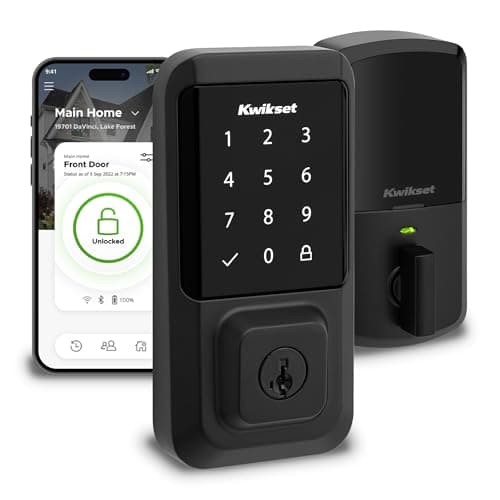
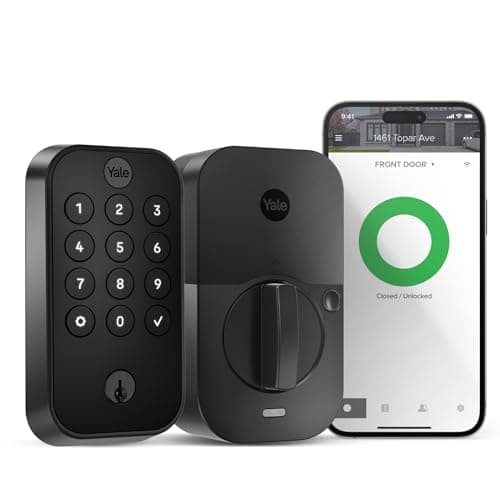
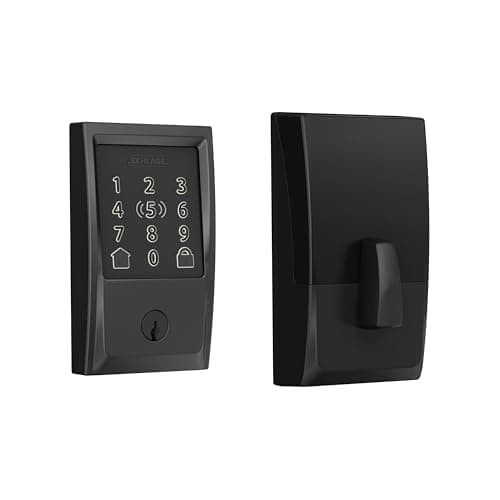
We rank them on the same thing that decides every lock: whether they fit the phone and the voice assistant you already own. The Schlage Encode Plus is the most complete, adding Apple HomeKit and Apple Home Key to its built-in Wi-Fi. The Kwikset Halois the value pick whose listing literally says "No Hub." The Yale Assure Lock 2 gets its Wi-Fi through a connected keypad rather than a bridge, and keeps a physical key. The matrix below shows exactly what each one names.
What built-in Wi-Fi actually buys you
The payoff is simplicity and cost. A lock with Wi-Fi built in needs nothing else to reach the internet: you install the lock, join it to your network, and remote lock, unlock and activity alerts just work. There is no bridge to buy on top of the lock, no second device to find an outlet for, and no extra box for the family to unplug by accident. Compare that with a Bluetooth-only lock - excellent locks in their own right - which needs a plugged-in bridge somewhere central to be reachable when you are away. If you want one purchase that does the whole job, built-in Wi-Fi is the answer, and all three picks here deliver it (the Yale through its connected keypad rather than a separate bridge).
The honest tradeoff: battery life
Here is the part most Wi-Fi lock roundups skip. Built-in Wi-Fi is convenient precisely because the lock is now doing the networking itself - and a Wi-Fi radio is thirstier than the low-power Bluetooth or Thread radios in other locks. That means a Wi-Fi lock generally goes through batteries faster, and how it manages that radio (checking in periodically versus staying awake) makes a real difference to how often you are swapping cells. It is not a reason to avoid Wi-Fi locks - it is a reason to expect a shorter battery interval and to keep spares. Every lock here warns you well before it dies and keeps a code or key backup so a flat battery never locks you out, but you should go in clear-eyed. Our full explainer on smart lock battery life covers the drain, the low-battery warnings and the jump-terminal and keyway backups in plain terms - read it before you buy a Wi-Fi lock, not after.
When a Wi-Fi lock is the wrong choice
Built-in Wi-Fi is not automatically the right answer, and it is fair to say when to skip it. If your front door sits far from the router and the signal is weak out there, a lock straining to hold a Wi-Fi connection will disappoint and drain faster - a mesh point near the door, or a Bluetooth lock with a well-placed bridge, may serve you better. If you rarely need to control the lock from away and mostly want a keypad for the family, you are paying for a radio you will barely use, and the longest battery life generally belongs to low-power Bluetooth or Thread locks, not Wi-Fi ones. Weigh your actual habits against the battery tradeoff before you commit - the convenience is real, but so is the cost, and it is not the same call for every door.
Which Wi-Fi lock fits your ecosystem
Built-in Wi-Fi gets the lock online; your ecosystem decides which one to buy. If you live in Apple Home and want to tap an iPhone or Apple Watch to unlock, only the Schlage Encode Plus here names Apple HomeKit and Apple Home Key - it is the clear top pick for an Apple household. If you are on Alexa and want to spend less, the Kwikset Halo is the value deadbolt, though its listing names neither Apple nor Google, so treat it as an app-and-Alexa lock. If Google Home is your hub, the Yale Assure Lock 2 names both Alexa and Google and keeps a physical key as backup. None of these listings names Matter, so we do not claim it for them; if future-proofing around Matter matters to you, read our ecosystem compatibility guideand confirm the exact model and firmware first. As always, every spec and every matrix cell comes from each lock's own listing read on the date shown - where a maker does not name a platform, we mark it "Not listed" rather than guess, and the whole method is on our methodology page.
Built-in Wi-Fi versus a bridge - what you are really choosing
The distinction that decides this purchase is where the internet connection lives. A built-in-Wi-Fi lock, like all three here, carries the radio inside the lock body (or, for the Yale, inside the connected keypad), so there is nothing else to buy or place. A bridge-based lock keeps the lock itself on low-power Bluetooth and relies on a separate plugged-in bridge to reach the network - cheaper on batteries, but one more device to buy, power and position within range. Neither approach is wrong, but they are different purchases. If you value one box that does everything and you do not mind swapping batteries a bit more often, built-in Wi-Fi is the simpler life, and this page is your shortlist.
Plan for the battery interval before you install
Because the Wi-Fi radio is the thing draining the cells, the smartest move before you install a Wi-Fi lock is to plan for the swap rather than be surprised by it. Buy a spare set of the exact batteries the lock takes, turn on low-battery notifications in the app, and know where the backup entry is - the Schlage and Kwikset use their keypad and app, and the Yale keeps a physical keyed cylinder. What actually happens as the battery fades, and what still works when it is flat, is laid out in our guide on smart locks without power. And if the network itself drops, the local functions that keep working - keypad codes, the key, Bluetooth at the door - are covered in do smart locks work without Wi-Fi.
Then pick on ecosystem and backup
With the Wi-Fi and battery questions settled, the choice comes down to two things: your ecosystem and whether you want a physical key. Apple households should buy the Schlage Encode Plus for HomeKit and Apple Home Key. Alexa households watching the budget should look at the Kwikset Halo. Google households, or anyone who wants a real keyed backup alongside codes and remote access, should choose the Yale Assure Lock 2. If you want to see these Wi-Fi picks next to the retrofit and fingerprint options too, our full best smart locks roundup puts the whole field in one place.