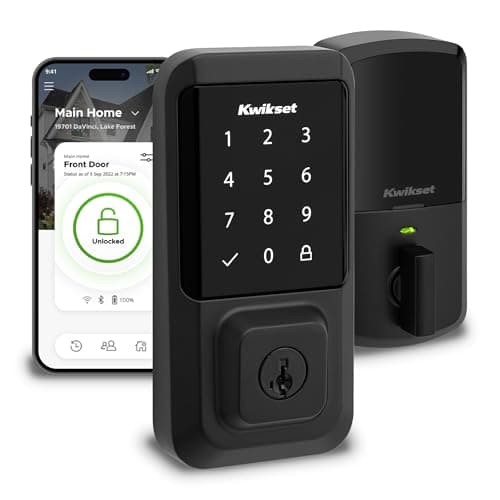
Most smart-lock buying goes wrong in the same place: people over-buy. They chase a lock with every ecosystem, every radio and every future-proofing badge, then spend a weekend fighting a hub and an app for features they never use. The Kwikset Halo is the antidote. It is a touchscreen-keypad deadbolt with Wi-Fi built into the lock itself, so there is nothing else to buy - no hub, no bridge, no monthly plan. It names Amazon Alexa and Google, it is Grade AAA and UL listed for genuine physical security, and it installs easily. This review is about why that focused simplicity is exactly right for a lot of homes, and about the two honest limits - Apple and Matter - that decide whether it is right for yours.
Built-in Wi-Fi is the whole point
The single most important spec on the Halo is that the Wi-Fi radio lives inside the deadbolt. That sounds small; it changes everything about living with the lock. It means the day you install it, you can lock and unlock the door from your phone anywhere, check whether you left it open, and set or delete entry codes remotely - with nothing else on your shelf. There is no separate hub to power, position within range, and keep alive. There is no bridge that becomes the thing that fails at the worst moment. You buy one box, you fit one box, and the smart half of the lock simply works.
It is worth appreciating how much friction that removes, because the alternative is common. A lot of capable locks - including one of our favorites, the Aqara U100 - are Bluetooth on their own and lean on a hub for remote access, which is more hardware, more setup, and one more point of failure per door. The Halo skips all of it. For a household that wants remote control and shared codes without becoming a part-time network administrator, built-in Wi-Fi with no hub is the feature that matters most, and it is why the Halo is the lock we point simplicity-first buyers toward on the best smart locks overall list.
The physical-security credentials are real, not marketing
It is easy to get so absorbed in apps and ecosystems that you forget a smart lock is still a lock - a piece of physical security that has to resist someone trying to force it. This is where the Halo quietly separates itself. Its listing claims a BHMA Grade AAA rating and a UL listing, and those are not decorative. Grade AAA is the top residential tier for the qualities that matter on a real door - security, durability and finish under repeated use - and a UL listing speaks to independently assessed safety standards. Plenty of smart locks talk endlessly about voice assistants and say very little about how well the deadbolt itself holds up.
For a front door, that reassurance is worth as much as any app feature. You are trusting this hardware to hold when someone leans on it, to keep working through years of daily use, and to still throw a solid bolt after ten thousand cycles. The Halo's credentials say it is built for that job, and that is a big part of why it turns up whenever we talk about serious hardware in the best smart deadbolts roundup. A smart lock that is weak as a lock is a bad trade no matter how clever its app is; the Halo does not ask you to make it.
A keypad anyone can use, and an easy install
The Halo is a full touchscreen-keypad deadbolt, and the keypad does more work than people expect. It is the answer to every "how do I let them in" problem that does not involve your phone: a code for a house cleaner, a temporary code for a contractor, a permanent one for a kid who does not carry a phone. Because codes are managed in the app over the built-in Wi-Fi, you can add or revoke them from anywhere, which makes the Halo a genuinely practical lock for a busy household - or, for that matter, for a host running codes on a rental, which is why it appears on our best smart locks for Airbnb list too.
Installation is the other place the Halo earns its keep. Kwikset's listing calls out an easy install, and in practice a keypad deadbolt like this is a screwdriver-and-an-afternoon job for most standard doors: you remove the old deadbolt and fit the new one in the same prep. There is no hub to onboard onto the network separately - the lock joins your Wi-Fi directly in the app. For someone who wants to be done in an evening rather than troubleshooting a bridge, that straightforwardness is part of the appeal, and it fits the Halo's whole personality: a lock that does not make you work for it.
The first honest catch: no Apple
Now the limits, stated plainly, because they decide who should buy this lock. The Halo names Alexa and Google - and only those. It does not do Apple HomeKit, and it does not do Apple Home Key. That means it will not appear in the Apple Home app, you will not control it with Siri, and you cannot tap an iPhone or Apple Watch against it to unlock. If you live in Apple Home, this is not the lock for you, and no amount of the Halo's other strengths changes that - the integration simply is not there.
This is not a knock on the Halo so much as a matter of fit. For an Alexa or Google household - which is a very large share of homes - losing Apple costs nothing, because you were never going to use it. For an iPhone-first home that wants the lock in Apple Home and tap-to-unlock, it is a hard stop, and you should look at a Home Key lock instead. Our best smart locks for Apple Home page is built for exactly that household. Knowing which side of that line you are on is most of the decision.
The second honest catch: no Matter, so not future-proof
The other limit is about tomorrow rather than today. The Halo's listing does not claim Matter, so we mark it "No Matter" and do not credit it with support it does not name. Matter is the emerging cross-ecosystem standard that is meant to let one device work across Apple, Alexa, Google and SmartThings without per-platform integrations. A Matter lock is a hedge against changing your smart-home setup later. The Halo is not that hedge: it is a plain Alexa/Google lock, and if you switch ecosystems down the road, its ties may not follow you.
Whether that matters depends entirely on you. If you are settled on Alexa or Google and expect to stay there, "no Matter" is an abstraction that will never touch your day - the lock does everything you need through the assistants you already use. If you are the kind of buyer who wants every new device to be as ecosystem-agnostic as possible, the Halo is not it, and you should weigh a Matter-capable lock instead. To understand what the standard actually buys you before you decide it is a dealbreaker, our smart lock ecosystem compatibility guide lays out how Matter, HomeKit and the assistants relate.
Who the Halo is for, and who should skip it
It helps to say plainly who this lock suits, because the Halo is a deliberately focused product rather than a do-everything one. It is for the household that runs Alexa or Google, wants a keypad deadbolt with remote access, and would rather not manage a hub, a bridge or a subscription. That describes a very large number of homes - people who want the smart-lock basics done reliably and are not chasing an ecosystem badge. For them, the Halo is close to ideal: fit it, add it to the app, share a code, and get on with life. The absence of exotic features is not a shortcoming here; it is the reason the lock is so easy to live with.
It is not for two groups, and both are easy to identify in advance. The first is the Apple household that wants the lock in Apple Home or expects to tap an iPhone to unlock - the Halo simply does not do that, so a Home Key lock is the right call instead. The second is the future-proofer who wants every device to be Matter-ready and ecosystem-agnostic - the Halo is a committed Alexa/Google lock, not a hedge. If you are in neither group, its simplicity is a feature, not a compromise; if you are in either, one of the other locks on our best smart locks list will fit you better.
The verdict
The Kwikset Halo earns its award as our best no-hub Wi-Fi lock because it nails the thing most buyers actually want and skips the things they do not. Wi-Fi in the deadbolt means remote control and shared codes with no hub and no plan; Grade AAA and UL listing mean the lock is strong where it counts; the keypad and easy install mean anyone in the house can use it and you can fit it in an evening. The two catches are real and easy to check against yourself: it is not for an Apple household, and it is not a future-proof Matter lock. But for an Alexa or Google home that wants a dependable, uncomplicated keypad deadbolt with nothing extra to manage, it is one of the easiest recommendations we make. If reliable offline entry is a worry, our do smart locks work without Wi-Fi guide covers what the Halo still does on the keypad when the connection drops, and if Google is your platform, the best smart locks for Google Home page ranks the Halo against its rivals there.
The two locks to weigh it against
Against August, the question is whether you replace the deadbolt or keep it — Kwikset Halo vs August. Against Level, it is a conventional keypad escutcheon against an in-door design that fits tight trim — Level Lock+ vs Kwikset Halo.