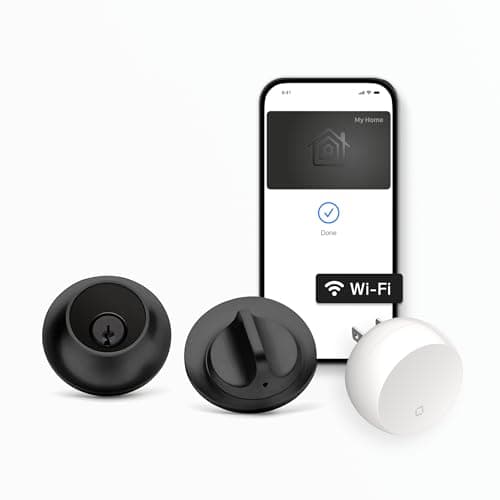
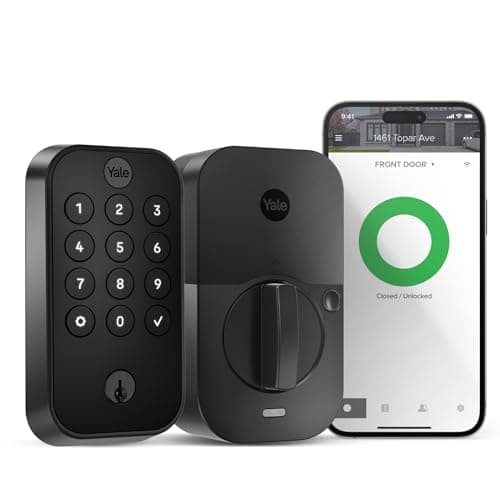
The Yale Assure Lock 2 and the Level Lock+ are both full-replacement deadbolts - you remove your old lock and fit the new one either way - and neither charges a subscription, so the running cost after purchase is zero for both. On paper they sound like the same purchase. In practice they are opposites in the one way you notice every single day: what shows on the door. The Yale wears a touchscreen keypad out front and keeps an optional keyed backup; the Level hides the entire lock inside the door and ships with no keypad at all. A keypad for guests versus an invisible design is the core trade, and it should decide which one you install.
The one difference that decides it: a visible keypad vs an invisible lock
The Yale Assure Lock 2 is a touchscreen-keypad deadbolt. It looks like a smart lock and acts like one: an illuminated keypad sits on the exterior face, so anyone you give a code to - a guest, a cleaner, a kid without a phone - can punch it in and walk in. It is built on a swappable-module system, and in the configuration we are comparing it ships with the Wi-Fi module for remote access and voice control. You can also choose a version with a keyed backup, so a physical key remains a fallback. That keypad is the whole point: the lock does not depend on everyone at the door owning the right phone.
The Level Lock+ takes the opposite approach and hides. Nearly all of its smart hardware lives insidethe door bore, so from either side it reads as an ordinary deadbolt - there is no keypad, no glowing panel, nothing that says "smart lock" to a passerby. By default it ships withoutan exterior keypad, and entry is by phone (Apple Home Key or the Level app), a key card, or a traditional key. Its advantage is pure discretion, and it adds a feature the Yale's Wi-Fi configuration does not name: Apple Home Key, so you tap an iPhone or Apple Watch to open it.
The catch is the mirror image of each strength. The Yale cannot disappear - a keypad deadbolt announces itself, and that is the trade for guest codes and a keyed backup. The Level cannot take a code at the door out of the box - the clean, hidden look is the trade for leaving the keypad off. Neither is "better" in the abstract. A keypad plus a keyed backup is the safer default for a home that shares access; an invisible, Apple Home Key lock is the better tool when a discreet door and an iPhone tap matter more than code-based entry.
Guest access and backups: where the Yale earns its keep
The abstract choice gets concrete the moment someone who isn't you needs to get through the door. Picture the usual cast: a dog-walker at 1pm, a cleaner every other Friday, a teenager who left their phone at school, a relative staying for the weekend. With the Yale Assure Lock 2 you hand each of them a code and you never have to be home, cut a key, or leave one under the mat. And if you choose the keyed-backup version, a physical key still works when a battery dies or the app is having a bad day - a second offline way in that a code-on-the-lock design keeps working even when the network does not. That combination is the single most-cited reason people buy a keypad deadbolt.
The Level Lock+ can absolutely give guests access too, but it asks you to plan ahead. Because there is no keypad on the door by default, an authorized visitor needs one of the other keys to the kingdom: the Level app on their phone, a key card you have handed over, or an old-fashioned physical key. For a couple who mostly let themselves in and rarely have visitors, that is a non-issue. For a home with a revolving door of helpers, it is friction the Yale simply does not have. If code-and-fingerprint entry is a priority for you, our keypad vs fingerprint smart locks guide is worth a read, and the best keypad smart locks roundup ranks the Yale against the other code-driven options.
Ecosystem: Apple Home Key vs Alexa and Google
This is the second real difference, and it favors the Level for Apple homes. The Level Lock+ listing names Apple, Alexa and Google, and adds Apple Home Key, so an iPhone household gets tap-to-unlock and the widest platform coverage of the two. The Yale Assure Lock 2, in the Wi-Fi configuration we are comparing, names Alexa and Google through its Wi-Fi module - great for a Google home, which not every lock covers - but it does not name Apple HomeKit or Apple Home Key. Neither lock claims Matter.
So the ecosystem story is short: the Level is the one for Apple households or for the broadest platform list, and the Yale is a solid Alexa-and-Google lock that happens to skip the Apple side. We report only the platforms a listing actually names and mark the rest "Not listed" rather than assume them - the matrix below is that discipline applied. For the fuller explainer on what each platform does for a lock, our smart lock ecosystem compatibility guide is the piece behind the table, and if your home is firmly Apple, the best smart locks for Apple Home roundup ranks the Level for iPhone households.
Install and living with each one
Both are full-replacement deadbolts, so you remove your existing deadbolt and fit the new lock - a standard screwdriver job rather than a locksmith call. The Yale's keypad face is the familiar, well-documented install most people picture when they think of a smart deadbolt, and because remote features hang on the Wi-Fi module, it is worth confirming that module is in the version you buy. The Level, by design, keeps a normal keyway on the exterior precisely so the door still looks and works like a traditional lock, with the smarts tucked away. If you want the step-by-step for either before you buy, our how to install a smart lockguide walks through checking your door's backset and thickness first.
Day to day, the difference you feel is who is at the door. If it is mostly you and other phone owners, both are effortless - walk up, tap or code, in. The moment someone withoutthe right phone needs to get in on their own, the Yale's keypad earns its keep, and its optional keyed backup gives you one more offline way in; the Level asks you to have handed out a key card or a physical key in advance. Neither lock charges a fee for any of this, which is worth underlining: whatever you spend is the hardware and nothing more. What still works when the internet drops is covered in our guide on whether smart locks work without Wi-Fi.
Who should buy which
Buy the Yale Assure Lock 2 if you want people to let themselves in with a code and you want a physical key as a fallback. A household with cleaners, dog-walkers, teenagers or a steady stream of guests gets the most from the touchscreen keypad, the optional keyed backup adds a reassuring offline route, and the Wi-Fi module covers Alexa and Google. It is the more universally practical everyday lock for a door a lot of different people use, and it is our pick here for that reason - though it is genuinely buyer-dependent, so read the next paragraph before you decide.
Buy the Level Lock+ if you want a smart lock nobody can tell is smart, or if you live in the Apple ecosystem. If a clean, traditional-looking door matters to you - a period home, an HOA-sensitive frontage, or just a preference for hardware that does not advertise itself - the Level is unmatched, and it is the only one of the two with Apple Home Key and the broadest platform list. Go in knowing the trade: no keypad by default, so plan to unlock by phone, key card or key, and be ready to pay a premium for hardware you deliberately cannot see.
If you want a one-line rule of thumb: the more different people use your door - and the more you value a keyed backup - the more the Yale's keypad earns its keep; the more you care about how the door looksor about Apple Home Key, the more the Level's hidden design earns its price. Everything else is close enough to call a tie: both are full-replacement deadbolts, both skip a hub for their core features, and neither ever bills you. For the wider view, both sit in our best smart locks roundup, and each has a dedicated review (Yale / Level).
The usual honest caveat applies, the same one on every page here: we did not install and stress-test these two locks in a lab. We read each lock's own Amazon listing and manufacturer documentation for its specs and the ecosystems it actually names, and compared them straight. Where a claim would have to come from hands-on testing, we say so rather than inventing it. Our full method is on the methodology page.