The filter on this page is power, and only power. Every doorbell here runs on a rechargeable battery, which means you can mount one on a door that has no doorbell wiring behind it at all - a back door, a side gate, a garden studio, an older home that never had a low-voltage transformer. If your problem is "there is no wire where I want a doorbell," this is the list that solves it. Nothing here needs an electrician, and nothing here needs an existing chime circuit.
It is worth being clear about how this differs from two neighboring lists, because the three get confused constantly. Our best video doorbells for apartments list is filtered on install - no drilling, no-damage mounting, HOA-friendly and landlord-friendly hardware a renter can put up and take down. Our best no-subscription video doorbells list is filtered on fee - doorbells that record locally so you never pay a monthly bill. This list is filtered on power. Plenty of doorbells overlap all three, but the question each page answers is different: apartments asks "can a renter mount it," no-subscription asks "will it cost me monthly," and this page asks "will it run with no wire." Start here when the deciding factor is that there is nowhere to plug the doorbell in.
A quick word on what "battery" buys and costs you. The upside is placement freedom: you screw the mount to the doorframe, clip the doorbell on, and it works, wire or no wire. The cost is a recharge every few months - how often depends on how busy the door is and how cold the weather gets, since batteries drain faster in the cold. Three of these four (the Ring, eufy and Nest) can also be hardwired to existing doorbell terminals if you happen to have them, which keeps the battery topped up so you never think about it. But you never need the wiring; that is the whole point of the category.
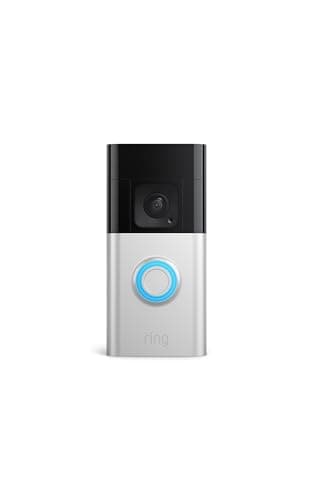
Our top pick: Ring Battery Doorbell Plus
For most homes the Ring Battery Doorbell Plus is the safe first choice, and it is the obvious one if your house already runs on Alexa. It shoots a tall Head-to-Toe HD+ view, so you see a visitor from face to feet and a parcel on the step stays in the frame rather than getting cropped off the bottom. The app is the tidiest of this group, and viewing on an Echo Show is native and effortless - a doorbell press pops the live view onto the display with nothing to configure. Its removable battery pack is a small but genuine convenience: you slide the battery out to charge it and leave the doorbell on the wall, rather than unmounting the whole unit.
The honest catch is storage. Ring records to the cloud, and saving or replaying your clips needs a paid Ring Home plan - there is no local card, so there is no fee-free way to keep your history. For a household already comfortable in the Ring and Alexa world, that fee buys a polished experience and is the price of entry many people happily pay. For a household that refuses a recurring bill on principle, it is the reason to look one row down. It is still our top pick here because for the largest share of buyers - Alexa homes that want the smoothest experience - it is simply the most trouble-free battery doorbell to live with.
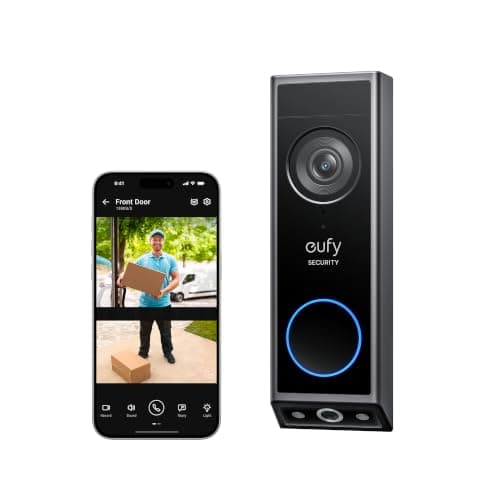
The no-fee pick: eufy Video Doorbell E340
If your line in the sand is "never a monthly fee," the eufy Video Doorbell E340 is the battery doorbell to buy, and it does not feel like a compromise to get there. It records to 8GB of built-in storage that costs nothing, so your events are saved locally with no plan attached. It shoots a tall 2K Head-to-Toe view, has color night vision and two-way talk, and - the standout - carries a second camera pointed straight down at the step. That downward lens watches for parcels a single face-height camera would crop out of frame, so if package theft is your reason for buying, the eufy sees the delivery the others miss.
The trade for fee-free ownership is that history is bounded by that 8GB: on a busy door, older clips eventually roll off unless you manage them, where a cloud doorbell just keeps everything for as long as you pay. You also live in the eufy app, with Alexa and Google support for voice and viewing but no Matter and no HomeKit. For anyone whose top priority is never paying a bill, those are easy trades - which is why the eufy also leads our no-subscription list.
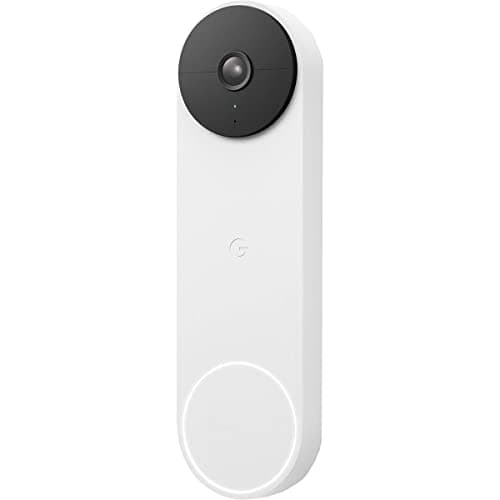
The Google pick: Nest Doorbell (battery)
In a Google home, the Nest Doorbell (battery) is the natural fit. Its headline is genuinely useful and, unusually, free: on-device AI that tells a person from a package, an animal or a vehicle without a plan, so your alerts mean something out of the box. It shoots a tall 3:4 view that shows a caller head to toe, runs on a rechargeable battery or hardwired, and slots cleanly into Google Home - a ring shows up on your Nest and Google displays with no fuss.
The catch is the free history. Nest gives you only about three hours of free event history, which is enough to catch up on a recent ring but not to keep a real record - for a longer history you move up to a Google Home Premium plan, the priciest recurring fee in this group if you want full coverage. So the Nest is at its best when you are already invested in Google and either happy with that short free window or willing to pay for the plan. If you are torn between the two big ecosystems, our Ring vs Nest doorbell comparison settles the Alexa-versus-Google question directly.
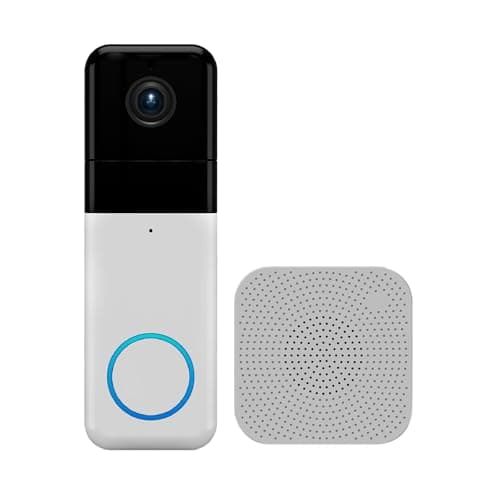
The budget pick: Wyze Video Doorbell Pro
When price leads, the Wyze Video Doorbell Prois the most doorbell for the least money. It shoots a sharp 1440 HD image in a square 1:1 shape that shows a caller and the doorstep together, includes a plug-in chime in the box, and records to a microSD card for free. It is wireless on a rechargeable battery, so like the rest of this list it mounts on a door with no wiring. The honest catches are the ones you would expect at the price: you supply and insert the card, the smartest AI alerts want the optional Cam Plus plan, and Wyze's past security incidents mean you should treat a unique password and two-factor authentication as mandatory. For a tinkerer on a tight budget, none of that undercuts the core value - free local recording on a wireless doorbell for very little money.
How to choose between them
The decision is not really about picture quality - all four show you who is at the door clearly enough. It is about two things: which ecosystem you already live in, and whether you will pay a monthly fee. If you run Alexa and want the smoothest experience, the Ring is the pick and the fee is the cost of that polish. If you run Google, the Nest slots in and gives you free smart AI, with a plan only if you want a longer history. If you refuse a recurring bill, the eufy keeps everything local for free and even watches the step for parcels. And if price is the whole conversation, the Wyze does the job for the least money. Every one of these runs with no wire, so power is never the thing that decides it - your ecosystem and your fee tolerance are. For the wider view including wired doorbells, see our best video doorbells roundup.
The usual honest caveat, the same one on every page here: we do not run a doorbell lab. We built this list from each doorbell's own Amazon listing and manufacturer documentation, recorded only the features each one actually names, and marked anything a listing left unsaid rather than assuming it. This is a researched roundup, not a hands-on test.
Start with the wire you don't have
The reason to be on this page is that there is no doorbell wiring where you want a doorbell, or you would simply rather not deal with it. That is the whole filter. A battery doorbell mounts to the doorframe and runs off a rechargeable pack, so a back door, a gate post, a garden office or an older home with no transformer all become fair game. If you are not sure whether your door even has doorbell wiring, the short answer is that it does not matter here - none of these need it. If you also worry about the doorbell working when the internet is down rather than the power, that is a separate question, and our video doorbell without Wi-Fi guide covers what still functions when the connection drops.
Then decide your fee tolerance
Battery power gets you onto the door; the monthly fee decides how you live with the doorbell for years afterward. Two of these four keep your clips locally with no bill: the eufy on built-in 8GB and the Wyze on a microSD card you add. Two record to the cloud and charge to keep your history: the Ring needs a Ring Home plan to save clips, and the Nest gives only a short free window before a Google Home Premium plan. Neither route is wrong - cloud recording is genuinely more hands-off and often better integrated - but over the years you own a doorbell the recurring cost is real, so decide up front whether you are a fee-free household or a pay-for-polish one.
Then match the ecosystem you already run
None of these support Matter or Apple HomeKit (Matter doorbell support has barely started), so "ecosystem" here means Alexa or Google. If your speakers and displays are Echo, the Ring is the native fit and the Wyze also works with Alexa. If you run Google Home, the Nest is built for you. The eufy sits in the middle, working with both Alexa and Google while keeping its storage local. Buying into the ecosystem you already own is the difference between a doorbell that just appears on your existing displays and one you have to work around.
Then think about the doorstep, not just the door
The last thing to weigh is what you actually want to see. If porch packages are your worry, the eufy's second, downward-facing camera is the differentiator - it looks straight down at the step so a delivery does not vanish below the frame the way it can on a single lens. If you want your alerts pre-sorted into person, package, animal or vehicle for free, the Nest's on-device AI does that with no plan. The Ring and Wyze both show a tall, head-to-toe view that keeps the caller and the step together in one frame. Match the doorbell to the moment you most want to catch, and the choice between four fee and ecosystem profiles gets a lot simpler.
What actually determines the charging interval
Not the size of the cell — the number of times a day the doorbell wakes up. Which is why the same model can run for months on a quiet rear door and weeks on a street-facing porch, and why every published figure in this category is an "up to" number. The seven things that genuinely drain it, in order, are in how long do video doorbell batteries last.