Skip to content
Latch & Hub

Doorbells · Video Doorbells

The Best Video Doorbells for Apartments and Renters

Three battery-powered doorbells you can put up without wiring, without drilling into a landlord's door frame, and without a mandatory monthly bill. Ranked for renters, with the running cost worked out.

By Stephen V.Updated How we choose
#ad

We earn a commission when you buy through our Amazon links, at no extra cost to you. It never changes our rankings — where the subscription-free or cheaper option is the better buy, we say so. How this works.

A doorbell for a rented apartment is a different shopping problem from a doorbell for a house you own. You usually cannot hardwire anything, you often cannot drill into a door frame or a shared hallway wall, and whatever you put up has to come down cleanly when you move — ideally without your landlord ever noticing it was there. On top of that, most renters would rather not sign up for yet another monthly bill. So we ranked these three the way a renter actually has to shop: battery power first, no-drill mounting second, nothing landlord-visible third, and low or no fee running underneath all of it.

The criteria that matter in a rental

Battery power, so there is no wiring.This is the non-negotiable one. A hardwired doorbell needs existing low-voltage wiring and a transformer, which most apartments either don't have at the unit door or won't let you touch. Every doorbell here runs on a rechargeable battery, so it installs with no electrician, no exposed wires, and no permanent change to the building. You pull the unit off to recharge it every so often and put it back — that is the whole maintenance story.

No-drill mounting, so you leave no holes.This is where renters get nervous, and fairly so. The good news is that no-drill mounting options exist and are widely available — think removable adhesive mounts, over-the-door brackets that hook over the top edge of the door, and peephole mounts that use an existing peephole instead of new holes. We are being deliberately general here because what comes in a given box changes over time, and we won't claim a specific accessory ships with a specific doorbell when we haven't confirmed it. The reliable takeaway is that a battery doorbell plus an aftermarket no-drill mount is a proven, damage-free way to hang one in a rental — check the exact mount that fits your door before you buy.

Nothing your landlord will object to. Because these are wireless and can go up with adhesive, over-the-door or peephole hardware, none of them require altering the building. That matters both for your deposit and for the fact that many leases quietly forbid permanent fixtures. Removable mounting keeps you on the right side of that. If your lease or building has rules about cameras in shared spaces, read them first — but the hardware itself asks nothing permanent of you.

Low or no monthly fee. A doorbell is cheap to buy and can be quietly expensive to own, because the saved clip — the reason you bought it — is often a paid feature. Two of our three picks keep footage locally for free; the third is excellent but bills you monthly to save clips. We do the multi-year math below so the running cost is not a surprise. The same reasoning drives our no-subscription doorbell page, where the fee-free picks get the full cost breakdown.

Why the eufy E340 wins for renters

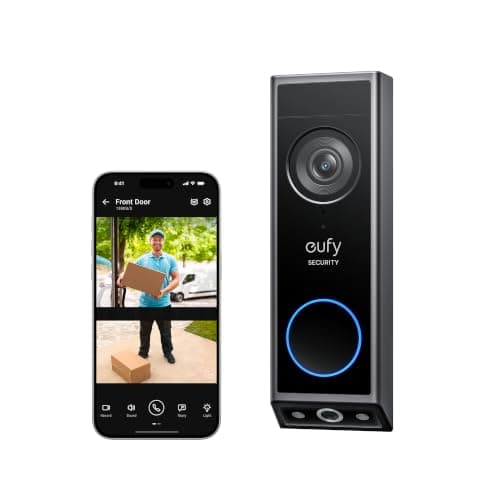
The eufy Video Doorbell E340 is our top pick because it clears every renter criterion and adds the one feature apartment dwellers ask about most. It runs on battery, so no wiring. It records every clip to 8GB of built-in storage with no monthly fee, so no bill. And its second, downward-facing camera watches the doorstep for parcels — which, in a building with a shared hallway or a lobby where packages get left, is exactly the angle you want. The honest catch is that 8GB is finite: in a high-traffic hallway, older clips roll off unless you manage the space now and then. For most renters that is a fair trade for never paying a fee. We pit it directly against the Ring in eufy E340 vs Ring Battery Doorbell Plus if you want that decision in isolation.

Wyze for the tightest budget

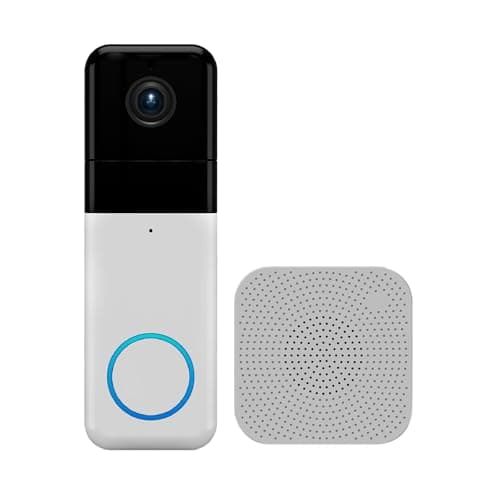
The Wyze Video Doorbell Pro is the pick when price comes first — it is among the cheapest ways to get a genuinely capable wireless doorbell, and it even includes a chime in the box, which saves you buying one separately for an apartment with no existing chime. It records sharp 1440 HD in a square 1:1 shape that fits a doorway well, and it stores clips locally on a microSD card you supply, with no subscription required. Two honest cautions: the smartest AI alerts want the optional Cam Plus plan, and given Wyze's past security incidents, you should set a unique password and turn on two-factor authentication before it ever watches your door. For a first apartment on a strict budget, it is the value benchmark.

Ring if you already run Alexa

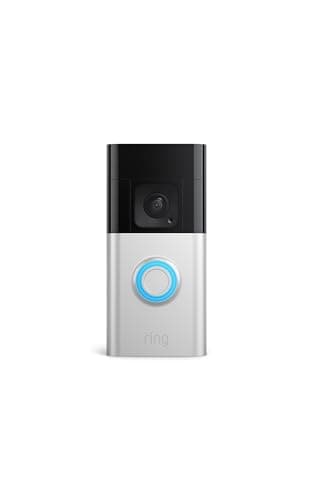
The Ring Battery Doorbell Plus is the smoothest of the three to live with — if you already run Alexa and Ring. Its removable battery pops off to recharge, so it fits a rental with no wiring, and the tall Head-to-Toe HD+ image shows a visitor face to feet with a parcel on the step. Everything lands in one tidy app alongside any Ring cameras. The condition, and it is a real one, is the fee: without a Ring Home plan you get live view and alerts but cannot save a single recorded clip, and Ring is cloud-only with no local option. For a renter already inside Alexa who is happy to treat the plan as part of the price, it is a fine choice; for anyone else here, the no-fee picks are the smarter money.

One caveat for every pick

None of these support Matter or Apple HomeKit today, because Matter still does not cover video doorbells — so you will live in the brand's own app plus Alexa or Google, never Apple Home. And one apartment-specific gotcha worth naming: a battery doorbell still needs a solid Wi-Fi signal at the door, and apartment doors are often the weakest spot in the flat for it. If your signal struggles out there, read the no-Wi-Fi doorbell guidebefore you buy — the options are narrower than the marketing suggests. As always, we compiled these from the manufacturers' published specs and listings; we don't run a doorbell lab, and where a figure came from someone else's testing we say so.

The short answer

Quick picks

Tap any row for the full write-up.

  • eufy Video Doorbell E340
    01 eufy Video Doorbell E340Top pick

    The best overall doorbell for a rental: it runs on battery so there is no wiring, records every clip to built-in 8GB with no monthly fee, and adds a downward camera that watches the step for parcels — the thing apartment dwellers worry about most. Nothing here needs your landlord's sign-off.

    Best for: Best overall for renters — no fee, package view · No Matter (doorbells not covered yet)

    $149.99View on Amazon

    #ad · we may earn a commission from this link to eufy Video Doorbell E340

  • Wyze Video Doorbell Pro
    02 Wyze Video Doorbell Pro

    The cheapest way into a capable wireless doorbell: sharp 1440 HD in a square 1:1 shape, a chime already in the box, and free local recording to a microSD card you supply. For a first apartment on a tight budget, it does the job for the least money.

    Best for: The cheapest capable wireless doorbell · No Matter (doorbells not covered yet)

    $103.98View on Amazon

    #ad · we may earn a commission from this link to Wyze Video Doorbell Pro

  • Ring Battery Doorbell Plus
    03 Ring Battery Doorbell Plus

    The pick for a renter who already runs Alexa: a tall Head-to-Toe image, a removable battery, and one tidy app for the doorbell and any Ring cameras. It is the smoothest daily experience of the three — but every saved clip needs a Ring Home plan, so budget the fee.

    Best for: Renters already living in Alexa · No Matter (doorbells not covered yet)

    $108.37View on Amazon

    #ad · we may earn a commission from this link to Ring Battery Doorbell Plus

#ad · Live prices from the Amazon Product API, as of Jul 26, 2026. Where we have no verified live price we show none — we would rather leave a gap than print a number that has rotted.

3-year cost for renters: doorbell + any cloud plan (single unit)
ProductHardwareMonthly3-yr fees3-yr total
Wyze Video Doorbell ProLocal microSD you add — no plan$104$0$0$104
eufy Video Doorbell E340Built-in 8GB — no plan$120$0$0$120
Ring Battery Doorbell PlusRing Home Basic to save clips$150$5/mo$180$330

Hardware figures are approximate MSRP context for the comparison; the live, date-stamped price is on each product's buy button. Fees are the published plan rates at the time of writing — always confirm current pricing with the brand.

In detail

The picks, in full

01

eufy Video Doorbell E340

Top pick
eufy Video Doorbell E340
$149.99View on Amazon

Price as of Jul 26, 2026. Amazon's price at checkout is the one that counts.

#ad · we may earn a commission from this link to eufy Video Doorbell E340

The best overall doorbell for a rental: it runs on battery so there is no wiring, records every clip to built-in 8GB with no monthly fee, and adds a downward camera that watches the step for parcels — the thing apartment dwellers worry about most. Nothing here needs your landlord's sign-off.

  • Dual cameras — door view plus a downward package view
  • 2K FHD, Head-to-Toe view
  • Built-in 8GB local storage
  • Color night vision, two-way talk
  • AI motion & package detection
  • Wireless or hardwired
Matter: No Matter (doorbells not covered yet)Fee: Free — 8GB local storageResearched, not hands-on tested

Good

  • Runs on battery, so there is no hardwiring and nothing permanent to install in a rental
  • Records to 8GB of built-in storage with no monthly fee — saved clips cost nothing
  • A downward-facing package camera watches the doorstep, which matters most in a shared hallway

Less good

  • 8GB is finite — a busy building hallway means older clips roll off unless you manage the space
  • You live in the eufy app; there is no HomeKit Secure Video and no Matter

Skip it if: you want unlimited cloud history you never manage, or you are already committed to Ring and Alexa and want one app for everything.

02

Wyze Video Doorbell Pro

Wyze Video Doorbell Pro
$103.98View on Amazon

Price as of Jul 26, 2026. Amazon's price at checkout is the one that counts.

#ad · we may earn a commission from this link to Wyze Video Doorbell Pro

The cheapest way into a capable wireless doorbell: sharp 1440 HD in a square 1:1 shape, a chime already in the box, and free local recording to a microSD card you supply. For a first apartment on a tight budget, it does the job for the least money.

  • 1440 HD video
  • 1:1 head-to-toe view (1:1 aspect ratio)
  • Two-way audio
  • Night vision
  • Local microSD storage
  • Wireless, chime included
Matter: No Matter (doorbells not covered yet)Fee: Free with microSD (Cam Plus optional)Researched, not hands-on tested

Good

  • Among the least expensive ways to get a capable wireless doorbell, with a chime included in the box
  • Records locally to a microSD card you supply, with no subscription required
  • Square 1:1 shape shows a caller and the doorstep together in one frame

Less good

  • The smartest AI alerts and cloud history want the optional Cam Plus plan
  • Wyze's past security incidents mean you should use a unique password and turn on two-factor authentication

Skip it if: you want a polished, hands-off ecosystem — Wyze rewards someone happy to set up the microSD workflow themselves.

03

Ring Battery Doorbell Plus

Ring Battery Doorbell Plus
$108.37View on Amazon

Price as of Jul 26, 2026. Amazon's price at checkout is the one that counts.

#ad · we may earn a commission from this link to Ring Battery Doorbell Plus

The pick for a renter who already runs Alexa: a tall Head-to-Toe image, a removable battery, and one tidy app for the doorbell and any Ring cameras. It is the smoothest daily experience of the three — but every saved clip needs a Ring Home plan, so budget the fee.

  • Head-to-Toe HD+ video
  • Two-way talk
  • Motion detection & alerts
  • Battery or hardwired
  • Works with Alexa
Matter: No Matter (doorbells not covered yet)Fee: $4.99/mo Ring Home for saved clipsResearched, not hands-on tested

Good

  • Removable battery pack pops off to recharge — no wiring needed in a rental
  • Head-to-Toe HD+ view shows a caller from face to feet, including a package on the step
  • Slots into an existing Ring and Alexa home with one app for the doorbell and cameras

Less good

  • Recorded clips need a Ring Home plan — without one you get live view and alerts only
  • No local storage option; every saved clip lives in Ring's cloud

Skip it if: you refuse a monthly plan — without Ring Home you can never open a single recorded event.

Start with how it mounts, not how it looks

In a rental, the mount decides everything. Measure your door and its surround first, then pick the mounting method that leaves no damage: a removable adhesive mount on a smooth frame, an over-the-door bracket that hooks over the top edge, or a peephole mount if you have a peephole and no good surface beside the door. All three doorbells here are light, battery units suited to that kind of hardware. Confirm the specific mount that fits your door before you commit — that is the step that keeps your deposit intact.

Then decide who keeps your footage

This sets your cost for years, so decide it deliberately. If you never want a bill, choose a doorbell that records locally: the eufy E340 saves clips to built-in 8GB, and the Wyze Pro records to a microSD card you add. If you are already inside Ring and Alexa and don't mind a monthly fee, the Ring is the tidier day-to-day experience — just add the plan to your budget from day one rather than finding it at checkout. Our connectivity guide and the wider best video doorbells roundup go deeper if you are weighing all the options.

Finally, check Wi-Fi and your lease

Two apartment-specific checks before you buy. First, Wi-Fi: stand at the door with your phone and see how the signal holds — a doorbell that keeps dropping is worse than none. Second, your lease and any building rules on cameras in shared spaces. The hardware asks nothing permanent of you, but a shared hallway can have its own policy. Clear both, and a battery doorbell is one of the easiest upgrades a renter can make.

How we chose

We don't run a test lab

We don't wire every one of these into a test rig, and we won't write "in our testing" as if we do. What we did instead: pulled each product's published specifications, confirmed its Matter/Thread/HomeKit support from the manufacturer's own documentation, added up the real 3-year cost with any monthly fee included, and read the aggregated verified-buyer sentiment. Every pick is chosen against that published method. Where a number came from someone else, we name and link them in Sources.

Questions

Frequently asked

Can you install a video doorbell in an apartment without drilling?
Yes. Every doorbell here is battery-powered, and no-drill mounting options are widely available — removable adhesive mounts, over-the-door brackets, and peephole mounts that use an existing peephole instead of new holes. That combination lets you put up a doorbell and take it down cleanly with no damage. Check the specific mount that fits your door, since what suits an adhesive surface differs from what suits a peephole.
Do you need existing doorbell wiring?
No. All three of these run on a rechargeable battery, so they work at a door with no wiring and no transformer. You recharge the unit every so often depending on how much traffic it sees. If you happen to have wiring and are allowed to use it, hardwiring keeps the battery topped up — but it is optional, not required.
Do I need my landlord's permission?
The hardware itself asks nothing permanent of you — battery power plus a no-drill mount means no wiring and no holes. That said, some leases and buildings have rules about cameras in shared hallways or entryways, so it is worth checking your agreement and any building policy before you mount one facing a common space. A doorbell on your own unit door with removable hardware is the low-friction case.
Which apartment doorbell has no monthly fee?
Two of them. The eufy Video Doorbell E340 records to built-in 8GB storage, and the Wyze Video Doorbell Pro records to a microSD card you supply — both save clips with no subscription. The Ring Battery Doorbell Plus needs a Ring Home plan to save any recorded clip. For the no-fee case in full, see our no-subscription roundup.
Will a battery doorbell work with weak apartment Wi-Fi at the door?
Only if the signal reaches the door reliably — and apartment doors are often the weakest spot for Wi-Fi. Stand there with your phone and check before you buy. If the signal is poor, a mesh node or extender near the entry usually fixes it; if that is not possible, read the no-Wi-Fi doorbell guide, because the genuinely offline options are narrower than the marketing implies.

Keep reading

Receipts

Sources

  • Amazon product listings for each doorbell (specs + live price)(read 2026-07-26)
  • Ring / eufy / Wyze manufacturer plan & spec pages(read 2026-07-26)

We do not run a test lab, and we do not pretend to. Compatibility and subscription-cost claims come from the manufacturer's own documentation and the live retailer listing, read on the dates shown. Read our full method.