If your home already runs on Echo speakers and Alexa routines, a video doorbell should slot into that setup, not fight it. Most doorbell roundups ignore the question entirely and rank on features your assistant cannot use. We hold every doorbell to one honest standard: does it actually work with Alexa, and if so, how deeply? On that rule, three of the doorbells we cover belong on this page - one that is genuinely Alexa-native, and two that are Alexa-friendly with no subscription. It is defined as much by the popular doorbell we deliberately left off as by the three we kept. If you want the whole field across every use case, our best video doorbells overall guide ranks them all.
What "works with Alexa" actually means for a doorbell
Two very different things get sold under the same phrase, and the gap between them decides which doorbell is right for you. The strongest version is Alexa-native: press the button and your Echo speakers announce "someone is at the front door," and an Echo Show pulls up the live camera feed so you can see and speak to the caller without ever touching your phone. That is a genuine, hands-free integration built into the doorbell's own ecosystem. The weaker version is Alexa-friendly: you can add the doorbell to the Alexa app and ask an Echo Show to show the feed, but it does not automatically announce and cast the moment someone rings.
Both are real, and both are worth having - but they are not the same promise, so this page keeps them clearly separate. Only one doorbell here is truly Alexa-native, and it happens to be the one that is cloud-only. The other two are Alexa-friendly and keep your footage local with no monthly fee. That trade - the deepest Alexa integration versus no subscription - is the whole story of this list, and it is why we rank rather than pretend they are interchangeable. If you are still weighing the two big assistants against each other, our Alexa vs Google Home guide is the wider explainer behind this shortlist.
Why the Nest Doorbell is not on this page
This is the most important thing on the page, so we are being explicit about it. The Google Nest Doorbell (Battery) is a doorbell we rate highly - it is our top pick on a different page - and it is not here, on purpose, not by oversight. The reason is our own honesty rule: the Nest Doorbell is a Googledevice. It works with Google Home and Google Assistant, casts to a Nest Hub and Google smart displays, and its listing does not name Amazon Alexa. On a page whose entire promise is "doorbells that work with Alexa," a doorbell built for the other assistant cannot appear, however good it is elsewhere.
This is the exact line that separates this page from its mirror image, our best video doorbells for Google Home page. There, the Nest Doorbell is the top pick, because it is the true Google-native option - and the Ring Battery Doorbell Plus is the one left off, because it is Alexa-native and does not name Google. It is the same catalog of doorbells, filtered by a different question, and each page's top pick being the other page's exclusion is the clearest proof that both are filtered honestly rather than padded. If you run a mixed Alexa-and-Google home, that dividing line is worth knowing before you buy, and the two no-fee picks below - the eufy and the Wyze - are the doorbells that sit comfortably on both pages because they work with both assistants.
The three doorbells that work with Alexa, and how they differ
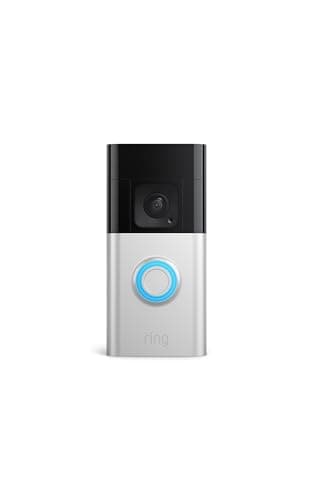
The Ring Battery Doorbell Plus is the top pick, because it is the only Alexa-native one. Press the button and your Echo announces the visitor out loud while an Echo Show brings up the live feed, hands-free - no other doorbell here does that. It shoots Head-to-Toe HD+ video, so the whole doorstep is framed from a face down to a parcel on the ground, and it runs on battery, so it installs almost anywhere without wiring. The honest catch is that it is cloud-only: live view is free, but saved recorded clips need a Ring Home subscription rather than living on the device. For an Echo household that wants the tightest integration and does not mind a plan for recordings, it is the standout, which is why our full Ring Battery Doorbell Plus review goes deeper on it.
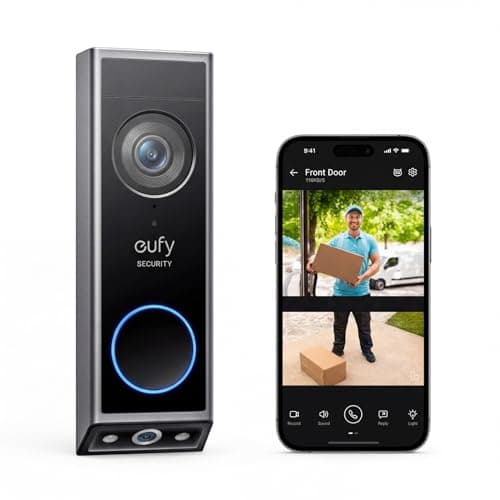
The eufy Video Doorbell E340 is the honest value pick. It works with Alexa, but its real appeal is that it records to built-in 8GB local storage with no subscription at all - you keep your clips and never see a recurring charge. It also adds a second camera aimed straight down at the doorstep, so a package left on the ground stays in frame when the main lens cannot see it, and it runs wired or on battery. The difference from the Ring is honesty about depth: it is Alexa-friendly, not Alexa-native, so it does not announce and cast to an Echo Show the same seamless way. If keeping footage local and fee-free matters more than hands-free announcements, this is the one; our eufy Doorbell E340 review has the full picture.
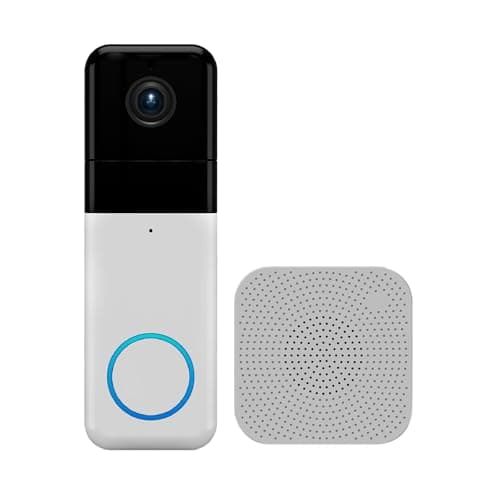
The Wyze Video Doorbell Pro is the budget answer. It is the cheapest way onto this list: a wireless doorbell that includes its own chime in the box, shoots 1440 HD in a tall 1:1 head-to-toe aspect that shows a visitor head to toe with a parcel at their feet, and records free to a microSD card with no subscription. It works with Alexa and Google for viewing, so it drops into an Echo home without adding a bill. Like the eufy, its Alexa support is for viewing rather than the full announce-and-cast experience, and it keeps things simple with a single camera. For a first doorbell or a spare door where cost matters most, it is the value entry point - our Wyze Video Doorbell Pro review walks through it.
Cloud or local? That is the real fork on this page
For an Alexa home, the choice is not really about the assistant - all three work with Alexa - it is about where your footage lives and whether you pay for it. The Ring is cloud-only: live view is free, but to keep and rewatch a recorded clip you need a Ring Home plan, so budget an ongoing cost the way you would with most cloud doorbells. The eufy and the Wyze are local-storage: the eufy saves to built-in 8GB and the Wyze to a microSD card, both with no subscription, so your clips are yours and there is no monthly bill. That single distinction, not the Alexa badge, is what usually decides this purchase. We map the plans and what each really costs in our video doorbell subscription costs breakdown, and the fee-free field is ranked in the best no-subscription video doorbells roundup.
Neither approach is wrong. Cloud storage means clips are safe even if a thief pries the doorbell off the wall, and Ring's app and Alexa integration are the most polished here. Local storage means no recurring cost and no dependence on a company's servers, at the price of footage that lives on the device. Decide which of those you value before you decide on a model, because it is the difference you will feel every month, not just on day one.
A word on Matter, HomeKit and the honest caveat
None of these three listings claims Matter as of our review date, so we do not credit any of them with it - each is an Alexa doorbell (the eufy and Wyze also Google) rather than a future-proof, cross-ecosystem one. On Apple HomeKit, the Ring's listing explicitly does not support it, and the eufy and Wyze listings do not name it, so none of these three is the pick for an Apple household. That does not affect Alexa today: all three add to the Alexa app and work with your Echo devices right now. If a broad, assistant-agnostic setup is your goal, our best smart home ecosystem guide is the place to start, and the how video doorbells work explainer covers the mechanics behind all of them.
The same caveat sits on every page here: we do not run a doorbell lab. We built this list from each product's own Amazon listing and manufacturer documentation, recorded only the features and Alexa support each one actually names, and marked anything a listing left unsaid as "Not listed" rather than assuming it. That discipline is exactly why the Nest Doorbell is off this page - it does not name Alexa, so we do not claim it works with it. This is a researched roundup, not a hands-on test, and where a listing goes quiet, so do we. The full method is on our methodology page.
Start with how deep your Alexa integration needs to be
Before storage, before price, answer one question: do you want your doorbell to announce and show callers on your Echo Show hands-free, or is it enough to add it to the Alexa app and pull up the feed yourself? If hands-free announcements are the whole point - you want to be in the kitchen and have Alexa tell you who is at the door and put them on the Show - the Ring Battery Doorbell Plus is the only pick here that does it, because it is genuinely Alexa-native. If you would happily open the feed yourself and would rather not pay a monthly fee, the eufy E340 and Wyze Pro are Alexa-friendly and keep your footage local. This single question removes most of the field before you think about anything else.
Then decide whether you will pay for storage
This is the fork that costs or saves you money every month. The Ring is cloud-only: live view is free, but saved recorded clips need a Ring Home plan, so if you want to rewatch what happened while you were out, that is a recurring cost. The eufy and Wyze record locally - the eufy to built-in 8GB, the Wyze to a microSD card - with no subscription, so your clips are yours and there is no bill. If a fee is a dealbreaker, that alone points you at the eufy or the Wyze; if you value cloud safety and the tightest Alexa integration and do not mind a plan, the Ring earns it. Our storage explainer lays out how on-device, microSD and cloud recording actually differ.
Then match the doorbell to your door, power and budget
Now the practical shape. On power, the Ring and Wyze are battery/wireless, so they mount almost anywhere with no wiring, while the eufy can run on battery or be hardwired to your existing doorbell wires if you never want to recharge it - our wired vs battery guide covers that trade in full. On coverage, the eufy's second downward camera is the one to pick if parcels on the doorstep are your main worry, while the Ring and Wyze use a single tall frame that still catches a package at a visitor's feet. On budget, the Wyze is the cheapest entry and includes its own chime, the eufy sits in the middle as the no-fee dual-camera pick, and the Ring is the one you choose for Alexa-native polish rather than to save money. Whichever you land on, check our installation guide first so the mount and chime are sorted before the box arrives - and if your Google-side family is weighing in, send them our Google Home doorbell page, the mirror of this one.