Skip to content
Latch & Hub

Ecosystem · Guides

A Whole-Home Smart Starter Kit for Around $300

Triple the budget of the entry kit and you can cover the whole home: control, a camera, automated plugs, the front door, and room sensing with IR control - five pieces, each a distinct job, almost none of them charging a monthly fee. Here's the kit and the order to buy it.

By Stephen V.Updated How we choose
#ad

We earn a commission when you buy through our Amazon links, at no extra cost to you. It never changes our rankings — where the subscription-free or cheaper option is the better buy, we say so. How this works.

Triple the budget of an entry setup and something changes: you stop covering a corner and start covering the whole home. For around three hundred dollars you can buy five pieces that each play a distinct role - control, a camera, automated plugs, the front door, and room sensing with legacy IR control - and end up with a genuinely capable, subscription-free smart home rather than a scattering of gadgets. This kit is deliberately the under-$100 starter plus two additions that matter most next: the busiest entrance, and the ability to react to the room. Here is the whole kit, why each piece is in it, and the order to buy them.

How we built it - the same role-first logic, wider

The rule is the one from the smaller kit, applied to a bigger canvas: every piece fills a role, and the roles add up to a system. Here that means five jobs. A control layer (the speaker) to run everything by voice and routine. A sensing layer that is now two devices - a camera for a chosen angle and a video doorbell for the front door, because the entrance is the highest-value point in any home. An action layer (the smart plugs) to automate lamps and appliances. And an environment layer(the sensor-and-IR hub) so the home can react to temperature and light and control legacy gear. Almost none of it charges a monthly fee, which is the discipline that keeps a "$300 kit" an actual $300 rather than $300 plus subscriptions forever. Five roles, one coherent home.

The centrepiece: the front door

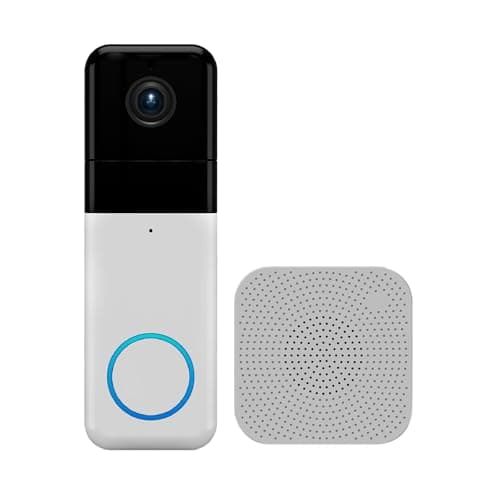
In a whole-home kit the anchor is the video doorbell, because the front door is where a smart home does its most useful work every single day - packages, visitors, the person you were not expecting. This one is sharp 1440 HD, mounts wireless with no doorbell wiring, includes a chime in the box, and - the part that keeps the kit fee-free - records to a microSD card with no subscription. It covers deliveries and callers and gives you a recording you keep for nothing. There are two honest caveats: you supply the card, and because of Wyze's past security history you should treat a unique password and two-factor authentication as non-negotiable. Handle those and it is the most doorbell for the money, which is why it also tops our no-subscription doorbells list. If you would rather a more hands-off ecosystem doorbell, our best video doorbells roundup has the pricier alternatives.

Control, camera and plugs: the core carried over

Three of the five pieces are the proven core from the smaller kit, and they do the same jobs here. The speaker is the control layer - voice, routines, the thing that makes five devices behave like one home, and the piece that sets your ecosystem (buy the rest with Alexa in mind, or start on your own platform per the ecosystem guide). The camera adds a second angle the doorbell cannot cover - a back door, a driveway, a room - in sharp 2K+ with no-subscription local recording. The smart plugs, a Matter-compatible multi-pack, turn lamps and appliances into scheduled, voice-controlled devices that fake an occupied house while you are away and switch off on a "good night" command. Together these three are already a real smart home; the doorbell and the hub are what make it a whole-home one.

The new dimension: sensing and IR

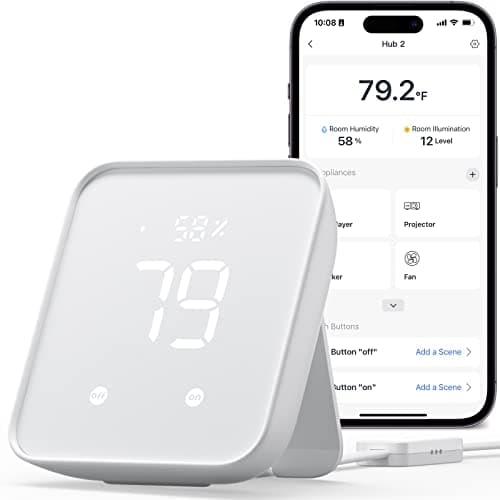
The fifth piece is the one that adds a capability the other four simply do not have: the ability to react to the room. The sensor-and-IR hub reads temperature, humidity and light, so your routines can do things like nudge a fan on when it gets warm or brighten lamps as daylight fades - triggers based on conditions, not just time or voice. Its IR blasteris the sleeper feature: it learns the remotes of old TVs, fans and air conditioners, pulling appliances you already own into the smart home without replacing them, which is pure value. Be clear on what it is not: it bridges SwitchBot's own gear to Matter, but it is not a Zigbee or Thread hub and will not run third-party mesh sensors - that is a job for a full controller like the Aqara Hub M3, a step up in budget covered in our Hub 2 vs M3 comparison. For a $300 kit, sensing plus IR is exactly the right amount of "react to the environment" without paying for a whole-home mesh you are not ready to fill.

The order to buy, and how it grows

You do not need to buy all five at once, and the sensible sequence is: the speaker first (control), then the doorbell (the highest-value security piece), then the plugs (cheap, immediate automation), then the camera for your second angle, and finally the sensor hub once you want the home reacting to conditions. Spread it over a few paydays if you like - each piece is useful the day it arrives and more useful as the others join it. From here, the clear next upgrades are a smart lock to bring the front door's lock under control alongside its camera, and - when you want cheap door and motion sensors driving real security automations - a proper Zigbee/Thread hub. This $300 kit is the base those additions bolt onto cleanly, and it deliberately leaves you a growth path rather than a dead end.

As always, we did not lab-test these devices. We chose them for their published specs and their fit as complementary whole-home pieces, described the trade-offs honestly, and every price you see is live from Amazon via our price pipeline and stamped with the date we checked it - never a remembered number. The full method is on the methodology page.

The short answer

Quick picks

Tap any row for the full write-up.

  • Wyze Video Doorbell Pro
    01 Wyze Video Doorbell ProTop pick

    The anchor of a whole-home kit: a sharp 1440 HD wireless video doorbell that covers your busiest entrance, includes a chime in the box, and records to a microSD card with no subscription. The front door is where a smart home earns its keep, and this does it for the least money.

    Best for: The front-door centrepiece

    $103.98View on Amazon

    #ad · we may earn a commission from this link to Wyze Video Doorbell Pro

  • Amazon Echo Dot (5th Gen)
    02 Amazon Echo Dot (5th Gen)

    The control layer that ties the kit together: a compact Alexa speaker for voice commands, routines, timers and reminders. Cheap, and the piece that turns five separate devices into one home you can talk to.

    Best for: Voice control and routines

    $49.99View on Amazon

    #ad · we may earn a commission from this link to Amazon Echo Dot (5th Gen)

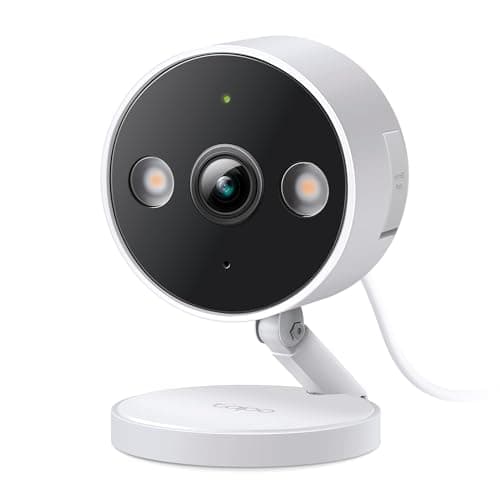
  • TP-Link Tapo C120
    03 TP-Link Tapo C120

    The camera: a sharp 2K+ indoor/outdoor unit with person, pet and vehicle detection and subscription-free local storage. Point it at a second entrance, a driveway or a room the doorbell doesn't cover.

    Best for: A no-fee second angle

    $35.99View on Amazon

    $39.9910% off

    #ad · we may earn a commission from this link to TP-Link Tapo C120

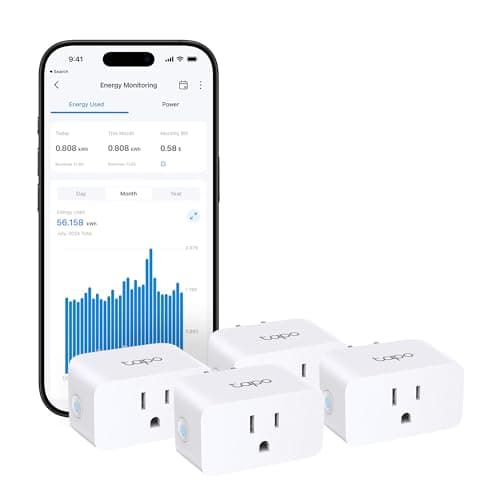
  • TP-Link Tapo P110M Smart Plug Mini
    04 TP-Link Tapo P110M Smart Plug Mini

    The automation layer: a Matter smart plug multi-pack that turns lamps and appliances into scheduled, voice-controlled devices, working across Alexa, Google and Apple Home. The cheapest way to make what you own smart.

    Best for: Smartening lamps and appliances

    $28.69View on Amazon

    $35.9920% off

    #ad · we may earn a commission from this link to TP-Link Tapo P110M Smart Plug Mini

  • SwitchBot Hub 2
    05 SwitchBot Hub 2

    The sensing-and-IR layer: a temperature, humidity and light sensor plus an IR blaster that can smarten an old TV or air conditioner, and bridge SwitchBot gear to Alexa, Google and Apple Home via Matter. It adds the 'react to the room' dimension the other four lack.

    Best for: Room sensing and legacy IR devices · Matter bridge (some SwitchBot devices)

    $59.99View on Amazon

    #ad · we may earn a commission from this link to SwitchBot Hub 2

#ad · Live prices from the Amazon Product API, as of Aug 1, 2026. Where we have no verified live price we show none — we would rather leave a gap than print a number that has rotted.

In detail

The picks, in full

01

Wyze Video Doorbell Pro

Top pick
Wyze Video Doorbell Pro
$103.98View on Amazon

Price as of Aug 1, 2026. Amazon's price at checkout is the one that counts.

#ad · we may earn a commission from this link to Wyze Video Doorbell Pro

The anchor of a whole-home kit: a sharp 1440 HD wireless video doorbell that covers your busiest entrance, includes a chime in the box, and records to a microSD card with no subscription. The front door is where a smart home earns its keep, and this does it for the least money.

  • 1440 HD video
  • 1:1 head-to-toe view
  • Two-way audio, night vision
  • Local microSD storage
  • Wireless, chime included
Fee: Free with microSD (Cam Plus optional)Researched, not hands-on tested

Good

  • Covers the single busiest point of your home - the front door and its deliveries - in sharp 1440 HD
  • Records locally to a microSD card with no monthly fee, and a plug-in chime is in the box
  • Runs wireless on a rechargeable battery, so it mounts with no existing doorbell wiring

Less good

  • You supply the microSD card, and the smartest AI alerts want the optional Cam Plus plan
  • Wyze has had past security incidents, so a unique password and two-factor are mandatory

Skip it if: you want a hands-off, polished ecosystem doorbell you never think about - the Wyze rewards someone happy to manage a microSD and lock the account down.

02

Amazon Echo Dot (5th Gen)

Amazon Echo Dot (5th Gen)
$49.99View on Amazon

Price as of Aug 1, 2026. Amazon's price at checkout is the one that counts.

#ad · we may earn a commission from this link to Amazon Echo Dot (5th Gen)

The control layer that ties the kit together: a compact Alexa speaker for voice commands, routines, timers and reminders. Cheap, and the piece that turns five separate devices into one home you can talk to.

  • Compact Alexa speaker
  • Voice control + routines
  • Timers, reminders, audio
  • Controls compatible devices
  • The ecosystem on-ramp
Fee: None - no subscriptionResearched, not hands-on tested

Good

  • The control layer for the whole kit - voice and routines that make the other four act together
  • Inexpensive, and a capable little speaker for music, timers and reminders
  • The easy way into the Alexa ecosystem that most affordable devices support

Less good

  • It controls things but doesn't see or protect on its own
  • Commits you toward Alexa, so buy with Alexa compatibility in mind

Skip it if: your home runs on Apple Home or Google - start with that platform's speaker so your control layer matches your phones.

03

TP-Link Tapo C120

TP-Link Tapo C120
$35.99View on Amazon

$39.9910% off

Price as of Aug 1, 2026. Amazon's price at checkout is the one that counts.

#ad · we may earn a commission from this link to TP-Link Tapo C120

The camera: a sharp 2K+ indoor/outdoor unit with person, pet and vehicle detection and subscription-free local storage. Point it at a second entrance, a driveway or a room the doorbell doesn't cover.

  • 2K+ (QHD) resolution
  • Indoor / outdoor
  • Person / pet / vehicle detection
  • Color night vision
  • Local storage - no subscription
Fee: None required - local microSDResearched, not hands-on tested

Good

  • Sharp 2K+ image with person/pet/vehicle detection at a very low price
  • Records to local storage with no subscription - no ongoing cost
  • Indoor or outdoor, covering the entrance or room the doorbell doesn't

Less good

  • Wired, so it needs power nearby - placement is decided by outlets
  • You supply the microSD card

Skip it if: you need a wire-free camera for a spot with no outlet - a battery camera suits that better, at a higher price.

04

TP-Link Tapo P110M Smart Plug Mini

TP-Link Tapo P110M Smart Plug Mini
$28.69View on Amazon

$35.9920% off

Price as of Aug 1, 2026. Amazon's price at checkout is the one that counts.

#ad · we may earn a commission from this link to TP-Link Tapo P110M Smart Plug Mini

The automation layer: a Matter smart plug multi-pack that turns lamps and appliances into scheduled, voice-controlled devices, working across Alexa, Google and Apple Home. The cheapest way to make what you own smart.

  • Matter compatible
  • Alexa, Google, SmartThings
  • Energy monitoring
  • 15A, UL certified
  • Multi-pack
Fee: None - no subscriptionResearched, not hands-on tested

Good

  • Turns any lamp or appliance into a scheduled, voice- and app-controlled device with no new hardware
  • Matter-compatible, so it works across Alexa, Google and Apple Home
  • A multi-pack with energy monitoring, so several things get smart at once

Less good

  • Switches the outlet - it doesn't dim a bulb
  • 2.4GHz Wi-Fi only, so it adds to your Wi-Fi device load

Skip it if: you want colour or dimmable lighting - that needs a smart bulb, not a plug that switches power on and off.

05

SwitchBot Hub 2

SwitchBot Hub 2
$59.99View on Amazon

Price as of Aug 1, 2026. Amazon's price at checkout is the one that counts.

#ad · we may earn a commission from this link to SwitchBot Hub 2

The sensing-and-IR layer: a temperature, humidity and light sensor plus an IR blaster that can smarten an old TV or air conditioner, and bridge SwitchBot gear to Alexa, Google and Apple Home via Matter. It adds the 'react to the room' dimension the other four lack.

  • Temperature + humidity sensor
  • IR blaster (universal remote)
  • Matter bridge for SwitchBot devices
  • Alexa, Google, Apple Home
  • Built-in light sensor
Matter: Matter bridge (some SwitchBot devices)Fee: None - no subscriptionResearched, not hands-on tested

Good

  • Adds temperature, humidity and light sensing, so routines can react to the room's conditions
  • The IR blaster pulls an old TV, fan or air conditioner into the smart home without replacing it
  • Bridges SwitchBot accessories to Alexa, Google and Apple Home via Matter

Less good

  • Not a Zigbee, Thread or Z-Wave hub - it won't run third-party mesh sensors
  • Its Matter bridging covers SwitchBot's own devices, not third-party gear

Skip it if: you need to run third-party Zigbee or Thread sensors - that wants a full controller like the Aqara Hub M3, which is a step up in budget.

How we chose

We don't run a test lab

We don't wire every one of these into a test rig, and we won't write "in our testing" as if we do. What we did instead: pulled each product's published specifications, confirmed its Matter/Thread/HomeKit support from the manufacturer's own documentation, added up the real 3-year cost with any monthly fee included, and read the aggregated verified-buyer sentiment. Every pick is chosen against that published method. Where a number came from someone else, we name and link them in Sources.

Questions

Frequently asked

What do you get in a $300 smart home starter kit?
Five pieces, each a distinct job: a voice speaker (control), a subscription-free camera, a Matter smart plug multi-pack (automation), a video doorbell with free local recording (the front door), and a sensor-and-IR hub (room conditions and legacy appliances). It's the under-$100 core plus the two additions that matter most next, and almost none of it charges a monthly fee.
In what order should I buy the pieces?
Speaker first (the control layer), then the video doorbell (the highest-value security piece), then the smart plugs for cheap immediate automation, then the camera for a second angle, and finally the sensor-and-IR hub once you want the home reacting to temperature and light. Each is useful the day it arrives and more useful as the others join it.
Is this kit really subscription-free?
Almost entirely. The speaker, plugs and sensor hub have no fees, and both the camera and the doorbell record to local storage with no subscription required (their optional AI plans are just that - optional). Keeping the running cost near zero is deliberate, so a '$300 kit' stays $300 rather than $300 plus monthly fees.
What's the difference between the SwitchBot Hub 2 and a real smart home hub?
The Hub 2 is a sensor and IR bridge for SwitchBot gear - it reads temperature/humidity/light and controls legacy IR appliances, but it's not a Zigbee, Thread or Z-Wave hub, so it can't run third-party mesh sensors. For that you need a full controller like the Aqara Hub M3; our Hub 2 vs M3 comparison explains the difference.

Keep reading

Receipts

Sources

  • Amazon product listings for each device (specs + ecosystem claims)(read 2026-08-01)

We do not run a test lab, and we do not pretend to. Compatibility and subscription-cost claims come from the manufacturer's own documentation and the live retailer listing, read on the dates shown. Read our full method.