Skip to content
Latch & Hub

Systems · Security Systems

The Best Home Security Systems for Elderly Parents in 2026

The specification that matters here is not the siren. It is whether your mother can arm the house at the keypad without opening an app, and whether you can fix it from two hundred miles away when she forgets. We ranked three DIY systems on exactly that — and we are straight about the thing none of them does.

By Stephen V.Updated How we choose
#ad

We earn a commission when you buy through our Amazon links, at no extra cost to you. It never changes our rankings — where the subscription-free or cheaper option is the better buy, we say so. How this works.

Verdict

The bottom line

For most families, buy the Ring Alarm 8-Piece Kit: it has a physical keypad a parent can use without a phone, it self-monitors for free, you can arm and disarm it remotely from your own phone, and 24/7 professional monitoring can be switched on later for $19.99 a month without replacing anything. Buy the eufy Alarm 5-Piece Kit with HomeBase 3 if you want no recurring cost at all and local, private processing in the house rather than a cloud account. Buy the Ring Alarm Proif the parent's broadband is unreliable — it adds cellular and battery backup (with a plan) and an eero Wi-Fi 6 router, which quietly fixes a patchy-signal house at the same time. One honest caveat before you buy any of them: these are intruder alarms, not medical alert systems. None has a fall detector or a pendant, and none will call an ambulance. If that is the need, buy a medical alert device as well — not instead of being clear-eyed about what an alarm does.

The short answer

Quick picks

Tap any row for the full write-up.

  • Ring Alarm 8-Piece Kit (2nd Gen)
    01 Ring Alarm 8-Piece Kit (2nd Gen)Top pick

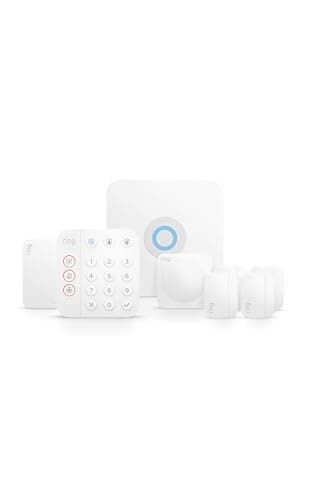
    The simplest system to hand to someone who does not want a new app in their life: a base station, a keypad that works on its own, door and window sensors, a motion detector and a range extender. Free self-monitoring, no contract, and professional monitoring available at $19.99 a month if the family decides it wants someone answering at 3am.

    Best for: Most families — keypad-first, free to self-monitor, easy to upgrade · No Matter — Ring/Alexa app

    • 8-piece DIY kit
    • Base station + physical keypad
    • Door/window and motion sensors included
    • Range extender included
    • Optional 24/7 professional monitoring
    • Works with Alexa
    $249.99View on Amazon

    #ad · we may earn a commission from this link to Ring Alarm 8-Piece Kit (2nd Gen)

  • eufy Alarm 5-Piece Kit with HomeBase 3
    02 eufy Alarm 5-Piece Kit with HomeBase 3

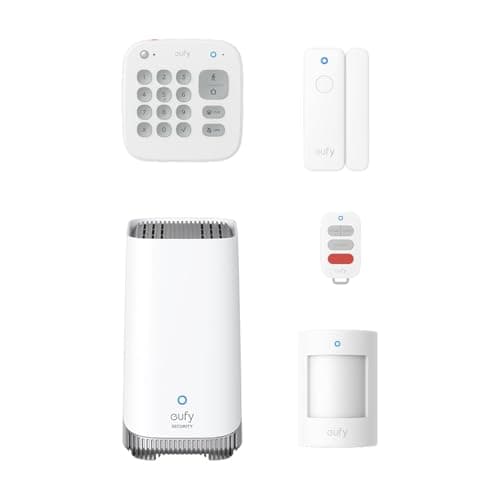
    The no-fee, keep-it-in-the-house option. Devices arrive pre-configured, you arm at a keypad or in the app, and the HomeBase 3 stores and processes locally with eufy stating no ongoing costs. For a family that does not want another subscription or another company holding footage, this is the pick.

    Best for: Families that want no monthly fee and local, private processing · No Matter — eufy app, Alexa and Google Assistant

    • 5-piece kit with HomeBase 3 (S380)
    • Pre-configured devices; keypad or app arm/disarm
    • 100 dB siren on the HomeBase
    • Local storage — eufy lists 16GB built in, expandable to 16TB
    • Supports up to 16 devices and 34 sensors
    • Works with Alexa and Google Assistant; not compatible with Apple HomeKit
    $282.85View on Amazon

    $344.9518% off

    #ad · we may earn a commission from this link to eufy Alarm 5-Piece Kit with HomeBase 3

  • Ring Alarm Pro 8-Piece Kit
    03 Ring Alarm Pro 8-Piece Kit

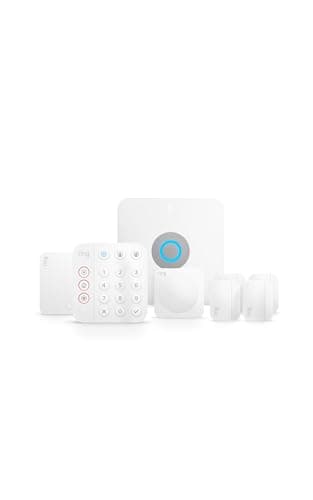
    The pick for a house where the internet is the weak link. Same keypad-and-sensors simplicity as the standard Ring kit, plus an eero Wi-Fi 6 router built into the base station, and cellular and battery backup available with a plan — so a dropped line or a brief power cut does not silently disarm the house.

    Best for: Parents on patchy broadband, or a house with Wi-Fi dead spots · No Matter listed — Alexa, no HomeKit

    • 8-piece kit: Pro base, keypad, 4 contact sensors, motion detector, range extender
    • Built-in eero Wi-Fi 6 router
    • Cellular + battery backup (with plan)
    • Local video recording via Ring Edge (with plan)
    • DIY installation
    • Works with Alexa (no Apple HomeKit)
    $299.99View on Amazon

    #ad · we may earn a commission from this link to Ring Alarm Pro 8-Piece Kit

#ad · Live prices from the Amazon Product API, as of October 17, 2026. Where we have no verified live price we show none — we would rather leave a gap than print a number that has rotted.

Most "best security system" advice assumes the buyer and the user are the same person. Here they usually are not: an adult child does the research and pays, and a parent in their seventies or eighties has to live with the result. That changes which specifications matter. Siren decibels, app design awards and camera resolution all drop down the list. What rises to the top is whether the system can be operated without a smartphone, whether family can fix it remotely, and what happens when nobody is watching the notification.

Start here: an alarm is not a medical alert system

This is the most important paragraph on the page. A home security system detects doors opening, windows breaking and movement in rooms. It does not detect a fall, it has no pendant or wrist button, and pressing the keypad panic button — where one exists — summons a response to a break-in, not a medical emergency. If the real worry is a fall or a health event, you need a medical alert service with a pendant and a 24/7 care line, and that is a different purchase from everything on this page.

They coexist well. A security system is the right answer to doorstep callers, an unlocked back door and knowing whether the house was armed last night. It is the wrong answer to "what if she falls in the bathroom." Buying one and believing you have bought the other is the mistake worth avoiding before you spend anything.

The four specifications that actually matter in this house

A physical keypad. Non-negotiable. Arming by app assumes a charged phone, a remembered passcode and comfort with a menu — three assumptions that fail on a bad day. All three picks include a keypad; make sure it is mounted by the door that is actually used, which is often the back door rather than the front.

Remote control by family. The system will be left disarmed, or armed when the cleaner arrives, and someone two hundred miles away needs to be able to sort that out in ten seconds. All three picks allow it, and this single feature is what stops a well-meant gift becoming a weekly phone call.

Who answers the alarm.Self-monitoring means the alert goes to phones. If the family is attentive and nearby, that genuinely works and costs nothing. If the parent lives alone and the nearest relative is a plane ride away, professional monitoring is what you are actually buying — that is the Ring systems here, at $19.99 a month for Ring's 24/7 tier. Our DIY vs monitored security page makes that call properly.

What happens in an outage. A DIY alarm that loses broadband can stop notifying anyone while continuing to look armed. That is why the Ring Alarm Pro is on this list: cellular and battery backup (with a plan) keep the alerts flowing. Our guide to systems without Wi-Fi explains what each kit does and does not keep doing.

Sensors worth adding — and the ones that cause arguments

Two additions earn their place in an older parent's house, and neither is about burglary. A leak sensor under the kitchen sink or behind the washing machine catches the failure that does the most expensive damage in a house nobody checks daily. And a smart smoke and CO alarm — or a listener that hears the existing one — means a family member knows the alarm is sounding even if the parent cannot reach a phone.

The sensor to think twice about is the indoor camera. It is the single most useful device for a worried family and the single most intrusive device for the person being watched. If you fit one, agree where it points and when it is on — and consider putting it in a hallway rather than a living room. Our smart home for elderly parents guide covers the wider kit, including lighting and door locks, with the same bias towards dignity.

What each system gives an older household — from each maker's published specifications, read 2026-10-17
DeviceKeypad includedWorks without a phonePro monitoringMonthly feeOutage backup
Ring Alarm 8-PieceEasiest to hand overYesYes — keypadYes, $19.99/moNone to self-monitorNot listed
eufy Alarm 5-Piece + HomeBase 3Local processing, no feeYesYes — keypadNoNoneNot listed
Ring Alarm ProBuilt-in eero routerYesYes — keypadYes, $19.99/moPlan for backup featuresCellular + battery (with plan)

In detail

The picks, in full

01

Ring Alarm 8-Piece Kit (2nd Gen)

Top pick
Ring Alarm 8-Piece Kit (2nd Gen)
$249.99View on Amazon

Price as of October 17, 2026. Amazon's price at checkout is the one that counts.

#ad · we may earn a commission from this link to Ring Alarm 8-Piece Kit (2nd Gen)

The simplest system to hand to someone who does not want a new app in their life: a base station, a keypad that works on its own, door and window sensors, a motion detector and a range extender. Free self-monitoring, no contract, and professional monitoring available at $19.99 a month if the family decides it wants someone answering at 3am.

  • 8-piece DIY kit
  • Base station + physical keypad
  • Door/window and motion sensors included
  • Range extender included
  • Optional 24/7 professional monitoring
  • Works with Alexa
Matter: No Matter — Ring/Alexa appFee: Free self-monitored; $19.99/mo Ring Pro for 24/7 monitoringResearched, not hands-on tested

Good

  • The keypad is the whole argument: arming and disarming is four digits on a wall panel, not a phone unlock followed by an app. That is the difference between a system that gets used and one that gets ignored
  • Family can arm, disarm and check status remotely, so a forgotten set-up at bedtime is solved from your own sofa rather than with a phone call
  • Free self-monitoring means it works from day one with no subscription, and 24/7 professional monitoring is a switch you can flip later — no new hardware, no contract
  • Alexa support matters more in this house than most: a parent who already talks to an Echo can ask about the alarm instead of learning an interface

Less good

  • Self-monitoring puts the response on the family: if nobody sees the notification, nothing happens. For a parent living alone that is the argument for paying for monitoring
  • No Apple HomeKit and no Matter, so the system lives in Ring's app and Alexa rather than wherever the rest of the family's devices live
  • Cameras and video are a separate Ring purchase with their own plan — this kit is an alarm, not a camera system

Skip it if: you want zero recurring cost and no cloud account at all — the eufy kit is built for exactly that objection.

02

eufy Alarm 5-Piece Kit with HomeBase 3

eufy Alarm 5-Piece Kit with HomeBase 3
$282.85View on Amazon

$344.9518% off

Price as of October 17, 2026. Amazon's price at checkout is the one that counts.

#ad · we may earn a commission from this link to eufy Alarm 5-Piece Kit with HomeBase 3

The no-fee, keep-it-in-the-house option. Devices arrive pre-configured, you arm at a keypad or in the app, and the HomeBase 3 stores and processes locally with eufy stating no ongoing costs. For a family that does not want another subscription or another company holding footage, this is the pick.

  • 5-piece kit with HomeBase 3 (S380)
  • Pre-configured devices; keypad or app arm/disarm
  • 100 dB siren on the HomeBase
  • Local storage — eufy lists 16GB built in, expandable to 16TB
  • Supports up to 16 devices and 34 sensors
  • Works with Alexa and Google Assistant; not compatible with Apple HomeKit
Matter: No Matter — eufy app, Alexa and Google AssistantFee: None — eufy states no ongoing costsResearched, not hands-on tested

Good

  • eufy states no ongoing costs, and processing and storage are local to the HomeBase rather than in someone's cloud — the privacy answer for a family uneasy about that
  • Devices come pre-configured, which removes the setup step that most often ends with an adult child on the phone walking a parent through pairing
  • It grows: up to 16 devices and 34 sensors on one base, so adding a door sensor or a camera later does not mean a new system
  • Works with Alexa and Google Assistant, so it fits whichever speaker is already in the kitchen

Less good

  • There is no professional monitoring tier to upgrade to, so an unanswered alert stays unanswered — this is self-monitoring by design
  • eufy's own pages give two different built-in storage figures (the Amazon listing says 32GB, eufy's HomeBase 3 page says 16GB eMMC) — we quote both rather than pick one
  • No Apple HomeKit compatibility, confirmed on eufy's own support page

Skip it if: you want someone else to answer the alarm at 3am — only the Ring systems here offer professional monitoring.

03

Ring Alarm Pro 8-Piece Kit

Ring Alarm Pro 8-Piece Kit
$299.99View on Amazon

Price as of October 17, 2026. Amazon's price at checkout is the one that counts.

#ad · we may earn a commission from this link to Ring Alarm Pro 8-Piece Kit

The pick for a house where the internet is the weak link. Same keypad-and-sensors simplicity as the standard Ring kit, plus an eero Wi-Fi 6 router built into the base station, and cellular and battery backup available with a plan — so a dropped line or a brief power cut does not silently disarm the house.

  • 8-piece kit: Pro base, keypad, 4 contact sensors, motion detector, range extender
  • Built-in eero Wi-Fi 6 router
  • Cellular + battery backup (with plan)
  • Local video recording via Ring Edge (with plan)
  • DIY installation
  • Works with Alexa (no Apple HomeKit)
Matter: No Matter listed — Alexa, no HomeKitFee: Free self-monitoring; cellular backup, local video and 24/7 monitoring require a Ring plan (confirm current pricing)Researched, not hands-on tested

Good

  • The eero Wi-Fi 6 router in the base solves two problems in one purchase: the alarm's connection and the dead spot in the back bedroom that makes every other device unreliable
  • Cellular and battery backup (with a plan) mean an outage does not quietly leave the house unprotected — the most common hidden failure in a DIY alarm
  • Everything else behaves like the standard Ring kit, including remote arming by family and the option of 24/7 monitoring

Less good

  • The features that distinguish it — cellular backup, local video recording — are plan-gated, so this is the pick that most expects a subscription
  • More expensive than the standard kit, and if the parent's broadband is solid you are paying for a router you do not need
  • Replacing the existing router is a small project of its own in a house where nobody wants anything changed

Skip it if: the broadband is already reliable and you do not want a plan — the standard Ring Alarm 8-Piece does the same alarm job for less.

Setting it up so it still works in six months

Install it yourself, on a visit. All three are DIY kits, and the install is peel-and-stick sensors plus a keypad. Do it in person, with the parent watching, and then have them arm and disarm it twice while you are standing there. A system someone has used successfully once is a system they will use again.

Write the code down, in the house. Not on the keypad — but a code nobody can recall is the fastest route to a system left permanently disarmed. Pick four digits that mean something to them, not to you.

Decide who gets the notifications before you leave. Add every family member who will actually respond, and agree who calls. An alert that three people see and nobody acts on is worse than no alert.

Turn off the chimes you do not need. The quickest way to have a system disabled is to let every door report with a beep. Keep the entry chime on the door that matters and silence the rest.

Diarise the batteries. Sensor batteries last years, not forever, and a low-battery notification will arrive on your phone, not theirs. Note the install date somewhere you will see it again — how security sensors work explains what each one is doing between now and then.
How we chose

We don't run a test lab

We don't wire every one of these into a test rig, and we won't write "in our testing" as if we do. What we did instead: pulled each product's published specifications, confirmed its Matter/Thread/HomeKit support from the manufacturer's own documentation, added up the real 3-year cost with any monthly fee included, and read the aggregated verified-buyer sentiment. Every pick is chosen against that published method. Where a number came from someone else, we name and link them in Sources.

Questions

Frequently asked

Can I arm and disarm my parent's system from my own phone?
Yes, on all three picks — and it is the feature that makes these systems workable at a distance. You can check whether the house is armed, arm it if it was forgotten, and disarm it when a carer or cleaner is due. Set this up on your own phone during the install visit rather than talking someone through it later.
Do any of these have fall detection or a medical pendant?
No. None of them. These are intruder alarms: door and window contacts, motion sensors, a siren and a keypad. There is no fall detector, no wearable button and no care line. If a fall or a health event is the real concern, buy a dedicated medical alert service alongside the alarm — the two answer different questions and neither substitutes for the other.
Is professional monitoring worth $19.99 a month for a parent living alone?
Usually yes, and this is the one place we would spend the money. Self-monitoring assumes a family member sees a phone notification and acts on it — at 3am, reliably, every night. If the nearest relative is far away or sleeps through notifications, professional monitoring is the service you are actually buying. Both Ring systems here can be upgraded to it without new hardware; do you need a monitoring plan walks through the decision.
Will the system keep working if the internet or power goes out?
Partially, and it varies. The sirens and keypads are local, so the alarm can still sound, but notifications and remote access depend on a connection. The Ring Alarm Pro is the pick that addresses this directly with cellular and battery backup available on a plan. For the others, treat an outage as a period when the family will not be notified — do systems work without Wi-Fi has the detail.
Which of these is easiest for someone who does not use a smartphone?
The Ring Alarm 8-Piece, narrowly, because the keypad plus Alexa covers nearly everything a parent needs to do day to day and the family handles the rest from their own phones. The eufy kit is comparably simple at the keypad; its drawback for this use case is that there is no monitoring service behind it if nobody answers the alert.
Should I add cameras inside the house?
Only with the parent's agreement, and ideally not in the rooms where they spend their day. An indoor camera is the most useful device for a worried family and the most intrusive one for the person living there. A hallway camera, a doorbell at the front door and a leak sensor under the sink often answer the real worries without putting a lens in the living room — see best video doorbells for the doorstep half.
Is a contract required?
No. All three are DIY, no-contract systems: you buy the hardware once. Ring's monitoring is month-to-month and can be cancelled, and eufy states no ongoing costs at all. That matters here — it means you can start self-monitored, see how it goes, and add monitoring only if the family decides it is needed.

Keep reading

Receipts

Sources

We do not run a test lab, and we do not pretend to. Compatibility and subscription-cost claims come from the manufacturer's own documentation and the live retailer listing, read on the dates shown. Read our full method.