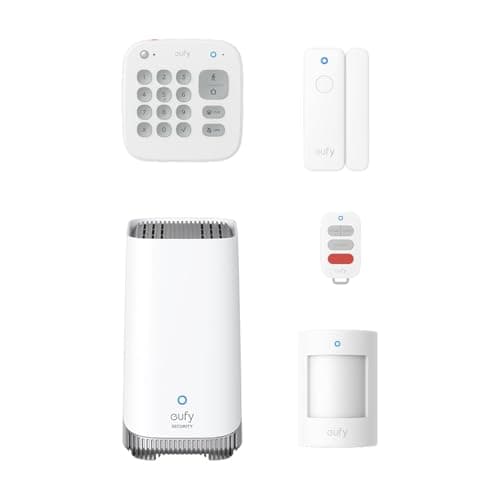
Nearly every DIY security system is sold as hardware and monetised as a subscription. The kit is the hook; the recurring fee for keeping your own video is the business. The eufy Alarm 5-Piece Kit is interesting because it does not have that second half at all. eufy sells no monitoring plan for this system and no video plan to keep its footage, and the reason it can get away with that is the box at the centre of the kit: HomeBase 3 is not just an alarm hub, it is a local video recorder. Everything the system sees is written to storage in your house. This review is about what that actually buys you, and the two things it costs you.
What is in the box
Five pieces: HomeBase 3, a keypad, a motion sensor and two entry sensors. That is a front door, a back door and one room of motion coverage, which is a sensible shape for an apartment or a small house and an obvious starting point for a bigger one. eufy's listing stresses that every device arrives pre-configured, and that matters more than it sounds - the part of DIY security that tries people's patience is not sticking sensors to door frames, it is pairing each one to a hub that keeps timing out. Arming and disarming is a code on the keypad or a tap in the app, and eufy publishes the keypad's open-air range to the hub at up to 656 feet, so placement is not a constraint in a normal home.
The siren is inside HomeBase 3 itself, rated by eufy at 100dB. That is the one piece of hardware most people underestimate: a loud local siren is what ends an opportunistic break-in, and it works whether or not anyone is watching a phone. If none of these components are familiar, our security system basics guide walks through what each one actually does.
The hub is the recorder - this is the whole pitch
HomeBase 3 is where this kit separates from the field. eufy publishes 16GB of built-in eMMC storage on the hub (the Amazon listing for this kit states 32GB; we quote both rather than pick the flattering one) and support for expanding that to 16TB by attaching a 2.5-inch SATA drive. It supports up to 16 eufy cameras or doorbells and up to 34 sensors. So an alarm kit bought for two doors can become a sixteen-camera system with a quarter of a decade's worth of storage capacity behind it, and the monthly cost of that is zero - not zero on an introductory tier, zero because eufy does not sell a tier.
The processing is local too, which is the privacy half of the same argument: eufy's listing describes faster response times and complete data privacy from local processing, and its BionicMind facial recognition is pitched as distinguishing family members from strangers so the alerts you get are the ones that matter. Compare that to the usual arrangement, where recorded clips live in a vendor's cloud and reviewing last Tuesday costs a monthly fee, and the difference over three years is substantial. We run exactly that math in the no-subscription systems roundup.
The two things it costs you
First: there is no professional monitoring, and there never will be on this system. eufy does not sell a plan where a monitoring centre watches the alarm and dispatches police when you miss the alert. On a Ring kit that is a $10-a-month decision you can make and unmake; here it is not on the menu. If you are the kind of buyer who thinks "I will self-monitor for now and add monitoring if I travel more," this is the wrong system - not because it is worse, but because that door is closed. Our DIY vs monitored guide is the honest version of whether you need that centre at all.
Second: no camera comes in the box, and eufy publishes no cellular backup for the kit. The hub records cameras; it is not a camera. So the day-one experience is an alarm, and the video half of the proposition starts when you buy your first eufy camera. And because there is no cellular path, the system depends on your home Wi-Fi to reach your phone - the siren still sounds locally in an outage, but the notification may not arrive. If that matters where you live, read do home security systems work without Wi-Fi before you commit.
Ecosystem: Alexa and Google, and not Apple
eufy's own compatibility documentation puts HomeBase 3 with Amazon Alexa and Google Assistant, and states plainly that it is not compatible with Apple HomeKit. There is no Matter support for the alarm either. We would rather say that flatly than imply otherwise: if your home runs on Apple and you want the alarm in the Home app, this is not the system, and as it happens nothing we can currently link to is. The ecosystem comparison is the guide for deciding which platform to build around before you buy hardware that commits you.
Where it fits
This kit is for the buyer who has already answered the subscription question and answered it "never." If you want the alarm and the cameras in one app, the footage on a drive you own, and no line item on a card, it is the strongest expression of that position in DIY security - and the sixteen-camera ceiling means it is a decision you can keep growing into. If you want the cheapest possible route to a monitoring centre, the biggest accessory catalogue, or anything that appears in Apple Home, look at the full systems roundup instead, where the Ring kits make those cases.
Who should buy this kit
Buy it if you want the alarm and the camera footage in one place, in your house, with nothing on the meter - and if you are confident you will never want a monitoring centre. It is also the right buy if you already own eufy cameras or intend to, because HomeBase 3 turns them into a local recording system rather than sixteen separate cloud subscriptions.
Who should look elsewhere
If 24/7 professional monitoring is on the table now or later, buy a Ring Alarm instead - eufy has no plan to upgrade to, and switching systems later is far more expensive than paying a cheaper monthly fee. If you need the alarm in Apple Home, nothing on our current shortlist does that; abode's iota does, and our abode iota review explains it, but Amazon no longer stocks it so you would be ordering direct.
Budget for the drive and the first camera
Two honest line items beyond the kit price. The 16TB ceiling is reached by attaching your own 2.5-inch drive, so if long history is the point, price a surveillance-rated drive in. And since no camera ships in the box, the video half of the system starts with your first eufy camera purchase. Neither is a hidden fee - they are one-off hardware, which is the whole difference from a subscription - but they belong in the total you compare against a cloud system.