Skip to content
Latch & Hub

Systems · Security Systems

The Best Home Security Systems With Cameras

Most people want two things at once - an alarm that sounds when a door opens, and eyes on the home to see what set it off. This page ranks the systems that give you both in one ecosystem and one app: one with a camera built into the base station, and two that pair cleanly with cameras you add. Here they are, with honest cons on each.

By Stephen V.Updated How we choose
#ad

We earn a commission when you buy through our Amazon links, at no extra cost to you. It never changes our rankings — where the subscription-free or cheaper option is the better buy, we say so. How this works.

Almost everyone shopping for a security system actually wants two things at once: an alarm that sounds the moment a door or window opens, and a camera so they can see what set it off - was it a package, a cat, or someone who should not be there. The problem is that the alarm and the camera are usually sold as separate worlds, on separate apps, and stitching them together after the fact is where the frustration lives. This page is the shortlist of systems that solve that up front: an alarm and a camera that belong to the same ecosystem and answer to the same app. One does it by building the camera into the base station; the other two do it by pairing cleanly with cameras you add. All three are ranked here with the honest trade-offs spelled out.

What "a system with a camera" really means

There are two honest ways a security system can "have a camera," and the difference decides which pick suits you. The first is a camera built into the system - the base station that houses the siren and radios also has a lens, so the moment you buy the kit you have an alarm and a live view in one device. That is the abode iota, and it is the reason it is our top pick: nothing else here gives you the camera in the box. The second way is a system that pairs cleanly with cameras you add later, so the alarm and the cameras share one app, one login and one set of alerts even though the camera is a separate purchase. That is both Ring systems: the alarm handles the sensors and siren, and Ring cameras and doorbells drop into the same Ring app beside it.

Neither approach is wrong - they suit different homes. A built-in camera is the tidiest answer if you want the essentials covered from a single box and one room of coverage is enough to start. A pairs-with-cameras system is the more scalable answer if you know you will end up with a camera on the porch, one over the driveway and a doorbell, because you are buying into a camera line that grows. The one thing we refuse to blur is the difference: we do not credit a system with a camera it does not have, and where a listing is silent on which extra cameras or local recording it supports, we mark it as Not listed rather than assume it. If you want the wider field of alarm systems without the camera angle, our best home security systems roundup ranks them all.

The three picks, and how they differ

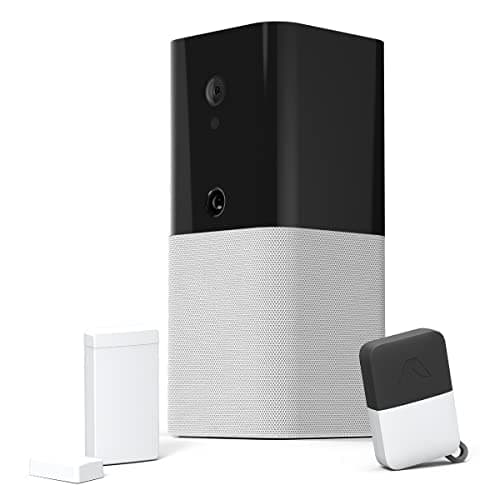
The abode iota is the top pick because it is the only true all-in-one. The base station that sounds the alarm has a camera built into it, so one kit gives you the siren, the door/window and motion sensors, a key fob and a live view - no second app, no separate camera to buy for basic coverage. It is also the most flexible on ecosystem: its listing names Apple HomeKit, Alexa and Google, which is the widest reach on this page and the only one that welcomes an Apple household. DIY install, a free self-monitoring tier, and professional monitoring left as an option rather than a requirement. Its one real limit is scope: the camera watches the room the base sits in, so wider coverage still means adding cameras. Our full abode iota review digs into how the integrated camera behaves day to day.

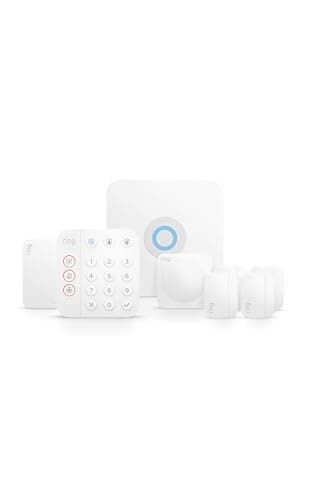
The Ring Alarm 8-Piece is the pick if you are buying into Ring. It has no camera of its own - it is the alarm half - but that is the point: it shares the Ring app with every Ring camera and doorbell, so you buy the kit for the sensors and siren, add a camera or two, and run all of it from one app with Alexa. Self-monitoring is free, so you get alerts and control with no mandatory plan, and inexpensive no-contract professional monitoring is there if you want it. The camera you most often add to it is the Ring Stick Up Cam, which pairs straight into the same app. The honest catch is that saved clips from Ring cameras live behind a Ring Home subscription, so "one app" can still mean a monthly fee for recorded video. Our Ring Alarm review covers the kit in full.

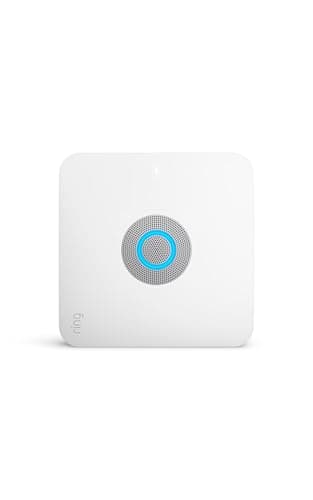
The Ring Alarm Pro is the same alarm with a router bolted on.The base station is a built-in eero Wi-Fi 6 router, and it adds local video recording through Ring Edge plus cellular and battery backup when you carry a plan - so it can keep working through an internet or power interruption. For the right buyer that is a genuinely neat consolidation: one box becomes both the home's router and its alarm hub. For everyone else it is hardware you are paying for twice, because if your current router is fine you gain little over the standard Ring Alarm. Buy it for the router and the backup, not as a default. The Ring Alarm Pro review weighs exactly when the upgrade earns its keep.

Where the camera actually comes from

This is the crux of the whole page, so it is worth being blunt. With the abode iota, the camera is already there - it is inside the base station you were going to buy anyway. With either Ring system, the camera is a separate purchase that you add to the alarm. That is not a knock on Ring; a great many people prefer it, because it lets you put the camera exactly where you need it - a battery camera on a fence, a wired one on the porch, a doorbell at the door - rather than being limited to wherever the base station happens to sit. The Ring line has a camera for nearly every mount, and they all share the app with the alarm.

So the practical question is not "which system has a camera" but "how many cameras, and where." If one indoor view from the hub is enough to start, the iota's built-in camera is the least-fuss answer. If you already know you want the porch, the driveway and the back door covered, you are really buying a camera system as much as an alarm, and the Ring route - alarm kit plus a set of Ring cameras in one app - scales to that better. Either way, when you get to choosing the cameras themselves, our best home security cameras guide ranks the options that pair with these systems, and if you are still deciding whether you even need the alarm or just the cameras, our security system or just cameras explainer settles that first.

The subscription reality, told straight

Two separate fees can attach to these systems, and it is easy to conflate them. The first is professional monitoring- paying a company to watch the alarm and call for help. On all three systems that is genuinely optional: every one includes free self-monitoring, where the alarm sounds and your phone gets the alert, and you decide whether to add a paid plan for 24/7 response. Ring's professional monitoring is inexpensive and has no contract; abode's is likewise an optional add-on. In every case, confirm current pricing before you commit, because plan tiers change. Whether that plan is worth it for you is exactly the question our do you need a monitoring plan guide is built to answer.

The second fee is saved video, and this is where the "system with a camera" angle gets a caveat. On the Ring systems, live view is free, but saving and reviewing recorded clips from Ring cameras generally requires a Ring Home subscription - so the video half of your one-app setup can carry its own monthly cost. The abode iota's recording and storage terms are not detailed on its listing beyond the optional monitoring, so we do not claim free cloud saving it does not name; treat recorded storage as a "confirm current pricing" item there too. The honest summary: budget for the hardware first, then decide plan by plan what you actually want to pay to keep - do not assume saved clips are free just because the live view is.

One ecosystem, one app - why it is the whole point

The reason to buy a system-with-a-camera rather than an alarm from one brand and a camera from another is simple: fewer apps, fewer logins, one place for alerts. When a sensor trips, you want to open one app and immediately see the camera view for the same event, not juggle two notifications from two vendors that do not talk to each other. The abode iota delivers that natively - alarm and camera are the same device. Ring delivers it by keeping its whole line, alarm and cameras and doorbells, inside the Ring app with Alexa voice control across all of it. The two Ring systems are so close that the choice between them is really just "do I also want a router," and if you are weighing abode against Ring on the alarm itself, our Ring Alarm vs abode iota comparison is the head-to-head.

A note on ecosystem breadth, because it can quietly decide the whole purchase. The abode iota is the only pick here whose listing names Apple HomeKit, so if your home runs on Apple and you want the alarm and its camera to appear in the Home app, it is effectively the pick by default - both Ring systems name Alexa but not HomeKit. If you are already an Alexa and Ring household, the reverse is true and the Ring route feels native. Match the system to the ecosystem you already live in and the day-to-day experience is dramatically smoother than trying to bridge two that were never meant to meet.

The honest caveat

The same disclosure sits on every page here: we do not run a security lab. This ranking is built from each system's own Amazon listing and manufacturer documentation, read on August 1, 2026. We recorded only the features and compatibilities each system actually names - built-in camera, ecosystem support, monitoring options - and marked anything a listing left unsaid as Not listedrather than filling the gap from memory. That is why the compatibility matrix below has "Not listed" cells where a plainer roundup would guess a checkmark. This is a researched roundup, not a hands-on test; the full method is on our methodology page.

The short answer

Quick picks

Tap any row for the full write-up.

  • abode iota All-In-One Kit
    01 abode iota All-In-One KitTop pick

    The true all-in-one: the alarm base station itself has a camera inside, so a single kit gives you the siren, the sensors and a live view from one device and one app - and it is the only system here whose listing names Apple HomeKit.

    Best for: The all-in-one: alarm plus a built-in camera plus HomeKit · No Matter listed (HomeKit, Alexa, Google)

    $249.99View on Amazon

    #ad · we may earn a commission from this link to abode iota All-In-One Kit

  • Ring Alarm 8-Piece Kit (2nd Gen)
    02 Ring Alarm 8-Piece Kit (2nd Gen)

    The DIY alarm that lives in the same app as Ring's cameras and doorbells: buy the kit for the sensors and siren, add a Ring camera or two, and the whole thing runs from one Ring app with Alexa, on free self-monitoring.

    Best for: One Ring and Alexa app for the alarm and Ring cameras · No Matter listed (Alexa, no HomeKit)

    $249.99View on Amazon

    #ad · we may earn a commission from this link to Ring Alarm 8-Piece Kit (2nd Gen)

  • Ring Alarm Pro
    03 Ring Alarm Pro

    The pro option: the same Ring Alarm, but the base station is also a Wi-Fi 6 router, with local video recording through Ring Edge and cellular plus battery backup on a plan. Worth it only if you also want to replace your router.

    Best for: Buyers who also want a Wi-Fi 6 router and local video · No Matter listed (Alexa, no HomeKit)

    $249.99View on Amazon

    #ad · we may earn a commission from this link to Ring Alarm Pro

#ad · Live prices from the Amazon Product API, as of Aug 1, 2026. Where we have no verified live price we show none — we would rather leave a gap than print a number that has rotted.

Security systems with cameras - only what each listing claims
DeviceBuilt-in cameraPairs with camsHomeKitAlexaFree self-monitorLocal video
abode iotaCamera in the baseYesNot listedYesYesYesNot listed
Ring Alarm 8-PieceAdd Ring camerasNoYesNoYesYesNo
Ring Alarm ProRouter + Ring EdgeNoYesNoYesYesYes

In detail

The picks, in full

01

abode iota All-In-One Kit

Top pick
abode iota All-In-One Kit
$249.99View on Amazon

Price as of Aug 1, 2026. Amazon's price at checkout is the one that counts.

#ad · we may earn a commission from this link to abode iota All-In-One Kit

The true all-in-one: the alarm base station itself has a camera inside, so a single kit gives you the siren, the sensors and a live view from one device and one app - and it is the only system here whose listing names Apple HomeKit.

  • Base station with integrated camera
  • Door/window + motion sensors and a key fob
  • DIY installation
  • Works with Apple HomeKit, Alexa and Google
  • Free self-monitoring; optional professional monitoring
Matter: No Matter listed (HomeKit, Alexa, Google)Fee: Free self-monitoring; optional no-contract professional monitoring (confirm current pricing)Researched, not hands-on tested

Good

  • The base station has an integrated camera, so the hub that sounds the alarm also gives you a live view - one device, one app, no separate camera to buy for basic coverage
  • Its listing names Apple HomeKit, Alexa and Google, the widest ecosystem reach here, so it fits an Apple household the Ring systems shut out
  • DIY install with a free self-monitoring tier, and professional monitoring is an optional add-on rather than a mandatory contract

Less good

  • The built-in camera watches one area - the room the base sits in - so covering more rooms or the yard still means adding cameras alongside it
  • The listing does not name which additional cameras or local-video recording it supports, so we mark those as Not listed rather than assume them
  • Professional monitoring is an optional paid add-on; confirm current pricing before you count on 24/7 response

Skip it if: you want eyes on several rooms or the driveway out of the box - the integrated camera covers the base station's location, so a multi-camera home is a job for a dedicated camera system running alongside the alarm.

02

Ring Alarm 8-Piece Kit (2nd Gen)

Ring Alarm 8-Piece Kit (2nd Gen)
$249.99View on Amazon

Price as of Aug 1, 2026. Amazon's price at checkout is the one that counts.

#ad · we may earn a commission from this link to Ring Alarm 8-Piece Kit (2nd Gen)

The DIY alarm that lives in the same app as Ring's cameras and doorbells: buy the kit for the sensors and siren, add a Ring camera or two, and the whole thing runs from one Ring app with Alexa, on free self-monitoring.

  • Base, keypad, contact + motion sensors, range extender
  • DIY installation
  • Free self-monitoring included
  • Optional no-contract 24/7 professional monitoring
  • Works with Alexa (no Apple HomeKit)
Matter: No Matter listed (Alexa, no HomeKit)Fee: Free self-monitoring; optional inexpensive no-contract professional monitoring (confirm current pricing)Researched, not hands-on tested

Good

  • The alarm shares the Ring app with every Ring camera and doorbell, so sensors, siren and video all live in one place with Alexa voice control
  • Free self-monitoring is included - app alerts and full control with no mandatory plan - and inexpensive no-contract 24/7 professional monitoring is an option on top
  • A complete DIY kit with base, keypad, sensors and a range extender covers a typical home out of the box and expands with more Ring gear

Less good

  • There is no camera in the box - this is the alarm half, so you add a Ring camera such as the Ring Stick Up Cam for the video half
  • Ring cameras save recorded clips to the cloud behind a Ring Home subscription, so 'one app' still means a monthly fee if you want saved footage (confirm current pricing)
  • No Apple HomeKit, so an Apple-first household is better served by the abode iota

Skip it if: you want a camera already built into the system, or you refuse any subscription for saved video - the Ring alarm has no onboard camera and Ring's saved clips sit behind a plan.

03

Ring Alarm Pro

Ring Alarm Pro
$249.99View on Amazon

Price as of Aug 1, 2026. Amazon's price at checkout is the one that counts.

#ad · we may earn a commission from this link to Ring Alarm Pro

The pro option: the same Ring Alarm, but the base station is also a Wi-Fi 6 router, with local video recording through Ring Edge and cellular plus battery backup on a plan. Worth it only if you also want to replace your router.

  • Base station with built-in eero Wi-Fi 6 router
  • Local video recording via Ring Edge (with plan)
  • Cellular + battery backup (with plan)
  • DIY installation
  • Works with Alexa (no Apple HomeKit)
Matter: No Matter listed (Alexa, no HomeKit)Fee: Free self-monitoring; local video and backup features require a Ring plan (confirm current pricing)Researched, not hands-on tested

Good

  • The base station is a full eero Wi-Fi 6 router, so one device replaces both your router and your alarm hub
  • Supports local video recording through Ring Edge and adds cellular plus battery backup with a plan, so the system can keep working through an internet or power interruption
  • Runs the same Ring app and Alexa as the standard Ring Alarm and pairs with the same Ring cameras and doorbells

Less good

  • The router is the whole point - if you are happy with your current router, you are paying for hardware you do not need and the standard Ring Alarm is the smarter buy
  • Local video, cellular and battery backup depend on a Ring plan, so the headline features are subscription-gated (confirm current pricing)
  • No Apple HomeKit, the same limitation as the rest of the Ring line

Skip it if: you already have a router you like, or you do not want Ring Edge and backup tied to a plan - then the plain Ring Alarm gives you the same alarm with less hardware to pay for.

First: camera in the box, or a camera you add?

This is the fork that removes most of the field. If you want the essentials covered from a single purchase and one room of coverage is enough to begin with, buy the system with the camera built in - the abode iota, where the alarm base and the camera are the same device. If you already know you will want several cameras in specific spots - the porch, the driveway, a doorbell - you are really buying a camera system alongside the alarm, and a Ring kit that shares one app with a whole camera line scales to that far better. Answer this before you look at anything else, because it decides whether you are buying one box or a platform.

Then: match the system to your ecosystem

For an Apple household, the abode iota is effectively the default - it is the only pick here whose listing names Apple HomeKit, so the alarm and its camera can appear in the Home app. For an Alexa and Ring household, either Ring system feels native, with Alexa voice control across the alarm and every Ring camera. Both abode and Ring name Google as well. Do not fight your existing ecosystem: the whole benefit of a system-with-a-camera is one app and one set of alerts, and that only holds if the system speaks the language your home already runs on.

Then: settle monitoring and saved video separately

Keep the two fees apart in your head. Monitoring - paying someone to watch the alarm - is optional on all three; each includes free self-monitoring, and both abode and Ring offer optional no-contract professional plans (confirm current pricing). Saved videois the separate one: on Ring, keeping recorded clips generally needs a Ring Home subscription, so budget for it if you want footage you can review later. Decide each on its own merits rather than assuming a system is "free" or "paid" overall. If you would rather avoid ongoing fees wherever possible, start with our no-subscription security systems guide, and if you are still torn on professional monitoring, the DIY vs monitored breakdown lays out the real trade.
How we chose

We don't run a test lab

We don't wire every one of these into a test rig, and we won't write "in our testing" as if we do. What we did instead: pulled each product's published specifications, confirmed its Matter/Thread/HomeKit support from the manufacturer's own documentation, added up the real 3-year cost with any monthly fee included, and read the aggregated verified-buyer sentiment. Every pick is chosen against that published method. Where a number came from someone else, we name and link them in Sources.

Questions

Frequently asked

What is the best home security system with a camera?
For most buyers, the abode iota is the strongest pick because it is the only true all-in-one here: the alarm base station has a camera built in, so one kit gives you the siren, the sensors and a live view, and its listing names Apple HomeKit, Alexa and Google. If you are already in the Ring and Alexa world, the Ring Alarm 8-Piece is the better fit - it shares one app with Ring cameras and doorbells - and the Ring Alarm Pro adds a Wi-Fi 6 router and local video for buyers who also want to replace their router.
Does the Ring Alarm come with a camera?
No. The Ring Alarm 8-Piece and the Ring Alarm Pro are the alarm half - base, keypad, sensors and, on the Pro, a router - with no camera in the box. The point is that they share the Ring app with Ring cameras and doorbells, so you add a camera such as the Ring Stick Up Cam and run the alarm and the video from one app with Alexa. If you want the camera already built into the system, the abode iota is the pick, because its base station has an integrated camera.
Do I have to pay a monthly fee to use these systems?
Not for the alarm itself. All three include free self-monitoring, so the siren sounds and your phone gets the alert with no mandatory plan, and professional monitoring is an optional add-on on both abode and Ring (no contract on Ring). The fee to watch for is saved video: on Ring, keeping recorded clips from Ring cameras generally requires a Ring Home subscription. Live view is free; saved footage is the part that can carry a monthly cost. Confirm current pricing on any plan before you rely on it.
Which of these works with Apple HomeKit?
Only the abode iota. Its listing names Apple HomeKit, Alexa and Google, so it is the pick for an Apple household that wants the alarm and its camera in the Home app. Both Ring systems name Amazon Alexa but not Apple HomeKit, so they suit an Alexa-first home rather than an Apple-first one. None of the three lists Matter as of our review date, so we do not credit it.
Is the Ring Alarm Pro worth it over the standard Ring Alarm?
Only if you also want a new router. The Ring Alarm Pro is the same alarm with a built-in eero Wi-Fi 6 router, local video recording through Ring Edge, and cellular plus battery backup on a plan. If your current router is fine, you are paying for hardware you do not need, and the standard Ring Alarm gives you the same alarm and the same app for less. Buy the Pro for the router and the backup, not as a default upgrade.

Keep reading

Receipts

Sources

  • Amazon product listings for the abode iota, Ring Alarm 8-Piece and Ring Alarm Pro (features + ecosystem claims)(read 2026-08-01)
  • abode and Ring manufacturer documentation for monitoring and camera compatibility(read 2026-08-01)

We do not run a test lab, and we do not pretend to. Compatibility and subscription-cost claims come from the manufacturer's own documentation and the live retailer listing, read on the dates shown. Read our full method.