Skip to content
Latch & Hub

Cameras · Security Cameras

How Long Do Security Cameras Keep Footage?

There is no single number, and anyone who gives you one is guessing. Retention is set by three things: how much storage the footage lands on, how much of it the camera writes, and whether a subscription is holding a copy. Here is how to work out your own answer — and how to make it longer.

By Stephen V.Updated How we choose
#ad

We earn a commission when you buy through our Amazon links, at no extra cost to you. It never changes our rankings — where the subscription-free or cheaper option is the better buy, we say so. How this works.

Verdict

The bottom line

A typical home security camera keeps footage for a few days to a few weeks, and the length is set by where the video is stored rather than by the camera itself. A camera recording motion clips to its own microSD card — like the Wyze Cam v4 (cards up to 256GB) or the TP-Link Tapo C120 (up to 512GB) — typically holds weeks of clips and then overwrites the oldest first. A camera with small built-in storage, like the eufy SoloCam S340 at 8GB, holds days. A wired NVR system such as the Reolink RLK8-800B4, with a 2TB drive, holds a continuous 24/7 timeline measured in weeks across four cameras. Cloud plans keep a fixed window instead — Ring, for example, publishes a saved-video history of up to 180 days on its plans. In every case the storage is a loop: when it fills, the oldest footage is deleted automatically, so the useful question is not "how long does it keep footage" but "how far back can I look today, and is that far enough?"

People usually ask this question after the fact: something happened on Saturday, it is now Thursday, and they want to know whether the footage still exists. The answer depends almost entirely on a decision made at purchase — where the camera puts its video — and most people never think about that decision until it matters. So let us take it apart properly.

The three storage models, and what each one keeps

A card in the camera. Most affordable cameras record to a microSD card. The card is a loop: the camera writes until it is full, then overwrites the oldest footage. Because these cameras usually record motion events rather than continuously, a surprisingly small card goes a long way — a card-based camera on a quiet side wall can hold weeks, while the same camera pointed at a busy pavement fills much faster. Published ceilings vary by model: Wyze supports up to 256GB on the Cam v4, TP-Link up to 512GB on the Tapo C120.

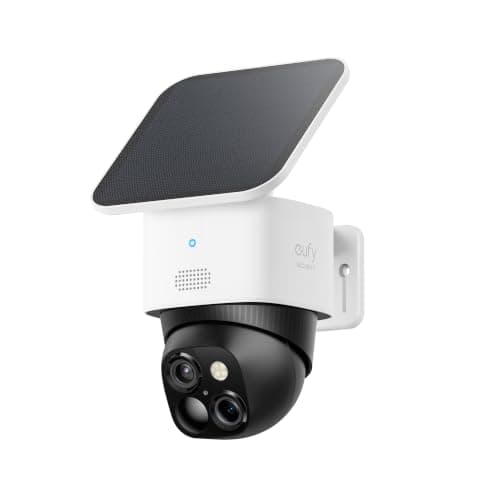
Built-in storage. Some cameras have fixed internal memory and no card slot — the eufy SoloCam S340 has 8GB built in. That is genuinely convenient (nothing to buy, nothing to fail) and genuinely short: 8GB of motion clips is a matter of days on an active camera, then it starts overwriting. Check whether the model can offload to a base station, which is how eufy extends it.

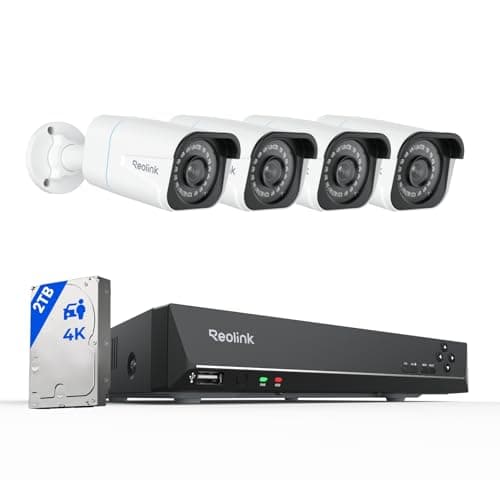
A hard drive in a recorder. A wired PoE system records every camera continuously to a drive in an NVR — the Reolink RLK8-800B4 ships with 2TB. This is the only setup that gives you a true timeline rather than a pile of clips, so you can scrub to 3:40am and see what was there whether or not anything triggered a motion alert. It is also the most storage-hungry mode, which is why drive size and compression matter so much here.

A cloud plan. Subscription cameras upload clips and keep them for a published window — Ring states up to 180 days of video history on its plans. The window is fixed by the tier rather than by your hardware, the footage survives the camera being stolen, and it stops the day you stop paying. Our local vs cloud camera storage page weighs that trade in full.

The four things that actually set your retention

One: capacity. Obvious, and the only lever you can pull after purchase. A bigger card or a bigger surveillance-rated drive buys proportionally more history.

Two: how much the camera writes. Continuous recording consumes vastly more than motion-triggered clips. A camera set to record only on person detection may hold ten times the history of the same camera recording 24/7 — at the cost of the quiet footage before and after an event, which is often the useful part.

Three: resolution and compression. 4K eats storage; 1080p sips it. H.265 compression roughly halves the bitrate of H.264 for similar quality, which is why Reolink naming H.265 on its listing matters to how long that 2TB lasts. A 4K camera on H.264 at 30fps is the fastest way to fill a drive there is.

Four: how busy the scene is. Motion-based recording is driven by the world, not the clock. The same camera and card retain very different amounts in a quiet back garden and over a pavement, and this is why nobody can honestly hand you one number. Our guide to reducing false alerts doubles as a retention guide: fewer junk triggers means a longer history of real events.

What the cameras below are chosen for

Having established that storage decides retention, the picks that follow are simply the four storage models in our registry made concrete — the two big-card cameras, the small built-in-storage camera that shows the short end of the scale, and the NVR system that keeps a continuous timeline. They are what we would actually buy for each answer, not a ranking of cameras in general; for that, start with best home security cameras.

The short answer

Quick picks

Tap any row for the full write-up.

  • Reolink RLK8-800B4 4K PoE System
    01 Reolink RLK8-800B4 4K PoE SystemTop pick

    The right answer if retention is what you care about. A wired PoE system records every camera continuously to the 2TB drive in the recorder, giving you a real timeline you can scrub rather than a set of clips, and H.265 compression is what makes that drive stretch. Nothing is uploaded and nothing is billed monthly.

    Best for: The longest, most complete history — continuous 24/7 recording · No Matter — local NVR + Reolink app

    $699.99View on Amazon

    #ad · we may earn a commission from this link to Reolink RLK8-800B4 4K PoE System

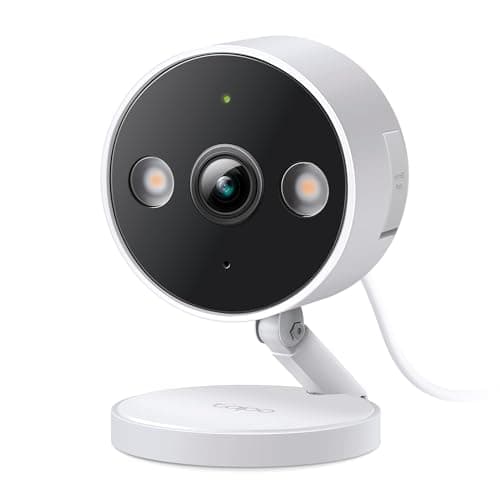
  • TP-Link Tapo C120
    02 TP-Link Tapo C120

    The best card ceiling of the wireless-style cameras here: TP-Link supports microSD up to 512GB, and on-device person, pet and vehicle detection means the card fills with events worth keeping rather than every passing car. Subscription-free by design.

    Best for: The longest card-based history without a subscription · No Matter — Tapo app plus Alexa/Google voice

    $27.44View on Amazon

    #ad · we may earn a commission from this link to TP-Link Tapo C120

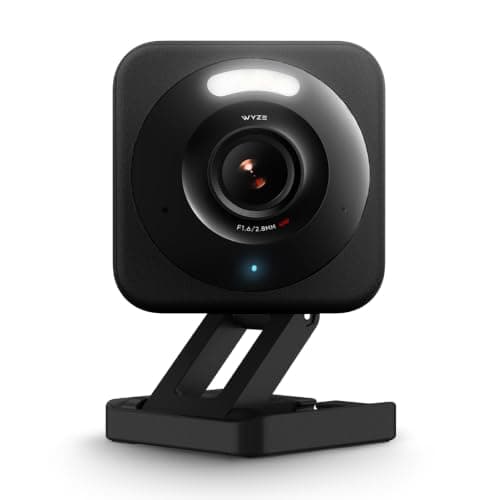
  • Wyze Cam v4
    03 Wyze Cam v4

    The cheapest way to get weeks of local history. 2.5K video to a microSD card up to 256GB, recording that works with no plan at all, and a spotlight and siren built in. The card is the retention, so buy a decent one and size it deliberately.

    Best for: Budget local recording — weeks of clips for the price of a takeaway · No Matter — Wyze app plus Alexa/Google voice

    $44.98View on Amazon

    #ad · we may earn a commission from this link to Wyze Cam v4

  • eufy SoloCam S340
    04 eufy SoloCam S340

    Here for honesty about the short end of the scale: 8GB of built-in storage with no card slot is days of clips on an active camera, not weeks. In exchange you get a solar-charged, battery-powered 3K pan-and-tilt camera that needs no wiring and no fee, and it can offload to a eufy HomeBase if you want a longer history.

    Best for: No-wiring placement, accepting a short local history · No Matter — eufy app

    $199.99View on Amazon

    #ad · we may earn a commission from this link to eufy SoloCam S340

#ad · Live prices from the Amazon Product API, as of October 17, 2026. Where we have no verified live price we show none — we would rather leave a gap than print a number that has rotted.

Storage model and published capacity — what sets your retention, read 2026-10-17
DeviceWhere footage goesPublished capacityRecording modeSurvives theft?Fee
Reolink RLK8-800B4NVR in the house2TB drive in the NVR2TB (replaceable)Continuous 24/7Yes, if NVR is hiddenNone
TP-Link Tapo C120Card in the cameramicroSDUp to 512GBMotion eventsNoNone
Wyze Cam v4Card in the cameramicroSDUp to 256GBMotion eventsNoNone
eufy SoloCam S340Fixed internal memoryBuilt-in storage8GBMotion eventsNoNone
Cloud plan (e.g. Ring)For contrastProvider's cloudUp to 180 days historyMotion eventsYesSubscription

In detail

The picks, in full

02

TP-Link Tapo C120

TP-Link Tapo C120
$27.44View on Amazon

Price as of October 17, 2026. Amazon's price at checkout is the one that counts.

#ad · we may earn a commission from this link to TP-Link Tapo C120

The best card ceiling of the wireless-style cameras here: TP-Link supports microSD up to 512GB, and on-device person, pet and vehicle detection means the card fills with events worth keeping rather than every passing car. Subscription-free by design.

  • 2K QHD, indoor/outdoor wired
  • microSD up to 512GB — subscription-free local storage
  • On-device person / pet / vehicle AI + cross-line detection
  • IP66; color night vision rated to ~98 ft
  • Alexa and Google Assistant listed
Matter: No Matter — Tapo app plus Alexa/Google voiceFee: Free — microSD local storage (Tapo Care optional)Researched, not hands-on tested

Good

  • A 512GB ceiling is double the Wyze's, which translates directly into a longer local history at the same settings
  • On-device detection filters what gets recorded, so the card is spent on events rather than shadows
  • IP66 and a published night-vision range make it a genuine outdoor camera at a low price

Less good

  • Wired power with a 9.8 ft cord, so the mounting spot has to have an outlet nearby
  • A card in the camera goes with the camera if it is stolen — the classic weakness of local-only storage
  • One fixed view per camera: no pan, no tilt

Skip it if: you want footage to survive the camera being taken — that is what a cloud plan or an NVR indoors is for.

03

Wyze Cam v4

Wyze Cam v4
$44.98View on Amazon

Price as of October 17, 2026. Amazon's price at checkout is the one that counts.

#ad · we may earn a commission from this link to Wyze Cam v4

The cheapest way to get weeks of local history. 2.5K video to a microSD card up to 256GB, recording that works with no plan at all, and a spotlight and siren built in. The card is the retention, so buy a decent one and size it deliberately.

  • 2.5K QHD, 2560 x 1440
  • microSD up to 256GB — local recording with no plan
  • IP65; color night vision + spotlight
  • Wired (outdoor adapter sold separately)
  • Alexa, Google Assistant and IFTTT listed
Matter: No Matter — Wyze app plus Alexa/Google voiceFee: Free with microSD (Cam Plus optional for AI alerts)Researched, not hands-on tested

Good

  • Local recording is free and unconditional — no plan is required for the camera to keep writing footage
  • 2.5K means the retained clips are actually detailed enough to be useful, not just evidence that something moved
  • Cheap enough to put several around a house, which spreads retention across cards rather than one drive

Less good

  • 256GB card ceiling is half the Tapo's
  • 2.4 GHz Wi-Fi only, so several of them in one house needs a thought about congestion
  • Smart alert filtering sits behind Cam Plus — without it, a busy scene fills the card with cars

Skip it if: the camera must go somewhere with no power at all — a battery-and-solar model is the trade-off.

04

eufy SoloCam S340

eufy SoloCam S340
$199.99View on Amazon

Price as of October 17, 2026. Amazon's price at checkout is the one that counts.

#ad · we may earn a commission from this link to eufy SoloCam S340

Here for honesty about the short end of the scale: 8GB of built-in storage with no card slot is days of clips on an active camera, not weeks. In exchange you get a solar-charged, battery-powered 3K pan-and-tilt camera that needs no wiring and no fee, and it can offload to a eufy HomeBase if you want a longer history.

  • 3K dual camera, 360° pan and tilt
  • Solar panel + rechargeable battery
  • 8GB built-in storage (no card slot)
  • No monthly fee
  • Alexa and Google listed on the Amazon listing
Matter: No Matter — eufy appFee: Free — 8GB local storageResearched, not hands-on tested

Good

  • Goes where there is no power and no cable, which is often exactly where the coverage gap is
  • Solar plus battery means no recharging trips in practice, and no subscription for the storage it does have
  • Pan and tilt covers a wide area from one mount, so one camera's 8GB covers what two fixed cameras would

Less good

  • 8GB is the shortest retention here by a wide margin, and there is no card slot to extend it — a HomeBase is the upgrade path
  • Battery cameras record events, not continuously, so there is no timeline between clips
  • Pan-and-tilt sees 360 degrees in sequence, not at once

Skip it if: being able to look back a week or more matters — buy a card-based or NVR camera instead.

How to get a longer history out of what you own

Fit a bigger card — up to the published ceiling.Cameras reject cards above their stated maximum, and the maximum differs per model (256GB on the Wyze Cam v4, 512GB on the Tapo C120; Reolink's Argus PT Ultra pages contradict each other at 128GB and 512GB, so buy the smaller size if you want certainty). Use a card rated for continuous video — ordinary camera cards fail early under constant rewriting.

Record events, not everything — unless you have an NVR. On a card-based camera, switching from continuous to person-detection recording multiplies your history. On an NVR with a large drive, continuous is the point and worth keeping.

Narrow the detection zone.Every junk trigger spends storage. Masking out the road, the tree and the neighbour's drive is the cheapest retention upgrade there is.

Drop the resolution one step on busy cameras. Going from 4K to 2K on the camera that watches a pavement roughly doubles its history, and 2K is enough to recognise a person at normal distances.

Export anything that matters, the day you find it. This is the habit that makes the rest academic. All of these systems delete the oldest footage automatically, so a clip you might need in a claim or a police report should be saved out of the app immediately — not left to sit in a loop that is quietly overwriting itself.
How we chose

We don't run a test lab

We don't wire every one of these into a test rig, and we won't write "in our testing" as if we do. What we did instead: pulled each product's published specifications, confirmed its Matter/Thread/HomeKit support from the manufacturer's own documentation, added up the real 3-year cost with any monthly fee included, and read the aggregated verified-buyer sentiment. Every pick is chosen against that published method. Where a number came from someone else, we name and link them in Sources.

Questions

Frequently asked

How many days of footage does a 128GB card hold?
There is no honest single answer, because it depends on resolution, compression, frame rate and how often the camera is triggered. The relationship is what to hold on to: halving the resolution roughly doubles the days, H.265 stretches it further than H.264, continuous recording consumes several times more than motion clips, and a busy scene fills a card far faster than a quiet one. Check your own camera after a week — the app will show you how far back the oldest clip goes, and that is your real number.
Do security cameras delete footage automatically?
Yes. Every storage model here is a loop: when the card, drive or plan window is full, the oldest footage is deleted to make room for the newest. Nothing warns you first. That is why exporting a clip you care about on the day you find it is the single most useful habit in this whole subject.
How far back do police usually need footage to go?
We are not going to invent a figure for that. What we can say from how these systems behave is that incidents are often reported days after they happen — a parcel noticed missing at the weekend, damage spotted on a car on Monday — so a retention window measured in days is uncomfortably tight and one measured in weeks is much safer. If you are keeping footage for a claim or a report, export it rather than relying on the camera still having it.
Does a subscription keep footage longer than a card?
Sometimes, and it is more about safety than length. A cloud plan keeps a fixed published window — Ring states up to 180 days of history on its plans — and that copy survives the camera being stolen or smashed, which local storage does not. A large card or a 2TB NVR drive can match or beat the length for nothing per month, but the footage is in the building. Our subscription costs page prices the difference.
Do cameras keep recording when the internet is down?
Local-storage cameras generally keep writing to the card or drive — the recording is local, so the outage affects your ability to watchrather than the camera's ability to record. Cloud-only cameras cannot upload and typically lose the event entirely. This is one of the strongest practical arguments for local storage; see do security cameras need Wi-Fi.
Can I keep footage forever?
Only by taking it out of the system. Export the clips you want to a computer or a backup drive; nothing in a camera, a card, an NVR or a subscription is designed as an archive. On an NVR you can extend the window a long way with a bigger surveillance-rated drive and motion recording, but it is still a loop.

Keep reading

Receipts

Sources

We do not run a test lab, and we do not pretend to. Compatibility and subscription-cost claims come from the manufacturer's own documentation and the live retailer listing, read on the dates shown. Read our full method.