Skip to content
Latch & Hub

Cameras · Security Cameras

How to Power an Outdoor Security Camera

The reason most outdoor cameras end up in the wrong place is power. There is no socket on the gable, running an extension lead outside is not a solution, and an electrician is expensive — so people mount the camera where the cable reaches instead of where the camera is needed. There are four ways out of that, and only one of them involves an electrician.

By Stephen V.Updated How we choose
#ad

We earn a commission when you buy through our Amazon links, at no extra cost to you. It never changes our rankings — where the subscription-free or cheaper option is the better buy, we say so. How this works.

Verdict

The bottom line

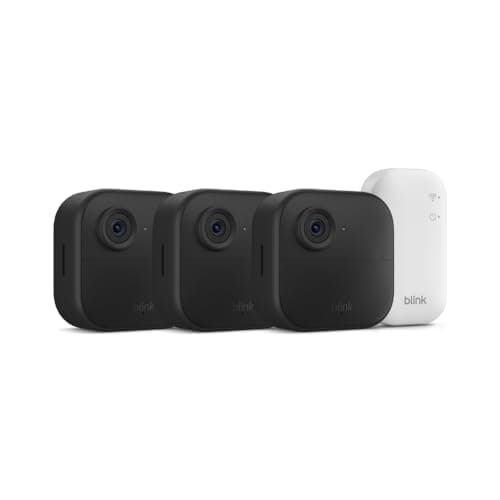
There are four ways to power an outdoor camera and the right one is decided by distance and by whether you can get a cable to the spot. If the camera is within a few feet of an existing outdoor-rated outlet, use the maker's own low-voltage adapter and nothing else — it is the cheapest and most reliable option, and it allows continuous recording. If the spot is further away but you can get a cable there, Power over Ethernetis the best answer available: one network cable carries both power and video up to around 100 meters, it is low voltage so it is not an electrician's job, and a system like the ANNKE 8CH 4K PoE kit records everything to a drive in the house. If no cable can reach, go wire-free: solar is the correct choice for anything you cannot easily get a ladder to, which means the eufy SoloCam S340 or the Reolink Argus PT Ultra, and plain battery — the Blink Outdoor 4 kit — only for spots that are permanently shaded or easy to reach for recharging. Never run an indoor extension lead outside to solve this.

Ask people why their outdoor camera is pointed at the wrong thing and the answer is almost always the same: that is where the power was. Power is the real constraint on outdoor camera placement, and it is worth solving deliberately rather than compromising around, because a camera watching the side of a shed is not doing the job you bought it for. Here are the four options, what each actually involves, and the mistakes that cause trouble later.

Option one: an AC adapter into an outdoor-rated outlet

If there is already an exterior outlet within reach, this is the cheapest and most reliable answer and you should take it. Three things make it work properly. Use the camera maker's own adapter — most outdoor cameras run on low-voltage DC from a brick that plugs into an outlet, and the voltage and amperage have to match; a generic supply with the wrong rating will either not start the camera or will cause intermittent dropouts that look like a Wi-Fi fault for months. Use a weatherproof outlet cover, the hinged "in-use" type that closes over the plug, not the flat flap designed for an empty socket. And secure the cable along its run with proper clips so it is not hanging in a loop someone can pull.

The thing not to do is run an indoor extension lead out of a window. It is the most common improvisation here and it fails three ways: indoor cords and connections are not rated for moisture, the window cannot close properly on the cable, and the whole arrangement is trivial to unplug from outside. If the camera needs power further away than the cable it came with, the answer is one of the next three options, not a longer indoor lead.

Option two: Power over Ethernet — the best answer most people have not considered

PoE sends power and video down a single network cable, and for an outdoor camera it is genuinely the strongest option available. The practical consequences are worth spelling out. One cable does everything, so there is one hole to drill rather than two. The run can be long — the Ethernet standard gives you about 100 meters, which covers a detached garage, the end of a driveway or an outbuilding that Wi-Fi never reached properly. It is low voltage, so in most jurisdictions it is not electrical work requiring an electrician, and the cable itself is cheap. And because the camera is wired, it records continuously rather than in motion clips, with the footage landing on a recorder inside the house where a thief cannot take it.

The trade-offs are real but narrow: you have to physically get a cable from the house to the camera, which means drilling an exterior wall and routing through an attic, a soffit or a conduit; and you need either a PoE switch or an injector at the house end, which is usually included in a kit. If you are putting up more than one camera, or putting any camera more than about twenty feet from an outlet, this is the option to price up first. See what is a PoE security camera for how the standard works, and best wired security camera systems for the kits.

Option three: battery, when nothing can reach the spot

Battery cameras exist precisely for the places cable cannot go, and they do that job honestly. What they cost you is continuous recording: a battery camera cannot film all the time or the battery would last days, so it sleeps and wakes on a motion sensor. That means motion clips rather than a continuous record, a short delay at the start of each clip while the camera wakes, and a battery life figure that depends entirely on how busy the view is — a camera watching a quiet side gate can last the claimed year or two, while the same camera watching a sidewalk may need recharging monthly.

The practical rule: battery is fine for a spot you can reach with a step ladder in two minutes, and a bad idea for anything high, awkward, or at the far end of a yard. Recharging a camera you need to fetch a ladder for is a chore you will start postponing, and a flat camera is the same as no camera. Best wireless security cameras ranks the field.

Option four: solar — battery without the recharging

Solar is a battery camera with a trickle charger attached, and it is the right answer for the awkward positions where battery alone would be a nuisance. A small panel — the cameras below include 2.2W and 3W panels in the box — generates enough across a day to replace what a moderately busy camera uses, so in practice you stop thinking about charging entirely.

Three things decide whether it works. Direct sun, not daylight: a panel in bright shade generates a fraction of its rating, so a north-facing wall or a shaded light well will not sustain the camera. Winter, not summer: the panel has to cover the camera's usage on the shortest, grayest days of the year, not the average day, which is why a camera on a busy frontage may still need a mid-winter top-up. And panel placement separate from camera placement: most of these panels are on their own cable, so the correct install often puts the camera in the shade at the right angle and the panel two feet away in the sun. The ranked field is in best solar security cameras.

What about the camera also being a light?

If the spot you want already has an exterior light fitting, you have a fifth option worth knowing about: a floodlight camera wires into the existing junction box and takes its power from the lighting circuit. That is line-voltage electrical work — it needs a neutral wire and, in most cases, an electrician — but if the wiring is already there the job is short, and you get a camera, a bright light and usually a siren from one fixture and one hole. See best floodlight cameras for that route.

The four mistakes that cause problems later

Using a generic power adapter.Match the maker's voltage and amperage exactly. An undersized supply produces random reboots and dropped streams that get blamed on Wi-Fi for months.

Leaving the connector exposed. The plug-and-socket joint between the camera lead and the extension or adapter is the part that fails, not the cable. Tape it, sleeve it, or tuck it inside a weatherproof junction box — and make sure it is not sitting in a position where water can pool on it.

Running the cable where it can be cut or pulled. A power lead dangling within reach of the ground is the single easiest way to disable a camera. Run it tight to the structure, through the wall as close to the camera as possible, and leave no slack loop.

Forgetting the camera still needs a network. Power solves one problem. A camera at the end of a yard with perfect power and two bars of Wi-Fi will still drop out — which is the real argument for PoE at distance, since it carries both. If a camera is already dropping off, why is my security camera offline covers the diagnosis.

Cold weather changes the arithmetic

One seasonal note, because it catches people out. Lithium batteries hold less charge and discharge faster in cold weather, so a battery camera that lasts three months in summer may need charging every few weeks in January — and that is exactly when solar output is at its lowest too. If you live somewhere with real winters and the camera matters, wired or PoE is the robust choice and wire-free is the convenient one. The detail is in do security cameras work in cold weather.
The short answer

Quick picks

Tap any row for the full write-up.

  • ANNKE 8CH 4K PoE System
    01 ANNKE 8CH 4K PoE SystemTop pick

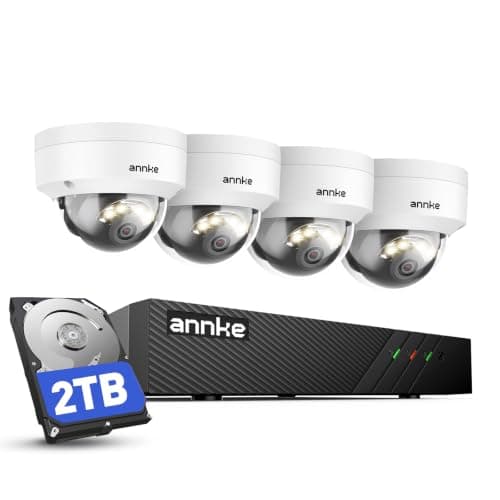
    The answer when you can get a cable to the spot. One network cable per camera carries power and video up to around 100 meters, the four 8MP cameras record continuously to the 2TB drive in the house, and none of it depends on Wi-Fi reaching the end of the yard.

    Best for: Permanent outdoor coverage at distance, with continuous recording · No Matter (ONVIF/RTSP + app)

    $439.99View on Amazon

    $509.9914% off

    #ad · we may earn a commission from this link to ANNKE 8CH 4K PoE System

  • eufy SoloCam S340
    02 eufy SoloCam S340

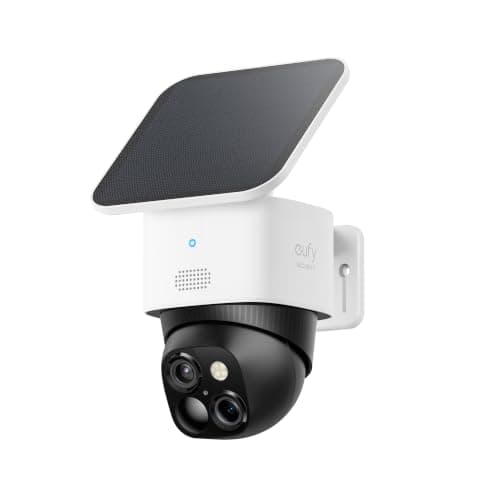
    The solar answer for a spot no cable can reach. The 2.2W panel is in the box, footage goes to 8GB inside the camera, and in a position with real sun you stop thinking about power entirely — which is the whole point of solar over plain battery.

    Best for: Awkward, high or far positions with direct sun · No Matter (app + Alexa/Google)

    $159.99View on Amazon

    $199.9920% off

    #ad · we may earn a commission from this link to eufy SoloCam S340

  • Reolink Argus PT Ultra
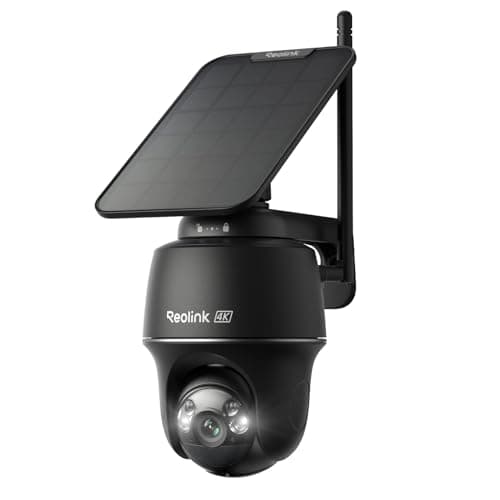
    03 Reolink Argus PT Ultra

    The solar pick when you also want 4K and months of local history. A 3W panel in the box, a pan-tilt head so the camera can be positioned for sun and still aimed where you need it, and a microSD card up to 512GB rather than a fixed scrap of internal memory.

    Best for: Solar power with 4K detail and the most local storage · No Matter (Reolink app; Alexa & Google)

    $159.99View on Amazon

    #ad · we may earn a commission from this link to Reolink Argus PT Ultra

  • Blink Outdoor 4
    04 Blink Outdoor 4

    The plain-battery option, and the right one for spots that are shaded but easy to reach. Three cameras with a two-year battery claim means no power, no cable and no panel to position — at the cost of recharging on a schedule and no continuous recording.

    Best for: Shaded or sheltered spots you can reach with a step ladder · No Matter

    $189.99View on Amazon

    #ad · we may earn a commission from this link to Blink Outdoor 4

#ad · Live prices from the Amazon Product API, as of October 10, 2026. Where we have no verified live price we show none — we would rather leave a gap than print a number that has rotted.

The four ways to power an outdoor camera, compared on reach, recording and what the install involves
DeviceHow far it reachesContinuous recordingInstallNeeds an electricianMain weakness
Mains adapter to an outdoor outletAs far as the supplied low-voltage leadYesPlug in, weatherproof cover, clip the cableNo, if the outlet existsPosition limited by the existing outlet
Power over Ethernet (PoE)Around 100 m on one network cableYesDrill and route one cable per cameraNo — low voltageYou have to get a cable there
BatteryAnywhereNo — motion clips onlyMount and goNoRecharging, and it depends on how busy the view is
Solar + batteryAnywhere with direct sunNo — motion clips onlyMount camera and panel, often separatelyNoNeeds real sun in winter, not just daylight
Floodlight camera on a lighting circuitWherever an exterior light already isVaries by modelHardwired into the junction boxUsually yes — mains workOnly an option where a fitting already exists

In detail

The picks, in full

01

ANNKE 8CH 4K PoE System

Top pick
ANNKE 8CH 4K PoE System
$439.99View on Amazon

$509.9914% off

Price as of October 10, 2026. Amazon's price at checkout is the one that counts.

#ad · we may earn a commission from this link to ANNKE 8CH 4K PoE System

The answer when you can get a cable to the spot. One network cable per camera carries power and video up to around 100 meters, the four 8MP cameras record continuously to the 2TB drive in the house, and none of it depends on Wi-Fi reaching the end of the yard.

  • 4× 8MP dome (IK08)
  • 8-ch 4K PoE NVR
  • 2TB HDD included
  • Color night vision + mic
  • ONVIF / RTSP
Matter: No Matter (ONVIF/RTSP + app)Fee: Free — records to the 2TB driveResearched, not hands-on tested

Good

  • PoE is the only option here that solves power and network with the same cable, which is what makes a camera at a detached garage or the end of a driveway reliable rather than hopeful
  • Low-voltage cabling is not usually electrical work needing an electrician, so the cost is cable, a drill bit and an afternoon rather than a trade call-out
  • It records continuously to the included 2TB drive with no subscription, so there are no motion-clip gaps and nothing to pay monthly
  • The IK08-rated dome bodies sit flush and are harder to grab, blind or spin out of aim than a protruding bullet camera

Less good

  • You have to physically route cable from the house to each camera, which means drilling the exterior wall and working through an attic, soffit or conduit
  • Recording audio is legal in fewer places than video — check your local consent rules before you leave the mic on
  • The ANNKE Vision app is functional rather than polished, and support leans on the app and community rather than a phone line

Skip it if: there is no route for a cable — a PoE system is the best option only when you can physically get the cable there.

02

eufy SoloCam S340

eufy SoloCam S340
$159.99View on Amazon

$199.9920% off

Price as of October 10, 2026. Amazon's price at checkout is the one that counts.

#ad · we may earn a commission from this link to eufy SoloCam S340

The solar answer for a spot no cable can reach. The 2.2W panel is in the box, footage goes to 8GB inside the camera, and in a position with real sun you stop thinking about power entirely — which is the whole point of solar over plain battery.

  • 3K wide (2880x1620) + 2K telephoto
  • 360 degree pan / 70 degree tilt
  • 8GB built-in eMMC
  • 2.2W solar panel included
  • Alexa + Google
Matter: No Matter (app + Alexa/Google)Fee: Free — 8GB local + solarResearched, not hands-on tested

Good

  • The panel is included rather than an accessory, so the camera arrives as a complete no-power solution rather than a battery camera you upgrade later
  • Pan and tilt across 360 degrees means one wire-free camera covers ground that would otherwise need two, which matters when every position has to be a sunny one
  • Records events to 8GB of built-in memory with no plan, so a camera with no power cable also has no monthly cost

Less good

  • Solar needs direct sun, not daylight. A north-facing wall or a shaded light well will not sustain it, and winter is the test rather than summer
  • Like every wire-free camera it records motion clips rather than continuously, and wakes on a sensor — so there is a short delay at the start of each event
  • 8GB fills quickly on a busy camera, and no Matter or HomeKit

Skip it if: the mounting spot is in permanent shade — you would be buying a battery camera with an ornament attached.

How we chose

We don't run a test lab

We don't wire every one of these into a test rig, and we won't write "in our testing" as if we do. What we did instead: pulled each product's published specifications, confirmed its Matter/Thread/HomeKit support from the manufacturer's own documentation, added up the real 3-year cost with any monthly fee included, and read the aggregated verified-buyer sentiment. Every pick is chosen against that published method. Where a number came from someone else, we name and link them in Sources.

Questions

Frequently asked

Can I power an outdoor security camera without an outlet nearby?
Yes, in three ways. Power over Ethernet carries power and video down one network cable for around 100 meters, which is the best option if you can physically route a cable to the spot. If you cannot, a solar camera with its panel in a sunny position needs nothing from the building at all. A plain battery camera is the third option and the right one for shaded spots you can easily reach to recharge. What you should not do is run an indoor extension lead out of a window.
Is it safe to use an extension cord for an outdoor camera?
Not an indoor one, no. Indoor cords and their connections are not rated for moisture, the window cannot close on the cable, and the plug is trivially accessible from outside — which makes disabling the camera a two-second job. If you must extend, use an outdoor-rated cord with a weatherproof in-use cover over every connection, keep joints out of places where water pools, and treat it as temporary. The permanent answers are PoE or wire-free.
What is PoE and do I need an electrician for it?
Power over Ethernet sends both electrical power and the video signal down a single network cable, so one cable does the whole job. Because it is low voltage, it is not usually electrical work requiring a licensed electrician — the labour is drilling an exterior wall and routing cable, which many people do themselves. You need a PoE switch or injector at the house end, normally included in a kit. More in what is a PoE security camera.
Do solar security cameras work in winter?
In a position with genuine direct sun, usually yes — but winter is the test, not the average day. The panel has to cover the camera's consumption on the shortest, grayest days, and a busy camera in a northern climate may still need a mid-winter top-up. Two things help: mount the panel separately from the camera so it can face the sun while the camera faces the approach, and accept that a shaded position will never sustain solar regardless of panel size.
Can I use any power adapter with my camera?
No, and this causes more mystery faults than almost anything else. Outdoor cameras mostly run on low-voltage DC from a supplied brick, and the voltage and current rating have to match what the maker specifies. An undersized supply does not fail cleanly — it causes random reboots, dropped streams and night-vision failures that look exactly like a Wi-Fi problem, and people chase the network for months. Use the maker's adapter, or an exact match on both figures.
Does a wired camera still need Wi-Fi?
A AC-powered Wi-Fi camera does — power and network are separate problems, and solving one does not solve the other. That is the real argument for PoE at distance: the same cable carries both, so a camera at a detached garage is not depending on Wi-Fi that barely reaches. If your existing camera has solid power and still drops out, the issue is the network, and do security cameras need Wi-Fi covers the alternatives.

Keep reading

Receipts

Sources

We do not run a test lab, and we do not pretend to. Compatibility and subscription-cost claims come from the manufacturer's own documentation and the live retailer listing, read on the dates shown. Read our full method.