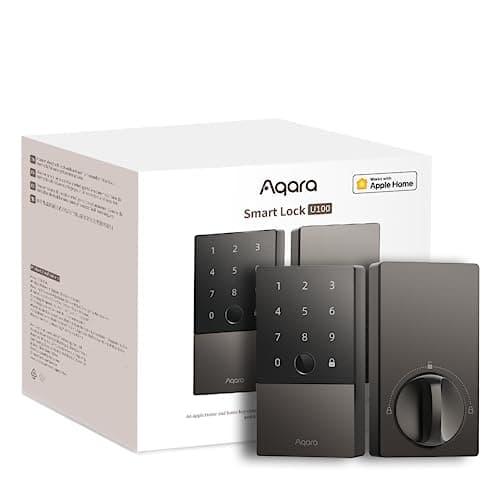
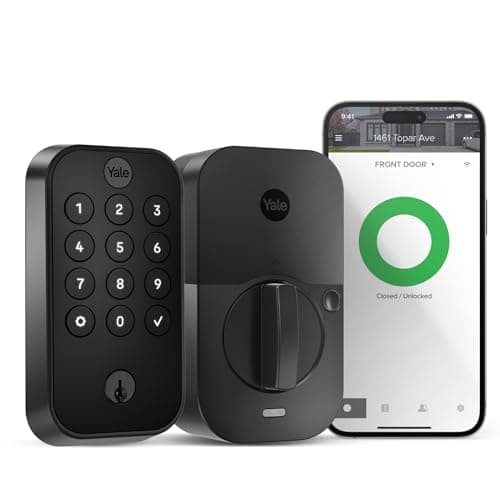
The Aqara U100 and the Yale Assure Lock 2 are both full-replacement touchscreen keypad deadbolts, but they answer "how does this lock reach the outside world?" in opposite ways, and that single architectural choice decides most of the comparison. The Yale, in this configuration, puts a Wi-Fi module inside the lock, so remote access and voice work with no separate hub. The Aqara is Bluetooth on its own and leans on an Aqara hubto bridge it to your network for remote access and voice. On top of that, the U100 adds a fingerprint reader and Apple Home Key that the Yale does not, while the Yale keeps a plain physical keyway that the U100's spec does not headline. So this is really a question about your ecosystem and how much gear you are willing to run. Answer that and the winner is nearly made.
The verdict up front
For a mainstream Alexa or Google household, the Yale Assure Lock 2 is our pick here. With its Wi-Fi module fitted, it is genuinely self-contained: remote lock/unlock, Alexa and Google all live in the lock, with no extra box to buy or position, and this configuration keeps a physical keyway so a traditional key still opens the door if everything electronic fails. That combination - no hub, real voice control, and a key you can fall back on - is what most buyers actually want, and it is why the Yale is our winner here.
The Aqara U100 wins a different, real audience: Apple and fingerprint households, especially ones already running Aqara gear. It is the only one of the two that lists Apple Home Key and HomeKit, so an iPhone or Apple Watch taps it open and Siri works, and it adds a fingerprint reader on top of the keypad, so two of its three entry methods need no phone at all. The honest catch, which we lead with in the full Aqara U100 review, is that it is Bluetooth on its own and needs an Aqara hub for remote access and voice. Inside an Aqara home the hub is likely already there, and the objection evaporates; as a standalone lock, it is real extra hardware.
The core difference: a Wi-Fi module vs an Aqara hub
This is the sentence that decides most of the comparison. The Yale Assure Lock 2 in this configuration carries a Wi-Fi module, so from the moment it is installed you can lock, unlock and check status from anywhere, and Alexa and Google work, with nothing else to buy. The Aqara U100 is Bluetooth on its own. On the door it does everything locally - fingerprint, keypad, Apple Home Key tap - but for remote access from outside the house, open notifications, and voice control, it needs an Aqara hub to bridge it to your network. That is real extra hardware to buy and place within range, and it is the honest asterisk on every U100 comparison: without a hub, the U100 is a local Bluetooth-and-fingerprint lock. Our do smart locks need a hub guide covers this distinction in general terms.
Which architecture is "better" depends entirely on your house. If you want the simplest possible path to a lock you can control from the office, the Yale wins outright - the module is in the lock and it is done. But if you already run Aqara, the hub is probably on your shelf already, the U100 slots straight into an app you use, and the whole objection disappears. The Yale is at its best as a standalone lock; the U100 is at its best as part of an Aqara household. Be honest about which describes you, because it is the crux of the decision.
Ways in: fingerprint and Home Key vs keypad and a real key
Where the U100 pulls clearly ahead is the sheer number of ways it opens. It has a fingerprint reader on top of the touchscreen keypad and Apple Home Key, so a family member unlocks with a thumb, a guest with a code, and you with an iPhone tap - three independent methods, no phone required for two of them. That breadth, and specifically fingerprint plus Apple Home Key at this price, is unusual, and if fingerprint entry is something you have wanted, the U100 is the only one of this pair that offers it. Our keypad vs fingerprint smart locks guide is worth a read if you are weighing those two entry styles.
The Yale's counter is a touchscreen keypad for codes and, in this configuration, a physical keyway- a plain, reassuring backup that opens the door with a metal key when a battery dies or the electronics sulk. The U100 does not headline a keyed cylinder, so its fallback story is different. If "there is always a key that works" matters to you - and for many buyers it genuinely does - the Yale answers that directly, and our guide on whether you can still use a key with a smart lock explains why a real keyway is worth having.
Ecosystem: Apple-first vs Alexa and Google
The platform split lines up with everything above. The Aqara U100 is the Apple-first lock: it names Apple HomeKit and Apple Home Key, so an iPhone or Apple Watch taps it open and Siri works, and it adds Alexa, Google and IFTTT on top - the broadest list of the two. The Yale Assure Lock 2 in this configuration names Alexa and Google through its Wi-Fi module, but not Apple HomeKit or Apple Home Key, so there is no iPhone tap-to-unlock on this Yale. Neither lock claims Matter. So if you are an Apple household, or you want the widest ecosystem list, the U100 is the fit - just plan for an Aqara hub if you want remote access. If you are on Alexa or Google and want the lock to stand on its own, the Yale is the match. The deeper explainer on how Home Key, HomeKit, hubs and Matter fit together is in our smart lock ecosystem compatibility guide, and the Apple field specifically is ranked in our best smart locks for Apple Home roundup.
Backups, weather and the swappable module
A few smaller differences round out the picture. The U100 carries an IP65 weatherproof rating, which is worth having on an exposed front or side door that takes direct sun and rain; the Yale listing for this configuration does not headline a comparable rating. The Yale, in turn, is built around a swappable-module system- the Wi-Fi module that gives it Alexa, Google and remote access is a part you fit, which means you can change how the lock connects later without replacing the whole deadbolt. That is a quietly useful bit of future-proofing, and it is specific to Yale's design. Both locks run on batteries with low-battery warnings; what still works when the internet or the batteries fail is covered in our guides on working without Wi-Fi and how smart locks work in general.
Who should buy which
Buy the Yale Assure Lock 2 (with its Wi-Fi module) if you are on Alexa or Google and want a keypad deadbolt that stands on its own - remote access baked in, no hub to buy, and a physical key you can always fall back on. It is the more self-contained, more mainstream choice, and for most homes that simplicity plus a real keyway is exactly right, which is why it is our winner here.
Buy the Aqara U100 if you want fingerprint entry and Apple Home Key, you value the broadest ecosystem list (Apple, Alexa, Google and IFTTT) or an IP65 body, and you either already run Aqara or do not mind adding a hub for remote access. It is the more versatile lock and, inside an Aqara household, arguably the better product outright - just be clear-eyed that its remote access and voice run through the Aqara hub, so budget and plan for that box if you do not already own one. The one-line rule: want a no-hub Alexa/Google keypad with a key backup, buy the Yale; want fingerprint and Apple Home Key in an Aqara home, buy the U100.
The usual honest caveat applies, the same one on every page here: we did not install and cycle these two locks in a lab. We read each lock's own Amazon listing and manufacturer documentation for its specs, radios and the ecosystems it names, and compared them straight, crediting nothing a listing does not claim - including being explicit that the Aqara reaches remote access and voice through its hub. Where a judgment would need hands-on time, we say so; our full method is on the methodology page.