Skip to content
Latch & Hub

Locks · Smart Locks

Kwikset Halo vs Yale Assure Lock 2: Two Alexa/Google Keypad Deadbolts, Compared

These two are the closest match in our smart-lock coverage: both are touchscreen-keypad deadbolts that name Alexa and Google, both do Wi-Fi with no monthly fee, and neither claims Apple or Matter. So the decision is not about ecosystem at all - it is about a built-in radio and a Grade AAA body versus a swappable module and a physical key.

By Stephen V.Updated How we choose
#ad

We earn a commission when you buy through our Amazon links, at no extra cost to you. It never changes our rankings — where the subscription-free or cheaper option is the better buy, we say so. How this works.

Most of our lock comparisons split cleanly on ecosystem - one lock is the Apple pick, the other the Google pick, and your phone makes the call. This one does not. The Kwikset Halo and the Yale Assure Lock 2 (in this Wi-Fi module configuration) both name Amazon Alexa and Google, both are full touchscreen-keypad deadbolts, both do remote control over Wi-Fi, and neither charges a subscription or claims Apple or Matter. On paper they are siblings. So the honest way to choose between them is to ignore the ecosystem entirely - it is a tie - and look at the two places they genuinely diverge: how the Wi-Fi gets into the lock, and what happens on the day the batteries die.

The ecosystem is a tie - stop comparing it

It is worth saying plainly, because the internet will try to sell you a difference that is not there: for an Alexa or Google household, these two locks give you the same doors into your smart home. Both respond to "Hey Google, is the front door locked?" and to Alexa routines. Both put a touchscreen keypad on the outside so a guest, cleaner or kid without a phone can punch a code and walk in. Both let you add and revoke those codes remotely. And crucially, both do all of it with no monthly fee - the smart features are included in the hardware, forever. If you are an iPhone-first home, neither of these is your lock; the best smart locks for Apple Home page is where you should be. But if you run Alexa or Google, the assistant question is settled the moment you shortlist this pair.

That leaves two real differences, and they are both about hardware rather than software. The first is connectivity architecture. The second is your fallback when the electronics are unavailable. Get those two right for your situation and either lock will serve you for years.

Built-in Wi-Fi vs a swappable module

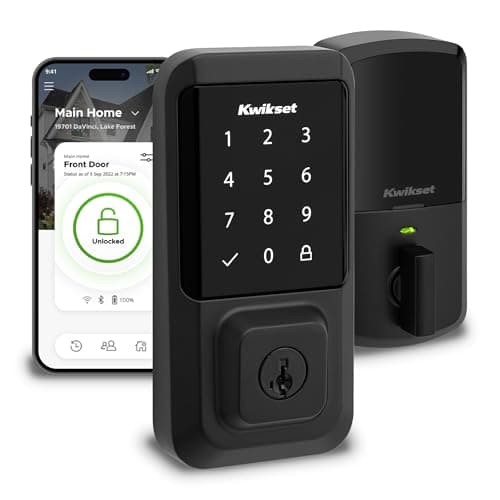
The Kwikset Halo puts its Wi-Fi radio inside the deadbolt. That is the whole personality of the lock: you install one box, join it to your network in the app, and remote control simply exists. There is no bridge to power and position, and nothing to add later. It is the most friction-free path to a keypad lock you can control from anywhere, which is exactly why the Halo is our default recommendation for simplicity-first buyers in the best smart locks roundup and why the full Kwikset Halo review spends most of its time on that one built-in radio.

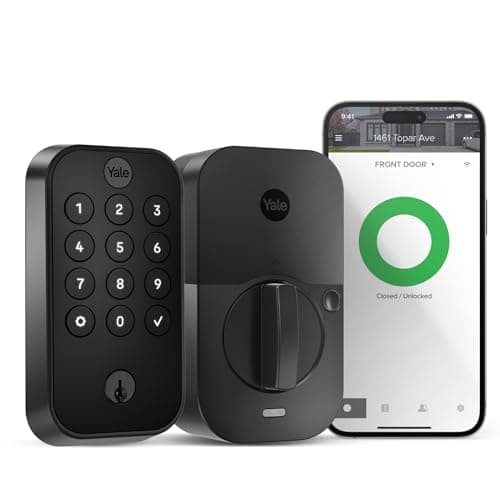
The Yale Assure Lock 2 takes the opposite philosophy: the connectivity is a modulethat clips into the lock, and Yale sells the same deadbolt in Wi-Fi, Z-Wave, Bluetooth-only and other flavours. The configuration we cover here ships with the Wi-Fi module, so out of the box it does the same remote lock/unlock the Halo does. The upside of the module system is genuine future-proofing of a specific kind: if your setup changes and you would rather the lock spoke a different radio, you can swap the module instead of buying a whole new lock. The downside is that it adds one thing you have to get right - you must confirm the exact module that ships with the variant you are buying, because "Yale Assure Lock 2" alone does not tell you how it connects. With the Halo there is nothing to confirm; with the Yale, the module is the spec. If you love the idea of upgrading connectivity later, the Yale rewards you. If you would rather never think about it again, the Halo is the cleaner buy.

The batteries-are-dead test: keyway vs no keyway

Here is the difference that actually shows up in real life, usually at the worst moment. The Yale Assure Lock 2 in this configuration keeps a traditional keyway. If the batteries ever run completely flat and you ignored every warning, a physical key still opens the door. The Kwikset Halo, by contrast, has no keyway on this model - your entry methods are the keypad code and the app, both of which need the lock to have power. In normal life this rarely matters, because both locks warn you for weeks before the batteries die and a fresh set of AAs is a two-minute fix. But the philosophies are different, and some people sleep better with a metal key as the ultimate fallback.

If a keyed backup is a hard requirement for you, that alone can settle this comparison in the Yale's favour, full stop. If you are comfortable managing batteries and would actually prefer not to have a pickable keyway on the door at all - a legitimate security view - the Halo's keyless design is a feature, not a gap. Before you decide it is a dealbreaker either way, our guides on whether smart locks work without power and without Wi-Fi walk through exactly what keeps working in each scenario - short version, the keypad code is checked on the lock itself, so it opens the door even when your internet is down.

Build, keypad and everyday feel

On the physical hardware, the Kwikset Halo carries a specific badge worth noting: its listing claims Grade AAA and a UL listing, the top residential tier for security, durability and finish under repeated use. That is a reassuring line on a value lock, because it speaks to the mechanism holding up over years of daily throws, not just the app being clever. The Yale wears Yale's long reputation for solid residential deadbolts and a slimmer, lower-profile touchscreen face that many people find the sharper-looking of the two. Neither is fragile; for a typical front door both are comfortably stronger than the builder-grade deadbolt they replace. If a printed security grade reassures you, the Halo states one; if you care most about a clean, understated keypad, the Yale tends to win on looks.

Installation is a wash - both are standard screwdriver-and-an-afternoon deadbolt swaps on a normal door, and both manage codes in their app. Day to day you will not notice which lock you bought once it is on the door; you will notice the code working, the app locking up from the office, and the assistant answering. That sameness is the point of this comparison: you are not trading away capability by picking one over the other, you are choosing a hardware philosophy.

Price and the honest bottom line

Because the two locks land close on price and identical on ecosystem, this is one of the cleaner decisions in the category, and it comes down to two yes/no questions. Do you want a physical key as a backup? If yes, buy the Yale Assure Lock 2 - the keyway is its answer and the module system is a bonus. Do you want the least possible to think about, with Wi-Fi baked in and a printed Grade AAA badge for peace of mind? If yes, buy the Kwikset Halo - built-in radio, no module to track, no keyway to pick. Both are excellent, subscription-free Alexa/Google keypad deadbolts, which is why they sit near the top of our best smart deadbolts list; you are choosing between two good answers to slightly different questions.

As always, we did not bolt these two locks to a test door and cycle them ten thousand times. We read each lock's own Amazon listing and manufacturer documentation for its specs and the ecosystems it names, and compared them straight - crediting no feature a listing does not claim. Where a judgment would require hands-on testing, we say so rather than inventing it; the full method is on the methodology page.
The short answer

Quick picks

Tap any row for the full write-up.

  • Kwikset Halo Wi-Fi
    01 Kwikset Halo Wi-FiTop pick

    The pick when you want the simplest possible ownership: Wi-Fi lives inside the deadbolt so there is nothing to add, the body is Grade AAA / UL listed, and it names Alexa and Google with no monthly fee. You buy one box and the smart half just works.

    Best for: The no-hub, no-fuss keypad deadbolt · No Matter (Alexa / Google)

    $192.12View on Amazon

    #ad · we may earn a commission from this link to Kwikset Halo Wi-Fi

  • Yale Assure Lock 2
    02 Yale Assure Lock 2

    The pick when you want a traditional key in your pocket and the option to change how the lock connects down the road: a sharp touchscreen deadbolt on Yale's swappable-module system, shipping here with the Wi-Fi module and a keyway, on Alexa and Google.

    Best for: Keyed backup + upgradeable connectivity · No Matter (Alexa / Google, Wi-Fi module)

    $169.99View on Amazon

    $259.9935% off

    #ad · we may earn a commission from this link to Yale Assure Lock 2

#ad · Live prices from the Amazon Product API, as of Aug 1, 2026. Where we have no verified live price we show none — we would rather leave a gap than print a number that has rotted.

Kwikset Halo vs Yale Assure Lock 2 - only what each listing claims
DeviceHomeKitApple Home KeyAlexaGoogleMatterWi-FiKeyway
Kwikset Halo Wi-FiBuilt-in radioNoNoYesYesNoBuilt-inNo keyway
Yale Assure Lock 2Wi-Fi module configNot listedNoYesYesNot listedWi-Fi moduleKeyed

In detail

The picks, in full

01

Kwikset Halo Wi-Fi

Top pick
Kwikset Halo Wi-Fi
$192.12View on Amazon

Price as of Aug 1, 2026. Amazon's price at checkout is the one that counts.

#ad · we may earn a commission from this link to Kwikset Halo Wi-Fi

The pick when you want the simplest possible ownership: Wi-Fi lives inside the deadbolt so there is nothing to add, the body is Grade AAA / UL listed, and it names Alexa and Google with no monthly fee. You buy one box and the smart half just works.

  • Touchscreen-keypad deadbolt
  • Built-in Wi-Fi, no hub needed
  • Alexa + Google
  • Grade AAA / UL listed
  • Easy install
Matter: No Matter (Alexa / Google)Fee: None - no subscriptionResearched, not hands-on tested

Good

  • Wi-Fi is built into the lock, so remote lock/unlock and code management work out of the box with no separate hub or module to buy
  • Grade AAA and UL listed - a reassuring physical-security credential on a value lock, not just app features
  • Names both Alexa and Google, installs easily, and charges nothing per month

Less good

  • No physical keyway on this model - your fallback is the keypad and the batteries, so you must respect the low-battery warnings
  • No Apple HomeKit/Home Key and no Matter, so it is a plain Alexa/Google lock rather than a future-proof one

Skip it if: you specifically want a traditional key as a backup or you like the idea of changing the lock's connectivity later - the Yale's keyway and swappable module are built for exactly those buyers.

02

Yale Assure Lock 2

Yale Assure Lock 2
$169.99View on Amazon

$259.9935% off

Price as of Aug 1, 2026. Amazon's price at checkout is the one that counts.

#ad · we may earn a commission from this link to Yale Assure Lock 2

The pick when you want a traditional key in your pocket and the option to change how the lock connects down the road: a sharp touchscreen deadbolt on Yale's swappable-module system, shipping here with the Wi-Fi module and a keyway, on Alexa and Google.

  • Full touchscreen-keypad deadbolt
  • Wi-Fi module for remote access (included)
  • Alexa + Google
  • Swappable-module system
  • Keyed backup
Matter: No Matter (Alexa / Google, Wi-Fi module)Fee: None - no subscriptionResearched, not hands-on tested

Good

  • Keeps a traditional keyway, so a physical key is a genuine fallback if the batteries ever die completely
  • The module system means you could swap connectivity later instead of replacing the whole lock
  • Crisp low-profile touchscreen and Alexa + Google support, with no subscription

Less good

  • Remote access depends on the correct module being fitted - you must confirm this configuration ships with the Wi-Fi module before buying
  • No Apple HomeKit/Home Key and no Matter listed on this variant, same ecosystem ceiling as the Halo

Skip it if: you would rather never think about which module you have and just want Wi-Fi baked in - the Kwikset Halo's built-in radio is the simpler answer.

How we chose

We don't run a test lab

We don't wire every one of these into a test rig, and we won't write "in our testing" as if we do. What we did instead: pulled each product's published specifications, confirmed its Matter/Thread/HomeKit support from the manufacturer's own documentation, added up the real 3-year cost with any monthly fee included, and read the aggregated verified-buyer sentiment. Every pick is chosen against that published method. Where a number came from someone else, we name and link them in Sources.

Questions

Frequently asked

Is the Kwikset Halo or the Yale Assure Lock 2 better?
For an Alexa or Google home they are close to a tie on features - both are touchscreen-keypad deadbolts with Wi-Fi and no subscription, and both name Alexa and Google. The Halo puts Wi-Fi inside the lock (nothing to add) and states a Grade AAA / UL rating; the Yale keeps a traditional keyway and uses a swappable connectivity module. Pick the Yale if you want a physical-key backup, the Halo if you want the simplest no-hub setup.
Do both locks work with Apple HomeKit?
No. Neither the Kwikset Halo nor this Yale Assure Lock 2 configuration names Apple HomeKit or Apple Home Key - both are Alexa and Google locks. If you need Apple Home or tap-to-unlock with an iPhone, look at a Home Key lock like the Schlage Encode Plus or Level Lock+ on our best smart locks for Apple Home page instead.
Does the Kwikset Halo have a key?
No - the Halo is a keyless model, so its entry methods are the keypad code and the app, both of which need the lock to have power. It warns you well before the batteries die. If a traditional keyway matters to you as a last-resort backup, the Yale Assure Lock 2 keeps one.
Does the Yale Assure Lock 2 need a hub?
Not in this configuration - it ships with the Wi-Fi module, so it connects to your network directly for remote access, just like the Halo. Yale sells the same lock with other modules (including Bluetooth-only), so always confirm the variant you are buying includes the Wi-Fi module if you want remote control.
Do either of these support Matter?
Neither of these configurations claims Matter as of our review date, so we do not credit it. Both work through Alexa and Google. If standardizing every device on Matter is your goal, confirm the exact model and consider a lock that lists Matter support.

Keep reading

Receipts

Sources

We do not run a test lab, and we do not pretend to. Compatibility and subscription-cost claims come from the manufacturer's own documentation and the live retailer listing, read on the dates shown. Read our full method.