Skip to content
Latch & Hub

Systems · Security Systems

The Best Door and Window Sensors for 2026

A contact sensor is two magnets and a radio. What actually decides which one you buy is the radio: whether it needs a hub you already own, a hub you'd have to buy, or no hub at all. We ranked five on exactly that.

By Stephen V.Updated How we choose
#ad

We earn a commission when you buy through our Amazon links, at no extra cost to you. It never changes our rankings — where the subscription-free or cheaper option is the better buy, we say so. How this works.

A door and window sensor is the least glamorous thing in a smart home and quietly one of the most useful. It is two pieces: a magnet on the moving part, a sensor on the frame. When they separate, something happens — your phone buzzes, a siren sounds, the hall light comes on, the camera starts recording, the air conditioning stops cooling the street. The hardware is genuinely simple, which is why almost every one of them "works."

So the ranking below is not really about sensors. It is about radios. Every sensor here speaks a different one — Thread, Z-Wave, Bluetooth, Zigbee, LoRa — and that single choice decides which hub you need, which app you live in, which ecosystems can see the sensor, and whether it still works when your internet drops. Buy the wrong radio and you own a very reliable gadget that can't talk to anything you already have. If you want the mechanical background first, our guide to how home security sensors work covers contact, motion and glass-break sensors before you shop.

The usual caveat, and it's on every page here: we don't run a test lab. We compiled each sensor's published specifications from the manufacturer's own documentation and its live retail listing, read the compatibility claims those makers publish, and say plainly when a figure isn't published rather than inventing one. Where a spec is missing, you'll see us say so in the picks — that absence is information too. Our methodology explains the whole process.

Start with the hub you already own

This is the entire decision, and most buying guides bury it. Four of the five sensors here do nothing on their own; they need a hub, and they need a specific kind of hub. If you already own a Ring Alarm base station, the Ring sensors are almost automatically correct. If you own a SmartThings or Aeotec hub, or an Echo with a Zigbee radio in it, the Zigbee four-pack is the cheapest sensible answer. If you own a HomePod, a recent Apple TV or an Aqara hub, you have a Thread border router, and the Aqara P2 unlocks all four major ecosystems at once.

Work in that order — hub first, sensor second — and the shortlist usually collapses to one obvious pick. Work the other way round, buying the sensor with the best reviews and then discovering it needs a hub you don't own, and you've turned a $30 purchase into a $130 one. If you have no hub at all and don't want one yet, that's a real answer too, and it points at exactly one product on this page: the SwitchBot, which runs over Bluetooth straight to your phone. If you're choosing a hub at the same time, our Matter hub roundup is the right companion page.

The radios, in one paragraph each

Threadis the new one, and it's the reason the Aqara wins. It's a low-power mesh, and because it carries Matter, a Thread sensor shows up as a native device in Apple Home, Alexa, Google Home and SmartThings simultaneously. The catch is the Thread border router — the box that bridges Thread to your home network. Our guide to what a Thread border router is explains which devices you may already own that quietly do the job.

Zigbee is the old, cheap, extremely well-proven mesh. It needs a hub, it will never speak Matter directly, and it is dramatically cheaper per sensor. Z-Wave is the same idea on a less-crowded frequency and is what Ring Alarm uses internally; our Zigbee vs Z-Wave guide covers why a security system tends to pick Z-Wave. Bluetoothneeds nothing but your phone and reaches about as far as you'd expect. And LoRa, YoLink's choice, trades bandwidth for absurd range — a quarter mile in open air — which is exactly the trade you want for a shed. If the whole protocol landscape is new to you, Matter vs Thread vs Zigbee is the plain-English version.

Battery life is the spec that actually annoys you

Nobody buys a contact sensor for its battery. Everybody regrets one with a bad battery. These things live on window frames you can't reach without a chair, and you're likely to own six or eight of them, so a two-year cell across eight sensors means changing a battery every three months somewhere in the house. That's the difference between a system you forget about and a nagging chore.

The published figures split the field cleanly. YoLink claims up to five years from two AA cells. Ring states approximately three years from two CR2032s. SwitchBot publishes a typical three years from two AAAs under a stated daily-use pattern — the most transparent claim here, because it tells you the assumptions. Aqara publishes no figure at all for the P2, only that life varies with your border router. THIRDREALITY doesn't publish one we could verify. Two of our five picks therefore have honest unknowns, and we'd rather tell you that than quote a number we made up.

What you're actually going to do with them

There are two jobs, and they want different sensors. The first is security: a sensor that's part of an armed system, that sounds a siren and can escalate to a monitoring center. Only the Ring does that properly here, because it's a component of a real alarm rather than a standalone gadget — and whether the escalation is worth paying for is covered in do you need a monitoring plan. The second job is automation and awareness: knowing the back door is open, getting a nudge that the garage has been up for twenty minutes, killing the heating when a window opens, turning on a light when someone comes in after dark. Every sensor here does that one, and it's honestly where most people get the daily value — smart home automation ideas has plenty of worked examples.

Be honest with yourself about which job you're buying for. If it's security, you're really shopping for a system, and our DIY home security systems roundup is the better starting point — the sensors come in those boxes. If it's awareness and automation, buy the sensors that match your hub and skip the alarm entirely. Plenty of people genuinely don't need a siren, and the no-subscription systems page covers the middle ground where you get alerts without a monthly bill.

The short answer

Quick picks

Tap any row for the full write-up.

  • Aqara Door and Window Sensor P2
    01 Aqara Door and Window Sensor P2Top pick

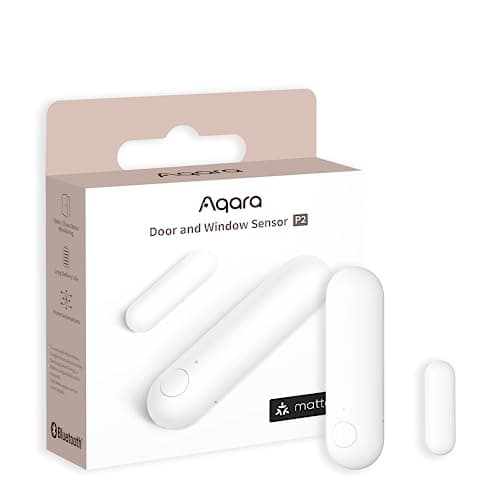
    The only sensor here that isn't a bet on one company. Matter over Thread means Apple Home, Alexa, Google Home and SmartThings all see it as a native device, so it survives you changing your mind about which ecosystem you live in — as long as you already own something that acts as a Thread border router.

    Best for: Anyone who wants one sensor that works with every ecosystem · Matter over Thread — native

    $29.99View on Amazon

    #ad · we may earn a commission from this link to Aqara Door and Window Sensor P2

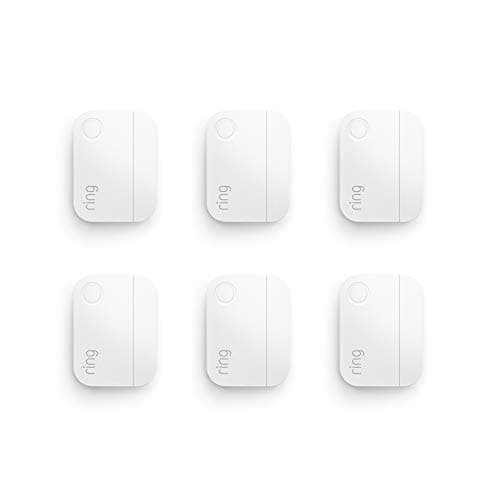
  • Ring Alarm Contact Sensor 6-Pack (2nd Gen)
    02 Ring Alarm Contact Sensor 6-Pack (2nd Gen)

    If you already own a Ring Alarm, stop reading and buy these. They are the sensors the system is designed around, they carry a published three-year battery life, and a six-pack covers a normal house in one purchase. If you don't own a Ring Alarm base station, they do nothing at all.

    Best for: Ring Alarm owners covering a whole house at once · No Matter — Ring Alarm only

    $59.99View on Amazon

    $99.9940% off

    #ad · we may earn a commission from this link to Ring Alarm Contact Sensor 6-Pack (2nd Gen)

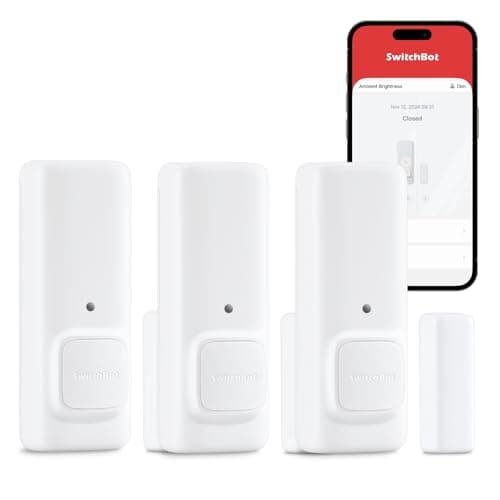
  • SwitchBot Door Alarm Contact Sensor (3-Pack)
    03 SwitchBot Door Alarm Contact Sensor (3-Pack)

    The one that works the minute you unbox it. It pairs to your phone over Bluetooth with no hub at all, and it's the only sensor here that also watches for motion and light level — so a single unit can tell you the door opened, someone walked past it, and whether the room was dark at the time.

    Best for: Starting from nothing, with no hub to buy first · Alexa/Google via a SwitchBot hub

    $33.99View on Amazon

    $49.9932% off

    #ad · we may earn a commission from this link to SwitchBot Door Alarm Contact Sensor (3-Pack)

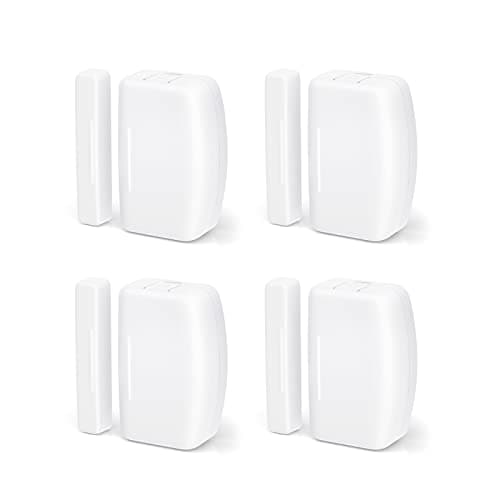
  • THIRDREALITY Zigbee Contact Sensor (4-Pack)
    04 THIRDREALITY Zigbee Contact Sensor (4-Pack)

    The value play for anyone who already runs a Zigbee hub. Four sensors for the price of one premium unit, and the listing names the hubs it works with rather than leaving you to guess — Home Assistant, SmartThings, Aeotec, Homey, Hubitat, or an Echo with a Zigbee radio built in.

    Best for: Cheapest per window if you already run a Zigbee hub · No Matter — Zigbee hub required

    $75.99View on Amazon

    #ad · we may earn a commission from this link to THIRDREALITY Zigbee Contact Sensor (4-Pack)

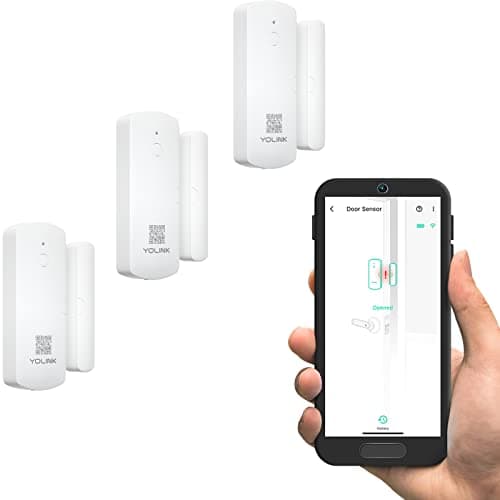
  • YoLink LoRa Smart Door & Window Sensor (3-Pack)
    05 YoLink LoRa Smart Door & Window Sensor (3-Pack)

    The sensor for the door that's too far away. LoRa reaches up to a quarter mile in open air, which is why this is the answer for a detached garage, a barn, a shed, a gate or a basement that Wi-Fi and Zigbee simply do not reach — and the published battery life is the longest here by years.

    Best for: Detached garages, sheds, gates and dead-zone basements · No Matter — YoLink hub required

    $47.99View on Amazon

    #ad · we may earn a commission from this link to YoLink LoRa Smart Door & Window Sensor (3-Pack)

#ad · Live prices from the Amazon Product API, as of Sep 1, 2026. Where we have no verified live price we show none — we would rather leave a gap than print a number that has rotted.

Door and window sensors compared — radio, hub requirement, ecosystems and published battery life
DeviceRadioHub requiredEcosystems it reachesBattery (published)Works with no hub
Aqara Door & Window Sensor P2Thread (Matter) + BluetoothThread border routerApple Home · Alexa · Google · SmartThings · AqaraCR123A · life not publishedNo
Ring Alarm Contact Sensor (2nd Gen)Z-WaveRing Alarm base stationRing Alarm2x CR2032 · approx. 3 yearsNo
SwitchBot Contact SensorBluetoothOptional SwitchBot hubSwitchBot app · Alexa & Google via hub2x AAA · typically 3 yearsYes — Bluetooth range
THIRDREALITY Zigbee Contact SensorZigbeeAny Zigbee hubSmartThings · Aeotec · Hubitat · Homey · Home Assistant · Zigbee EchoNot publishedNo
YoLink Door & Window SensorLoRa 923.3 MHzYoLink hubYoLink app · Alexa · IFTTT · Home Assistant2x AA · up to 5 yearsNo

In detail

The picks, in full

01

Aqara Door and Window Sensor P2

Top pick
Aqara Door and Window Sensor P2
$29.99View on Amazon

Price as of Sep 1, 2026. Amazon's price at checkout is the one that counts.

#ad · we may earn a commission from this link to Aqara Door and Window Sensor P2

The only sensor here that isn't a bet on one company. Matter over Thread means Apple Home, Alexa, Google Home and SmartThings all see it as a native device, so it survives you changing your mind about which ecosystem you live in — as long as you already own something that acts as a Thread border router.

  • Matter over Thread (plus Bluetooth)
  • Apple Home, Alexa, Google Home, SmartThings
  • Requires a Matter controller + Thread border router
  • CR123A lithium battery (included)
  • Aqara publishes no fixed battery-life figure
Matter: Matter over Thread — nativeFee: No subscriptionResearched, not hands-on tested

Good

  • Aqara lists Apple Home, Alexa, Google Home and SmartThings as supported platforms — no other sensor here reaches all four, and none of them need Aqara's own app or hub to do it
  • Thread is a mesh: each mains-powered Thread device you add strengthens the network, so coverage improves as your home grows instead of degrading
  • Ships with the CR123A lithium cell in the box, and it is a common, cheap cell rather than a proprietary pack

Less good

  • It is useless on its own — Aqara is explicit that you need a combined Matter controller and Thread border router, which means a HomePod, a recent Apple TV, a Thread-capable Echo, an Aqara hub or a SmartThings Station. If you own none of those, budget for one before you budget for sensors
  • Aqara publishes no battery-life number, only that life may vary depending on the Thread border router — so unlike the Ring and SwitchBot sensors here you cannot plan around a stated figure
  • It is the most expensive way to cover a single door on this page. The Zigbee and LoRa multipacks cost far less per window

Skip it if: you don't already own a Thread border router and don't want to buy one — a Zigbee sensor on a hub you already have will cost you less and do the same job.

02

Ring Alarm Contact Sensor 6-Pack (2nd Gen)

Ring Alarm Contact Sensor 6-Pack (2nd Gen)
$59.99View on Amazon

$99.9940% off

Price as of Sep 1, 2026. Amazon's price at checkout is the one that counts.

#ad · we may earn a commission from this link to Ring Alarm Contact Sensor 6-Pack (2nd Gen)

If you already own a Ring Alarm, stop reading and buy these. They are the sensors the system is designed around, they carry a published three-year battery life, and a six-pack covers a normal house in one purchase. If you don't own a Ring Alarm base station, they do nothing at all.

  • Z-Wave to a Ring Alarm base station
  • Six sensors in the box
  • Two CR2032 cells, included
  • Ring publishes approximately 3-year battery life
  • Base station required (sold separately)
Matter: No Matter — Ring Alarm onlyFee: Free self-monitoring; paid plan for pro monitoringResearched, not hands-on tested

Good

  • The published battery figure is the best-documented on this page — Ring states approximately three years from the two included CR2032 cells, which for six sensors is a genuinely set-and-forget install
  • Six sensors in one box is the cheapest per-window way to cover a whole house here, and they arm and disarm as one system rather than as six separate gadgets
  • They feed a real alarm system, not just an app notification — a tripped sensor can sound the base station siren and, on a paid plan, reach a monitoring center

Less good

  • The listing says it plainly: base station required. Without a Ring Alarm base station these are inert plastic, so this is a pick for existing Ring owners, not a starting point
  • They talk Z-Wave to Ring and nothing else — no Matter, no Apple Home, no using them to trigger automations in another ecosystem
  • Professional monitoring and cellular backup are a paid Ring plan on top; the sensors themselves are free to self-monitor, but the full alarm experience isn't

Skip it if: you don't already own (or aren't about to buy) a Ring Alarm base station — every other sensor on this page will be more useful to you.

03

SwitchBot Door Alarm Contact Sensor (3-Pack)

SwitchBot Door Alarm Contact Sensor (3-Pack)
$33.99View on Amazon

$49.9932% off

Price as of Sep 1, 2026. Amazon's price at checkout is the one that counts.

#ad · we may earn a commission from this link to SwitchBot Door Alarm Contact Sensor (3-Pack)

The one that works the minute you unbox it. It pairs to your phone over Bluetooth with no hub at all, and it's the only sensor here that also watches for motion and light level — so a single unit can tell you the door opened, someone walked past it, and whether the room was dark at the time.

  • Works over Bluetooth with no hub
  • Built-in motion sensor and light-level sensing
  • Detection to 16.4 ft (5 m), 90 degrees horizontal
  • Two AAA cells, typically 3-year life
  • SwitchBot hub adds Alexa and Google
Matter: Alexa/Google via a SwitchBot hubFee: No subscriptionResearched, not hands-on tested

Good

  • It is the only pick here with no hub prerequisite — SwitchBot states you get push alerts locally at home over Bluetooth, so a first-time buyer can start with three sensors and nothing else
  • Motion (PIR) and ambient-light sensing are built into the same unit, which no other sensor on this page offers; that turns one device into three triggers for automations
  • SwitchBot publishes a typical three-year life from two standard AAA cells under a defined daily-use pattern — a rare, checkable figure

Less good

  • Bluetooth means Bluetooth range. Without a SwitchBot hub you get alerts at home, not while you're out, and SwitchBot notes the hub is required for remote push on Android
  • SwitchBot is explicit that Alexa and Google Home do not support the light-level sensor or the motion features — so the two things that make this sensor special stay inside SwitchBot's own app
  • It is not part of a monitored alarm system. It notifies; it does not dispatch anyone

Skip it if: you want a sensor that feeds a real alarm with a siren and optional professional monitoring — that's the Ring, not this.

04

THIRDREALITY Zigbee Contact Sensor (4-Pack)

THIRDREALITY Zigbee Contact Sensor (4-Pack)
$75.99View on Amazon

Price as of Sep 1, 2026. Amazon's price at checkout is the one that counts.

#ad · we may earn a commission from this link to THIRDREALITY Zigbee Contact Sensor (4-Pack)

The value play for anyone who already runs a Zigbee hub. Four sensors for the price of one premium unit, and the listing names the hubs it works with rather than leaving you to guess — Home Assistant, SmartThings, Aeotec, Homey, Hubitat, or an Echo with a Zigbee radio built in.

  • Zigbee — hub required
  • Four sensors in the box
  • Home Assistant, SmartThings, Aeotec, Homey, Hubitat
  • Works with Echo devices that have a built-in Zigbee hub
  • No published battery-life figure we could verify
Matter: No Matter — Zigbee hub requiredFee: No subscriptionResearched, not hands-on tested

Good

  • Four sensors at this price is the lowest cost per window on the page — the honest answer for covering a lot of windows on a budget
  • The listing names specific hubs rather than claiming vague compatibility, including Aeotec and SmartThings, which is what most readers here will already own
  • Zigbee is a mesh like Thread, so range improves as you add mains-powered Zigbee devices, and it doesn't consume a Wi-Fi slot per sensor

Less good

  • Hub required, full stop — and unlike Thread there is no path to Matter, so these will never appear natively in Apple Home
  • We could not reach a manufacturer spec page to verify a published battery life, so we don't quote one. Assume you'll be checking cells rather than forgetting about them
  • It is the least-known brand here. That matters less for a two-magnet sensor than it would for a lock, but support and app polish are not in the same league as Aqara or Ring

Skip it if: you don't own a Zigbee hub — the four-pack saving evaporates the moment you have to buy a hub to use it.

Count your openings before you count your dollars

Walk the house and count every door and ground-floor window you'd actually want monitored. Most people land between six and ten, and that number changes the answer more than any spec does. At one or two openings, a single premium sensor is fine and the Aqara is easy to justify. At eight, per-sensor cost dominates everything, and a multipack — the Ring six-pack if you own the base station, the Zigbee four-pack if you own a Zigbee hub — will save you more than any feature on this page is worth.

Check whether you already own the hub

Before you buy anything, open the app you use most and look at what's already there. A HomePod, a HomePod mini, an Apple TV 4K, a Thread-capable Echo, an Aqara hub or a SmartThings Station means you have a Thread border router and the Aqara P2 is live for you. An Aeotec or SmartThings hub, a Hubitat, a Homey, a Home Assistant box or an Echo with a built-in Zigbee radio means the THIRDREALITY four-pack is the cheap, correct answer. A Ring Alarm base station means the Ring six-pack. This one check settles the purchase for most readers.

Decide if you need a siren or just a notification

A notification tells you. A siren tells the neighborhood — and, on a paid plan, tells a monitoring center. Those are different products and different budgets. Contact sensors bought for awareness are a $10-to-$25-per-opening purchase with no running cost. Contact sensors as part of a monitored alarm mean a base station, and usually a monthly fee for the professional dispatch and cellular backup that make monitoring meaningful. Our Ring Alarm review walks through what that actually costs, and do I need a security system or just cameras is worth reading before you commit to either.

Mind the gap — literally

The one genuine installation gotcha with contact sensors is alignment. The magnet and the body have to sit close together and roughly parallel when the door or window is shut; SwitchBot, for example, specifies less than about 1.2 inches between the two parts. Doors with thick weatherstripping, uPVC windows with deep recesses and crown-molded frames all create a gap that's too wide, and the sensor reads "open" permanently. Measure before you buy a six-pack, and check whether the brand sells a spacer or riser — Ring, for instance, sells one specifically for trim and molding.

Buy for the ecosystem you'll have in three years

Sensors are the cheapest part of a smart home and the most annoying to replace, because replacing them means peeling adhesive off eight window frames. That asymmetry argues for Matter over Thread if you can support it: it's the only radio here that doesn't tie you to one company's hub and app. If you're already deep in Ring, or already running Home Assistant on Zigbee, the ecosystem question is settled and you should buy accordingly — but if you're starting fresh and buying a hub anyway, buying into Thread is the choice you're least likely to regret. Our what works with Matter guide tracks where support genuinely exists today.

How we chose

We don't run a test lab

We don't wire every one of these into a test rig, and we won't write "in our testing" as if we do. What we did instead: pulled each product's published specifications, confirmed its Matter/Thread/HomeKit support from the manufacturer's own documentation, added up the real 3-year cost with any monthly fee included, and read the aggregated verified-buyer sentiment. Every pick is chosen against that published method. Where a number came from someone else, we name and link them in Sources.

Questions

Frequently asked

Do door and window sensors need a hub?
Usually yes, and it's the first thing to check. The Aqara P2 needs a Matter controller and Thread border router; the Ring sensors need a Ring Alarm base station; the THIRDREALITY four-pack needs any Zigbee hub; the YoLink three-pack needs a YoLink hub. The exception on this page is the SwitchBot Contact Sensor, which pairs to your phone over Bluetooth and works with no hub at all — though SwitchBot notes a hub is needed for remote alerts away from home. See do I need a smart home hub for the wider picture.
Which door and window sensors work with Apple Home?
On this page, the Aqara Door and Window Sensor P2 is the one — it's Matter over Thread, and Aqara lists Apple Home alongside Alexa, Google Home and SmartThings. You'll need a device that acts as both a Matter controller and a Thread border router, which in an Apple household usually means a HomePod, a HomePod mini or a recent Apple TV 4K. The Ring, THIRDREALITY and YoLink sensors do not appear in Apple Home; the SwitchBot reaches Alexa and Google through a SwitchBot hub, not Apple.
How long do contact sensor batteries last?
It depends on the radio and how often the door moves, and the published claims vary widely. YoLink publishes up to five years from two AA cells, helped by LoRa's very low power draw. Ring publishes approximately three years from two CR2032s. SwitchBot publishes a typical three years from two AAAs, and unusually states the daily-usage pattern behind the figure. Aqara publishes no number for the P2, saying life varies with your Thread border router, and we could not verify a published figure for the THIRDREALITY sensors — so we don't quote one for either.
Do window sensors work without Wi-Fi or during an internet outage?
The sensor-to-hub link is not Wi-Fi on any of these — it's Thread, Z-Wave, Zigbee, Bluetooth or LoRa — so the sensor keeps talking to its hub when the internet drops. What you lose is everything that leaves the house: remote notifications, voice control and, on an alarm system, the path to a monitoring center unless the base station has cellular backup. Local automations generally keep running. YoLink's device-to-device pairing is explicitly designed to keep working without an internet connection. There's a fuller answer in do home security systems work without Wi-Fi.
How many door and window sensors do I need?
Cover every exterior door first, then ground-floor and basement windows, then any window reachable from a flat roof, porch or fence. For most homes that's six to ten openings, which is why the multipacks here exist. Upper-floor windows that need a ladder to reach are usually where people stop. If budget forces a choice, doors beat windows — they're how most intruders actually enter, and they're also where the useful everyday automations live.
Can I mix brands of sensors on one hub?
Within a radio standard, generally yes — a Zigbee hub will usually take Zigbee sensors from several brands, and a Matter controller will take any Matter-over-Thread sensor regardless of who made it. Across proprietary systems, no: Ring's contact sensors only work with a Ring Alarm base station, and YoLink's LoRa sensors only work with a YoLink hub. That's the practical argument for Matter over Thread if you're starting from scratch — it's the one choice here that keeps your options open.

Keep reading

Receipts

Sources

We do not run a test lab, and we do not pretend to. Compatibility and subscription-cost claims come from the manufacturer's own documentation and the live retailer listing, read on the dates shown. Read our full method.