Skip to content
Latch & Hub

Cameras · Security Cameras

The Best Budget Security Cameras for 2026

The best cheap cameras are the ones that don't quietly bill you every month to see what they recorded. We rank three budget picks and say plainly which one still leans on a subscription.

By Stephen V.Updated How we choose
#ad

We earn a commission when you buy through our Amazon links, at no extra cost to you. It never changes our rankings — where the subscription-free or cheaper option is the better buy, we say so. How this works.

Cheap is easy. Cheap to own is the hard part. A security camera's sticker price is only the deposit, because the recorded clips - the entire point of a camera - are often locked behind a monthly plan. This page ranks three genuinely inexpensive cameras on the cost that actually adds up, the monthly one, and is blunt about the single pick here that still asks for a subscription to show you what it saw.

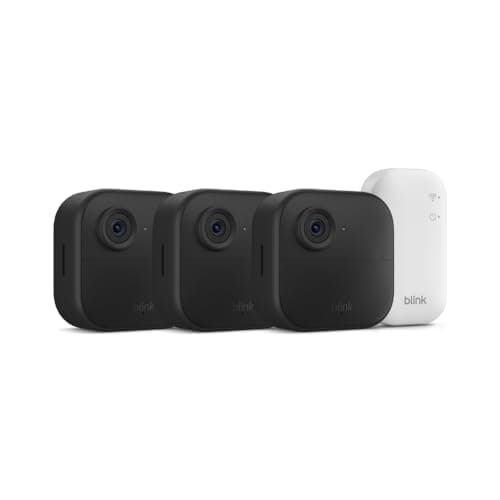
Two of the three below record locally for free. The Wyze Cam v4 and the Tapo C120 both write footage to a microSD card, so once you buy the card you never pay again to review an event. The third, the Blink Outdoor 4, is a different kind of bargain: a three-camera wire-free kit for the price others charge for one, but the included Sync Module Core keeps clips in the cloud, and seeing that history means a Blink plan. That is not a dealbreaker - it is a trade - and we would rather name it than bury it the way the listing does.

One honest caveat before the rankings: we don't run a camera lab and we don't hand out invented scores. Everything in the spec lists and the matrix below comes from each camera's own Amazon listing and the manufacturer's documentation, read on the date shown. Where a listing doesn't claim something, we write "Not listed" rather than guess. If you want the wider field beyond the budget end, the main camera roundup ranks it all on true cost.

What "budget" should and shouldn't cost you

A good budget camera should be cheap once and cheap forever. That means it records where you can watch it back without a fee - a microSD card or built-in memory - and it means the sensor and night vision are good enough to actually be useful, not just present. The Wyze and Tapo clear that bar comfortably: 2.5K and 2K+ respectively, both with color night vision, both recording locally. The Blink clears the first bar in a different way, by making one small recharge-free kit cover three doors, and misses the second by leaning on a plan for clip history. Read the subscription-cost breakdown before you decide the fee is fine - over three years it can cost more than the cameras did.

Wired, plug-in or battery - power decides your shortlist

Price picks the tier, but power picks the camera. The Tapo C120 is wired: run it to an outlet and it will record continuously, day and night, which is exactly what you want over a doorway or driveway. The Wyze Cam v4 is a plug-in camera too, so it also wants an outlet nearby but is happy indoors or out. The Blink Outdoor 4 is the only wire-free pick here, running two years on batteries, which is what makes a three-camera kit realistic in spots with no power. If your target is a far fence line with no socket in sight, the Blink is the only one of the three that reaches it. Our wireless camera roundup goes deeper on the battery-and-solar options if that is your whole house.

Resolution is real, but only where you need to read detail

The temptation on a budget is to chase megapixels. Resist it a little. Resolution matters most where you need to read something specific - a face at the door, a plate on the drive - and there the 2.5K Wyze and 2K+ Tapo pull clearly ahead of the 1080p Blink. For a general "is something moving in the yard" camera, 1080p is genuinely fine, and the Blink's trade buys you two extra cameras instead. If you want to understand exactly how much sharper the step up is, our 2K vs 4K explainershows what each resolution can and can't recognize. Spend the pixels where the detail matters and save them everywhere else.

The short answer

Quick picks

Tap any row for the full write-up.

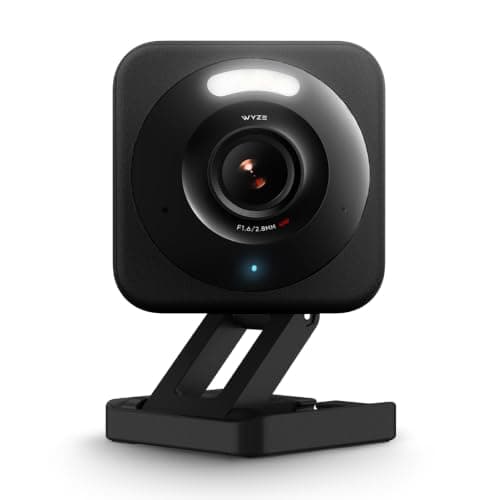
  • Wyze Cam v4
    01 Wyze Cam v4Top pick

    The cheapest camera here that never feels cheap: 2.5K with color night vision, recording free to a microSD card. It is the value benchmark the rest of this page is measured against.

    Best for: The tightest budget, indoors or out · No Matter (Alexa + Google)

    $36.99View on Amazon

    #ad · we may earn a commission from this link to Wyze Cam v4

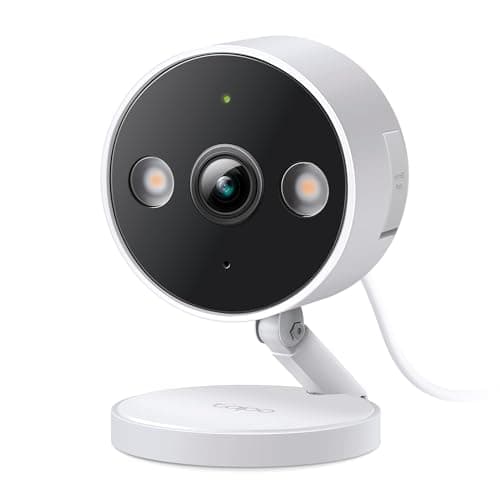
  • TP-Link Tapo C120
    02 TP-Link Tapo C120

    A tiny wired 2K+ camera that stores footage on a microSD card for free, with optional cloud if you ever want it. The cheapest honest way to watch a doorway or driveway continuously.

    Best for: Cheapest wired continuous recording · No Matter (Alexa + Google)

    $35.99View on Amazon

    $39.9910% off

    #ad · we may earn a commission from this link to TP-Link Tapo C120

  • Blink Outdoor 4
    03 Blink Outdoor 4

    The budget way to cover a whole house wire-free: three battery cameras with a two-year battery life in one kit. The catch is that saving and reviewing clips leans on a Blink plan.

    Best for: A cheap wire-free multi-camera kit · No Matter (Alexa)

    $189.99View on Amazon

    #ad · we may earn a commission from this link to Blink Outdoor 4

#ad · Live prices from the Amazon Product API, as of Aug 1, 2026. Where we have no verified live price we show none — we would rather leave a gap than print a number that has rotted.

What each budget camera actually gives you (from the maker's own listing)
DeviceResolutionPowerNight visionLocal storageCloud subscription
Wyze Cam v4Top pick2.5KPlug-inColormicroSDOptional
TP-Link Tapo C1202K+WiredColormicroSDOptional
Blink Outdoor 41080pBattery (2-yr)InfraredNot includedNeeded for clips

In detail

The picks, in full

01

Wyze Cam v4

Top pick
Wyze Cam v4
$36.99View on Amazon

Price as of Aug 1, 2026. Amazon's price at checkout is the one that counts.

#ad · we may earn a commission from this link to Wyze Cam v4

The cheapest camera here that never feels cheap: 2.5K with color night vision, recording free to a microSD card. It is the value benchmark the rest of this page is measured against.

  • 2.5K QHD video
  • Vibrant color night vision
  • Indoor/outdoor rated
  • microSD local storage
  • No subscription required
Matter: No Matter (Alexa + Google)Fee: Free with microSD (Cam Plus optional)Researched, not hands-on tested

Good

  • Genuinely the cheapest capable camera on this list, at around the price of a takeaway dinner
  • 2.5K with color night vision punches far above what the price suggests
  • Records free to a microSD card, so you can review a recorded event with no plan
  • Rated for indoor or outdoor use, so one inexpensive camera covers most spots

Less good

  • The smartest AI events and longer cloud history want the optional paid Cam Plus tier
  • Wyze's past security-incident history means you should use a unique password and 2FA
  • The microSD workflow rewards someone willing to size, insert and occasionally manage a card

Skip it if: you need a battery camera for a spot with no outlet nearby - the v4 has to be plugged in.

02

TP-Link Tapo C120

TP-Link Tapo C120
$35.99View on Amazon

$39.9910% off

Price as of Aug 1, 2026. Amazon's price at checkout is the one that counts.

#ad · we may earn a commission from this link to TP-Link Tapo C120

A tiny wired 2K+ camera that stores footage on a microSD card for free, with optional cloud if you ever want it. The cheapest honest way to watch a doorway or driveway continuously.

  • 2K+ QHD resolution
  • Person / pet / vehicle detection
  • Color night vision
  • microSD local, optional cloud
  • Wired indoor/outdoor
Matter: No Matter (Alexa + Google)Fee: Free - local microSD (Tapo Care optional)Researched, not hands-on tested

Good

  • Subscription-free local recording on a microSD card, with an optional cloud plan only if you want it
  • Sharp 2K+ sensor with on-device person, pet and vehicle detection at a budget price
  • Wired power keeps true 24/7 continuous recording on the table, not just short motion clips
  • A 2024 PCMag Editors' Choice pedigree for not much money

Less good

  • Wired-only - you need power near the mount, so it is not for a far fence line
  • The Tapo app is functional rather than polished

Skip it if: you need a wire-free camera for a spot with no power - the C120 has to stay plugged in.

Start with the total cost, not the sticker

The single most useful habit on a budget is to add three years of fees to the price before you compare anything. A camera that records to a microSD card costs you its hardware price plus a one-time card, and then nothing. A camera that saves clips only to the cloud costs its hardware price plus a fee every month for as long as you own it. At a few dollars a month per camera, that is real money over three years, and it is why the free-recording Wyze and Tapo lead this page while the Blink - cheaper to buy - can end up dearer to own. If the plan buys you something you genuinely want, that is a fair choice; just make it with the full number in front of you.

Match power to the spot, then storage to how much you review

Decide where the camera goes before you decide which one. A doorway or driveway with an outlet wants the wired Tapo C120 and its continuous recording. A general indoor or covered-outdoor spot near a socket suits the plug-in Wyze v4. A place with no power at all needs the wire-free Blink. Then size the storage to your habits: a microSD camera lets you fit a big card and keep weeks of history, while the Blink's cloud model ties history to a plan. If you rarely scroll back more than a day, any of them is fine; if you want a long record, buy the local cameras and a large card. The local vs cloud guide walks through what each choice means for your footage and your privacy.

Don't overbuy - the cheapest camera is often enough

Budget shoppers are pushed toward the most expensive kit and the fanciest AI, and often neither is needed. If you want one camera on one door, the Wyze v4 does that for the least money and records for free. If you want continuous coverage of a driveway, the wired Tapo is the honest answer. Reach for the three-camera Blink only when you actually need to cover multiple points with no wiring - and go in knowing the plan trade. If you're unsure how many you even need, our guide on how to choose a security camera keeps the shopping list honest and short.
How we chose

We don't run a test lab

We don't wire every one of these into a test rig, and we won't write "in our testing" as if we do. What we did instead: pulled each product's published specifications, confirmed its Matter/Thread/HomeKit support from the manufacturer's own documentation, added up the real 3-year cost with any monthly fee included, and read the aggregated verified-buyer sentiment. Every pick is chosen against that published method. Where a number came from someone else, we name and link them in Sources.

Questions

Frequently asked

What is the cheapest security camera that has no monthly fee?
The Wyze Cam v4 is the cheapest camera here that records for free. It writes footage to a microSD card, so you can review a recorded event with no subscription. The TP-Link Tapo C120 does the same at a slightly higher price with a wired, continuous-recording design. Both offer an optional cloud plan, but neither requires one to work.
Does the Blink Outdoor 4 need a subscription?
To save and review clip history with the Sync Module Core included in the kit, effectively yes - a Blink Subscription is what stores and lets you play back recorded clips. You can add local USB storage, but only by buying the pricier Sync Module 2, which is not in the box. That is the honest trade for its low sticker price and three-camera value, and it is why we rank the free-recording Wyze and Tapo above it. Compare the plan math in our subscription-cost breakdown.
Is a cheap 1080p or 2K camera good enough?
For most homes, yes. A 2.5K or 2K+ camera like the Wyze v4 or Tapo C120 is sharp enough to recognize a face at the door or a plate on the drive, and 1080p on the Blink is fine for general motion coverage of a yard. Resolution matters most where you need to read specific detail; for a broad "is something moving" view, the cheaper sensors are plenty. Our 2K vs 4K guide shows exactly where the step up earns its money.
Do these budget cameras work with Apple HomeKit or Matter?
No. None of these three support Apple HomeKit Secure Video or Matter - cameras are still outside Matter's scope, as the Matter vs Thread vs Zigbee guide explains. They live in each brand's own app plus Amazon Alexa (and Google Home for the Wyze and Tapo). If HomeKit is a firm requirement, you are looking at a shorter and pricier list.

Keep reading

Receipts

Sources

We do not run a test lab, and we do not pretend to. Compatibility and subscription-cost claims come from the manufacturer's own documentation and the live retailer listing, read on the dates shown. Read our full method.