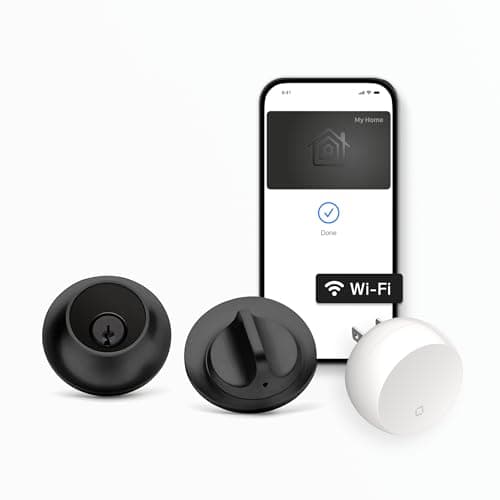
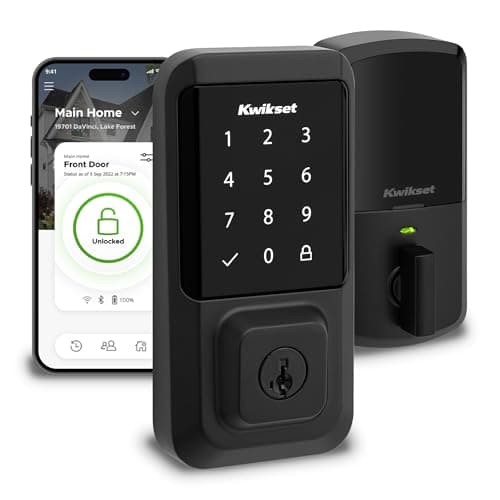
The Level Lock+ and the Kwikset Halo are both full-replacement deadbolts with built-in Wi-Fi and no hub, so on paper they start from the same place - and then they go in opposite directions. The Level Lock+ hides nearly all of its smart hardware inside the door, so it looks like an ordinary deadbolt while doing Apple Home Key. The Kwikset Halo wears a lit touchscreen keypad on the outside and makes its name on value and everyday convenience. So this is not really replace-versus-retrofit, the way many of our comparisons are; it is two visions of what a replacement deadbolt should be. Answer whether you want the lock to disappear or to hand out codes, and whether you live in Apple Home, and the winner nearly picks itself.
The verdict up front
For most households, the Kwikset Halo is our pick here. The reason is simple and practical: it has a real touchscreen keypad on the door, so anyone - a guest, a cleaner, a kid without a phone - can enter with a code, and it delivers that in a Grade AAA, UL-listed deadbolt at the value end of this pair, with Alexa and Google and no subscription. For the common case of "I want a good keypad lock that lets people in without a key," the Halo is the more useful buy, and it is our winner for that reason. It sits in our best keypad smart locks list for exactly this strength.
The Level Lock+ wins a different, real audience: Apple households, and anyone who wants a lock nobody can tell is smart. It is the only one of the two that lists Apple Home Key, so an iPhone or Apple Watch taps it open, and its whole design is about invisibility - the smart parts live in the door bore, so from either side it reads as a plain deadbolt. If you own your home, care how the door looks, or live near the Apple ecosystem, the Level is the more elegant and more capable-on-Apple choice, and it is not a compromise - it is a deliberately different priority.
The core difference: hidden and keypad-free vs a visible keypad
The Level Lock+ is built to disappear. You replace your existing deadbolt with it, and the point of the design is that once it is in, you cannot tell - nearly all of the smart hardware sits inside the door, so there is no keypad, no glowing panel, nothing on the outside that announces a smart lock. That discretion is its signature, and the trade is that entry, by default, is by phone (Apple Home Key or the Level app), a key card, or a traditional key. There is no code pad to punch on your way in.
The Kwikset Halo makes the opposite choice on purpose. Its new exterior carries an illuminated touchscreen keypad, so the very thing the Level hides is the Halo's headline feature: you and your household get in with a code, and you can hand out codes to anyone without cutting a key or sharing your phone. It looks like a smart lock because it is doing a job - phone-free entry for everyone - that a hidden lock cannot. Neither approach is "better" in the abstract: a hidden, keypad-free lock is the right tool when you value looks and an Apple-first workflow, and a visible keypad is the right tool when you want codes for a household with a revolving door of visitors. Our plain-English how do smart locks work explainer walks through both of these entry styles if you want the mechanics first.
Ecosystem: Apple Home Key vs Alexa and Google value
This is where the two diverge most, and it lines up neatly with their designs. The Level Lock+ is the Apple-friendly lock: its listing names Apple, Alexa and Google, and crucially it adds Apple Home Key, so you can tap an iPhone or Apple Watch against the door to open it with no app to launch. The Kwikset Halo lists Alexa and Google but not Apple HomeKit or Apple Home Key, so there is no iPhone tap-to-unlock on the Halo. Neither lock claims Matter. Read that carefully, because it is the whole ecosystem story: the Level is the one to buy for Apple Home Key or the widest platform coverage, and the Halo is the value pick for an Alexa or Google home that does not need Apple.
The matrix below is the comparison in a glance, and if you want the deeper explainer on what each platform actually does for a lock, our smart lock ecosystem compatibility guide is the piece behind the table. If your home is firmly Apple, the best smart locks for Apple Home roundup ranks the Level against the other iPhone-friendly options.
Guest access: the keypad question
For a lot of buyers, this single point decides it. If people who are not you need to get in - a housekeeper, a dog walker, teenagers, an Airbnb guest - the Kwikset Halo's built-in keypad is a genuine everyday convenience: you set a code, they type it, done, and you can change or delete codes without touching a key. The Level Lock+, by design, ships without an exterior keypad, so out of the box those same visitors need either the Level app on their phone, a key card, or a physical key. For a household that shares access constantly, the Halo is the obvious tool; for a couple or a single person who mostly lets themselves in with a phone, the Level's hidden, keypad-free look is the point.
It is worth being honest about what "no keypad by default" means before you buy the Level: every guest entry route runs through a phone, a card, or a key, so if code-sharing is central to your life, the Level is fighting its own design. That same keypad strength is why the Halo shows up in our best smart locks for Airbnb shortlist, where handing a code to a stranger for a weekend is the whole job.
Install, backups and connectivity
Both are full-replacement deadbolts, so the install is the same category of job: remove your old deadbolt and fit the new lock, a DIY-friendly, screwdriver-and-template task rather than a locksmith call. The Kwikset's listing calls out easy install with no hub; the Level is a standard deadbolt swap too, with the hidden hardware seated into the door bore. Because both are full replacements, you should not fit either to a door you rent - if you need a keep-your-keys retrofit instead, that is the August, which we line up against each of these elsewhere. Our how to install a smart lockguide covers checking your door's backset and thickness before you commit to either.
On connectivity and power the two are close. Both have Wi-Fi built into the lock, so remote lock, unlock and activity history work without a separate hub, and neither charges a subscription for any of it. Both run on batteries with low-battery warnings, and both keep a mechanical or card-based way in for when a battery dies - the Level via a key card or key, the Halo via its keyed cylinder. What still works when the internet drops is the same story for both, and our guide on whether smart locks work without Wi-Fi walks through exactly which features depend on the network and which do not.
Who should buy which
Buy the Kwikset Halo if you want a value-priced, security-graded keypad deadbolt that lets everyone in with a code - the most broadly useful setup for a busy household on Alexa or Google. Go in knowing the trade: it looks like a smart lock, and it does not do Apple Home Key. For the majority of buyers who want guest codes and a fresh graded lock without paying a design premium, it is the more complete choice, which is why it is our winner here.
Buy the Level Lock+ if you own your home and want a smart lock nobody can tell is smart, or if you live in Apple Home and want to tap an iPhone to open the door. It hides in the door, does Apple Home Key, lists the broadest platform support of the two, and puts Wi-Fi in the lock so you skip a hub. Go in knowing its trade too: it is the premium of the pair, and there is no keypad by default, so plan to unlock by phone, key card or key. The one-line rule: want guest codes and value, buy the Kwikset; want a hidden, Apple Home Key deadbolt, buy the Level. Each has a dedicated review if you want the closer look first (Level / Kwikset), and both appear in our best smart locks roundup.
The usual honest caveat applies, the same one on every page here: we did not install and stress-test these two locks in a lab. We read each lock's own Amazon listing and manufacturer documentation for its specs and the ecosystems it actually names, and compared them straight, crediting nothing a listing does not claim. Where a judgment would need hands-on time, we say so; our full method is on the methodology page.