Skip to content
Latch & Hub

Locks · Smart Locks

Will a Smart Lock Fit My Door?

Almost certainly yes, if your door has a standard American deadbolt — and the five minutes it takes to confirm it is the five minutes most people skip before ordering the wrong lock. Here are the five measurements that decide it, in the order they matter.

By Stephen V.Updated How we choose
#ad

We earn a commission when you buy through our Amazon links, at no extra cost to you. It never changes our rankings — where the subscription-free or cheaper option is the better buy, we say so. How this works.

Verdict

The bottom line

If your front door has a standard American deadbolt, a smart lock will almost certainly fit. The five things to check, in order, are: the backset (the distance from the door edge to the center of the bore hole, normally 2-3/8 or 2-3/4 inches), the door thickness (normally 1-3/8 to 1-3/4 inches), the bore holes (a 2-1/8 inch face bore and a 1 inch edge bore), the interior clearance around the thumb-turn if you are fitting a retrofit lock, and whether your existing deadbolt actually throws smoothly. If anything is non-standard, the safest buy is a retrofit lock that keeps your existing hardware — the August Wi-Fi Smart Lock or the SwitchBot Lock Ultra Touch Combo. If you need a replacement and space is tight, Level Lock+ hides its mechanism inside the door, and Schlage Encode Plus is the conventional full-size deadbolt swap.

American residential door hardware is unusually standardized, which is why this question has a reassuring answer most of the time. The vast majority of exterior doors in the US were prepped at the factory to the same dimensions, and every major lock brand builds to them. The locks that do not fit are not fitting because of one of five specific things — so measure those five and you will know before you spend anything.

Measurement 1: the backset

The backset is the distance from the edge of the door to the center of the round hole the lock sits in. In the US, it is almost always either 2-3/8 inches or 2-3/4 inches, and most replacement deadbolts ship with an adjustable latch that handles both — so this is usually a non-issue that only becomes a problem on an unusual custom or imported door. Measure it with a tape from the door edge to the middle of the cylinder. If the number is not close to one of those two, you are in custom territory and a retrofit lock is the safe route, because it does not care about the backset at all.

Measurement 2: the door thickness

Measure the edge of the door. Standard US exterior doors are 1-3/4 inches thick; interior and some older doors are 1-3/8 inches. Replacement locks typically state a supported range covering both, sometimes with an included spacer or a longer screw set for the thicker case. Where thickness genuinely bites is at the extremes: a very thick custom door, a solid-core slab with applied panels, or a door with heavy interior molding. The Level Lock+ is the interesting case here because its mechanism lives inside the bore rather than in an exterior escutcheon, which changes what "fits" means — read its published range before you assume either way.

Measurement 3: the bore holes

Standard prep is a 2-1/8 inch circular hole through the face of the door and a 1 inch hole drilled into the edge for the bolt. If your door already has a deadbolt, these holes already exist and already match — that is the whole point of standardization, and it is why a deadbolt swap is a screwdriver job rather than a drilling job.

You only need to think about this if your door has no deadbolt and you are adding one. That means drilling, which means a hole saw, a template and the risk of doing it slightly wrong in a door you cannot un-drill. If the door has no deadbolt and you are not confident, that is the one scenario on this page where paying a locksmith for an hour is genuinely good value.

Measurement 4: interior clearance — the one retrofit buyers miss

If you are buying a retrofit lock — one that mounts over your existing deadbolt and turns the thumb-turn with a motor — the backset and bore do not matter at all, because you are not touching them. What matters instead is physical room on the inside of the door. Retrofit bodies are noticeably larger than a thumb-turn, and three things take the space away: deep interior trim or molding close to the lock, a thumb-turn set unusually near the door edge, and anything that swings across the door such as a storm door, a closet door or a coat hook.

The test takes ten seconds. Hold your phone flat against the door where the lock body would sit, and open the door fully. If the phone clears everything, a retrofit will clear it too. This is the single most common reason a retrofit lock goes back, and it is entirely avoidable.

Measurement 5: does your current deadbolt actually work properly?

Not a measurement, and the most important item on the list. Go and throw your deadbolt now. If you have to lift the door, lean on it, pull the handle toward you or jiggle the key, your bolt is binding against a misaligned strike plate — and a smart lock will make that worse, not better. A human adjusts unconsciously. A small motor cannot: it will strain, drain the batteries, log jam errors and eventually fail to lock when you need it to.

The fix is usually adjusting or repositioning the strike plate so the bolt enters cleanly, which is a twenty-minute job with a chisel and a screwdriver and should be done before the lock arrives. This applies to retrofit locks most of all, because a retrofit is doing nothing but turning your existing, possibly misaligned, bolt. Our install guide covers the alignment check in the right order.

The doors where the answer is genuinely "no"

Five cases, and it is better to know now.

Sliding patio doors. A deadbolt smart lock does not fit a slider, full stop. Different hardware, different problem.

Mortise locks. Common in older apartment buildings and pre-war homes: the lock body sits in a deep rectangular pocket cut into the door edge rather than in round bores. Most consumer smart locks will not fit a mortise prep, and the ones that do are specialist products. A retrofit may still work if there is a separate conventional deadbolt with a thumb-turn.

Multi-point locks. Doors — often uPVC or fiberglass — where turning the handle throws several bolts into the frame at once. The smart-lock ecosystem for these is thin.

Glass and full-glass doors. No stile to mount into.

Metal doors with no existing deadbolt. Technically drillable, practically a job for someone with the right bits and nerve.

If you are in one of those categories and still want keyless access to something, the answer is often a different device class — a smart padlock for a gate, shed or storage, or a no-drill video doorbell for the access problem a lock was going to solve.

Retrofit versus replacement, decided by what you measured

Here is the decision tree in one paragraph. If your bore and backset are standard, your door is a standard thickness and your bolt throws smoothly, a replacement lock gives you a keypad on the outside and a cleaner look — buy Schlage Encode Plus or Level Lock+. If anything is non-standard, if you rent, or if you simply do not want to remove the existing hardware, buy a retrofit — it sidesteps the backset, the bore and the thickness entirely and only asks for interior clearance. If your bolt binds, fix that first regardless of which you buy. For the rental version of this decision in full, see best smart locks for renters, and for the whole field ranked, best smart locks and how to choose a smart lock.

The four locks below

Two retrofits and two replacements, chosen for the fit cases this page is about rather than ranked on features. If your door is standard and you have decided on a replacement, the direct comparisons worth reading are Level Lock+ vs Schlage Encode Plus and Level Lock+ vs August.

The short answer

Quick picks

Tap any row for the full write-up.

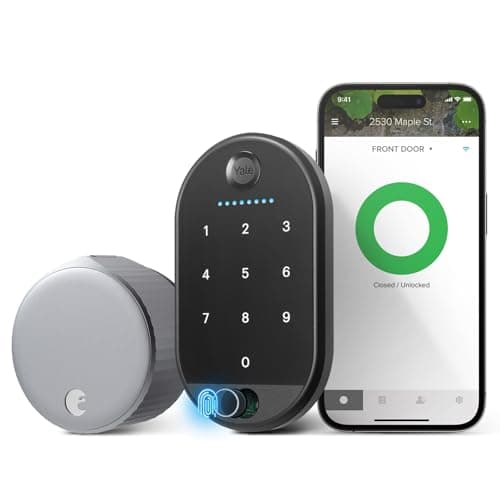
  • August Wi-Fi Smart Lock (4th Gen)
    01 August Wi-Fi Smart Lock (4th Gen)Top pick

    The safest answer to 'will it fit', because it does not care about your backset, your bore or your door thickness. It mounts over the existing deadbolt on the inside, keeps your keys working, and the 4th-gen body is small enough to clear most interior trim.

    Best for: Any door where you are not certain a replacement will fit · No Matter (Alexa / Google)

    $129.00View on Amazon

    #ad · we may earn a commission from this link to August Wi-Fi Smart Lock (4th Gen)

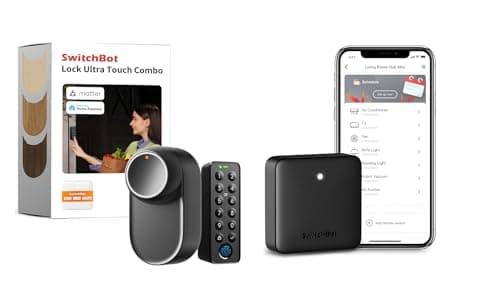
  • SwitchBot Lock Ultra Touch Combo (with Hub Mini)
    02 SwitchBot Lock Ultra Touch Combo (with Hub Mini)

    The retrofit for when you also want fingerprint entry and Matter. Same fit advantages as the August — your deadbolt and keys stay — with a keypad and a hub included, at the cost of being the largest interior body here.

    Best for: A retrofit fit where you also want fingerprints and Matter · Matter — via SwitchBot hub

    $196.70View on Amazon

    $205.094% off

    #ad · we may earn a commission from this link to SwitchBot Lock Ultra Touch Combo (with Hub Mini)

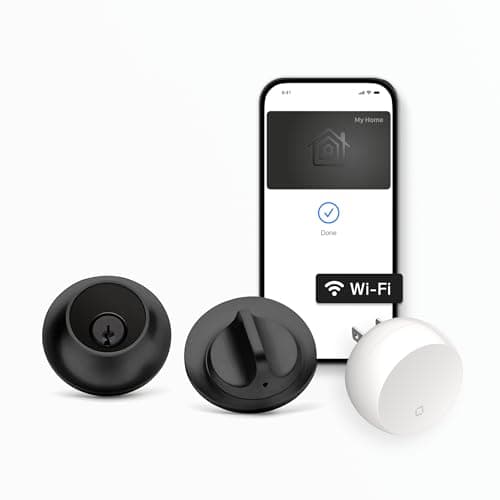
  • Level Lock+
    03 Level Lock+

    The replacement lock for the door where there is no room for a replacement lock. Level puts the whole mechanism inside the bore, so there is no bulky escutcheon on either face — which is what makes it fit doors and trim situations a conventional smart deadbolt cannot.

    Best for: Tight trim, glass sidelights and doors with no room for a bulky escutcheon · No Matter (HomeKit + Apple Home Key)

    $256.25View on Amazon

    $349.0027% off

    #ad · we may earn a commission from this link to Level Lock+

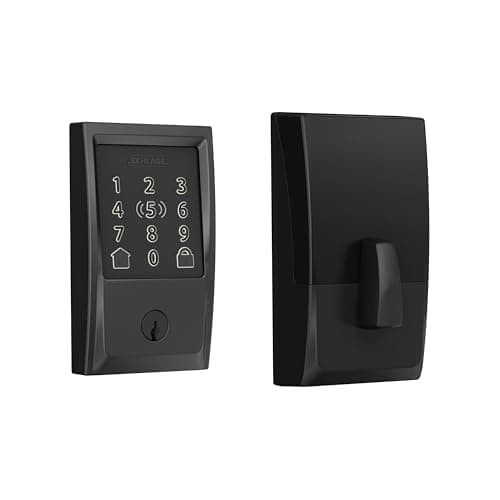
  • Schlage Encode Plus
    04 Schlage Encode Plus

    The conventional answer for a conventional door. A full-size replacement deadbolt with a touchscreen keypad on the outside, built-in Wi-Fi and Apple Home Key — the straightforward swap when your bore and backset are standard and you have the trim clearance.

    Best for: A standard-prep door where a conventional keypad deadbolt is wanted · No Matter (HomeKit + Apple Home Key)

    $329.00View on Amazon

    #ad · we may earn a commission from this link to Schlage Encode Plus

#ad · Live prices from the Amazon Product API, as of October 5, 2026. Where we have no verified live price we show none — we would rather leave a gap than print a number that has rotted.

What each lock type needs from your door — the measurement that actually decides it
DeviceBacksetDoor thicknessBore holesInterior clearanceExisting deadbolt
Retrofit (August, SwitchBot)Does not matterDoes not matterDoes not matterCRITICAL — measure thisKept, and must throw smoothly
In-door replacement (Level Lock+)Standard 2-3/8 or 2-3/4 inCheck published rangeUses existing 2-1/8 in boreMinimal — nothing protrudesRemoved; keep it safe
Conventional replacement (Schlage)Standard 2-3/8 or 2-3/4 inStandard 1-3/8 to 1-3/4 inUses existing 2-1/8 in boreNeeds face room for escutcheonRemoved; keep it safe
No existing deadbolt at allYou set it by drillingStandard rangeMust be drilled — 2-1/8 + 1 inDepends on lock chosenNone — consider a locksmith

In detail

The picks, in full

01

August Wi-Fi Smart Lock (4th Gen)

Top pick
August Wi-Fi Smart Lock (4th Gen)
$129.00View on Amazon

Price as of October 5, 2026. Amazon's price at checkout is the one that counts.

#ad · we may earn a commission from this link to August Wi-Fi Smart Lock (4th Gen)

The safest answer to 'will it fit', because it does not care about your backset, your bore or your door thickness. It mounts over the existing deadbolt on the inside, keeps your keys working, and the 4th-gen body is small enough to clear most interior trim.

  • Retrofit - fits your existing deadbolt
  • Keep using your existing keys
  • Built-in Wi-Fi, no separate hub
  • Keypad Touch included
  • Alexa, Google, SmartThings
Matter: No Matter (Alexa / Google)Fee: None - no subscriptionResearched, not hands-on tested

Good

  • A retrofit sidesteps four of the five measurements on this page: backset, thickness and both bore holes become irrelevant because you are not touching them
  • Your existing keys keep working, which also means your existing fallback keeps working
  • The 4th-gen body is smaller than earlier August generations, which is exactly what matters when interior clearance is the constraint
  • Built-in Wi-Fi with no bridge, so there is one device to fit rather than two to find homes for

Less good

  • It still needs interior clearance, which is the one measurement a retrofit cannot avoid — do the phone test before ordering
  • It depends on your existing deadbolt being in good order; a binding bolt will defeat it
  • No Matter and no Apple HomeKit in this configuration

Skip it if: your thumb-turn is boxed in by deep trim or a storm door — that is the one fit problem a retrofit has, and the Level below is the answer to it.

02

SwitchBot Lock Ultra Touch Combo (with Hub Mini)

SwitchBot Lock Ultra Touch Combo (with Hub Mini)
$196.70View on Amazon

$205.094% off

Price as of October 5, 2026. Amazon's price at checkout is the one that counts.

#ad · we may earn a commission from this link to SwitchBot Lock Ultra Touch Combo (with Hub Mini)

The retrofit for when you also want fingerprint entry and Matter. Same fit advantages as the August — your deadbolt and keys stay — with a keypad and a hub included, at the cost of being the largest interior body here.

  • Retrofit — keeps your deadbolt & key
  • Fingerprint via included Keypad Touch
  • Matter via included Hub Mini
  • Up to 12-month battery
  • Up to 100 fingerprints
Matter: Matter — via SwitchBot hubFee: No subscription — hub in the boxResearched, not hands-on tested

Good

  • Retrofit fit, so the backset, bore and thickness questions all disappear and your original cylinder and keys remain
  • The only lock here that reaches Matter, and the hub that provides it is in the box rather than a separate purchase
  • Up to 100 fingerprints on the included keypad, which solves the access-sharing problem the fit question is usually downstream of
  • An up-to-12-month published battery life is the longest here, which is one less thing to reach past the trim for

Less good

  • It is the bulkiest interior body in this group, so it demands the most clearance — if your trim is tight, measure twice
  • Three pieces to install and place: lock body, keypad and hub
  • Matter comes via the hub rather than natively in the lock

Skip it if: interior clearance is already marginal — this is the biggest body on the page and the August is the slimmer retrofit.

03

Level Lock+

Level Lock+
$256.25View on Amazon

$349.0027% off

Price as of October 5, 2026. Amazon's price at checkout is the one that counts.

#ad · we may earn a commission from this link to Level Lock+

The replacement lock for the door where there is no room for a replacement lock. Level puts the whole mechanism inside the bore, so there is no bulky escutcheon on either face — which is what makes it fit doors and trim situations a conventional smart deadbolt cannot.

  • Full-replacement deadbolt, hidden in-door design
  • Apple Home Key (tap an iPhone / Apple Watch)
  • Built-in Wi-Fi, no hub
  • Works with Apple, Alexa, Google
  • Level app for iOS and Android
Matter: No Matter (HomeKit + Apple Home Key)Fee: None - no subscriptionResearched, not hands-on tested

Good

  • Nothing protrudes on either face, which is the fit advantage: narrow stiles, close trim, adjacent glass sidelights and storm doors all stop being problems
  • Standard bore prep, so on a door that already has a deadbolt it is a direct swap with no drilling
  • Apple Home Key is the fastest entry method on this page — tap an iPhone or Apple Watch, no keypad needed on the door
  • Built-in Wi-Fi with no hub, so there is nothing extra to site

Less good

  • It replaces the deadbolt, which means removing the existing hardware — a lease question if you rent, and keep the original in a box either way
  • No keypad on the door, so sharing access with someone who has no compatible phone means handing over a physical key
  • No Matter, despite the broad Apple, Alexa and Google support

Skip it if: you want to punch a code at the door, or you are not permitted to change the lock — the retrofits above solve both.

04

Schlage Encode Plus

Schlage Encode Plus
$329.00View on Amazon

Price as of October 5, 2026. Amazon's price at checkout is the one that counts.

#ad · we may earn a commission from this link to Schlage Encode Plus

The conventional answer for a conventional door. A full-size replacement deadbolt with a touchscreen keypad on the outside, built-in Wi-Fi and Apple Home Key — the straightforward swap when your bore and backset are standard and you have the trim clearance.

  • Keyless-entry deadbolt (replaces yours)
  • Apple Home Key (iPhone / Apple Watch)
  • Built-in Wi-Fi + app control
  • Alexa + Apple HomeKit
  • Touchscreen keypad, easy install
Matter: No Matter (HomeKit + Apple Home Key)Fee: None - no subscriptionResearched, not hands-on tested

Good

  • A touchscreen keypad on the exterior is the most universally useful access method there is: anyone can use a code with no phone, no app and no account
  • Standard deadbolt prep means a direct swap on the great majority of American exterior doors, with a screwdriver and no drilling
  • Built-in Wi-Fi plus Apple HomeKit and Apple Home Key, so it covers both the code case and the Apple tap-to-enter case
  • Schlage is a mainstream lock brand, which matters for parts, keyways and replacement years from now

Less good

  • A full-size exterior escutcheon is the thing that does not fit tight trim, narrow stiles or doors with close sidelights — that is where the Level earns its price
  • A replacement, so the same lease and hardware-removal caveats as the Level apply
  • No Matter

Skip it if: your door has a narrow stile, close trim or a storm door swinging across it — measure the exterior face before you commit, and look at the Level if it is tight.

Take four measurements and a photo before you order

Write these down: door thickness at the edge, backset from edge to cylinder center, the distance from the thumb-turn to the nearest obstruction on the inside, and the distance from the door edge to the nearest obstruction on the outside (trim, sidelight glass, a storm door frame). Then photograph both faces of the door around the lock. Those four numbers and two photos answer every fit question on this page, and they let you check a lock's published dimensions against your actual door rather than against an assumption.

Fix the strike plate first, always

If the bolt does not glide into the strike with the door at rest, stop and fix that before the lock arrives. Loosen the strike plate screws and reposition it, or file the opening slightly, so the bolt enters with no resistance. A motor has no judgment and no leverage; a bolt that a human has been muscling closed for years will defeat it. Doing this first turns most smart lock installations from frustrating into boring, which is what you want from a lock.

Check what the lock needs behind it, not just in front

Beyond physical fit, three practical requirements catch people out. The lock needs 2.4GHz Wi-Fi within reach of the door if it has built-in Wi-Fi — a front door at the far end of a house is a common dead spot. It needs a battery compartment you can actually open with the door in place. And if it needs a hub, that hub needs an outlet somewhere sensible, which is covered in do smart locks need a hub.

Keep the old lock and the old keys

Whichever lock you fit, box the original hardware with its screws, its strike plate and its keys, and label it. If you rent, that box is how you hand the apartment back cleanly. If you own, it is how you get back into your house on the day something unexpected happens to the new lock — and the honest discussion of that scenario is in do smart locks work without power and can you use a key with a smart lock.
How we chose

We don't run a test lab

We don't wire every one of these into a test rig, and we won't write "in our testing" as if we do. What we did instead: pulled each product's published specifications, confirmed its Matter/Thread/HomeKit support from the manufacturer's own documentation, added up the real 3-year cost with any monthly fee included, and read the aggregated verified-buyer sentiment. Every pick is chosen against that published method. Where a number came from someone else, we name and link them in Sources.

Questions

Frequently asked

What measurements do I need before buying a smart lock?
Four numbers. Door thickness at the edge (normally 1-3/8 or 1-3/4 inches), backset from the door edge to the center of the lock cylinder (normally 2-3/8 or 2-3/4 inches), interior clearance from the thumb-turn to the nearest obstruction, and exterior clearance from the door edge to trim, glass or a storm door frame. If you are buying a retrofit lock, only the interior clearance matters. If you are buying a replacement, all four do.
Will a smart lock fit a door that has no deadbolt?
Only after drilling. Standard prep is a 2-1/8 inch hole through the face of the door and a 1 inch hole into the edge for the bolt, and a replacement lock needs both. Lock makers supply paper templates, and a hole saw does the work, but you cannot undo a hole drilled in the wrong place on an exterior door. If the door has no deadbolt and you are not confident with a hole saw, an hour of a locksmith's time is good value here in a way it rarely is elsewhere.
Do retrofit smart locks fit any door?
Any door with a conventional deadbolt and a thumb-turn, and enough room on the inside for the lock body — that last clause is the only real limit. A retrofit mounts over your existing hardware, so it is indifferent to backset, bore and thickness. What stops it is deep interior molding, a thumb-turn set very close to the door edge, or a storm door or closet door swinging across the space. Hold your phone flat where the body would sit and open the door fully: if the phone clears, the lock will.
What is a backset, and does it matter?
The backset is the distance from the edge of the door to the center of the bore hole the lock sits in. In the US it is almost always 2-3/8 or 2-3/4 inches, and most replacement deadbolts include an adjustable latch that handles both, which is why it rarely causes a problem. It becomes relevant only on unusual, custom or imported doors — and on those, a retrofit lock is the safe answer, because it does not use the bore at all.
Will a smart lock work on a metal or fiberglass door?
Yes, if the door has standard deadbolt prep — the material of the door does not change the fit, only the difficulty of drilling it if the prep is missing. Metal doors with an existing deadbolt take a replacement lock perfectly well. Metal doors with no deadbolt are the hard case, because drilling a metal skin and its internal reinforcement is a different job from drilling wood. Fiberglass with existing prep is straightforward. One quiet caveat: a metal door can attenuate Wi-Fi slightly more than a wooden one, which is worth remembering if the lock has built-in Wi-Fi and the router is far away.
Can I put a smart lock on a sliding door, a mortise lock or a multi-point door?
Generally no for all three with consumer smart deadbolts. A slider has no deadbolt bore at all. A mortise lock — common in pre-war buildings and older apartments — sits in a deep rectangular pocket rather than round bores, and almost no consumer smart lock fits that prep. A multi-point door throws several bolts from one handle turn, and the smart hardware for those is a specialist market. If one of those is your door, a smart padlock for the outbuilding or a video doorbell for the access problem is usually the practical path.

Keep reading

Receipts

Sources

We do not run a test lab, and we do not pretend to. Compatibility and subscription-cost claims come from the manufacturer's own documentation and the live retailer listing, read on the dates shown. Read our full method.