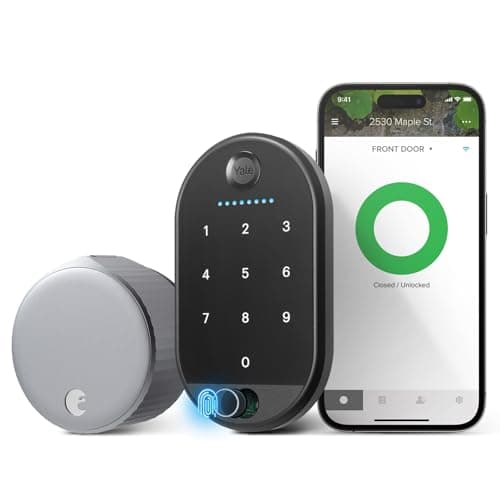
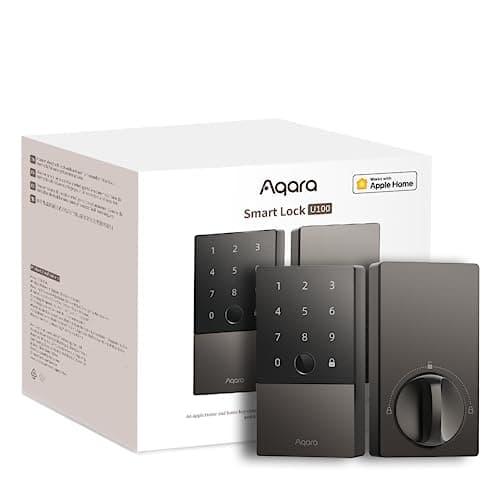
Most smart lock comparisons are about features. This one is about whether you are allowed to take the deadbolt out of your door. The Aqara U100 and the August Wi-Fi Smart Lock sit on opposite sides of that question, and once you have answered it honestly, the rest of the decision mostly makes itself. What follows is the published specification on both locks, read off each maker's own documentation, and the three or four places where the difference actually shows up in daily use.
Replace or retrofit: the question that decides it
The U100 is a deadbolt replacement. You remove the single-cylinder deadbolt you have, and the U100 goes in its place, with a new exterior panel carrying the fingerprint reader, the touchscreen keypad and the Home Key antenna. Aqara publishes the fit numbers so you can check before you buy: a 2 3/8 in or 2 3/4 in backset, a wooden door 1 3/8 in to 2 11/64 in thick, a 2 1/8 in bore, and a PH1 screwdriver. Most standard doors take it with no drilling. Your old keys stop being relevant, and the outside of the door looks different.
The August does the opposite. It mounts on the inside of the door, over your existing deadbolt, and turns the thumbturn for you. August's own wording is worth quoting because it is the whole pitch: "Leave your outside lock alone and you keep your existing deadbolt and keys." Nothing changes on the street side. Your spare keys in the neighbor's drawer still work. And if you move out, you unscrew it and the door is exactly as you found it.
That makes the August the default for renters, for anyone in a building with hardware rules, for landlords who need a key to still work, and for anyone whose front door hardware is matched to the rest of the house and would look wrong with a keypad on it. It makes the U100 the default for an owner-occupied door where the goal is the best lock rather than the least disruption. Our best smart locks for renters page is built around exactly this constraint, and will a smart lock fit my door is the one to read with a tape measure in hand before you spend anything.
Where the hub lives: Zigbee plus a hub, or Wi-Fi in the lock
This is the second real difference, and it cuts the other way. Aqara publishes the U100 as built on Zigbee: remote unlocking and automations require an Aqara 3.0 hub, Matter support requires a Matter-capable Aqara hub, and Apple Home remote access needs an Apple Home hub in the house. The Amazon listing describes it as a Bluetooth electronic deadbolt, which is the same story from the phone's side - locally it talks to you directly, and anything beyond Bluetooth range goes through a hub. Everything the lock does at the door - fingerprint, codes, Home Key, the mechanical key - works with no hub at all. It is remote control, alerts, automations and voice that need one.
August puts the radio in the lock. August publishes Wi-Fi at 802.11 b/g/n on 2.4 GHz or 5 GHz and states plainly that it "requires no additional bridge to connect." So remote lock and unlock, activity history and alerts work the day you install it, with nothing else bought and nothing else plugged in. For a single-lock household that is a genuine advantage: one box, one app, done.
The arithmetic flips if you already run smart home gear. If there is an Aqara hub on the shelf already - or if you were going to buy one anyway for sensors - the U100's hub requirement stops being a cost and the lock becomes a far better piece of hardware for the money. If this lock is the only smart thing you own, the August's built-in Wi-Fi is the simpler purchase. Our guide on do smart locks need a hub covers the trade-off in general, and Bluetooth vs Wi-Fi smart locks explains what each radio costs you in battery life.
Battery life is the biggest published gap
Aqara publishes up to 8 months on replaceable AA cells, measured at 8 fingerprint unlocks a day. August publishes up to 3 months on the two CR123 cells it ships with. Both are manufacturer figures under their own assumptions, and real life will be worse for both - but a 2.5x difference in the published numbers is too large to explain away, and it has a clear cause. Built-in Wi-Fi is expensive to run. A radio that maintains a connection to your router burns more power than one that wakes up to talk to a nearby Zigbee hub, and the August pays for its no-hub convenience in cells.
The practical difference is how often this becomes your problem. At the published figures that is roughly 4 battery changes a year on the August against 1 to 2 on the U100, plus the cost gap: AAs are the cheapest, most-stocked cell on earth, and CR123s are neither. The U100 also has the better failure story - a USB-C port on the outer panel means a dead lock opens with any phone power bank, where a dead August is opened with the physical key you still have, which is fine as long as you have it with you. Our smart lock battery life guide has the published figures for every lock we cover side by side, and what happens when a smart lock loses power covers both of these fallbacks properly.
Ecosystems: HomeKit is not Home Key
Both locks work with Apple, and only one of them taps open. August's page lists Alexa, Google Home and Apple HomeKit with Siri - so the lock appears in the Apple Home app and answers Siri. Aqara lists Apple Home, Aqara Home, Matter, Google Home, Alexa and IFTTT, and crucially adds Apple Home Key: hold an iPhone or Apple Watch to the lock and it opens, which Aqara says works even when the Apple device has no power left.
That distinction gets blurred constantly in listings, so it is worth being blunt. HomeKit means the lock is in the Apple Home app and in automations. Home Key means your phone is the key at the door. If the second one is what you pictured when you imagined an Apple smart lock, only the U100 does it - and it needs an Apple Home hub in the house for the remote half to work. Our best smart locks for Apple Home page ranks the Home Key locks specifically, and smart lock ecosystem compatibility is the matrix across every lock and platform we cover.
On Matter, neither lock is a native Matter device. The U100 can be exposed to Matter by bridging it through a Matter-capable Aqara hub, which is a real route but a hub-dependent one; August's page does not list Matter at all. If Matter is central to your plans, read is Matter worth it before you let it decide a lock purchase.
Getting other people in: codes, prints and DoorSense
The U100 has the keypad and the fingerprint reader built into the lock itself: Aqara publishes up to 50 stored fingerprints with a 98.6% recognition rate and sub-0.5-second recognition, plus permanent, periodic and one-time passwords and an anti-peep entry option. Two NFC tags come in the box, which is the answer for a child or an older relative who should not need a phone or a code.
The August gets codes and fingerprints from the separate Keypad Touch, which is included in the Amazon bundle linked on this page but is a distinct, battery-powered part you stick beside the door. That is a legitimate design - the keypad can go where it is convenient rather than where the bolt is - but it is one more thing with a battery, outdoors.
What the August has and the U100 does not is DoorSense: a sensor, in the box, that reports whether the door is actually closed rather than only whether the bolt is thrown. That sounds like a detail until the first time a door is left on the latch and the lock cheerfully reports itself locked. The U100's gyroscope auto-lock addresses part of the same problem by locking once the door has closed, but it is inferring the door state rather than sensing it. If several people are coming and going on codes, read how to share smart lock access with guests before you set either one up.
The security question nobody asks
A retrofit lock inherits the security of the hardware it is bolted to. The August changes who can turn your deadbolt; it does not change how hard your deadbolt is to attack. If your existing bolt is a cheap builder-grade unit with a short throw and a flimsy strike, the August makes it convenient, not stronger. That is not a criticism of August - it is simply what a retrofit is - but it means the honest version of "the August is the safe choice" is "the August is as safe as the lock already in your door."
The U100 replaces the whole mechanism, and Aqara's published position is careful: it says the lock complies with the same safety standard as BHMA Level 3 for structural security without claiming formal BHMA certification. We report that exactly as published rather than rounding it up to "BHMA Grade 3 certified," because those are different claims. Fingerprints are stored locally on the lock and Aqara publishes 128-bit AES for its data. Our are smart locks safe guide covers what actually gets attacked on a residential door, which is almost never the electronics.
So which one
Take the Aqara U100 if the door is yours to change. It gives every member of the household an independent way in, publishes more than twice the battery life, survives weather with a rated outer panel, recovers from a flat battery with a USB-C power bank, and is the only one of the two that does Apple Home Key - all for less money than August asks on its own site, before you add the hub. The hub is the honest cost, and if you already own one, this is simply the better lock.
Take the August Wi-Fi Smart Lock if changing the door is not on the table, or if you want the single simplest purchase: one box, built-in Wi-Fi, no hub, existing keys still working, and a door sensor included. Accept the 3-month battery figure and the absence of Home Key as the price of a lock that is fully reversible. For the wider field, our best smart locks roundup ranks everything we cover, and best smart deadboltsis the list if you have already decided to replace rather than retrofit. We have not tested either lock hands-on: every figure here is the manufacturer's own published specification, read on the date in the sources below.
How to choose between a replacement and a retrofit
One: are you allowed to change the door? Answer this before anything else. A lease, a condo board or a shared entrance usually settles it, and if the answer is no, the retrofit is the only honest option and the rest of the spec sheet is noise.
Two: who else needs to get in, and with what? A lock that only opens to your phone is a lock that still needs a key for everyone else. Count the people - cleaner, dog walker, teenager, in-laws - and then decide whether you need codes, a fingerprint reader, an NFC tag or all three. This is where a lock with everything built in pulls ahead of a lock plus a separate keypad.
Three: how will it talk to the internet, and what does that cost in batteries? Built-in Wi-Fi is the simplest to buy and the most expensive to run. A hub is an extra purchase that pays you back in battery life and tends to be more reliable at range. Neither is wrong - but the published battery figures tell you which one you chose.
Four: what happens when the batteries die? Every smart lock warns you first, and most people still get caught once. The three real answers are a physical key in your pocket, an external power port, or a keypad backup that runs independently. Make sure you have at least one of them, and know which it is.
Five: is the deadbolt itself any good? With a retrofit, your existing bolt is the actual security. If it is old, loose or short-throw, replacing it is the upgrade - and at that point you may as well put a better lock in the hole. See smart lock vs traditional deadbolt for what the mechanism is actually doing.