Skip to content
Latch & Hub

Locks · Smart Locks

The Best Fingerprint Smart Locks for 2026

A fingerprint reader is the fastest way through your own front door. But the sensor is the easy part — what actually decides the buy is your backups when a wet thumb fails, whether it needs a hub you don't own yet, and which ecosystem it answers to. We rank five on exactly that.

By Stephen V.Updated How we choose
#ad

We earn a commission when you buy through our Amazon links, at no extra cost to you. It never changes our rankings — where the subscription-free or cheaper option is the better buy, we say so. How this works.

A fingerprint reader is the fastest, most natural way through your own front door: no code to remember, no phone to fish out, no key to lose — you just touch the lock and walk in. Every lock here does that part well; modern sensors read a print in well under a second. So the sensor is not what separates them. What separates them is everything the listing photo doesn't show: what you fall back on when a wet or cold thumb won't read, whether the lock needs a hub you don't own yet to do anything remotely, and which voice assistant it actually answers to. We ranked these five on exactly those questions.

One honest caveat first, the same one on every page here: we don't run a lock lab. We compiled each lock's published specifications, confirmed its access methods, weather rating and ecosystem support from the manufacturer's own documentation and live retail listing, and read the aggregated verified-buyer sentiment. Where a figure came from someone else's testing, we say so. The keypad vs fingerprint comparison covers whether a print reader is even the right unlock method for you; if you decide it is, this is the shortlist.

The fingerprint sensor is the easy part

It's tempting to shop on the sensor spec — "reads in 0.3 seconds," "stores 100 prints" — but in day-to-day use those numbers barely move the needle. All five locks here read a clean, dry finger fast enough that you won't notice the difference, and every one stores far more prints than a normal household needs. Capacity only matters at the edges: a busy share house or a small office that has to enroll a dozen people leans toward the ~100 prints on the Ultraloq and SwitchBot rather than the 50 on the Aqara. For a family of four, any of these is overkill in the best way.

Where sensors genuinely differ is in the awkward moments — a thumb that's wet from the rain, cold and dry in winter, or dusted with flour on the way in with the groceries. No capacitive reader is perfect there, which is exactly why the next section matters more than this one.

Your backups are what actually matter

A fingerprint lock is only as good as what you do when the print fails, because it will fail occasionally. The right question isn't "how fast is the sensor" but "how many independent ways in does this give me before I'm stuck on the porch?" Every lock here keeps a physical keyway or a keyed backup, which is the one that saves you in a flat battery or a firmware sulk. On top of that you want a keypad code (so a guest or a babysitter can get in without enrolling a print) and app or Wi-Fi unlock (so you can let someone in from your phone).

The Ultraloq U-Bolt Pro WiFi leads here precisely because it stacks the most: fingerprint, code, key, app and built-in Wi-Fi. The Aqara adds Apple Home Key to that stack for Apple users. The SwitchBot is the interesting outlier — as a retrofit it keeps your existing physical key untouched, so your oldest, most reliable backup is the one you already have. Whichever you choose, treat the keypad code and the physical key as non-negotiable, not optional extras. For the wider view across all lock types, the main smart-lock roundup ranks the field on ecosystem and specs; this page is the fingerprint-first cut of it.

The hidden cost is the hub

Here is the trap that inflates the real price of a "$100 fingerprint lock." A lock that's Bluetooth-only can enroll prints and unlock at the door for free — but the moment you want to lock it from work, get an alert when a code is used, or say "lock the front door" to Alexa, you need Wi-Fi, and on many locks Wi-Fi means a separately-sold bridge or hub. That's a real second purchase that never shows up in the headline price.

We split the field on this deliberately. The Ultraloq U-Bolt Pro WiFi and the eufy C220 have Wi-Fi built in — no bridge, remote access works out of the box. The Aqara is Bluetooth plus Apple Home Key on its own and wants an Aqara hub for full remote and voice control. The Lockly Secure Plus is Bluetooth-range until you add its Secure Link Wi-Fi hub. The SwitchBot is the honest exception: it's sold here as a combo that already includes the Hub Mini, so the "extra" is in the box and priced in. Before you compare two locks on price, check whether both totals include the radio you actually need.

Which ecosystem it answers to

This is where a fingerprint lock stops being a lock and becomes part of your smart home, and it's the question this site exists to answer clearly. If you're in Apple's world, the Aqara U100 is the obvious pick: Apple Home Key lets you tap your iPhone or Watch to unlock, and it appears in the Apple Home app. If you run Alexa or Google, the Ultraloq and eufy both slot in cleanly. And if you specifically want Matter — the cross-ecosystem standard that finally lets a lock work the same in Apple Home, Alexa and Google — the SwitchBot Lock Ultra is the only pick here that gets there, and only through its included hub. None of these exposes to Matter without a hub, and cameras and locks are still where Matter support is thinnest, so read the badge on each pick rather than assuming. The smart-lock ecosystem compatibility guide lays out which lock works with which assistant, and why.

The short answer

Quick picks

Tap any row for the full write-up.

  • ULTRALOQ
    01 ULTRALOQ U-Bolt ProTop pick

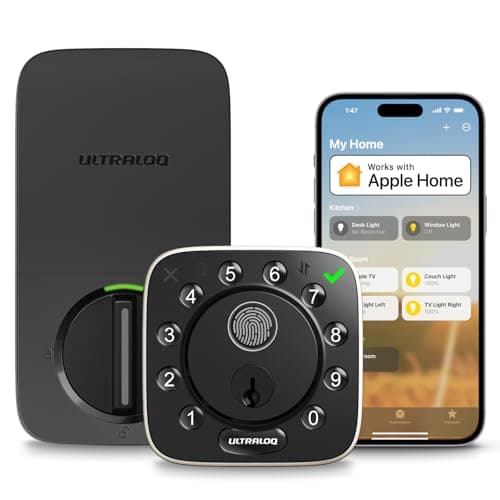
    The most complete fingerprint lock for a normal front door: a fast sensor, every backup you could want — code, physical key, phone and built-in Wi-Fi for remote access — and an ANSI Grade 1 body, all without paying the separate-bridge tax most locks in this class charge.

    Best for: Most front doors — every way in, no hub · No Matter (Alexa, Google)

    Check price on Amazon →

    #ad · we may earn a commission from this link to ULTRALOQ U-Bolt Pro

  • Aqara Smart Lock U100
    02 Aqara Smart Lock U100

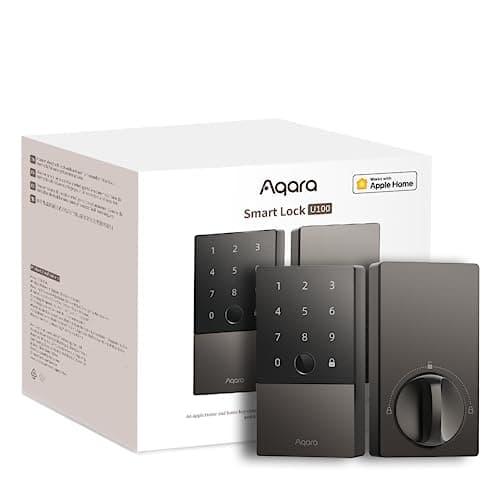
    The fingerprint lock to buy if your home runs on Apple: it pairs a quick fingerprint reader with Apple Home Key, so you tap an iPhone or Watch to unlock, and it keeps a real keyed backup for the day the tech gives up.

    Best for: Apple households — Home Key + fingerprint · Apple Home Key; no Matter

    $134.99View on Amazon

    $149.9910% off

    #ad · we may earn a commission from this link to Aqara Smart Lock U100

  • eufy Security Smart Lock C220
    03 eufy Security Smart Lock C220

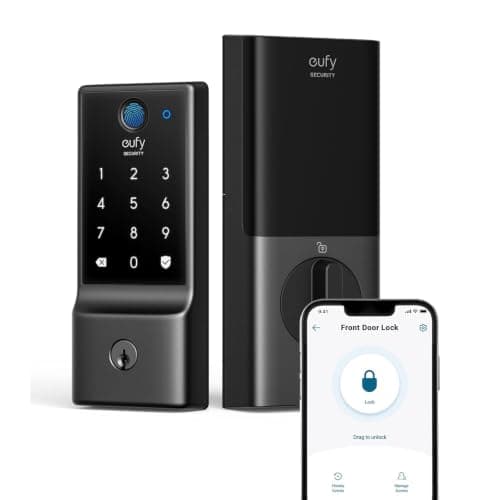
    The value pick: built-in Wi-Fi, a quick fingerprint reader and app control for around a hundred dollars, with no bridge to buy — as long as your door has some cover and you live in Alexa or Google, not Apple.

    Best for: Tightest budget with built-in Wi-Fi · No Matter (Alexa, Google)

    $99.99View on Amazon

    $169.9941% off

    #ad · we may earn a commission from this link to eufy Security Smart Lock C220

  • SwitchBot Lock Ultra Touch Combo (with Hub Mini)
    04 SwitchBot Lock Ultra Touch Combo (with Hub Mini)

    The pick for renters and anyone who can't swap the whole lock: it mounts over your existing deadbolt in minutes, keeps your original key and exterior hardware, and — uniquely on this list — bridges to Matter through the Hub Mini included in the box.

    Best for: Renters & retrofits — keep your deadbolt · Matter — via SwitchBot hub

    $196.70View on Amazon

    $205.094% off

    #ad · we may earn a commission from this link to SwitchBot Lock Ultra Touch Combo (with Hub Mini)

  • Lockly Secure Plus
    05 Lockly Secure Plus

    The choice when the keypad is exposed to neighbors or guests: Lockly's patented PIN Genie pad shuffles its numbers so nobody can guess your code from smudges or a glance, and the fingerprint data stays on the lock rather than in the cloud.

    Best for: Shared or exposed keypads (anti-peep) · No Matter (Alexa, Google)

    $249.99View on Amazon

    #ad · we may earn a commission from this link to Lockly Secure Plus

#ad · Live prices from the Amazon Product API, as of Sep 1, 2026. Where we have no verified live price we show none — we would rather leave a gap than print a number that has rotted.

Fingerprint locks compared — backups, Wi-Fi, ecosystem, security and fit
DeviceBackup ways inWi-FiEcosystemSecurity & weatherFit
Ultraloq U-Bolt Pro WiFiCode · key · appBuilt-inAlexa · GoogleANSI Grade 1 · IP65Replaces deadbolt
Aqara U100Code · key · Home KeyVia Aqara hubApple Home Key · Alexa · GoogleIP65Replaces deadbolt
eufy Smart Lock C220Code · key · appBuilt-inAlexa · GoogleBHMA Grade 3 · IP53Replaces deadbolt
SwitchBot Lock UltraYour key · code · NFCVia hub (Matter)Matter · Apple · Alexa · GoogleIP65 keypadRetrofit over deadbolt
Lockly Secure PlusAnti-peep code · keyVia Secure LinkAlexa · GooglePIN Genie anti-peepReplaces deadbolt

In detail

The picks, in full

01

ULTRALOQ U-Bolt Pro

Top pick
ULTRALOQ
Check price on Amazon →

We don't have a verified live price right now, so we aren't showing one.

#ad · we may earn a commission from this link to ULTRALOQ U-Bolt Pro

The most complete fingerprint lock for a normal front door: a fast sensor, every backup you could want — code, physical key, phone and built-in Wi-Fi for remote access — and an ANSI Grade 1 body, all without paying the separate-bridge tax most locks in this class charge.

  • Fingerprint + code + key + app + Wi-Fi
  • Built-in Wi-Fi — no bridge
  • ANSI/BHMA Grade 1
  • IP65 weatherproof
  • Auto-unlock + door sensor
Matter: No Matter (Alexa, Google)Fee: No subscription — Wi-Fi built inResearched, not hands-on tested

Good

  • Built-in Wi-Fi means remote lock/unlock and alerts work out of the box — no separately-sold bridge, unlike most locks at this price
  • The widest set of ways in here — fingerprint, keypad code, physical key, the app and Wi-Fi — so a dead battery or a wet thumb never locks you out
  • ANSI/BHMA Grade 1 is the highest residential security rating, a real step up from the Grade 3 bodies common at this price

Less good

  • Keeping Wi-Fi always on drains batteries faster than a Bluetooth-only lock — expect to recharge or swap cells more often than the eufy or Aqara here
  • Works with Alexa and Google only — no Apple Home/HomeKit and no Matter, so an Apple household should look at the Aqara instead

Skip it if: you're deep in Apple's ecosystem and want to tap-to-unlock with your iPhone or Watch — this lock doesn't speak HomeKit.

02

Aqara Smart Lock U100

Aqara Smart Lock U100
$134.99View on Amazon

$149.9910% off

Price as of Sep 1, 2026. Amazon's price at checkout is the one that counts.

#ad · we may earn a commission from this link to Aqara Smart Lock U100

The fingerprint lock to buy if your home runs on Apple: it pairs a quick fingerprint reader with Apple Home Key, so you tap an iPhone or Watch to unlock, and it keeps a real keyed backup for the day the tech gives up.

  • Fingerprint + Apple Home Key
  • Touchscreen keypad + keyed backup
  • Stores 50 fingerprints
  • IP65 weatherproof
  • Up to 8-month battery
Matter: Apple Home Key; no MatterFee: No subscription — Aqara hub for remoteResearched, not hands-on tested

Good

  • Apple Home Key is the headline — tap an iPhone or Apple Watch to unlock, and it still works even if the phone's battery is flat
  • Fingerprint, keypad code, Bluetooth and a physical key give you four independent ways in before you ever open the app
  • IP65 weatherproofing and a published up-to-8-month battery make it genuinely set-and-forget on an exposed door

Less good

  • Full remote control, plus Alexa and Google, needs an Aqara hub — the lock alone is Bluetooth and Apple Home Key, so budget for the hub if you don't already own one
  • It stores 50 fingerprints, fewer than the ~100 on the Ultraloq and SwitchBot — plenty for a family, tight for a busy share house

Skip it if: you own no Apple devices and no Aqara hub — you'd be paying for Home Key you can't use and adding a hub for features the Ultraloq gives you built in.

03

eufy Security Smart Lock C220

eufy Security Smart Lock C220
$99.99View on Amazon

$169.9941% off

Price as of Sep 1, 2026. Amazon's price at checkout is the one that counts.

#ad · we may earn a commission from this link to eufy Security Smart Lock C220

The value pick: built-in Wi-Fi, a quick fingerprint reader and app control for around a hundred dollars, with no bridge to buy — as long as your door has some cover and you live in Alexa or Google, not Apple.

  • Fingerprint + keypad + app + key
  • Built-in Wi-Fi — no bridge
  • BHMA Grade 3
  • IP53 weather-resistant
  • Up to 8-month battery
Matter: No Matter (Alexa, Google)Fee: No subscription — Wi-Fi built inResearched, not hands-on tested

Good

  • Built-in Wi-Fi with no bridge, at the lowest price here — remote unlock and alerts work over your home network out of the box
  • Fingerprint, keypad, app and a physical key cover every everyday and backup case
  • eufy publishes an up-to-8-month battery and charges nothing monthly for any lock feature

Less good

  • Its IP53 rating is splash-resistant, not fully weatherproof like the IP65 locks here — best on a door with some cover, not one fully exposed to driving rain
  • Alexa and Google only, and it's a BHMA Grade 3 body rather than the Ultraloq's Grade 1

Skip it if: your front door is fully exposed to the weather, or you want Apple Home or Matter — the IP rating and the ecosystem both point elsewhere.

04

SwitchBot Lock Ultra Touch Combo (with Hub Mini)

SwitchBot Lock Ultra Touch Combo (with Hub Mini)
$196.70View on Amazon

$205.094% off

Price as of Sep 1, 2026. Amazon's price at checkout is the one that counts.

#ad · we may earn a commission from this link to SwitchBot Lock Ultra Touch Combo (with Hub Mini)

The pick for renters and anyone who can't swap the whole lock: it mounts over your existing deadbolt in minutes, keeps your original key and exterior hardware, and — uniquely on this list — bridges to Matter through the Hub Mini included in the box.

  • Retrofit — keeps your deadbolt & key
  • Fingerprint via included Keypad Touch
  • Matter via included Hub Mini
  • Up to 12-month battery
  • Up to 100 fingerprints
Matter: Matter — via SwitchBot hubFee: No subscription — hub in the boxResearched, not hands-on tested

Good

  • Retrofit design fits over your current deadbolt with no drilling, so your landlord's key still works and there's nothing to un-install when you move out
  • The only pick here that reaches Matter — the included Hub Mini exposes it to Apple Home, Alexa and Google, the ecosystem story every other lock on this list misses
  • Fingerprint through the included Keypad Touch, plus a published up-to-12-month battery and up to 100 stored prints

Less good

  • It's the priciest way in, because you're buying a bundle — lock, fingerprint keypad and hub — rather than a single unit
  • As a retrofit it only automates the inside; the fingerprint pad is a separate exterior accessory, so installation is fussier than a one-piece deadbolt

Skip it if: you own your home and are happy to replace the whole deadbolt — a one-piece lock like the Ultraloq is cheaper and cleaner to fit.

05

Lockly Secure Plus

Lockly Secure Plus
$249.99View on Amazon

Price as of Sep 1, 2026. Amazon's price at checkout is the one that counts.

#ad · we may earn a commission from this link to Lockly Secure Plus

The choice when the keypad is exposed to neighbors or guests: Lockly's patented PIN Genie pad shuffles its numbers so nobody can guess your code from smudges or a glance, and the fingerprint data stays on the lock rather than in the cloud.

  • 3D fingerprint sensor
  • PIN Genie anti-peep keypad
  • On-device biometric storage
  • Bluetooth (Secure Link for Wi-Fi)
  • Keyed backup
Matter: No Matter (Alexa, Google)Fee: No subscription — Secure Link add-on for remoteResearched, not hands-on tested

Good

  • The anti-peep PIN Genie keypad randomizes where the digits sit every time, so a shoulder-surfer or a fingerprint smudge can't reveal your code
  • The 3D fingerprint reader is quick and stores dozens of prints, with the biometric data kept on the lock rather than in the cloud
  • Keeps a full set of backups — code, fingerprint, app and a physical key

Less good

  • Remote access and voice control need Lockly's Secure Link Wi-Fi hub, which this model doesn't include — factor that in if you want to check the door from work
  • It's among the priciest here, and Lockly's app has a mixed reputation for reliability next to the simpler eufy and Ultraloq apps

Skip it if: you want cheap built-in Wi-Fi out of the box — without the add-on Secure Link hub this is a Bluetooth-range lock, and the eufy gives you Wi-Fi for less.

How to actually choose a fingerprint lock

Start with your door, not the sensor. Measure whether you have a standard deadbolt and whether you rent or own — that alone narrows the field. If you rent, or you can't modify the exterior, a retrofit like the SwitchBot Lock Ultra is the only sane choice: it keeps the landlord's hardware and your original key. If you own and can swap the whole deadbolt, the one-piece locks (Ultraloq, Aqara, eufy, Lockly) are cheaper and neater to fit. Our install guide walks through the difference before you buy the wrong shape.

Pick your ecosystem before your lock

The single biggest regret with any smart lock is buying one that doesn't talk to the rest of your home. Decide first: Apple, Alexa, Google, or "I want Matter so it works with everything." That answer chooses your lock more than the fingerprint spec does — Apple points to the Aqara, Alexa/Google to the Ultraloq or eufy, and a Matter-first setup to the SwitchBot. Apple-home shoppers should also read best smart locks for Apple Home for the wider HomeKit field.

Add up the real cost, including the hub

Write down the price with the radio you need. A Bluetooth-only lock plus a Wi-Fi bridge can cost more than a lock with Wi-Fi built in, even if the sticker looks cheaper. The Ultraloq and eufy include Wi-Fi; the SwitchBot combo includes its hub; the Aqara and Lockly want an add-on for full remote and voice. None of these charges a monthly subscription for lock features, which is the one running cost cameras and alarms usually add — a genuine point in a fingerprint lock's favor, and one worth keeping when you compare against a full security system.

Match weatherproofing to how exposed the door is

A front door under a porch can take any lock here. A door fully exposed to driving rain wants an IP65 body — the Ultraloq or the Aqara — rather than the splash-resistant IP53 of the eufy. The reader and keypad live outside, so their rating is the one that matters; the smart guts sit on the warm, dry inside face. If your door bakes in afternoon sun or freezes in winter, check the published operating-temperature range too, not just the IP number.
How we chose

We don't run a test lab

We don't wire every one of these into a test rig, and we won't write "in our testing" as if we do. What we did instead: pulled each product's published specifications, confirmed its Matter/Thread/HomeKit support from the manufacturer's own documentation, added up the real 3-year cost with any monthly fee included, and read the aggregated verified-buyer sentiment. Every pick is chosen against that published method. Where a number came from someone else, we name and link them in Sources.

Questions

Frequently asked

Are fingerprint smart locks secure?
The lock body carries the security, not the fingerprint pad. Look for an ANSI/BHMA grade — Grade 1 (the Ultraloq U-Bolt Pro here) is the highest residential rating, Grade 3 (the eufy) the entry level. The biometric side is generally safe because reputable locks store your print as an encrypted template on the device, not a photo in the cloud — Lockly, for example, keeps it on the lock. The bigger real-world risk is a shoulder-surfed keypad code, which is exactly what Lockly's anti-peep PIN Genie pad is built to defeat. For the longer answer, see are smart locks safe.
What happens if the fingerprint reader fails or my finger is wet?
Every lock here keeps at least two other ways in for exactly that. A wet, cold or dirty finger may not read on the first try — that's true of any capacitive sensor — so you fall back on the keypad code, the app, or the physical key. This is why we rank backups above sensor speed: a fingerprint lock with no keypad and no keyway would leave you stranded the first rainy morning.
Do fingerprint smart locks need Wi-Fi or a hub?
Not to unlock at the door — the fingerprint reader works locally, offline, with no hub. You only need Wi-Fi for the remote features: locking from your phone when you're out, getting alerts, or voice control. The Ultraloq U-Bolt Pro WiFi and eufy C220 have Wi-Fi built in; the Aqara and Lockly need an add-on hub or bridge for that; the SwitchBot combo includes its hub. If you only ever unlock at the door, a Bluetooth-only lock is enough — see do smart locks work without Wi-Fi.
Which fingerprint locks work with Apple Home or Matter?
For Apple, the Aqara U100 is the pick — it supports Apple Home Key, so you can tap an iPhone or Apple Watch to unlock and manage it in the Apple Home app. For Matter, the SwitchBot Lock Ultra is the only lock here that gets there, and only through its included Hub Mini, which then exposes it to Apple Home, Alexa and Google alike. The Ultraloq and eufy are Alexa and Google only. Cameras and locks are still where Matter support is thinnest, so always read each product's ecosystem badge rather than assuming.
Can renters use a fingerprint lock?
Yes — use a retrofit lock. The SwitchBot Lock Ultra mounts over the inside of your existing deadbolt without drilling or changing the exterior, so the landlord's key still works and you can take it with you when you move. The one-piece locks here replace the whole deadbolt, which usually needs your landlord's permission. Renters should also see best smart locks for Airbnb, which covers guest codes and short-term rentals.

Keep reading

Receipts

Sources

We do not run a test lab, and we do not pretend to. Compatibility and subscription-cost claims come from the manufacturer's own documentation and the live retailer listing, read on the dates shown. Read our full method.