Skip to content
Latch & Hub

Locks · Smart Locks

eufy Smart Lock C220 Review: The Cheapest Honest Fingerprint Deadbolt

Five ways through the door, built-in Wi-Fi with no bridge to buy, and a BHMA Grade 3 certificate - at roughly half what the premium fingerprint deadbolts cost. The compromises are real and all documented: eight AA cells, an IP53 rating that wants a sheltered door, and no Apple Home, IFTTT or Matter.

By Stephen V.Updated How we choose
#ad

We earn a commission when you buy through our Amazon links, at no extra cost to you. It never changes our rankings — where the subscription-free or cheaper option is the better buy, we say so. How this works.

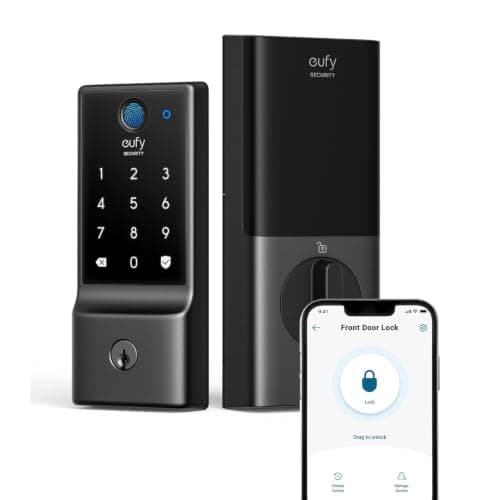
eufy Security Smart Lock C220

Our top pick

eufy Security Smart Lock C220

Genuine fingerprint entry and hub-free remote access at the lowest price we have found, with a real BHMA Grade 3 certificate behind it rather than a vague security claim. You pay for it with eight AA cells, a modest IP53 rating, no door sensor and an ecosystem list that stops at Alexa and Google.

Best for: Fingerprint entry on a sheltered front door, on the tightest budget

$109.99View on Amazon

$169.9935% off

#ad · we may earn a commission from this link to eufy Security Smart Lock C220

Verdict

The bottom line

The eufy Smart Lock C220 is the lock to buy when you want a fingerprint reader on your front door without paying premium-deadbolt money or adding a hub. eufy publishes five ways in - fingerprint, the eufy Security app, a keypad, a physical key and voice - with capacity for up to 50 fingerprints and 100 passcodes, Wi-Fi built directly into the lock so there is no bridge or HomeBase to buy, BHMA Grade 3 certification, an IP53 exterior rated from -22 F to 158 F, and roughly eight months on the eight AA cells it ships with. At its usual street price it undercuts every other fingerprint deadbolt we rate. The limits are equally clear and eufy documents all of them: Apple HomeKit, IFTTT and Matter are listed as not supported yet, so this is an Alexa-and-Google lock only; there is no door sensor, so auto-lock is a countdown rather than a response to the door actually closing; IP53 is modest weather protection that wants a porch or an overhang; and the spare keys cannot be rekeyed. If you live in Apple Home or need a weather-exposed door, buy something else. If you want a thumb on a reader for about a hundred dollars, this is the one.

Fingerprint readers used to be the thing that pushed a smart lock past two hundred dollars. The eufy C220 is interesting because it puts one on a deadbolt at roughly half that, with Wi-Fi in the lock so there is no hub to buy either - and then documents its compromises honestly enough that you can decide whether they matter to your door. That last part is rarer than it should be, and it is most of why this lock earns a place on the list.

Five ways in, and why that is the real feature

eufy publishes five unlock methods: a fingerprint, the eufy Security app, the keypad, a physical key and voice control. Capacity is up to 50 fingerprints and 100 passcodes, and the product bullets put a fingerprint unlock at under a second.

The number of methods matters more than any single one of them. A smart lock that only opens to a phone is a lock that still needs a key for everyone else in the house - the child without a phone, the relative who will not install an app, the cleaner who comes on Thursdays. Fifty fingerprints covers every member of a household several times over, and a hundred passcodes is enough to give a code to every tradesperson who will ever visit without reusing one. For a household where several people come and go independently, this capacity is the practical difference between a lock that works and a lock that creates a bottleneck at your phone. Our guide on sharing smart lock access with guests covers how to set that up without ending up with twelve permanent codes you never revoke, and keypad vs fingerprint is the comparison if you are not sure you need both.

Wi-Fi in the lock, with the trade-off that implies

eufy is specific about this and the specificity is useful: the C220 has direct Wi-Fi, and eufy's own FAQ states it does not work with any Wi-Fi bridge or with a eufy HomeBase. So remote lock and unlock, alerts and history work the day you install it, with nothing else bought. For a single-lock household that is the simplest possible purchase - one box, one app, done. Our guide on whether smart locks need a hub covers why that is worth paying attention to.

The cost of built-in Wi-Fi is always battery life, and here it arrives as eight AA cells. That is the most of any lock we cover, and it is the compromise that pays for the convenience: a radio maintaining a connection to your router draws far more power than one waking occasionally to talk to a nearby hub. eufy's published figure is roughly eight months, measured at ten unlocks a day through the keypad or app, with a notification below 20%. A busy family door doing twenty or thirty unlocks a day will not see eight months.

One genuine gap: eufy does not publish the Wi-Fi band. That is worth knowing because a lock on a congested 2.4 GHz network at the far end of a house is the most common reason a smart lock "stops working" remotely while still working perfectly at the door. If your front door is a long way from the router, read smart home WiFi congestion before you decide the lock is faulty, and Bluetooth vs Wi-Fi smart locks lays out what each radio costs you in cells.

BHMA Grade 3 is a real certificate, and that is the point

eufy publishes BHMA Grade 3 for this lock. That deserves emphasis because of how much security copy in this category is written to sound like a certification without being one - locks that "comply with the same standard as" a grade, or that reference a standard without claiming to have been tested to it. Grade 3 is the residential tier of the BHMA scale, so it is not a high-security rating, but it is a third-party grade the product actually holds.

Keep it in proportion. On a residential door, the lock is rarely the weak point: the frame, the strike plate and the glass next to the door usually are. A Grade 3 deadbolt in a solid frame with long strike screws is a reasonable front door. The same deadbolt in a soft frame with three-quarter-inch screws is not, and no grade fixes that. Our are smart locks safe guide covers what actually gets attacked on a home, which is almost never the electronics, and smart lock vs traditional deadbolt explains what the mechanism is doing underneath the app.

IP53 and the question of where your door is

eufy publishes IP53 for the exterior assembly, with an operating range of -22 F to 158 F. Those two figures tell a split story and it is worth separating them.

The temperature range is genuinely good - better documented and wider than most locks publish at any price, which is reassuring if you are in a climate with real winters. The IP53 rating is the modest part: 5 means dust-protected, and 3 means protected against spraying water at an angle up to 60 degrees from vertical. In practice that is a lock for a door with some cover - a porch, a recess, an overhang, a storm door. A fully exposed door facing prevailing weather wants IP65, which is what the Aqara U100 publishes at a similar price.

This is the single most useful thing to check before buying. Stand at your front door in the rain, metaphorically or otherwise: if the lock face gets wet, buy the higher-rated lock. If it is under a porch, IP53 is fine and you keep the money.

No door sensor, so auto-lock is a timer

The C220 has countdown auto-lock and no door sensor, and eufy does not publish the countdown duration. The distinction between a countdown and a sensor is small on paper and occasionally important in practice.

A countdown throws the bolt a set time after it was unlocked, whether or not the door is shut. A door sensor knows the door is closed and locks in response. With a countdown, a door standing open or resting on the latch can get a bolt driven into fresh air, and the app will report the lock as locked. For most households that is a once-a-year annoyance rather than a security problem. If you have children who leave doors ajar, it is worth knowing about - and a lock with a door sensor, like the August with its included DoorSense, is the answer to that specific problem.

The ecosystem ceiling

eufy lists external support as Alexa and Google voice assistant, and its own FAQ lists Apple HomeKit, IFTTT and Matter as not supported yet. "Yet" is eufy's word, not ours, and we are not going to credit a future that has not shipped.

That makes the decision simple. If your house runs on Alexa or Google, this lock fits and voice control works. If your house runs on Apple, this is the wrong lock - you will not see it in the Apple Home app and you will not tap your iPhone to the door. The locks that do that are on our best smart locks for Apple Home list, and smart lock ecosystem compatibility is the full matrix of which lock speaks which platform. If Matter specifically is central to your plans, is Matter worth it is worth reading before it decides a purchase for you.

Fitting it to your door

eufy publishes a door thickness range of 35 mm to 55 mm, a crossbore-center-to-top-of-handleset distance greater than 45 mm, compatibility with most standard US and Canadian deadbolts, and no compatibility with mortise locks. It does not publish a backset figure.

Measure before you order. The thickness and crossbore numbers are easy to check with a tape, and the mortise exclusion rules out a lot of older and apartment doors - if your door has a long rectangular lock body set into the edge of the door rather than a round bolt through a bored hole, this will not fit. Will a smart lock fit my door walks the five measurements that decide it, and how to install a smart lock covers the job itself, which on a standard bored door is a screwdriver and under an hour.

Where it sits in the range

Against the Aqara U100 at a similar price, you are trading ecosystem and weather rating for simplicity: the U100 adds Apple Home Key, IP65 and a longer published battery life on four AA cells, but needs an Aqara hub for anything remote, where the C220's Wi-Fi is built in. Against the Kwikset Halo, you are trading a fingerprint reader and a lower price for Kwikset's Grade AAA certification, SmartKey re-keying and a 250-code keypad - and we put those two head to head in Aqara U100 vs Kwikset Halo, which is the same hub-versus-built-in-Wi-Fi argument one price tier up.

Within the budget tier, the honest competition is a keypad-only lock. If you do not care about fingerprints, you can spend less - but a thumb on a reader is the feature people actually use every day, and it is the reason to pick this lock over a cheaper one. Our best fingerprint smart locks roundup ranks the field, and best budget smart locks covers what else is available at this money.

Who should buy it

Buy it if you want fingerprint entry and hub-free remote access for the least money, your door has some cover from weather, and your house runs on Alexa or Google. Buy it especially for a household where several people need their own way in and you would rather hand out fingerprints and codes than keys - our smart locks for older adults page explains why a fingerprint beats both a phone and a key for some people.

Skip it if you live in Apple Home, if your front door takes weather head-on, if you want the lock to sense the door rather than run a timer, if you need rekeyable keys to match existing hardware, or if eight AA cells in the interior assembly bothers you. We have not tested this lock hands-on: every specification above is eufy's own published figure, read on the date in the sources below, and the price on this page is live from the listing rather than typed in by us.

The short answer

Quick picks

Tap any row for the full write-up.

  • eufy Security Smart Lock C220
    01 eufy Security Smart Lock C220Top pick

    Genuine fingerprint entry and hub-free remote access at the lowest price we have found, with a real BHMA Grade 3 certificate behind it rather than a vague security claim. You pay for it with eight AA cells, a modest IP53 rating, no door sensor and an ecosystem list that stops at Alexa and Google.

    Best for: Fingerprint entry on a sheltered front door, on the tightest budget · No Matter - eufy lists HomeKit, IFTTT and Matter as not supported yet

    $109.99View on Amazon

    $169.9935% off

    #ad · we may earn a commission from this link to eufy Security Smart Lock C220

#ad · Live prices from the Amazon Product API, as of November 12, 2026. Where we have no verified live price we show none — we would rather leave a gap than print a number that has rotted.

eufy C220 against the two locks people cross-shop it with - only what each maker publishes
DeviceFingerprintKeypadRemote accessApple Home KeyAlexaGoogleWeather ratingPublished battery life
eufy Smart Lock C22050 prints / 100 codesYesYesBuilt-in Wi-FiNoYesYesIP53, -22 °F to 158 °F~8 months (8x AA)
Aqara U10050 printsYesTouchscreenVia Aqara hubYesYesYesIP65, -31 °F to 150 °FUp to 8 months (AA)
Kwikset Halo Wi-Fi250 user codesNoTouchscreenBuilt-in Wi-FiNoYesYesNot publishedNot published

In detail

The full write-up

01

eufy Security Smart Lock C220

Top pick
eufy Security Smart Lock C220
$109.99View on Amazon

$169.9935% off

Price as of November 12, 2026. Amazon's price at checkout is the one that counts.

#ad · we may earn a commission from this link to eufy Security Smart Lock C220

Genuine fingerprint entry and hub-free remote access at the lowest price we have found, with a real BHMA Grade 3 certificate behind it rather than a vague security claim. You pay for it with eight AA cells, a modest IP53 rating, no door sensor and an ecosystem list that stops at Alexa and Google.

  • Fingerprint, app, keypad, physical key and voice - five ways in
  • Up to 50 fingerprints and 100 passcodes
  • Direct Wi-Fi built in - no bridge or HomeBase required
  • BHMA Grade 3 certified
  • IP53 exterior, rated -22 °F to 158 °F
  • 8 x AA batteries included, roughly 8 months at 10 unlocks/day
  • Emergency power port on the underside of the exterior panel
  • Fits 35-55 mm doors; not compatible with mortise locks
  • Countdown auto-lock
Matter: No Matter - eufy lists HomeKit, IFTTT and Matter as not supported yetFee: None - no subscription for any lock featureResearched, not hands-on tested

Good

  • Fingerprint entry at this price is the whole story: eufy publishes capacity for up to 50 prints, which is more than any household needs, and the product bullets put an unlock at under a second
  • Wi-Fi is in the lock, and eufy states plainly that it does not work with any Wi-Fi bridge or a eufy HomeBase - so remote lock, unlock and alerts work out of the box with nothing else bought or plugged in
  • A published BHMA Grade 3 certification, which is a third-party standard actually tested against rather than a manufacturer's own claim of equivalence - a meaningful distinction when comparing security copy across brands
  • 100 passcodes is a lot of guest access for a budget lock, and the combination of codes plus stored fingerprints means nobody in the household needs a phone or a key to get in
  • An unusually wide published operating range of -22 F to 158 F on the exterior assembly, which is better cold-weather documentation than most locks at any price offer
  • An emergency power port on the underside of the exterior panel, so a flat battery is solved with a power bank at the door rather than a locksmith - eufy is clear that it supplies power only and does not charge the cells
  • No subscription for anything. Remote access, codes, fingerprints and history are all included, which is not universal in this category

Less good

  • Eight AA batteries. That is twice what most smart deadbolts take, it makes the interior assembly bulky, and a battery change is eight cells rather than two or four. eufy's roughly-8-month figure is also measured at 10 unlocks a day, so a busier door will fall short of it
  • IP53 is modest. It means dust-protected and resistant to spraying water, not weatherproof - so this wants a door with a porch, an overhang or a recess rather than one that takes driving rain head-on. Locks at a similar price publish IP65
  • No Apple HomeKit, no Apple Home Key, no IFTTT and no Matter. eufy's own FAQ lists all three as not supported yet, so an iPhone-first household gets the eufy app and voice control through Alexa or Google and nothing more
  • There is no door sensor, so auto-lock is a countdown. The lock relocks after a timer rather than when the door actually closes, which means a door left on the latch can be reported locked - and eufy does not publish the countdown duration
  • The spare physical keys cannot be rekeyed, so you cannot match this lock to the rest of your door hardware or re-key it after losing a key the way a Kwikset SmartKey cylinder allows
  • eufy does not publish the Wi-Fi band for this lock, which matters because a lock at the far end of a house on a congested 2.4 GHz network is the classic cause of a lock that stops responding remotely
  • Not compatible with mortise locks, and eufy publishes door-thickness and crossbore requirements but not a backset figure - so measure before you order rather than assuming a standard fit
  • No warranty term is published on the product page, only a hassle-free warranty badge, which is less documentation than a front-door lock should carry

Skip it if: you live in Apple Home, your front door is fully exposed to weather, or you want the lock to know whether the door is actually shut - the C220 has no HomeKit or Home Key, an IP53 rating that wants shelter, and a countdown auto-lock with no door sensor behind it.

What actually decides a budget fingerprint lock

One: is the lock face sheltered? This single question decides whether an IP53 lock is a bargain or a mistake. Under a porch, IP53 is fine and the money saved is real. Fully exposed to driving rain, buy IP65 and stop reading spec sheets.

Two: how many people need their own way in? Count them, including the ones without phones. If the answer is more than two, a lock with a fingerprint reader and a generous code limit is worth more than any app feature.

Three: hub or built-in Wi-Fi, and what it costs in cells. Built-in Wi-Fi is the simplest purchase and the shortest battery life. A hub is an extra box that buys you longer batteries and usually better range. Neither is wrong - just read the published battery figure and multiply by how often you will be on a step ladder.

Four: what happens when the batteries die? The three real answers are a physical key in your pocket, an external power port, or an independent keypad. The C220 has the first two. Know which one you are relying on before you need it - see do smart locks work without power.

Five: does it need to be in your ecosystem, or just on your door? A lock that works beautifully in its own app and nowhere else is a perfectly good lock. It only becomes a problem if you were counting on an automation - unlock triggers a light, leaving home locks the door - that needs the lock to appear in Apple Home, Google Home or a Matter network.
How we chose

We don't run a test lab

We don't wire every one of these into a test rig, and we won't write "in our testing" as if we do. What we did instead: pulled each product's published specifications, confirmed its Matter/Thread/HomeKit support from the manufacturer's own documentation, added up the real 3-year cost with any monthly fee included, and read the aggregated verified-buyer sentiment. Every pick is chosen against that published method. Where a number came from someone else, we name and link them in Sources.

Questions

Frequently asked

Does the eufy C220 need a hub or bridge?
No, and eufy is explicit about it: the lock has direct Wi-Fi built in, and its FAQ states it does not work with any Wi-Fi bridge or with a eufy HomeBase. Remote lock and unlock, alerts and history all work with nothing else bought. The trade is battery life - built-in Wi-Fi is why this lock takes eight AA cells.
Does it work with Apple HomeKit or Matter?
No. eufy's own FAQ lists Apple HomeKit, IFTTT and Matter as not supported yet, so we do not credit any of them. External support is Alexa and Google voice assistant. If you need the lock inside Apple Home, or a tap-to-unlock Apple Home Key, see our best smart locks for Apple Home picks instead.
How long do the batteries last, and how many does it take?
Eight AA cells, included in the box. eufy publishes roughly eight months, measured at ten unlocks a day through the keypad or app, with a low-battery notification below 20%. A busier door will do worse than that. Eight cells is the most of any lock we cover and it is the direct cost of putting Wi-Fi inside the lock - smart lock battery life compares the published figures across every lock here.
Is IP53 weatherproof enough for a front door?
It depends entirely on your door. IP53 means dust-protected and resistant to water sprayed at an angle, not sealed against driving rain - so it suits a door with a porch, recess, overhang or storm door. For a fully exposed door, buy a lock publishing IP65. eufy does publish an unusually wide operating temperature range for the exterior assembly, -22 F to 158 F, so cold is less of a concern than water.
Will it fit my door?
eufy publishes a 35 mm to 55 mm door thickness range, a crossbore-center-to-top-of-handleset distance greater than 45 mm, and compatibility with most standard US and Canadian deadbolts - but explicitly not with mortise locks, and it does not publish a backset figure. Measure first; will a smart lock fit my door walks every measurement that matters.
Can I rekey the physical keys?
No. eufy's documentation says the spare keys cannot be rekeyed, so you cannot match this lock to your other door hardware or re-key it after losing a key. If that matters, a lock with a rekeyable cylinder - Kwikset's SmartKey locks, for example - is the feature to look for.
Does it lock automatically when the door closes?
Not quite. It has countdown auto-lock, which relocks after a timer rather than in response to the door closing, and there is no door sensor on this model. eufy does not publish the countdown duration. In practice that means a door left ajar can be reported as locked - an occasional annoyance rather than a safety issue, but worth knowing if doors get left on the latch in your house.
Is there a subscription?
No. Fingerprints, passcodes, remote access, alerts and history are all included with the lock, and eufy sells no plan for any lock feature. The only recurring cost is AA batteries.

Keep reading

Receipts

Sources

We do not run a test lab, and we do not pretend to. Compatibility and subscription-cost claims come from the manufacturer's own documentation and the live retailer listing, read on the dates shown. Read our full method.