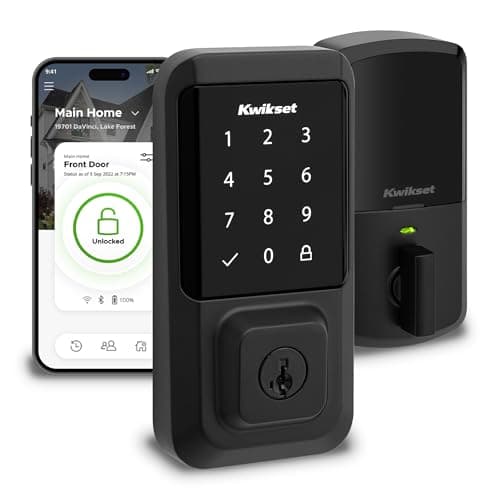
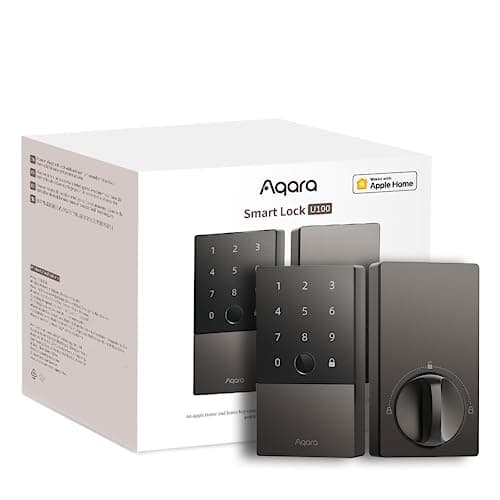
These two locks are priced within shouting distance of each other and almost nothing else about them lines up. One is a feature-dense deadbolt that wants a hub; the other is a certified, conventional deadbolt with the radio built in. That makes this a genuinely useful comparison, because the answer is not "the better lock" - it is which of two different trades suits your door and your house. Everything below is the manufacturer's own published specification, with one honest exception flagged where it occurs.
Certification versus capability: the real split
Start where the marketing is weakest, because it is where these locks differ most clearly. The Kwikset Halo's Amazon listing claims Grade AAA Certified and UL Listed. Aqara's published position on the U100 is that it complies with the same safety standard as BHMA Level 3 for structural security - and it does not claim to be BHMA certified.
Those are not the same statement and we are not going to flatten them. Holding a grade means the product was submitted and tested against it. Complying with the same standard is a self-assessment. Aqara's wording is careful and honest rather than evasive, and it may well be a perfectly strong lock - but if what you want is a certificate on the front door, the Halo is the one with it.
Keep it in proportion, though. On a residential door, the mechanism is rarely the weak point - the frame, the strike plate and the glass beside the door usually are. A certified Grade AAA deadbolt in a soft frame with short strike screws is not more secure than an uncertified one in a solid frame with three-inch screws. Our are smart locks safe guide covers what actually gets attacked, and smart lock vs traditional deadbolt covers what the bolt is doing underneath either app.
Where the radio lives, and what it really costs
The U100 is built on Zigbee. Everything at the door works with no hub - fingerprint, keypad codes, Apple Home Key, the NFC tags, the mechanical key - but Aqara publishes that remote unlocking and automations require an Aqara 3.0 hub, that Matter support requires a Matter-capable Aqara hub, and that Apple Home remote access needs an Apple Home hub in the house. The Halo puts the radio in the lock: its listing says "Easy Install No Hub", and remote access works out of the box.
This is where the price comparison inverts, and it is the most useful thing on this page. On hardware alone the U100 is the cheaper lock and the Halo is the more expensive one. Add the Aqara hub the U100 needs for remote access and the totals flip - the U100-plus-hub typically lands above the Halo on its own.
So the honest framing is: if you already own an Aqara hub, or you were going to buy one anyway for sensors and automations, the U100 is both cheaper and far more capable and this is not a close contest. If this lock is the only smart thing you own and you have no plans beyond it, the Halo is the simpler and cheaper purchase and the U100's feature list is partly unavailable to you. Our guide on whether smart locks need a hub covers the general trade, and Bluetooth vs Wi-Fi smart locks explains why the hub route usually buys longer battery life.
Getting other people in
The U100 has five ways through the door and the Halo has three, and the gap is the part people feel daily. Aqara publishes up to 50 stored fingerprints with a 98.6% recognition rate and sub-0.5-second recognition, plus permanent, periodic and one-time passwords with an anti-peep entry option, two NFC tags in the box, Apple Home Key, and a mechanical key.
The Halo answers with volume rather than variety: Kwikset's spec data puts it at 250 user codes on a 10-digit capacitive touchscreen. For a household that is overkill; for a short-term rental or a property with a lot of visiting trades, a large pool of revocable codes is genuinely useful - though our smart locks for Airbnb page is where that use case is properly ranked.
The practical difference: on the U100, a child or an older relative can use a thumb or a tag and never needs to remember anything. On the Halo, everyone needs a code or a phone. Keypad vs fingerprint is the longer version of that argument, and how to share smart lock access with guests covers managing either approach without ending up with a dozen live codes.
Ecosystems: this one is not close
Aqara lists Apple Home, Aqara Home, Matter, Google Home, Alexa and IFTTT for the U100, and adds Apple Home Key on top. Kwikset's Halo names Alexa and Google, with no Apple HomeKit, no Apple Home Key and no Matter.
If you own iPhones, that settles it. HomeKit means the lock appears in the Apple Home app and in automations; Home Key means your phone or watch is the key at the door. The Halo does neither. Our best smart locks for Apple Home page ranks the Home Key locks specifically, and smart lock ecosystem compatibility is the full matrix across every lock and platform we cover.
On Matter, neither lock is a native Matter device. The U100 can be bridged into Matter through a Matter-capable Aqara hub, which is a real route but a hub-dependent one; the Halo has no Matter story at all. If Matter is load-bearing in your plans, read is Matter worth it before letting it pick a lock for you.
Weather, batteries and the documentation gap
Here the U100 wins on something less exciting than features: Aqara publishes numbers Kwikset does not. The U100's outer panel is IP65 with a published operating range of -31 F to 150 F, and the battery is replaceable AA cells at up to 8 months measured at eight fingerprint unlocks a day, with a low-battery alarm and a USB-C emergency port on the outside.
For the Halo, Kwikset's spec data as carried by its retail listings gives 4 AA batteries - and we could not find a published battery-life figure, an IP rating or an operating temperature range for this lock. Kwikset's own Halo product page did not load on our retrieval date, which is why the Halo figures on this page are attributed to its listing and to retailer-carried spec data rather than to Kwikset's own page. We would rather say that plainly than present an unverified number as a specification.
What that means for you is a decision under uncertainty rather than a verdict. If your front door is sheltered and in a mild climate, the missing weather figures probably do not matter. If the lock face takes driving rain or a hard winter, the U100 is the one with published limits - and smart lock battery life compares every published figure we have across the range, including the gaps.
Dead batteries, and the thing nobody plans for
Both locks keep a physical key, which is the universal fallback. Beyond that the U100 adds a USB-C port on the outer panel: hold any phone power bank to the lock and it wakes up. That is a two-minute fix at the door versus a trip home for the backup key, and it is the kind of feature you value exactly once.
The Halo's answer is the SmartKey cylinder, which is a different sort of advantage: you can re-key the lock yourself, so the backup key can be made to match the rest of your house instead of being a thirteenth key on the ring. Neither approach is better in the abstract - one solves a flat battery, the other solves key management. Our guides on smart locks without power and using a key with a smart lock cover both fallbacks properly.
So which one
Take the Aqara U100 if the lock serves a household, if you run Apple devices, if the door is exposed, or if you already own an Aqara hub. It is the cheaper hardware, the more capable lock, the only one with Apple Home Key, and the only one publishing weather and battery figures. Budget for the hub honestly and the decision is easy.
Take the Kwikset Halo if this is your first and only smart lock, if you want a certified and UL listed deadbolt rather than a compliance claim, or if you want the fewest possible boxes in the house. Accept no fingerprint, no Apple, and documentation gaps on weather and battery life as the price of that simplicity.
For the rest of the field, our best smart locks roundup ranks everything we cover and best smart deadbolts narrows it to replacement deadbolts. If the budget is tighter than either of these, our eufy Smart Lock C220 review covers the cheapest fingerprint deadbolt we rate, which keeps the U100's thumb-on-a-reader convenience and the Halo's built-in Wi-Fi while giving up Apple support and weather rating. We have not tested either lock hands-on; every figure here is the manufacturer's own published specification or its listing's claim, read on the dates in the sources below.
How to choose between these two
One: is there already a hub in the house? This decides the price comparison. With an Aqara hub on the shelf, the U100 is cheaper and better. Without one, the Halo is the cheaper total purchase and the U100 loses half its feature list until you buy the box.
Two: whose phones are in the house? iPhones point at the U100 and nothing about the Halo will change that - there is no HomeKit and no Home Key. An Alexa or Google household can take either.
Three: how many people need their own way in? Count everyone, including the people without phones. Two adults can live on codes. A family with children, carers or regular visitors is the case a fingerprint reader was built for.
Four: certificate, or spec sheet? If you want a tested grade on your front door, the Halo claims one and the U100 deliberately does not. If you want published weather and battery numbers, the U100 has them and the Halo does not. Both are legitimate things to want; they just point at different locks.
Five: measure the door first. Aqara publishes backset, thickness and bore requirements you can check with a tape before ordering. Do that before anything else - will a smart lock fit my door walks every measurement, including the door types where the answer is no.