What Bluetooth actually buys you - and what it takes away
A Bluetooth lock makes its decisions locally. Your phone, your finger or the keypad talks to the lock over a radio measured in feet, and nothing in the exchange needs your router, your internet connection or a company's servers to be having a good day. That has three consequences worth buying for: the lock opens during an internet outage, it opens where there is no internet at all, and it cannot be used as a reason to sell you a subscription - none of the four locks on this page has a plan to buy.
The cost is the mirror image. A Bluetooth lock cannot tell you anything while you are out of range, which rules out the two features people most often discover they wanted: checking whether you locked up after you have already left, and letting a cleaner, dog walker or relative in while you are somewhere else. Voice control usually goes with it, because Alexa and Google Home talk over the internet rather than over Bluetooth.
That is the whole decision, and it is worth being blunt about which side you are on before you shop. Bluetooth vs Wi-Fi smart locks works through it in detail, and if you land on the other side, best Wi-Fi smart locks is the companion to this page: the same job, done by locks with the radio built in.
The honest state of the category: Bluetooth-only deadbolts are getting rare
This is the part most "best Bluetooth lock" pages will not tell you. When we read the live listings for every deadbolt in our catalogue on 2026-11-17, nearly all of them advertised built-in Wi-Fi on the box: the Kwikset Halo, the Schlage Encode Plus, the eufy C220, the ULTRALOQ Bolt Fingerprint, the Level Lock+ and the Yale Assure Lock 2 with its Wi-Fi keypad. Wi-Fi radios got cheap, and lock makers put them in everything, because remote access is what sells a smart lock in a product photo.
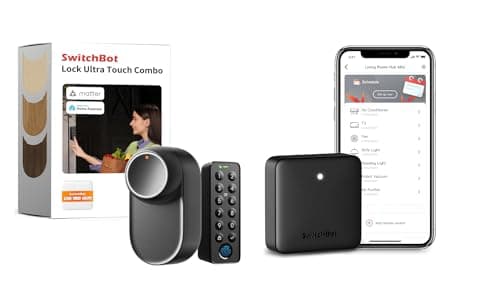
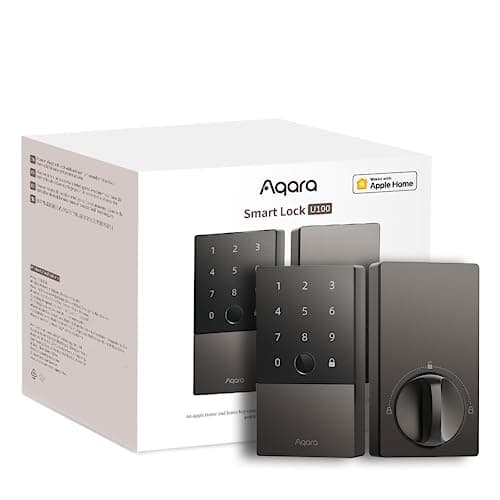
So the modern Bluetooth bracket is smaller than it was and it splits in two. On doors, the pick is a lock with no Wi-Fi radio and an optional hub - the Aqara U100 here - or a retrofit that leaves your existing cylinder alone, like the SwitchBot. On gates, sheds and lockers, Bluetooth is not a compromise at all but the only thing that works: there is no Wi-Fi at the back of a yard and no outlet on a gate post, so a padlock with a two-year coin cell and a short-range radio is the correct engineering answer.
One lock we would otherwise have ranked here, the Lockly Secure Plus, had no buyable offer on Amazon when we checked on 2026-11-17, so it is not a pick - we do not feature hardware you cannot actually buy today. Two more Bluetooth padlocks we cover, the Master Lock 4401LHEC and the eGeeTouch 5th Gen, are ranked in full on best smart padlocks, which is the page to read if the padlock is the whole purchase rather than one option among door locks.
Range is the spec nobody publishes honestly
Bluetooth range is quoted as a number by every manufacturer and delivered as a function of your walls by physics. A lock advertised at thirty or forty feet will reach across a hallway and may not reach through a brick wall and a steel door at the same time. The practical rule is simpler than the marketing: a Bluetooth lock is reliable when you are at the door, and unreliable as a way of doing anything from the sofa.
This is why auto-unlock behaves differently on Bluetooth hardware than it does on Wi-Fi hardware. Auto-unlock needs the lock to notice your phone approaching, and a short-range radio notices late - sometimes as you are already reaching for the handle. If walk-up-and-it-opens is the feature you are buying, smart locks with auto-unlock covers which locks publish it and how each one implements it.
Batteries: the quiet advantage of leaving Wi-Fi out
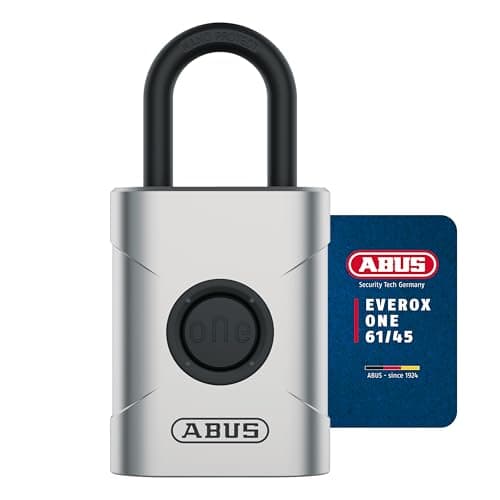
A Wi-Fi radio is the hungriest thing in a smart lock, and taking it out shows up in the published battery figures. Aqara rates the U100 at up to eight months on AA cells at eight unlocks a day. SwitchBot publishes about twelve months from 4,200 mAh of 18350 cells at ten cycles a day. ABUS rates the Everox One at roughly two years, or up to ten thousand openings, on a single CR2.
Compare that with the Wi-Fi field, where months rather than years is the norm and the lock has to stay associated with an access point all day long. If your actual complaint about smart locks is that you are tired of changing batteries, Bluetooth is the answer rather than a better Wi-Fi lock - smart lock battery life has the published numbers side by side and the behavior that drains each type fastest.
What happens when the power or the internet goes out
Every lock on this page is battery-powered and none of them needs your network to let you in, which makes this bracket the most outage-proof part of the category. A power cut does not touch them. An internet outage does not touch them. The thing to watch is the opposite failure: because there is no cloud copy of anything, a dead battery is a locked door with no app-based way around it.
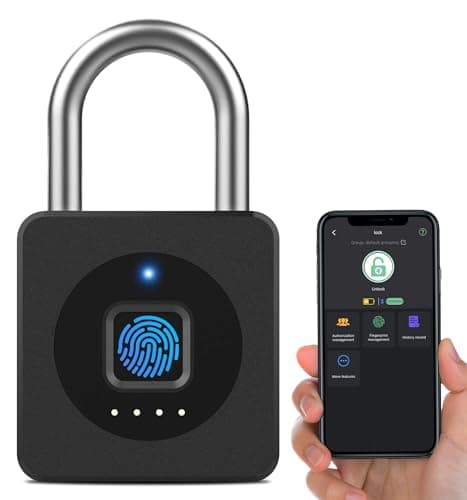
So plan the fallback at install time. The Aqara keeps a physical key. The SwitchBot leaves your existing key working, which is the cleanest fallback of the four. The Master Lock we rank on the padlock page publishes a 9-volt jump contact for exactly this scenario. The eLinkSmart has a rechargeable cell and no published code fallback, which is one more reason it belongs on a locker rather than a door. Do smart locks work without power goes through each failure mode, and do smart locks work without Wi-Fi covers which features survive an outage on which hardware.
How we ranked these
In this order. First, whether the lock genuinely works with no Wi-Fi and no internet - that is the entry requirement for this page, and it is why several locks we rate highly elsewhere are not here. Second, whether you can actually buy it today: we read every listing live on 2026-11-17 and dropped one lock that had no buyable offer. Third, the fallback when a battery dies, because a lock that cannot be opened is a worse problem than a lock that cannot be checked remotely. Fourth, what the maker publishes about weather and build - an IP rating and a stated material, not an adjective. Fifth, battery life from the manufacturer's own figures with their own test conditions attached.
We do not score these locks and we have not attacked any of them with tools, because we do not run a lock lab. Every specification here is the manufacturer's or seller's own published claim, read on the date in the sources below, and every price is pulled live from the listing rather than typed in by us. Where two sources disagree - as Amazon and Aqara currently do about the U100's radio - we say so on the page instead of picking the tidier answer. If you would rather start from the decision than from a radio, how to choose a smart lock is the page that does that.
Five checks before you buy a Bluetooth lock
Decide whether you will miss remote access - honestly. Picture the two scenarios that come up most: you are twenty minutes from home and cannot remember locking the door, and someone is standing at your door while you are at work. A Bluetooth lock answers neither. If reading that made you uncomfortable, buy a Wi-Fi lock and stop here.
Find the fallback before you buy, not after.Ask one question of any lock on this list: when the battery dies at 11pm, how do I get in? A keyway, a retained original key, a jump contact or a backup code are all fine answers. "Charge it" is not an answer when you are outside the door.
Measure before you order a padlock. Shackle diameter and clearance decide whether a smart padlock fits your hasp or chain at all, and the ABUS here is a tight 0.25 in shackle with 0.79 in of horizontal clearance. A tape measure costs nothing; a return costs an afternoon.
Check the install envelope on a door lock. A replacement deadbolt has to match your door thickness, backset and bore. A retrofit has to clear your existing thumb-turn and the frame. Will a smart lock fit my door has the measurements to take first, and how to install a smart lock covers the install itself.
Plan how you will share access. Bluetooth sharing means the other person needs the app, and sometimes needs to be in range to be enrolled. That is fine for a partner or a housemate and awkward for a one-off visitor. How to share smart lock access with guests covers what each approach actually asks of the guest.