Skip to content
Latch & Hub

Locks · Smart Locks

The Best Smart Locks Under $150 in 2026

A good smart lock used to start at $200 and the best ones still run to $300. That has changed at the bottom of the market faster than anywhere else: under $150 you can now buy a fingerprint reader, built-in Wi-Fi with no bridge and a published ANSI Grade 1 body. These four were all under $150 on the live listing when we checked.

By Stephen V.Updated How we choose
#ad

We earn a commission when you buy through our Amazon links, at no extra cost to you. It never changes our rankings — where the subscription-free or cheaper option is the better buy, we say so. How this works.

Verdict

The bottom line

Under $150, the lock to buy is the ULTRALOQ Bolt Fingerprint Wi-Fi. It is the only pick here with a published ANSI/BHMA Grade 1 body - the highest residential security rating - and it pairs that with a fingerprint reader, a keypad, a physical key, built-in Wi-Fi that needs no bridge, IP65 weatherproofing and a door sensor in the box. If you cannot change your door, or other people hold keys to it, the August Wi-Fi Smart Lock (4th Gen) is the answer instead: it retrofits onto the deadbolt you already own and every existing key keeps working. If your house runs on Apple Home and you want to open the door with a tap of your iPhone, the Aqara Smart Lock U100 is the only lock under this ceiling with Apple Home Key - just budget an Aqara hub, because it is Bluetooth on its own. And the budget pick is the eufy Security Smart Lock C220: the cheapest way we know to get fingerprint entry and hub-free Wi-Fi on the same door, with a real BHMA Grade 3 certificate behind it. All four were under $150 on the live listing on 2026-11-10 - the eufy only on a deep seasonal discount, which we say plainly below - and the price on each buy button is live rather than typed in by us.

The short answer

Quick picks

Tap any row for the full write-up.

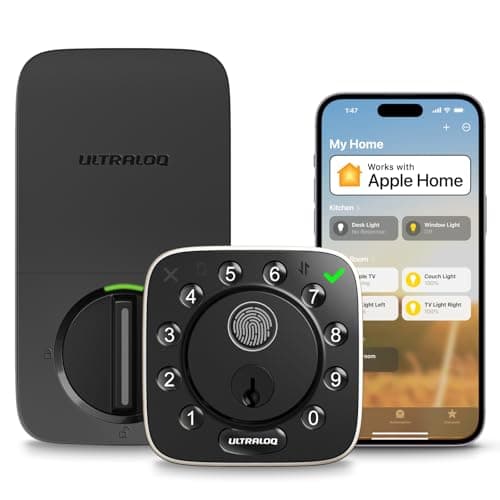
  • ULTRALOQ Bolt Fingerprint Wi-Fi
    01 ULTRALOQ Bolt Fingerprint Wi-FiTop pick

    The best lock under $150 and not by a narrow margin: a published ANSI/BHMA Grade 1 body, fingerprint, keypad, key and app, built-in Wi-Fi with no bridge to buy, IP65 weatherproofing and a door sensor included. The weak spot is the radio - 2.4 GHz only, and ULTRALOQ tells you to keep the router in range of the door.

    Best for: The strongest security spec under the ceiling · Apple Home, Alexa, Google, SmartThings - no Matter

    • Fingerprint + code + key + app + Wi-Fi
    • Built-in Wi-Fi - no bridge
    • ANSI/BHMA Grade 1
    • IP65 weatherproof
    • Stores up to 100 fingerprints
    • Auto-unlock + door sensor
    Check price on Amazon →

    #ad · we may earn a commission from this link to ULTRALOQ Bolt Fingerprint Wi-Fi

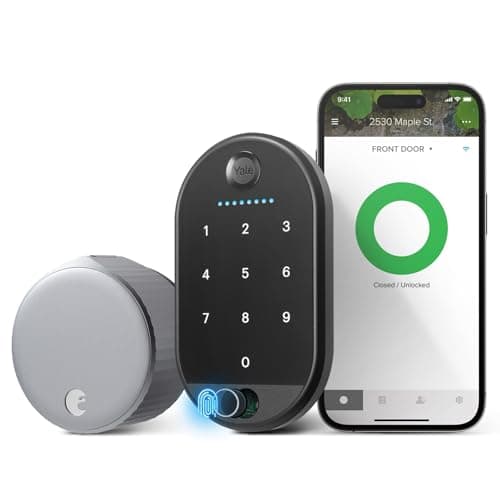
  • August Wi-Fi Smart Lock (4th Gen)
    02 August Wi-Fi Smart Lock (4th Gen)

    The only retrofit under this ceiling, and the right answer whenever the door is not entirely yours to change. It clamps onto the inside of your existing deadbolt, so the exterior, the keyway and every key already in circulation stay exactly as they are - and built-in Wi-Fi means remote access with no bridge.

    Best for: Keeping your existing keys - the only retrofit under $150 · No Matter (Alexa / Google)

    • Retrofit - fits your current deadbolt
    • Keep using your existing keys
    • Built-in Wi-Fi
    • Alexa, Google, SmartThings
    • Keypad Touch included
    $129.00View on Amazon

    #ad · we may earn a commission from this link to August Wi-Fi Smart Lock (4th Gen)

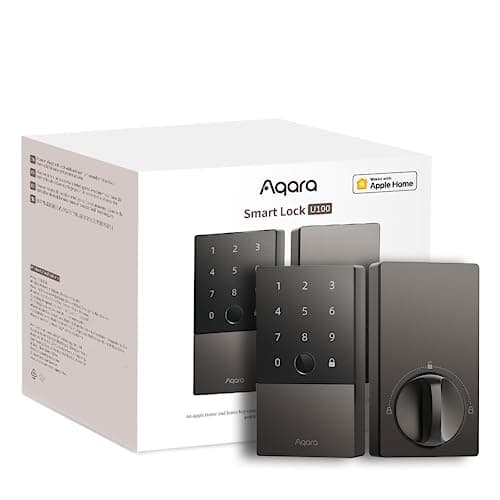
  • Aqara Smart Lock U100
    03 Aqara Smart Lock U100

    The only lock under $150 with Apple Home Key, and it stacks a fingerprint reader and a full touchscreen keypad on top in an IP65 body. The architecture is the catch: it speaks Bluetooth on its own, so remote access and voice control need an Aqara hub you have to buy and place.

    Best for: An Apple household that wants tap-to-open · No Matter (HomeKit + Apple Home Key)

    • Fingerprint + touchscreen keypad
    • Apple Home Key
    • Bluetooth deadbolt (Aqara hub for remote)
    • Apple HomeKit, Alexa, Google, IFTTT
    • IP65 weatherproof
    $149.99View on Amazon

    #ad · we may earn a commission from this link to Aqara Smart Lock U100

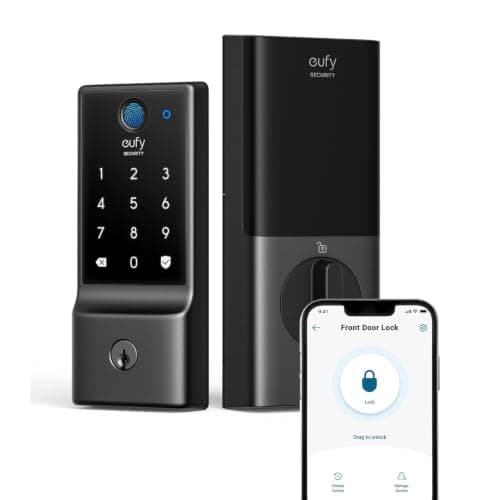
  • eufy Security Smart Lock C220
    04 eufy Security Smart Lock C220

    The budget pick, and a genuinely good one: fingerprint entry and direct Wi-Fi with no bridge or HomeBase, at the lowest price we have found for that combination, with a published BHMA Grade 3 certificate rather than a vague security claim. You pay in eight AA cells, a modest IP53 rating and an ecosystem list that stops at Alexa and Google.

    Best for: The cheapest fingerprint-and-Wi-Fi combination, on a sheltered door · No Matter - eufy lists HomeKit, IFTTT and Matter as not supported yet

    • Fingerprint, app, keypad, physical key and voice - five ways in
    • Up to 50 fingerprints and 100 passcodes
    • Direct Wi-Fi built in - no bridge or HomeBase required
    • BHMA Grade 3 certified
    • IP53 exterior, rated -22 F to 158 F
    • 8 x AA batteries included, roughly 8 months at 10 unlocks/day
    • Emergency power port on the exterior panel
    • Fits 35-55 mm doors; not compatible with mortise locks
    $109.99View on Amazon

    $169.9935% off

    #ad · we may earn a commission from this link to eufy Security Smart Lock C220

#ad · Live prices from the Amazon Product API, as of November 12, 2026. Where we have no verified live price we show none — we would rather leave a gap than print a number that has rotted.

Three years ago a page called "best smart locks under $150" would have been a page about compromises. It is not any more, and the reason is specific rather than general: the two features that used to define a premium lock - a fingerprint reader and Wi-Fi built into the lock itself rather than sold separately as a bridge - have both arrived at the bottom of the market. What has not changed is that a lock is the one smart home device where the body matters more than the software, and that is where the $150 ceiling still bites. This page is about which compromises are still real and which ones you no longer have to make.

The rule we used: under $150 on the live listing, today

Every lock here was under $150 on its live Amazon listing on 2026-11-10, in stock and buyable. We never type a price into a page - the number on each buy button is pulled from Amazon and timestamped, so if a lock creeps over the ceiling the page shows you that before we notice it, and if there is no buyable offer the button tells you to check rather than quoting a figure we cannot stand behind.

That ceiling is doing real work. It excluded the Kwikset Halo, the Yale Assure Lock 2 and the SwitchBot Lock Ultra, all of which sat between roughly $175 and $200 when we checked, and it excluded the Level Lock+ and Schlage Encode Plus by a wide margin. If your budget has a little more room, best budget smart locks is our value ranking up to about $200, and best smart locks is the whole field with no price limit at all.

One deliberate exclusion: padlocks. Several smart padlocks sit under $150 and some are excellent, but a padlock secures a gate, a shed or a locker rather than a front door, and mixing the two product classes on one page helps nobody. Best smart padlocks ranks those separately.

List price or promotion? Which is which, here

A price ceiling page has one failure mode worth stating plainly: a product that only clears the ceiling because it happens to be deeply discounted this week. Three of the four picks here were under $150 on their normal listing price when we checked - the ULTRALOQ Bolt, the August and the Aqara U100 - so the ceiling is not propped up by a sale.

The eufy C220 is the exception. Its listing showed a deep seasonal reduction on the day we checked, and at its list price it sits above $150 rather than under it. We have kept it as the budget pick because it is genuinely the cheapest route we know to fingerprint entry plus hub-free Wi-Fi, and because the live price on its button will always tell you the truth - but if the number you see there is above $150, the promotion has ended and the ULTRALOQ Bolt is the better lock at that money anyway. Worth knowing before you decide whether to buy now or wait: what actually discounts in this category.

Security grade is the spec the price ceiling actually cuts

If you read one section of this page, read this one. Residential deadbolts are graded by ANSI/BHMA, and the grade is a third-party standard tested against rather than a marketing adjective: Grade 1 is the highest residential rating, Grade 2 sits below it and Grade 3 is the entry level. The tests cover things you cannot see on a listing photograph - how many cycles the bolt survives, how much force the assembly takes, how it behaves under attack.

Under $150 the normal answer is Grade 3, and that is what makes the ULTRALOQ Bolt's published Grade 1 the most interesting number on this page. The eufy C220 publishes Grade 3, which is honest and certified and perfectly adequate behind a decent door in a low-risk location. The Aqara U100 is the interesting case: Aqara claims compliance with the same standard rather than a certification to it, which is a different kind of claim, and we are not going to blur them. The August has no grade at all, for a structural reason rather than a corner cut - it does not replace your bolt, so there is nothing of its own to grade. It inherits whatever your existing deadbolt is, which is either very good news or very bad news depending on what you already own.

That is the one place the $150 ceiling genuinely costs you, and it is worth knowing that most burglaries do not defeat the lock anyway - they defeat the frame, the strike plate or a window. A Grade 3 lock on a reinforced strike plate is a stronger door than a Grade 1 lock on two short screws into soft pine. Are smart locks safe covers that picture properly, and how to install a smart lock has the strike-plate upgrade that costs almost nothing and does more than a grade bump.

Built-in Wi-Fi, or a bridge you did not budget for

This is the hidden cost that decides whether a lock is actually under $150. A smart lock needs a radio to talk to your phone when you are not standing next to it, and there are two ways to get one: the lock has Wi-Fi inside it, or it speaks Bluetooth and relies on a separately sold bridge or hub to reach the internet. The listing price only tells you about the first case.

Three picks here have Wi-Fi built in - the ULTRALOQ, the August and the eufy C220 - so remote lock, remote unlock, away-from-home alerts and an activity log all work the moment the lock is on the door, with nothing else bought. One does not: the Aqara U100is Bluetooth locally and needs an Aqara hub for any of that, which means its real delivered cost sits above this page's ceiling even though the lock itself does not. We rank it third anyway, because it is the only Apple Home Key lock under $150 and for an Apple household that is worth the hub - but you should know you are buying two things.

Worth saying plainly: Bluetooth-only is not a defect. A lock that never touches the internet has a smaller attack surface and a longer battery life, and if you only ever unlock the door while standing in front of it, you may not want Wi-Fi at all. Bluetooth vs Wi-Fi smart locks is the full comparison, and do smart locks need a hub answers the question this section raises for every brand.

Retrofit or replacement changes who can still get in

The August is a retrofit: it mounts on the inside of the deadbolt you already have and turns your existing thumbturn with a motor. The other three are replacements. For most buyers this reads as an installation detail, and it is not - it is a decision about keys.

A retrofit means every key already in circulation keeps working. That is the right answer, and sometimes the only answer, when a landlord holds a key, when a neighbor waters the plants, when a parent has one for emergencies, or when you rent and are not allowed to change the hardware at all. A replacement deadbolt retires all of those keys the moment it goes on the door, so budget for the conversation as well as for cutting new ones.

The flip side is that a retrofit inherits your bolt's mechanical quality and gives you no security grade of its own, and it needs clearance around the inside of the door for a chunkier body. Will a smart lock fit my door has the five measurements to take first, and best smart locks for renters is the page to read if the door is not yours.

Credentials: what gets you in when the phone does not

The single best predictor of whether someone likes their smart lock a year later is how many ways into the house do not involve a phone. Under $150 you do not have to compromise here, which is the real change in this bracket.

Fingerprint is the most robust credential there is, because it cannot be forgotten, lost or left in a coat pocket, and it is the only one that works for a household member without a smartphone. Three of the four picks have it - the ULTRALOQ, the Aqara and the eufy - and only the August does not. Keypad codesare the right credential for guests, cleaners and trades, because a code can be named, scheduled and deleted; all four picks offer one, with the August's Keypad Touch included in the box. Apple Home Key is the fastest deliberate method of all - a tap of an iPhone or Apple Watch, no app, about a second - and under this ceiling only the Aqara U100 has it.

The one combination to avoid is a lock whose only non-phone fallback is a physical key you do not carry, which is how people end up standing on a porch at 11pm. Keypad vs fingerprint smart locks covers how each one fails - cold fingers, wet hands, worn keypads - and how to share smart lock access with guests is the practical side of running codes for other people.

Weather, batteries and the running cost nobody prices in

Two numbers decide how a cheap lock ages, and neither of them is on the front of the box.

The first is the exterior rating. IP65, which the ULTRALOQ and the Aqara publish, means protection against dust and against water jets - a lock you can mount on a fully exposed door. IP53, which eufy publishes for the C220, is splash protection: fine under a porch or an overhang, a real risk on a west-facing door that takes driven rain. The August sits outside this comparison because its electronics live inside the house.

The second is batteries. The eufy ships eight AA cells and publishes roughly eight months at ten unlocks a day; ULTRALOQ publishes up to ten months for the Bolt. Those figures assume usage patterns the makers do not fully state, so treat them as the shape of the answer rather than a promise - and note that eight AA cells twice a year is a running cost on a lock that was cheap to buy. What actually extends battery life on any of these is a bolt that slides freely rather than fighting a misaligned strike plate, because a motor straining against a sticky bolt is the single biggest avoidable drain. Smart lock battery life goes through what each design draws, and do smart locks work without power covers the dead-battery scenario - including the eufy's emergency power port, which is a genuinely useful inclusion at this price.

How we ranked these

In this order. First the ceiling: under $150 on the live listing, in stock, on 2026-11-10 - nothing else gets on the page. Second, what the maker publishes about the body, with a third-party security certification beating a claim of equivalence and both beating silence. Third, whether remote access works without buying a bridge, because a hub turns a $150 lock into a $200 purchase. Fourth, how many ways into the house do not need a phone. Fifth, the exterior rating and the published battery life, which decide how the lock ages. Sixth, whose keys stop working the day you fit it.

We do not score these locks and we have not fitted all four to a test door, because we do not run a lock lab. Every specification here is the manufacturer's or seller's own published claim, read on the date in the sources below, and every price is pulled live from the listing. If you would rather start from the decision than from a price bracket, how to choose a smart lock is the page that does that, and how much does a smart lock cost explains what the brackets above and below this one actually buy.
The four locks under $150 on 2026-11-10 - what the ceiling does and does not cost you
DevicePublished gradeRemote accessPhone-free entryExterior ratingExisting keysEcosystems named
ULTRALOQ Bolt Fingerprint Wi-FiANSI/BHMA Grade 1Built-in Wi-Fi - no bridgeFingerprint, code or keyIP65ReplacedApple Home, Alexa, Google, SmartThings
August Wi-Fi Smart Lock (4th Gen)None - inherits your deadboltBuilt-in Wi-Fi - no bridgeKeypad Touch code (included)Interior-mountedKeep workingAlexa, Google, SmartThings
Aqara Smart Lock U100Claims BHMA Level 3 complianceAqara hub requiredFingerprint, code or Home KeyIP65ReplacedApple HomeKit + Home Key, Alexa, Google, IFTTT
eufy Security Smart Lock C220BHMA Grade 3 certifiedDirect Wi-Fi - no bridge or HomeBaseFingerprint, code or keyIP53, -22 F to 158 FReplacedAlexa, Google (HomeKit/Matter listed as not supported yet)

In detail

The picks, in full

01

ULTRALOQ Bolt Fingerprint Wi-Fi

Top pick
ULTRALOQ Bolt Fingerprint Wi-Fi
Check price on Amazon →

No buyable offer at the last check (November 12, 2026) — the link still shows the current listing.

#ad · we may earn a commission from this link to ULTRALOQ Bolt Fingerprint Wi-Fi

The best lock under $150 and not by a narrow margin: a published ANSI/BHMA Grade 1 body, fingerprint, keypad, key and app, built-in Wi-Fi with no bridge to buy, IP65 weatherproofing and a door sensor included. The weak spot is the radio - 2.4 GHz only, and ULTRALOQ tells you to keep the router in range of the door.

  • Fingerprint + code + key + app + Wi-Fi
  • Built-in Wi-Fi - no bridge
  • ANSI/BHMA Grade 1
  • IP65 weatherproof
  • Stores up to 100 fingerprints
  • Auto-unlock + door sensor
Matter: Apple Home, Alexa, Google, SmartThings - no MatterFee: No subscription - Wi-Fi built inResearched, not hands-on tested

Good

  • ANSI/BHMA Grade 1 is the highest residential security rating and it is genuinely rare at this price - the Grade 3 bodies that are normal under $150 are tested to a materially lower standard, and a lock is the one device on your house where that distinction is the whole point
  • Built-in Wi-Fi means remote lock, unlock and alerts work the moment it is installed, with no separately sold bridge to buy, power and keep online - which is the hidden cost that quietly pushes cheaper locks over this ceiling
  • Every way in at once - fingerprint, keypad code, physical key, app and Wi-Fi - so a wet thumb, a flat phone or a guest without an account is an inconvenience rather than a lockout
  • IP65 and an included door sensor, which is the component that lets the lock tell 'the bolt is thrown' apart from 'the door is actually shut' - most locks at any price do not know the difference

Less good

  • 2.4 GHz Wi-Fi only, and ULTRALOQ's own listing says to keep the router within range of the door - a lock at the far end of a long house may want a mesh node before remote unlocking is dependable
  • It appears in the Apple Home app but does not do Apple Home Key, so there is no tapping an iPhone on the lock the way the Aqara below allows
  • It is a full deadbolt replacement: existing keys stop working, the exterior hardware changes visibly, and anyone who holds a key to your door needs a new credential

Skip it if: other people hold keys to your door and will keep using them - a replacement deadbolt retires every key in circulation, and the August below exists precisely for that situation.

02

August Wi-Fi Smart Lock (4th Gen)

August Wi-Fi Smart Lock (4th Gen)
$129.00View on Amazon

Price as of November 12, 2026. Amazon's price at checkout is the one that counts.

#ad · we may earn a commission from this link to August Wi-Fi Smart Lock (4th Gen)

The only retrofit under this ceiling, and the right answer whenever the door is not entirely yours to change. It clamps onto the inside of your existing deadbolt, so the exterior, the keyway and every key already in circulation stay exactly as they are - and built-in Wi-Fi means remote access with no bridge.

  • Retrofit - fits your current deadbolt
  • Keep using your existing keys
  • Built-in Wi-Fi
  • Alexa, Google, SmartThings
  • Keypad Touch included
Matter: No Matter (Alexa / Google)Fee: None - no subscriptionResearched, not hands-on tested

Good

  • Nothing changes on the outside of the door, which makes it the one lock here a renter can usually fit without asking, and the only one that does not force a neighbor, sibling or landlord holding a key to hand it back
  • Built-in Wi-Fi for remote lock, remote unlock and an activity history showing who came and went, with no separately sold bridge to keep powered
  • The Keypad Touch is included rather than sold separately, so you get a phone-free way in at no extra cost - which is not a given in this bracket
  • Auto-lock and auto-unlock together quietly end the 'did I lock it?' question, and because the install is interior-only it is the fastest lock here to fit and to reverse

Less good

  • Exterior security is only as good as the deadbolt you already have. The August automates your bolt, it does not upgrade it - so a builder-grade unit stays a builder-grade unit, and there is no security grade for us to quote you
  • The interior assembly is chunkier than a purpose-built deadbolt because it has to house a motor around your existing thumbturn - measure the clearance around the inside of the door before you order
  • The Amazon listing does not name Apple HomeKit or Apple Home Key. August's own product page does list Apple HomeKit with Siri, so the lock can appear in the Home app, but neither source claims Home Key - there is no tap-to-open

Skip it if: your existing deadbolt is old, stiff or poor quality - a retrofit motor cannot fix a bad lock, and asking a small motor to turn a sticky bolt is how a smart lock becomes an unreliable one.

03

Aqara Smart Lock U100

Aqara Smart Lock U100
$149.99View on Amazon

Price as of November 12, 2026. Amazon's price at checkout is the one that counts.

#ad · we may earn a commission from this link to Aqara Smart Lock U100

The only lock under $150 with Apple Home Key, and it stacks a fingerprint reader and a full touchscreen keypad on top in an IP65 body. The architecture is the catch: it speaks Bluetooth on its own, so remote access and voice control need an Aqara hub you have to buy and place.

  • Fingerprint + touchscreen keypad
  • Apple Home Key
  • Bluetooth deadbolt (Aqara hub for remote)
  • Apple HomeKit, Alexa, Google, IFTTT
  • IP65 weatherproof
Matter: No Matter (HomeKit + Apple Home Key)Fee: None - no subscriptionResearched, not hands-on tested

Good

  • Apple Home Key is the fastest deliberate entry method there is - tap an iPhone or Apple Watch on the lock and the door opens, with no app, no code and no phone unlock, and it keeps working on a nearly dead phone thanks to power reserve
  • Three ways in - fingerprint, touchscreen keypad and Home Key - so nobody in the household is stuck for a credential, including anyone without a smartphone
  • IP65 weatherproofing suits an exposed front or side door that takes sun, rain and dust head-on, which is a better exterior rating than the eufy below publishes
  • Names Apple HomeKit, Alexa, Google and IFTTT, so it is the most ecosystem-flexible lock on this page despite the hub requirement

Less good

  • Bluetooth only on its own. Remote lock and unlock, away-from-home alerts and voice control all need an Aqara hub - extra hardware to buy, power and place, which in practice pushes the real cost of this lock over the page's ceiling
  • It is at its deepest inside the Aqara app, so it rewards a household already running Aqara gear more than someone buying a single lock
  • It is the most expensive pick here and a full deadbolt replacement, so existing keys stop working

Skip it if: you refuse to add a hub - without one the U100 is a local Bluetooth lock, and the ULTRALOQ gives you built-in Wi-Fi for less money.

04

eufy Security Smart Lock C220

eufy Security Smart Lock C220
$109.99View on Amazon

$169.9935% off

Price as of November 12, 2026. Amazon's price at checkout is the one that counts.

#ad · we may earn a commission from this link to eufy Security Smart Lock C220

The budget pick, and a genuinely good one: fingerprint entry and direct Wi-Fi with no bridge or HomeBase, at the lowest price we have found for that combination, with a published BHMA Grade 3 certificate rather than a vague security claim. You pay in eight AA cells, a modest IP53 rating and an ecosystem list that stops at Alexa and Google.

  • Fingerprint, app, keypad, physical key and voice - five ways in
  • Up to 50 fingerprints and 100 passcodes
  • Direct Wi-Fi built in - no bridge or HomeBase required
  • BHMA Grade 3 certified
  • IP53 exterior, rated -22 F to 158 F
  • 8 x AA batteries included, roughly 8 months at 10 unlocks/day
  • Emergency power port on the exterior panel
  • Fits 35-55 mm doors; not compatible with mortise locks
Matter: No Matter - eufy lists HomeKit, IFTTT and Matter as not supported yetFee: None - no subscription for any lock featureResearched, not hands-on tested

Good

  • Wi-Fi is in the lock, and eufy states plainly that it does not work with a Wi-Fi bridge or a eufy HomeBase - so remote lock, unlock and alerts work with nothing else bought or plugged in, which is the single feature cheap locks most often charge extra for
  • A published BHMA Grade 3 certification, which is a third-party standard actually tested against rather than a manufacturer's claim of equivalence - a meaningful distinction when you are comparing security copy across budget brands
  • Up to 50 fingerprints and 100 passcodes is far more guest access than a household needs, and between prints and codes nobody needs a phone or a key to get in
  • An unusually wide published operating range of -22 F to 158 F, plus an emergency power port on the exterior panel so a flat battery is solved with a power bank at the door rather than a locksmith

Less good

  • IP53 is the weakest exterior rating on this page - it is splash protection, not the driven-rain protection IP65 implies - so this is a lock for a door with a porch or an overhang rather than a fully exposed one
  • Eight AA cells for roughly eight months is a lot of batteries to buy and change compared with the ULTRALOQ's published figure, and the cost of cells is a real running expense on a budget lock
  • eufy lists HomeKit, IFTTT and Matter as not supported yet, so an Apple household gets no Home app presence and no Home Key - and there is no door sensor in the box
  • It is the one pick here that clears the ceiling on a discount rather than on its normal price - the listing showed a deep seasonal reduction when we checked, and at its list price this lock sits above $150. Read the live price on the button before you count on it

Skip it if: the door is fully exposed to driven rain, or you live in Apple Home - IP53 wants some shelter, and the Aqara above is the only Home Key lock under this ceiling.

Five checks before you buy a lock under $150

Work out who holds a key before you choose. If the answer is anyone other than the people who live there, a replacement deadbolt retires their key and the August retrofit is probably your lock. This single question settles the choice more often than any specification does.

Measure the door, not the lock. Door thickness, backset, cross-bore and the clearance around the inside of the deadbolt. The eufy publishes a 35-55 mm door range and states it is not compatible with mortise locks; a retrofit needs room for a chunkier interior body. Will a smart lock fit my door has all five measurements.

Price the hub, not just the lock. If you are looking at the Aqara U100, add an Aqara hub to the basket before you compare it with anything here - without one it is a local Bluetooth lock, and with one it is no longer a sub-$150 purchase.

Check the exposure of the actual door. Stand outside and look at it in your head during the worst weather you get. A fully exposed door wants the IP65 picks; a porch or an overhang makes the IP53 eufy a perfectly sensible saving.

Fix the strike plate on install day. Longer screws into the frame stud and a bolt that slides without resistance. It takes five minutes, it does more for real security than a grade bump, and it is the single biggest thing you can do for battery life on a motorized lock.

How we chose

We don't run a test lab

We don't wire every one of these into a test rig, and we won't write "in our testing" as if we do. What we did instead: pulled each product's published specifications, confirmed its Matter/Thread/HomeKit support from the manufacturer's own documentation, added up the real 3-year cost with any monthly fee included, and read the aggregated verified-buyer sentiment. Every pick is chosen against that published method. Where a number came from someone else, we name and link them in Sources.

Questions

Frequently asked

What is the best smart lock under $150?
The ULTRALOQ Bolt Fingerprint Wi-Fi. It is the only lock under this ceiling with a published ANSI/BHMA Grade 1 body, and it pairs that with a fingerprint reader, a keypad, a physical key, built-in Wi-Fi that needs no bridge, IP65 weatherproofing and a door sensor in the box. The one thing it does not do is Apple Home Key - for that, the Aqara U100 is the only option under $150, and it needs an Aqara hub for remote access.
Are smart locks under $150 secure enough?
Yes, with one caveat worth understanding. Under $150 the usual body rating is ANSI/BHMA Grade 3, which is a real certified standard rather than a marketing word, and the ULTRALOQ here publishes Grade 1 - the highest residential rating. More to the point, most break-ins defeat the frame, the strike plate or a window rather than the lock cylinder, so a Grade 3 lock on a reinforced strike plate with long screws into the stud is a stronger door than an expensive lock fitted badly. See are smart locks safe for the full picture.
Can you get a smart lock with a fingerprint reader under $150?
Three of the four picks here have one: the ULTRALOQ Bolt, the Aqara U100 and the eufy C220 - and eufy publishes capacity for up to 50 prints on a lock that is the cheapest on this page. Fingerprint is the most robust credential a lock can offer because it cannot be forgotten or left behind, and it is the only one that works for a household member without a smartphone. Best fingerprint smart locks ranks the whole field.
Do any smart locks under $150 work with Apple Home Key?
One: the Aqara Smart Lock U100. It is the only lock under this ceiling that lists Apple Home Key, which lets you tap an iPhone or Apple Watch on the lock to open the door with no app and no code. The ULTRALOQ appears in the Apple Home app but has no Home Key, August's own page lists HomeKit with Siri but not Home Key, and eufy lists HomeKit as not supported yet for the C220. Note that the U100 needs an Aqara hub for remote access, so its real cost lands above $150.
Does a smart lock under $150 need a hub?
It depends on the lock, and it is the biggest hidden cost in this bracket. The ULTRALOQ Bolt, the August and the eufy C220 all have Wi-Fi built in, so remote lock, unlock and alerts work with nothing else bought. The Aqara U100 is Bluetooth on its own and needs an Aqara hub for any remote feature or voice control. If you only ever unlock the door while standing at it, none of this matters - do smart locks need a hub works through when it does.
Is a cheap smart lock a false economy?
Not in 2026, with two specific exceptions to watch. The first is a lock that is cheap because the radio is sold separately - add the hub and the saving disappears. The second is a lock with no published exterior rating or no published security grade at all, where you are being asked to trust an adjective; every pick on this page publishes at least one of those numbers, which is why they are here. Beyond that, the real running costs are batteries and your own strike-plate work, not the brand.
Why is the Kwikset Halo or Yale Assure Lock 2 not on this page?
Price, on the day we checked. Both sat between roughly $175 and $200 on 2026-11-10, above this page's ceiling, along with the SwitchBot Lock Ultra; the Level Lock+ and Schlage Encode Plus were well above it. They are all ranked in best smart locks, and best budget smart locks is our value ranking up to about $200 if your budget stretches that far.

Keep reading

Receipts

Sources

We do not run a test lab, and we do not pretend to. Compatibility and subscription-cost claims come from the manufacturer's own documentation and the live retailer listing, read on the dates shown. Read our full method.